Tokenizing Text
Explore how tokenization converts text into machine-readable data essential for chatbot development. Understand basic and advanced tokenization methods using NLTK and transformer models, and learn techniques like stemming, lemmatization, and stopword removal to improve chatbot efficiency.
To start using transformers for chatbot development, it is essential to understand how machines interpret text. Since machines primarily operate with numbers, we begin by converting text into a form that machines can understand through a process called tokenization. Tokenization is the bridge between raw text and machine-readable data, breaking down text into smaller units or tokens. This step is essential for chatbot development, allowing us to preprocess user inputs.
Tokenization: Breaking down text
We start by tokenizing the text or input.


Let’s look at a simple example of how text is tokenized.

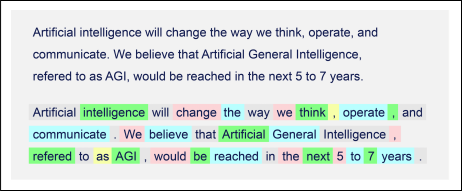
At a basic level, the text is broken down into words. This includes commas, colons, separators, and so on. Tokenization can be taken a step further by applying rigorous methods.
The first step is to convert all the words into lowercase letters. This process helps standardize inputs across different contexts and is essential for improving the model’s performance, as it reduces the vocabulary size the model needs to handle. A smaller vocabulary means less computational complexity and better generalization capabilities, making the chatbot more efficient and responsive.
Now we split the text into words. The text can be split based on specific rules. For example, it can be split into white spaces, colons, punctuation marks, special characters like newlines (\n), or even HTML tags, depending on the structure of the text and the requirements of the task.
Stemming or lemmatization are two known terms in the field of natural language processing. Stemming removes the word-final (suffix) or the word-beginning (prefix) affixes. For example, the sentence “He’s the kind of man who likes reading while traveling” becomes “He the kind of man who like read while travel” after stemming. Lemmatization (from lemma), on the other hand, determines if two words have similar roots or bases. For example, the words “mice” and “mouse” are the same. The objective of these two terms is to simplify the text and remove unnecessary words from the context.
Stopword removal adds to the simplification of the input text by removing noisy words such as “the,” “a,” and “are.” For example, the sentence, “Oh! Oliver, is a great driver!” becomes “Oh! Oliver, great driver.” Multiple libraries in Python provide functionalities for stopwords removal.
Introduction to NLTK for text processing
Natural Language Toolkit (NLTK) is a library that provides easy-to-use interfaces to over 50 corpora and lexical resources, such as WordNet. It also includes a suite of text-processing libraries for classification, tokenization, stemming, tagging, parsing, and semantic reasoning, wrappers for industrial-strength NLP libraries, and an active discussion forum.
Tokenizing text using NLP techniques
Let’s try to tokenize a sentence using NLTK. Run the below code to tokenize the provided sentence:
In this code, we perform the following steps:
- Lines 1–4: We import the NLTK library and its function
word_tokenize. - Lines 6–10: We provide the text to be tokenized.
- Lines 12–16: We transform the text to lowercase, and we print it.
- Lines 18–24: We tokenize the text using the function word tokenized, and we print it.
Once we run the output, we see that each word is separated and placed inside quotations to be marked as a separate string. This is exactly what is expected from the tokenization process.
Practice tokenization with NLTK
In the following exercise, try changing the text and see how the output differs.
Try using different characters, punctuation marks, and even symbols to see how the tokenized function handles them.
Enhancing tokenization with transformer models
While NLTK provides a solid foundation, transformer models offer advanced tokenization capabilities that can enhance our chatbot’s understanding of language nuances. Hugging Face hosts a wide selection of pretrained transformer models, offering a range of tokenizers designed for various NLP tasks. Models, such as BERT or GPT, utilize tokenization methods that account for context and sub-word nuances, providing a deeper level of text analysis compared to basic methods.
Let's understand the differences and the capabilities of each method:
Feature | NLTK | Transformers |
Approach | Rule-based | Contextual |
Handling Subwords | Not directly supported | Handles subwords efficiently |
Context Sensitivity | Operates on individual tokens | considers sentence context |
Performance on New Words | Struggles with out-of-vocabulary (OOV) words | Handles OOV words through subword tokenization |
Computational Efficiency | Generally fast and lightweight | Can be computationally intensive due to model complexity |
Output | List of tokens | Tokens with attention to context |
Tokenizing text using transformers
A powerful way of tokenizing text is by using transformers. Tokenization using transformers behaves in a different way from the NLTK library, and the tokens are separated in a different way depending on the chosen model. From the Models on Hugging Face, we can choose “Fill-Mask” and then “bert-large-uncased.”
Run the below code to tokenize the provided sentence:
In this code we perform the following steps:
- Lines 1–4: We import the transformer library and its function
AutoTokenizer. - Lines 6–7: We define the transformer model to be used.
- Lines 9–10: We initialize the
tokenizerfunction. - Lines 12–16: We provide the text to be tokenized.
- Lines 18–20: We print the current text.
- Lines 22–28: We tokenize the text using the transformer tokenizer, and we print it.
Notice how transformers changes the text to lowercase by itself without using any extra function.
Practice tokenization with transformers
In the following exercise, try changing the text and see how the output differs. Try using different characters, punctuation marks, and even symbols. Also, try changing the transformer model for the tokenization from the following list: “t5-small,” “camembert-base,” “gpt2,” or from the Hugging Face website.
Challenges and considerations in text processing
Text processing in the development of chatbots presents many challenges and considerations, starting with the complexity of human language and the need for models to accurately understand and respond to user queries. One of the main challenges is dealing with the diversity of linguistic patterns across different languages and dialects, which can affect a chatbot’s ability to interpret messages correctly. Ensuring that the model understands user intents accurately requires careful preprocessing of the text data to eliminate ambiguities.
Moreover, handling slang, idioms, and colloquial expressions poses additional challenges, as they can vary across cultures and communities. Incorporating mechanisms to interpret these expressions correctly is essential for building chatbots that can engage users in a natural manner. In addition, managing typos and spelling errors is essential for maintaining robustness, requiring sophisticated algorithms that can identify and correct errors without misinterpreting the user’s message.
Addressing these challenges and considerations in text processing requires a mix of advanced NLP techniques and careful design choices. By focusing on these aspects, developers can create chatbots that not only understand and process user input effectively but also deliver engaging, helpful, and human-like conversational experiences.