Generating Controllers, Services, and Module From the CLI
Explore how to efficiently generate modules, controllers, and services in a NestJS application using the CLI. Understand commands to create these core building blocks, automate CRUD operations, and utilize CLI options to preview or customize file generation. Gain practical skills to speed up backend development workflow.
Now that we have a fundamental understanding of the NestJS CLI, we’ll explore how to use it to generate key building blocks of a NestJS application, including modules, controllers, and services. We’ll see how these commands create files quickly, helping us avoid the often tedious process of manual file creation.
Generating a module
Suppose we build a user management system that handles user registrations, logins, and other user-related operations. We’ll need to create a dedicated module to encapsulate all these functionalities, a controller to handle HTTP requests, and a service for business logic. Let’s start with a module.
For example, to generate the users module from NestJS CLI, run the following command:
nest g mo users
This command will generate a new users.module.ts file within the src/users folder.
src/
├── app.controller.ts
├── app.module.ts
├── app.service.ts
└── users/
    └── users.module.ts
Generating controllers
To generate the users controllers, run the following command:
nest g controller users
This command will generate a new users.controller.ts and users.controller.spec.ts file in the users folder inside the src directory of our NestJS application
src/
├── app.controller.ts
├── app.module.ts
├── app.service.ts
└── users/
    ├── users.controller.ts
    ├── users.module.ts
    └── users.controller.spec.ts
The users directory now contains two new files (users.controller.ts and users.controller.spec.ts) generated by the nest g controller users command.
Generating a service
To generate the users service, run the following command:
nest g service users
This command will generate a new users.service.ts file in the src directory of the NestJS application, along with a corresponding users.service.spec.ts file for unit testing purposes.
src/
├── app.controller.ts
├── app.module.ts
├── app.service.ts
└── users/
    ├── users.controller.ts
    ├── users.module.ts
    ├── users.service.ts
    ├── users.controller.spec.ts
    └── users.service.spec.ts
The users directory now contains two new files (users.service.ts and users.service.spec.ts) generated by the nest g controller users command.
Now that we have learned the process of creating modules, services, and controllers with NestJS CLI, we can utilize the following terminal to create the module, service, and controller for the students feature:
To create a module, controller, and service for the students feature, we execute the following commands: nest g mo students, nest g controller students, and nest g service students. Take a look at the following screenshot, which displays the output generated by these commands:
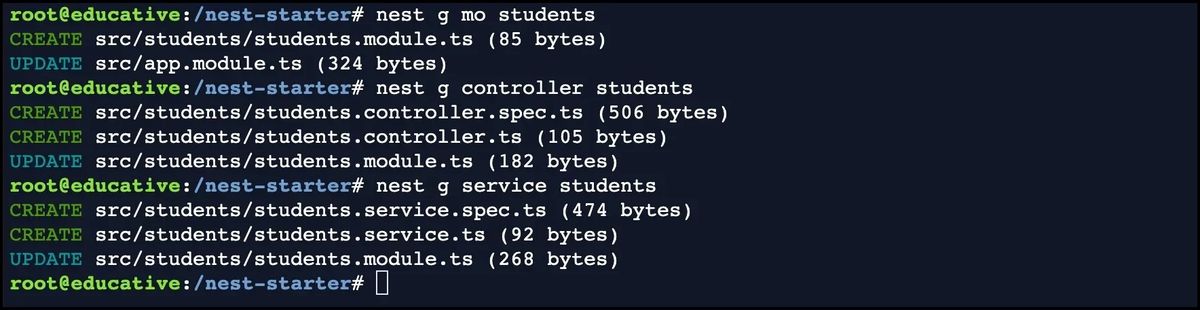
Generating a controller, service, and module in one command
Suppose there is a way to generate services, modules, and controllers with just one command. Imagine we need to implement users controller. To generate our CRUD, we can run the following command:
nest g resource users
This command will ask to choose the transport layer:
? What transport layer do you use? (Use arrow keys)
❯ REST API
  GraphQL (code first)
  GraphQL (schema first)
  Microservice (non-HTTP)
  WebSockets
In our case, we’ll choose the REST API as the transport layer.
After that, when prompted with the question, Would you like to generate CRUD entry points?,
we can respond with either Y or n depending on whether we want to generate the CRUD entry points.
Use the following terminal to generate a service, controller, and module with one command for the students feature:
To create a module, controller, and service for the students resource with one command, we execute the nest g resource students command. Refer to the screenshot below, which showcases the output of this command:
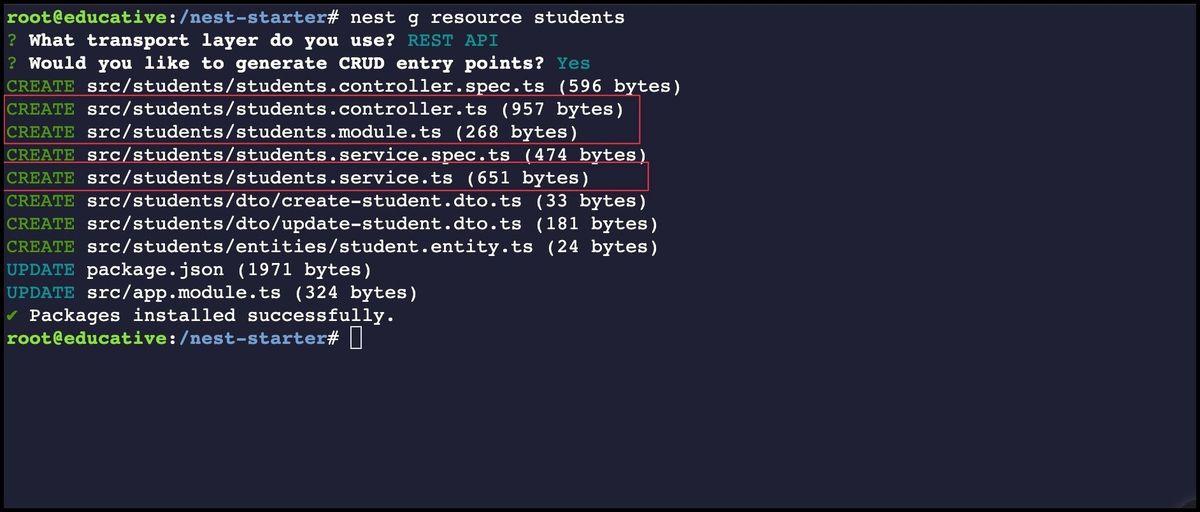
By examining the screenshot, we can visually confirm that executing the nest g resource students command successfully generates the module, controller, and service files for students.
More about CLI
The --dry-run option
The --dry-run option simulates the generation of files without creating them.
It is for previewing the files the command generates before running it.
nest g controller sample --dry-run
The --no-spec option
The --no-spec option tells the CLI not to generate a test file (spec file) along with the generated file.
This option is useful when the test file is not needed or desired or when a different testing framework is preferred.
nest g service sample --no-spec
The --flat option
The --flat option tells the CLI to generate the file in the main directory of the specified path rather than in a subdirectory with the same name as the defined path.
nest g module sample --flat