1.3 Breaking Down the UI
Explore how to break down a React application's UI into container and presentational components to improve separation of concerns and reusability. Understand the roles of stateful and stateless components in building Tesla's Battery Range Calculator.
We'll cover the following...
Almost all React application UIs consist of a composition of components. For example, a weather app consists of a component that displays a local name, a component that displays the current temperature, and a graph component that represents a five-day forecast. For this reason, it is a good idea to decompose the UI into component units before developing the React app.
See Thinking in React for an approach to looking at an application as a combination of components.
The layout of this application is shown below
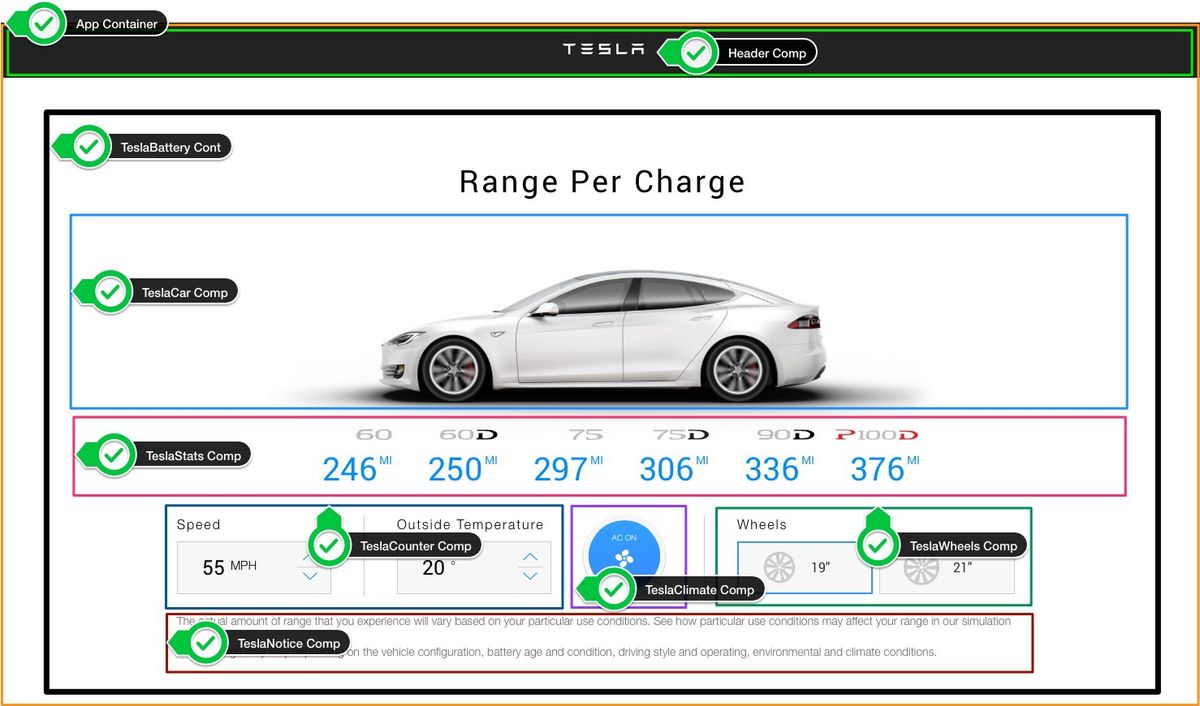
The UI is represented by a component tree as follows.
1.3.1 Container and Presentational Components
In the above mentioned component tree, we can see that it is classified as Container Component and Presentational Component.
This is a useful pattern that can be used when developing an application with React. It is easier to reuse by dividing components into two categories.
* Container Component (stateful component):
 - Are concerned with how things work.
 - In general, except for some wrapping divs, they do not have their   own DOM markup and have no style.
 - Provide data and actions to presentational or other container components.
 - Are often stateful, as they tend to serve as data sources.

* Presentational Component (stateless component):
 - Are concerned with how things look.
 - Usually have some DOM markup and styles of their own.
 - Receive data and callbacks exclusively via props.
 - Rarely have their own state (when they do, it’s UI state rather than data).
What are the benefits of using these patterns?
-
Better separation of concerns
-
Better reusability
-
Extract layout components to prevent duplication
For more details, see Presentational and Container Components