2.6 Divide The App Into Containers and Components
Explore how to reorganize a React app by dividing it into container components and presentational components. Learn to use Redux within container components to manage state, dispatch actions, and keep the UI logic clean and maintainable.
We'll cover the following...
Now, let’s re-build our Tesla calculator app that we made in Part 1 as a Redux version.
First, let’s look at the overall component UI layout of the app that will be implemented in this article.
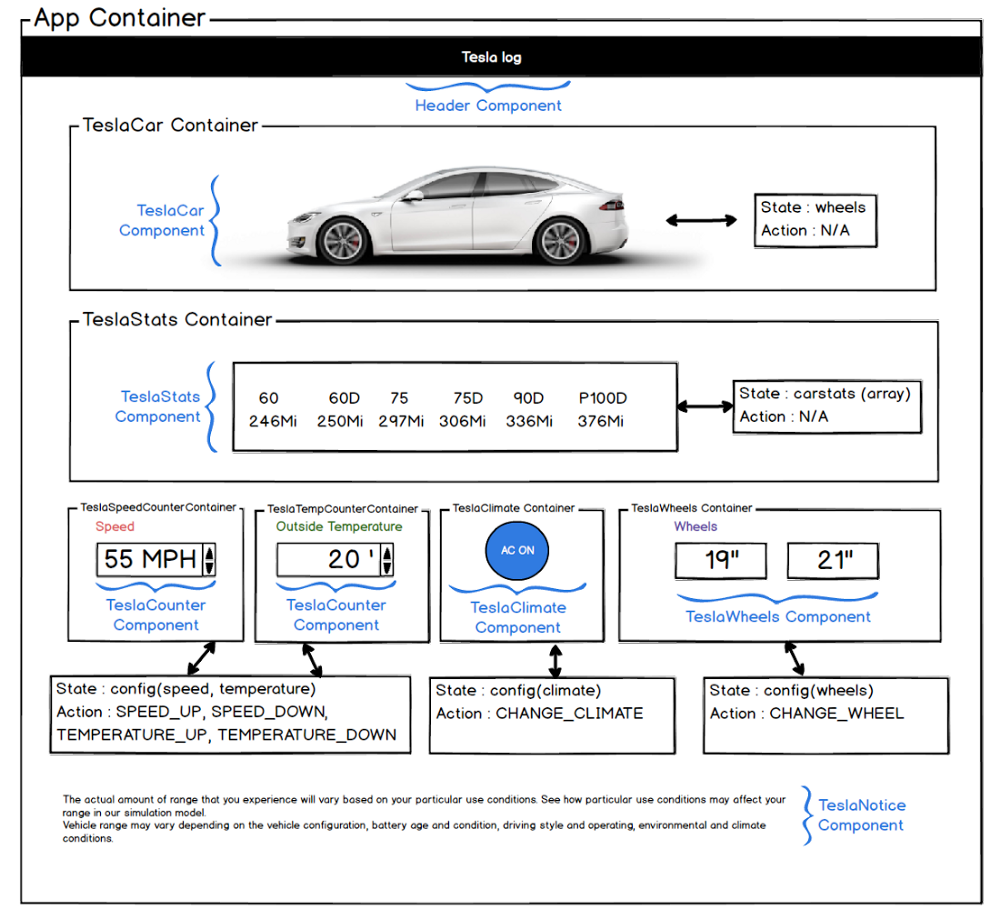
Placing React and Redux logic inside a single component can be messy, so it is recommended that you create a Presentational component for presentation purposes only, and a Container component, an upper wrapper component that handles Redux and dispatches actions.
The role of the parent Container component is to provide state values to presentational components, to manage events, and to communicate with Redux on behalf of presentational components.