Claude Artifacts: Documents and Dashboards
Explore how Claude transforms chat interactions into tangible outputs like documents, diagrams, and dashboards using artifacts. Understand the role of code execution in generating precise data analyses, charts, and downloadable files. Learn to create, iterate, and share artifacts to enhance your workflow with Claude.ai's production capabilities.
Beyond answering questions, Claude can produce tangible outputs such as documents, diagrams, dashboards, visualizations, and interactive components that live outside the chat. Artifacts are how Claude delivers these outputs. Code execution is how Claude works with data and files, running real code behind the scenes to calculate, chart, transform information, and generate finished files. Together, they turn Claude from a conversational assistant into something closer to a production tool. This lesson covers what you can create, how to iterate on it, and how to share the results.
Artifacts
An artifact is a piece of generated content that appears in a dedicated panel next to the conversation, separate from the chat itself. When Claude produces something substantial (a document, a diagram, a piece of code, an interactive component), it renders it as an artifact rather than dumping it inline.

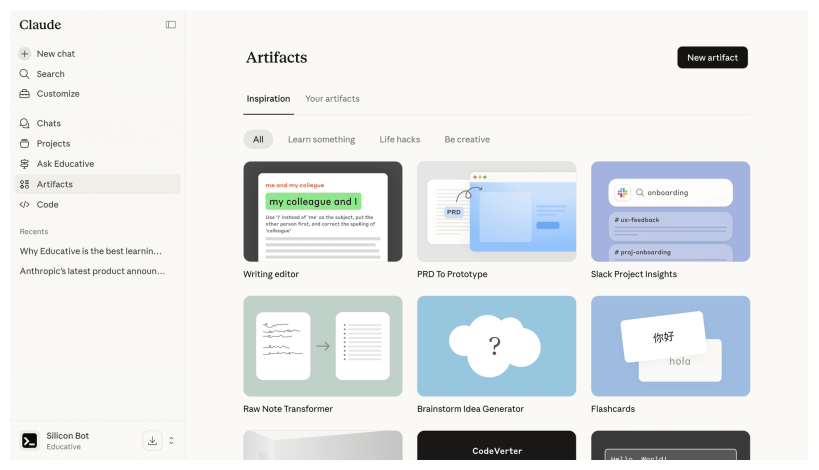
This separation matters. Chat messages scroll away. Artifacts persist in the side panel, where you can review, copy, download, or ask Claude to modify them. It is the difference between Claude telling you what a report could look like and Claude handing you the report.
What artifacts can be
Artifacts support a range of content types:
Documents: Formatted text like reports, memos, proposals, and briefs. Claude renders them with headings, lists, and structure, ready to copy into your word processor.
Code: Working code in languages like Python, JavaScript, or HTML. Useful even if you are not a developer, because the analysis tool (covered below) executes code artifacts automatically.
Mermaid diagrams: Flowcharts, org charts, sequence diagrams, and process maps. You describe the structure in plain language, and Claude generates the visual. One thing to note: if you want to use a Mermaid diagram outside Claude.ai, take a screenshot or export it. Copying the artifact directly gives you the text syntax behind the diagram, not the rendered image.
SVG graphics: Vector images like icons, simple illustrations, or ...