Testing the Deployment
Understand how to test machine learning model deployments in Azure using batch and online methods. Learn to invoke batch deployments with test data, visualize prediction outputs, and test online endpoints with JSON requests. Gain skills to verify deployments using Azure CLI commands and consume APIs securely with endpoint keys and scoring URIs.
Testing a batch endpoint
We will test the deployments in this lesson. Let’s start with batch deployment. We can pass the test data in a file. We will run the az ml batch-deployment invoke command to verify the test data against the deployment. It will pick up the endpoint’s default deployment if we don’t pass the deployment name. We will test against the batch-depl, which contains the iris MLflow model.
sepal_length,sepal_width,petal_length,petal_width
5.10E+00,3.50E+00,1.40E+00,2.00E-01
4.90E+00,3.00E+00,1.40E+00,2.00E-01
4.70E+00,3.20E+00,1.30E+00,2.00E-01
4.60E+00,3.10E+00,1.50E+00,2.00E-01
5.00E+00,3.60E+00,1.40E+00,2.00E-01
We can visualize the results of the job in Azure Machine Learning studio. We can see the “Data” and “batchscoring” jobs.

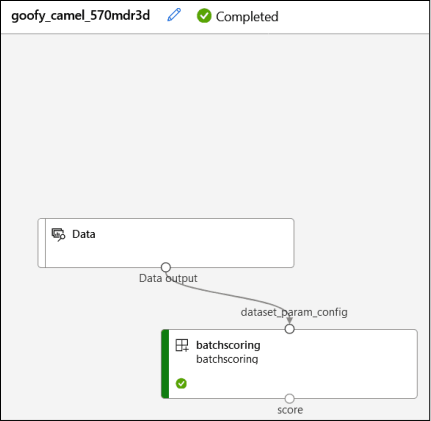
Click on the batchscoring job output, and the data will be accessed in the predictions.csv output log. This file contains the predicted values ...