Course Application Previews
Explore Firebase application previews by building real-world apps such as a chat app, photo sharing app, authentication boilerplate, and a to-do list. Learn key Firebase services like Cloud Firestore, Authentication, Storage, and Hosting while securing user data and deploying projects efficiently.
We'll cover the following...
Chat Application
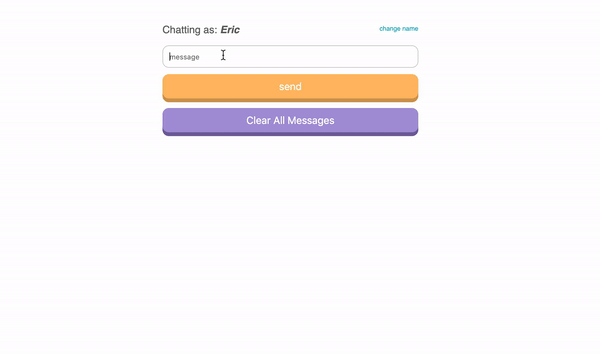
By building the Chat Application you will learn powerful queries that allow you to communicate with the Cloud Firestore database. It’s also a pretty useful app that you can use in the real world by itself or integrate into other applications of your choosing.
After it’s built and fully working I will use this app to teach you how to deploy applications using Firebase Hosting. There is no need to have a custom domain because you will get a live project URL from Firebase. This allows you to share it with friends, family or coworkers in order to get feedback and implement changes. If you do want to set up your own domain I will cover that too. If you want to deploy any other app, the steps are also the same.
Photo Sharing Application

A common problem amongst developers is where to store images, videos and other types of files for use on the web. Some things like logos that are static can reside in the deployed files, typically, inside an assets or images folder. But what if your app needs to handle user-supplied files? You would quickly run into this issue if you wanted to build an application similar to YouTube or Facebook. With apps like these, the user supplies the content like images and videos. For these types of applications, Firebase Storage is one of the best solutions around.
The Photo Sharing Application shows you how to take images from a user and upload them for use in your app. It only covers image uploading and usage, but the process for videos, PDFs, or other types of uploads is exactly the same!
Authentication Boilerplate Application

This application is going to make everything you do much easier. When you build on a solid foundation like this boilerplate you can use it any time you make an application. Not only does this make spinning up your own projects a cinch, but you will also look like a straight-up hero if you implement this in the workplace. There is no doubt about it, authentication can be tricky to set up. It often takes even seasoned developers days, if not weeks, to dial it in, but here you are ready to code the unique features of your app because you have authentication done. Doesn’t that feel nice?
To-Do List Application

The To-Do List Application is built on the Authentication Boilerplate Application. You will have users sign in and create their personal to-do lists. Because our users are authenticated they will be able to create lists unique to them. We will also implement some powerful security to keep their data safe!
One of the things I love the most about Firebase Authentication is the seamless integration with Firestore. We can easily set up user-based security with any authenticated user. Our goal is to make sure that the correct people can read, write, update and delete things from your database. Without this type of security, hackers could, for example, put 40,000 entries into your database. They could also delete entire collections of data with one query. Do not fear though; I will show you how to harden your application to make sure it is 100% secure from these kinds of evildoers.
This application walks you through user authorization and security step by step. I leave no stone unturned so you can feel confident in your knowledge at the end.
Learn by doing!
In the next section of this course, we hit the ground running with Cloud Firestore. We build the Chat application from scratch so that you can learn Firebase’s awesome database Cloud Firestore. I am so excited for you! Let’s do this.