Memoized Fibonacci
Explore how to implement and optimize the Fibonacci sequence function using memoization in JavaScript. Understand how storing previously calculated values reduces redundant computations and boosts performance during repeated calls, helping you write efficient algorithms for coding interviews.
We'll cover the following...
Fibonacci
We’ll start with the simple version and create the advanced version further down.
Instructions
Write a function that will take a positive integer n and return an array of length n containing the Fibonacci sequence.
Input: Integer > 0
Output: Array of Numbers
Examples
fibonacci(4); // -> [1, 1, 2, 3]
fibonacci(6); // -> [1, 1, 2, 3, 5, 8]
fibonacci(8); // -> [1, 1, 2, 3, 5, 8, 13, 21]
Solution 1
How it Works
We store the sequence in seq. In the loop, we add up the previous two values in the array and push the sum into the array. We run the loop until we have the array length we want.
Time
Time complexity is:
O(n),
since the number of times the loop runs is proportional to the the number provided.
Space
Space complexity is also:
O(n),
as we need to store every value we calculate. There’s no way around this, as it’s required by the problem statement.
While we can’t improve the time complexity of this solution, we can improve another aspect of it.
What happens if we want to call this function multiple times? Say we need to call it 10,000 times for very large input values. This could take some time.
What we can do is save the numbers we’ve already calculated so they don’t need to be calculated again. This is called memoization.
If you like, attempt this problem yourself. You’ll have to think about how to store values after a function has completed running.
Solution 2
How it Works
IIFE
This version of our function is an IIFE, or Immediately Invoked Function Expression. An IIFE is a function that is invoked immediately in order to make use of its return value.
Our main function, the one spanning lines 1 - 17, is anonymous. It has no name and exists only to be called once, immediately after its declaration.
What actually goes into the variable fibonacci is the return value of this IIFE. It’s the function that starts on line 4 and that our large, outer function returns.
Scope Access
This returned function, fibonacci, retains access to the scope it was created in. Even after its outer IIFE has returned, it still has access to the array seq, and can use it internally. More importantly, seq stays in memory through multiple calls.
Inside the function, we check the array seq. If it has more values than we need, we slice the array and return a sliced array. If not, we calculate the number of values we need and add them to the array.
Stored Computations
seq has become a data store that our function can access whenever it needs. It allows our function to never perform the same calculation twice. Once our function calculates the sequence up to a certain length, it never has to do that math again.
We can see this if we add some console.log statements into our function.
For the first call above, the function receives 7 and must calculate the whole sequence. For the second call, with 5, no computations are necessary at all. The data already exists. For the last call, 9, only two more numbers need to be calculated. The first 7 are stored.
Repeated Calls
Imagine calling our first solution 10,000 times with an input of 10,000. Our function has to redo the same work over and over.
Now imagine running the same with our new function. The math will only occur once. Every subsequent call will use stored data.
Performance
Here is how long the first solution takes in Chrome Dev Tools, called 10,000 times with a value of 10,000.
console.time() and console.timeEnd() are functions that allow us to time whatever operations we like.
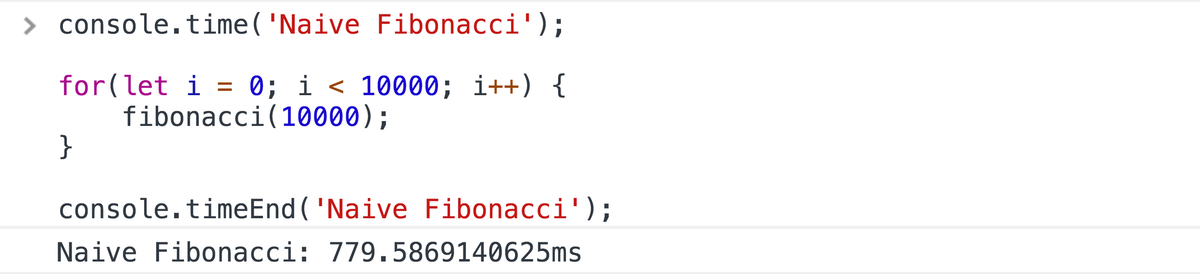
It takes 780ms. Let’s try with our second solution.
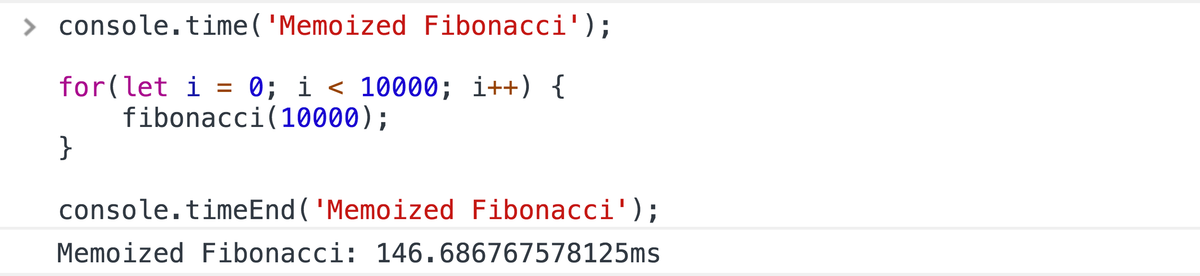
It takes 147ms, less than 1/5 of the time. We see some very real performance gains.
Conclusion
While we won’t likely have to call a Fibonacci function repeatedly, there are situations in which memoization makes a sizable performance difference. It’s an excellent technique to understand and to have in our toolbelt.