Published and Draft Paths
Explore how to publish and manage Skill Path drafts within DevPath. Learn to create drafts, publish them to your team, and access drafts for editing or collaboration to keep your learning paths organized and up to date.
We'll cover the following...
How to publish a Path
Once your Path is complete, click “Publish to Team” to make it accessible to everyone in your organization.
How to create a Path draft
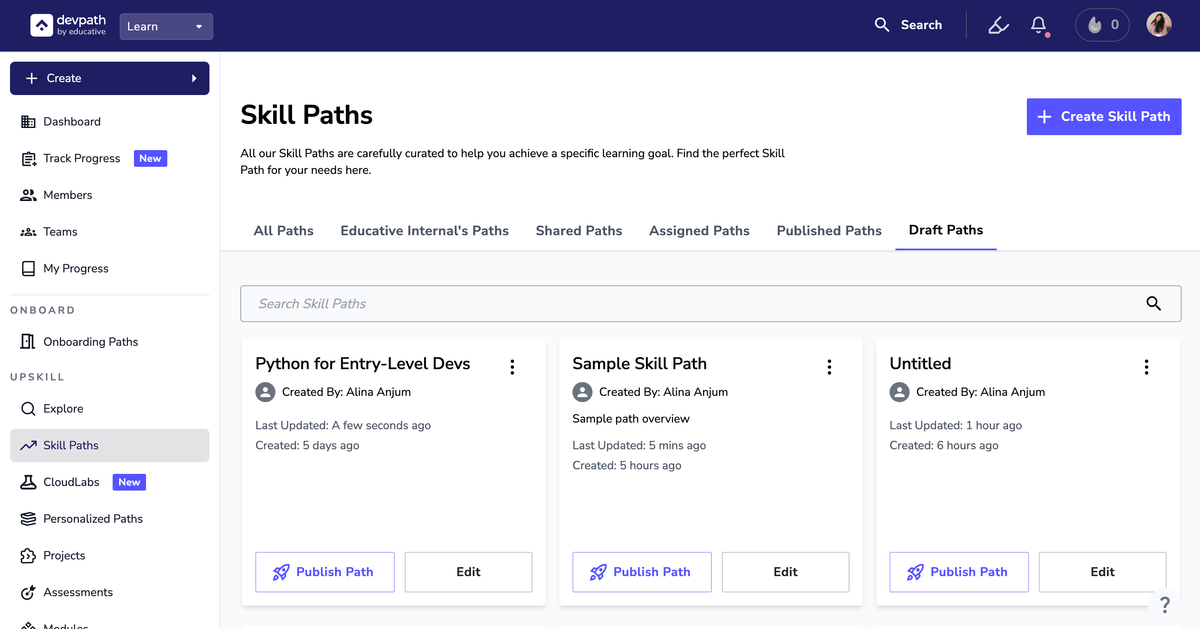
A Draft is automatically created when you create a Path and add information or content. If you do not publish a Path, it automatically gets saved in your Drafts. If you do not title the Path, your Draft will be saved as “Untitled.”
Your Drafts are only accessible to you and your Collaborators (if you added any).
View Drafts
Follow the steps below to view your Drafts:
Log in and navigate to your Skill Paths.
Access your Drafts directly from the tab labeled “Drafts.”
Once you publish your Draft, it will be removed from the “Drafts” tab.
If you later proceed to make any changes in that Path and do not publish those changes, the Path will show in your Drafts again.