Testing Against Containers
Explore techniques for testing microservices locally with container orchestration. Learn to perform API functionality tests using Postman and simulate heavy load on microservices with JMeter. Understand how to validate fault tolerance and high-throughput processing in event-driven microservices architecture.
We'll cover the following...
This course does not cover a full testing regime across all stages of a DevOps life cycle. However, we’ll walk through the technicalities of performing basic testing to prove the environment is healthy and demonstrate putting a load on the overall application. We want to show the high-scale throughput we can achieve by adopting an event-driven architecture over others.
Functionality testing
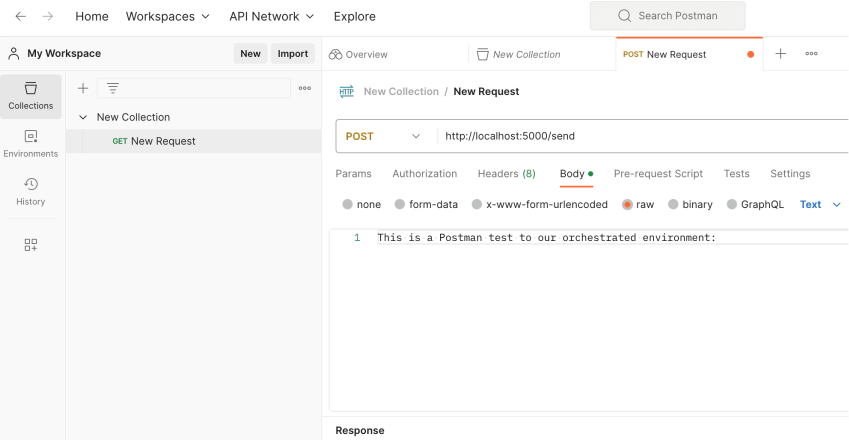
If we’re working on our own machine, we can set up a simple test using Postman:
We create a new collection, which is simply a folder to store a group of related API requests that we can execute repeatedly.
Next, we create a new request. We set the method type as
POSTand set the request URL ashttp://localhost:5000/send.We select the “Body” tab, choose “raw” as the format, and enter an event message in the text area. We chose to use the
This is a Postman test to our orchestrated environment:text.

We need to make sure the Visual Studio solution is open, and we’re debugging using the
docker-composelaunch profile from the last section.We click the “Send” button, and we should see Postman confirm that it received a
Status code is 200response. If we inspect the container ...