Creating a DataFrame From Arrays and Lists
Explore how to create Pandas DataFrames using Numpy ndarrays and dictionaries of lists. Understand key concepts like 2D arrays, default indexing, and multi-level indexing to structure data effectively for analysis.
We'll cover the following...
Create a DataFrame from a Numpy ndarray
Since a DataFrame is similar to a 2D Numpy array, we can create one from a Numpy ndarray.
You should remember that the input Numpy array must be 2D, otherwise you will get a ValueError.
If you pass a raw Numpy ndarray, the index and column names start at 0 by default. You can also assign different column names to your data which will be discussed in a later lesson.
A Numpy ndarray is created on line 4, which is a matrix of size 2*3.
Line 9 shows how to create a DataFrame object from a Numpy ndarray by passing the ndarray object to pd.DataFrame.
Create a DataFrame from a dictionary of lists
We have already learned how to create a pandas Series from a dictionary. We can also create a DataFrame object from a dictionary of lists. The difference is that in a series, the key is the index whereas, in a DataFrame, object, the key is the column name.
When you are trying to specify an index for each column value, only the rows with the same index value will be joined. Otherwise, a new row is created, and its columns are filled by
NaNif the type isintorfloat.
Of course, you can specify an index for each column value by nesting a dictionary in another dictionary.
The example code below shows both single and multi-level indexing in the DataFrame.
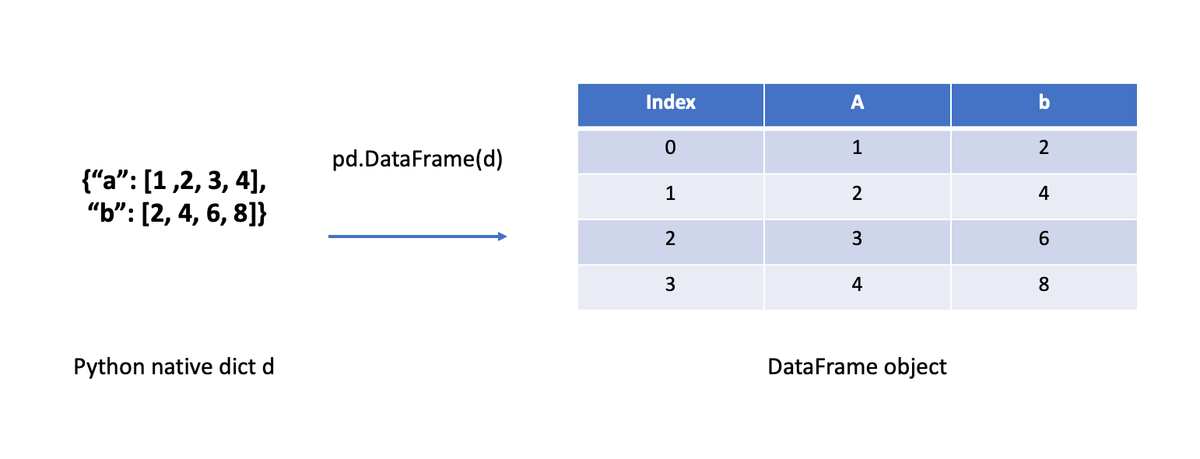
A Python dict is created on line 4, then is passed to pd.DataFrame to create a DataFrame object.
In line 12, a nested Python dictionary is created, then is passed to pd.DataFrame to create a DataFrame object on line 13.