Build an Interactive PDF Reader Using LangChain and Streamlit
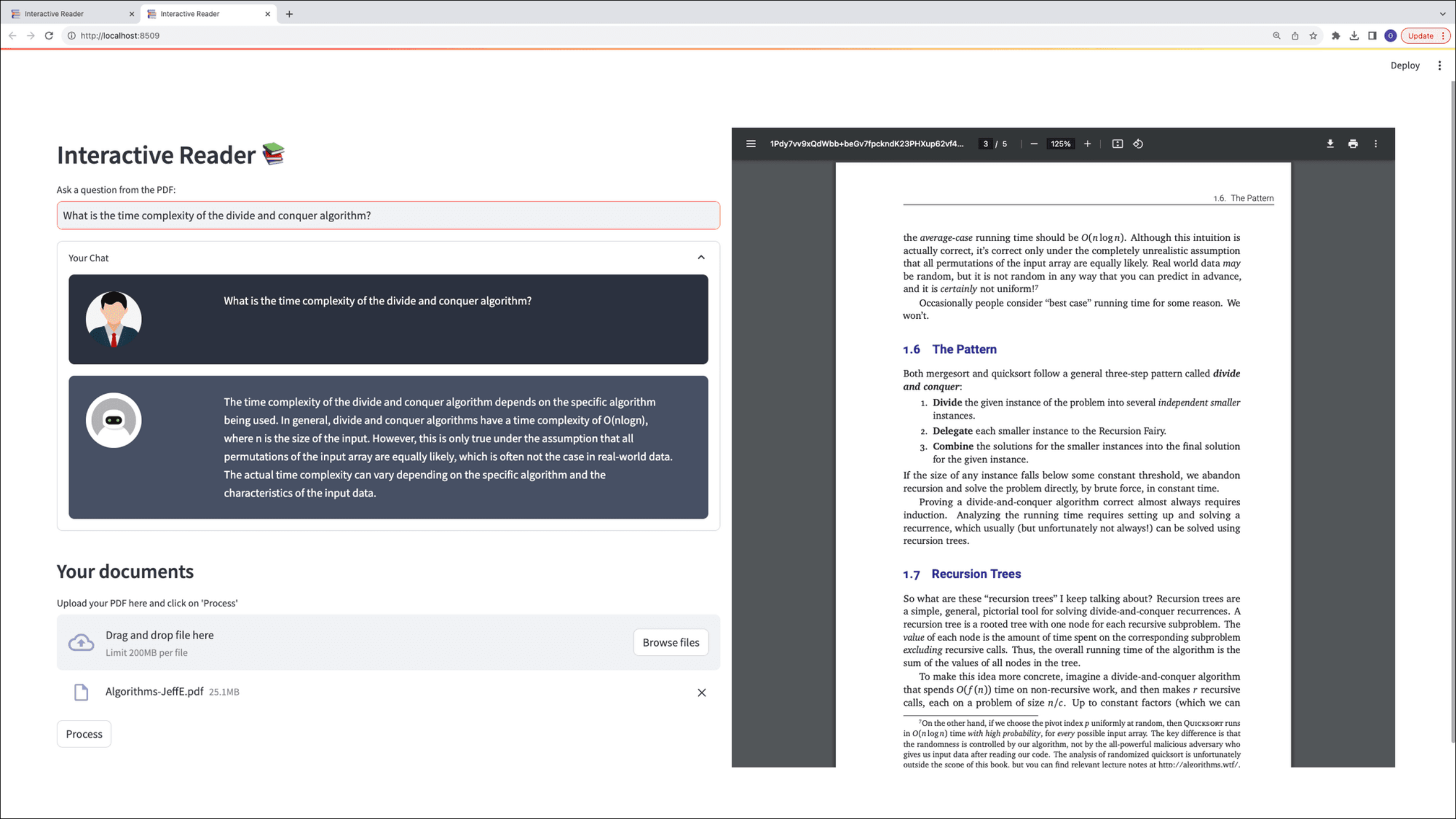
In this project, we'll build an intelligent PDF reader that lets users upload documents and interact with them through natural language questions. Using LangChain's conversational AI framework, we'll create a chatbot that searches uploaded PDFs, extracts relevant content, and generates accurate answers with page references for context. The application combines Streamlit for the web interface, HuggingFace embeddings for semantic text processing, and GPT-3.5 for natural language understanding and response generation.
We'll start by setting up the development environment and API keys, then build the Streamlit web application with file upload capabilities. Next, we'll implement the PDF processing pipeline using LangChain to chunk and embed document text. Finally, we'll integrate the chatbot interface that retrieves context-aware answers from the uploaded PDF and displays the source pages alongside each response. By the end, we'll have a fully functional document Q&A system that demonstrates practical applications of large language models, vector embeddings, and retrieval-augmented generation.
The basic functionality of the web application is shown in the figure below: