Hands-On: Serverless ML Pipeline in AWS
Explore deploying a serverless machine learning pipeline using AWS Step Functions to orchestrate Lambda functions. Learn to push Docker images to ECR, trigger model processing, and monitor executions through AWS monitoring tools like EventBridge and Lambda Logs.
Test yourself
Let's deploy our serverless machine learning application using Step Functions (state machines and ML pipeline). Use the following widget to deploy the application:
Don't forget to replace the value of
SERVERLESS_SERVICEenviroment variable with a name of your choice.
### Section where you define most general settings of your application

org: ${env:SERVERLESS_ORG}
app: ${env:SERVERLESS_APP}
service: ${env:SERVERLESS_SERVICE}

frameworkVersion: '3' # It is recommend to go directly for the latest major release, if you're not in need of migrating

provider:
  ### Reference: https://www.serverless.com/framework/docs/providers/aws/guide/serverless.yml#provider
  ### Generic provider settings
  name: aws
  stage: ${opt:stage, 'dev'}
  region: ${env:AWS_REGION}
  # stackName: - It is sometimes useful to overwrite this. By default, it is {service}-{stage}
  tags: ${self:custom.defaultTags} # It is a good practice to tag your resources
  stackTags: ${self:custom.defaultTags} # It is a good practice to tag your resources

  ### Generic function settings
  runtime: python3.8 # Defines generic runtime for all functions or individually per function
  logRetentionInDays: 7
  # environment: - It is used to define envs available to all functions
  #   KEY: value

  ### Deployment bucket
  deploymentBucket:
    name: ${env:AWS_BUCKET_NAME} # It is a good practice to give your pre-defined bucket that's shared for all sls deployments

  ### ECR Image
  ecr:
    images:
      mlimage:
        path: ./image
        cacheFrom:
          - serverless-101:latest

### Section where you define plugins used by your application

plugins:
  - serverless-python-requirements
  - serverless-step-functions
custom:
  service_stage: ${self:service}-${self:provider.stage}
  defaultTags:
    App: ${self:app}
    Service: ${self:service}
    Environment: ${self:provider.stage}
  pythonRequirements:
    pythonBin: python3
    dockerizePip: false # The dockerizePip option supports a special case in addition to booleans of 'non-linux' which makes it dockerize only on non-linux environments
    zip: true # keeping the deployment bundle as small as possible
    slim: true # keeping the deployment bundle as small as possible
    useDownloadCache: false # not necessarily needed
    useStaticCache: false

### Section where you define different parameters per stage

params:
  dev:
    memory: 128
  prod:
    memory: 256

### Section where you define what files to package

package:
  individually: true # Each Lambda function determines individually which files to package
  patterns:
    - "!./**"

### Section where you define your functions

functions:
  predict:
    # No need to indicate the handler, module, package, or anything
    # as the function is already a part of the Docker image
    image: mlimage
    name: ${self:custom.service_stage}-predict
    description: This Lambda makes predictions with an ML model
    memorySize: ${param:memory}
    timeout: 10
  add:
    module: handlers/add
    handler: handler.add
    name: ${self:custom.service_stage}-add
    description: This Lambda adds a random number to predictions
    memorySize: ${param:memory}
    timeout: 10
    package:
      patterns:
        - handlers/add/**
    layers:
      - arn:aws:lambda:${env:AWS_REGION}:336392948345:layer:AWSDataWrangler-Python38:2
  hello:
    module: handlers/hello
    handler: handler.hello
    name: ${self:custom.service_stage}-hello
    description: This Lambda says hello
    memorySize: ${param:memory}
    timeout: 10
    package:
      patterns:
        - handlers/hello/**
    # Resources:
    # 1) https://www.serverless.com/framework/docs/providers/aws/events/event-bridge
    # 2) https://docs.aws.amazon.com/step-functions/latest/dg/cw-events.html#cw-events-events
    events:
      - eventBridge:
          pattern:
            source:
              - aws.states
            # Add more details below to further filter action based on the message in EventBridge
    layers:
      - arn:aws:lambda:${env:AWS_REGION}:336392948345:layer:AWSDataWrangler-Python38:2

### Section where you define your step functions workflow

stepFunctions:
  stateMachines:
    mlPipeline:
      name: ${self:custom.service_stage}-pipeline
      definition:
        Comment: "This Step Functions workflows orchestrates a small ML model workflow"
        StartAt: Predict
        States:
          Predict:
            Type: Task
            Resource:
              Fn::GetAtt: [predict, Arn] # Fn::GetAtt - is CloudFormation syntax interpreted by serverless as well
            Next: Add
          Add:
            Type: Task
            Resource:
              Fn::GetAtt: [add, Arn]
            End: true
As a result, we should see two new ECR repositories in our account. Each of them will store our build mlimage.

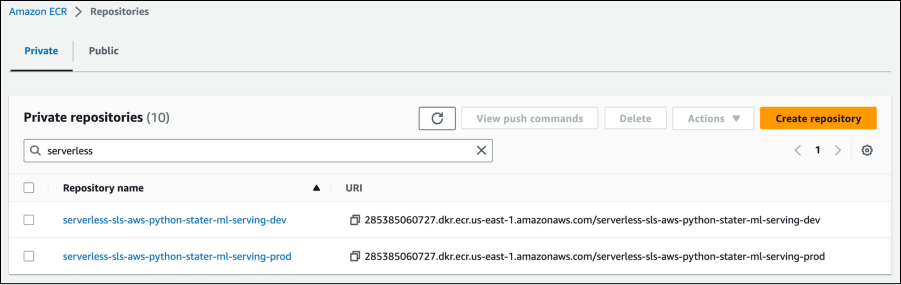
After the successful execution, click on a repository name. Then click on the “View push commands” button. Use the following steps to authenticate and push an image to your ...

