Overview of Dependency Injection
Explore the fundamentals of dependency injection in Android and how it separates class dependencies for better code reusability and testing. Understand how frameworks like Hilt and Dagger simplify managing dependencies, improve app architecture, and support isolated testing. Gain practical insights on integrating Hilt into your Android projects to create loosely coupled components and maintain SOLID principles.
We'll cover the following...
A class often depends on other classes. The class can create the dependencies or have them supplied as constructor parameters. Dependency injection (DI) is the process of providing dependencies from outside a class. DI is a good development practice. It improves code reusability, makes refactoring more effortless, and makes the code testable. For example, if our ViewModel depends on a Retrofit instance, we can pass a mock instance of Retrofit for our unit tests. Without DI, testing the ViewModel would be challenging as the class would initialize the Retrofit instance.
Overview
A class could have multiple dependencies. For example, a Coffee class might depend on the Sugar, Milk, and CoffeeBean classes. Without DI, the Coffee class needs to initialize all its dependencies. The diagram below illustrates how the Coffee class would look without DI. As the number of dependencies grows, initializing them becomes more challenging. In the above setup, we can’t test the implementation of the brewCoffee method in isolation.

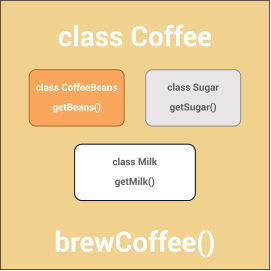
With DI, the constructor or delegate methods initialize a class’s dependencies. The diagram below illustrates the same Coffee class with dependency injection. We can pass all the required dependencies of the Coffee class to its constructor.


The Coffee class doesn’t need to worry about how we created the instances of its dependencies. In this setup, we can easily test the brewCoffee method in isolation by passing a mock implementation of its dependencies.
DI frameworks for Android
Android is well suited for dependency injection. Dagger and Hilt are two of the most popular DI frameworks for Android.
- Dagger generates code at compile-time to resolve all the dependencies.
- Hilt creates containers for Android classes and manages their lifecycle for us.
The Hilt library is an extension of the Dagger DI library and lets us leverage all of Dagger’s benefits. It integrates natively with the other Android Jetpack libraries, and is the recommended framework for using DI in Android.
Adding Hilt in Android
We need to add the Hilt plugin and its dependency in the Gradle file to start using the Hilt framework in our app.
First, we need to add the Hilt plugin in the root build.gradle file.
Next, we need to apply the Hilt plugin in the app/build.gradle file.
Finally, we need to add the Gradle dependency for the Hilt library.
Conclusion
Using dependency injection in Android provides several advantages. DI makes the classes loosely coupled and helps maintain SOLID principles in the app. With DI, we can test different components in isolation.