Redis Publisher/Subscriber Model
Explore how Redis functions as a message queue with its publisher subscriber model. Understand commands to subscribe and unsubscribe from channels, publish messages, and manage multiple subscribers for asynchronous task processing.
What is a message queue?
A message queue is a type of temporary storage for messages. The sender, also known as publisher, sends messages to the queue. The messages remain in the queue until a receiver also known as a subscriber, is ready to read the messages. The main use case for a message queue is when there are some larger jobs that need to be processed. The sender sends the jobs to a queue instead of directly sending it to the receiver. The receiver picks each job, one by one, and processes it.
Let’s say we are booking movie tickets on a website. There are a few things that should be done immediately, like selecting the seats, payment, etc. But a few things, like sending tickets via email, may take time and are not required to be done immediately. These tasks that time and are not required to be done immediately can be added to a queue and can be processed one by one.
How Redis is used as a message queue?
As we discussed earlier, Redis can also be used as a message queue. The publisher can publish to only one channel, although a channel may have multiple subscribers. A subscriber can subscribe to one or more channels.
Now we will look at how the Redis can be used as a message queue.
Subscribing to a channel.
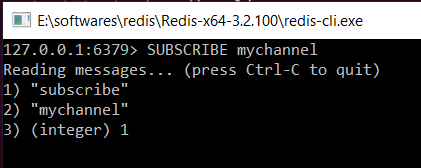
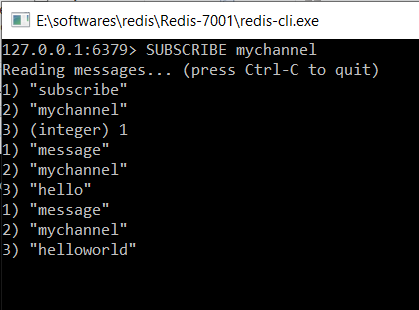
A user can subscribe to a channel using the SUBSCRIBE command. This command takes the name of the channel as an argument. The syntax of this command is:
SUBSCRIBE channel
Publishing to a channel
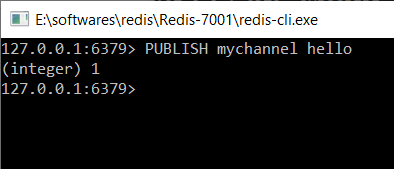
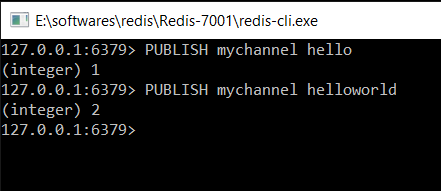
A user can publish to a channel using the PUBLISH command. The syntax of this command is:
PUBLISH channel message
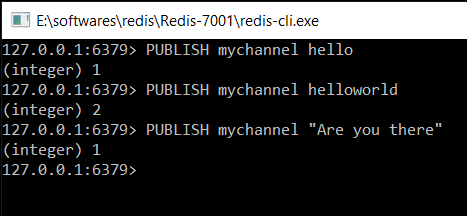
In the example below, the client is publishing a message to mychannel.
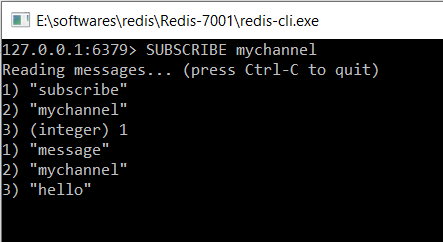
The message is sent to the other client.
A channel with multiple subscribers
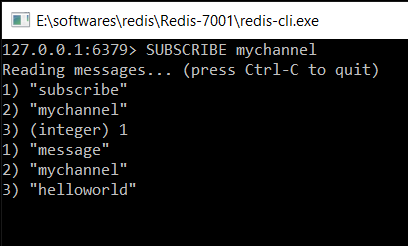
It is possible for different clients to subscribe to the same channel. Whenever a publisher publishes this channel, all the receivers receive the message.
In the example below, there are two clients subscribed to mychannel. When a publisher sends a message to this channel, both of the subscribers receive the update.
Unsubscribing from a channel in Redis
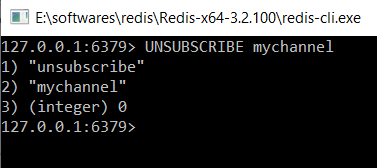
A client can easily unsubscribe from a channel using the UNSUBSCRIBE command. The syntax of this command is
UNSUBSCRIBE channel
In the example below, the client is unsubscribing from mychannel.
Subscribing to a group of channels
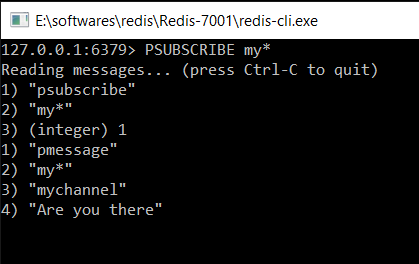
If a client wants to subscribe to all the channels starting with a particular character or string, they can use the PSUBSCRIBE command. The syntax of this command is:
PSUBSCRIBE string*
In the example below, a client is subscribing to a channel that starts with my.
Unsubscribing from a group of channels
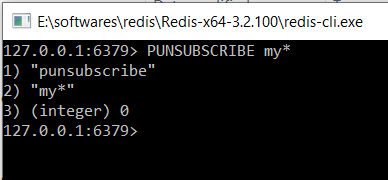
A client can unsubscribe to a group of channels using PUNSUBSCRIBE command.
In the example below, a client is unsubscribing to all the channels starting with my.