Organizing the Models with Folders and Tags
Explore how to organize dbt models using folders and tags to group related models. Learn to run specific models or groups with node selection commands and handle dependencies to streamline data builds and testing. Understand how to use YAML selectors for complex node selections and efficiently manage model execution in large dbt projects.
Introduction to node selection
When we start to have many models, we might not want to run all of them every time. dbt allows us to run one model at a time. If our project looks like this:

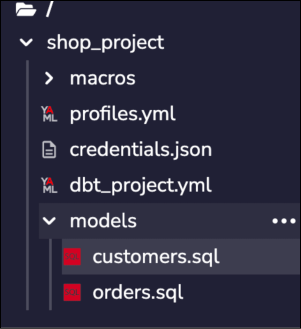
Example project folder structure
Then, we can run only a subset of models with the CLI using “node selection.”
Node selection is available for the following commands:
runtestseedsnapshotlscompilefreshnessbuild
Selecting nodes
To apply our command to a subset of nodes, we can use the —-select flag. ...