Find the colleges in the ranklist (grep, pipe and wc)
Explore how to use the grep command along with pipes and wc to identify lines containing 'college' in university ranking data. Learn to apply case-insensitive search and understand potential pitfalls in pattern matching within data analysis.
We'll cover the following...
Let’s now proceed to our first analysis: To list all the lines in the data file that contain the phrase “college”, we need to introduce you with the command grep (global regular expression print). Let’s first watch the following video lecture:

In a nutshell, grep allows you to look through all the lines in a file but only output those that match a pattern. In our case, we want to find all the lines in the dataset that contain “college”. Here’s how we do it:
Here, the grep command takes two command-line arguments: the first is the pattern, and the second is the file in which we want to search for this pattern. If you run this command you should see some lines that contain the string “college”:
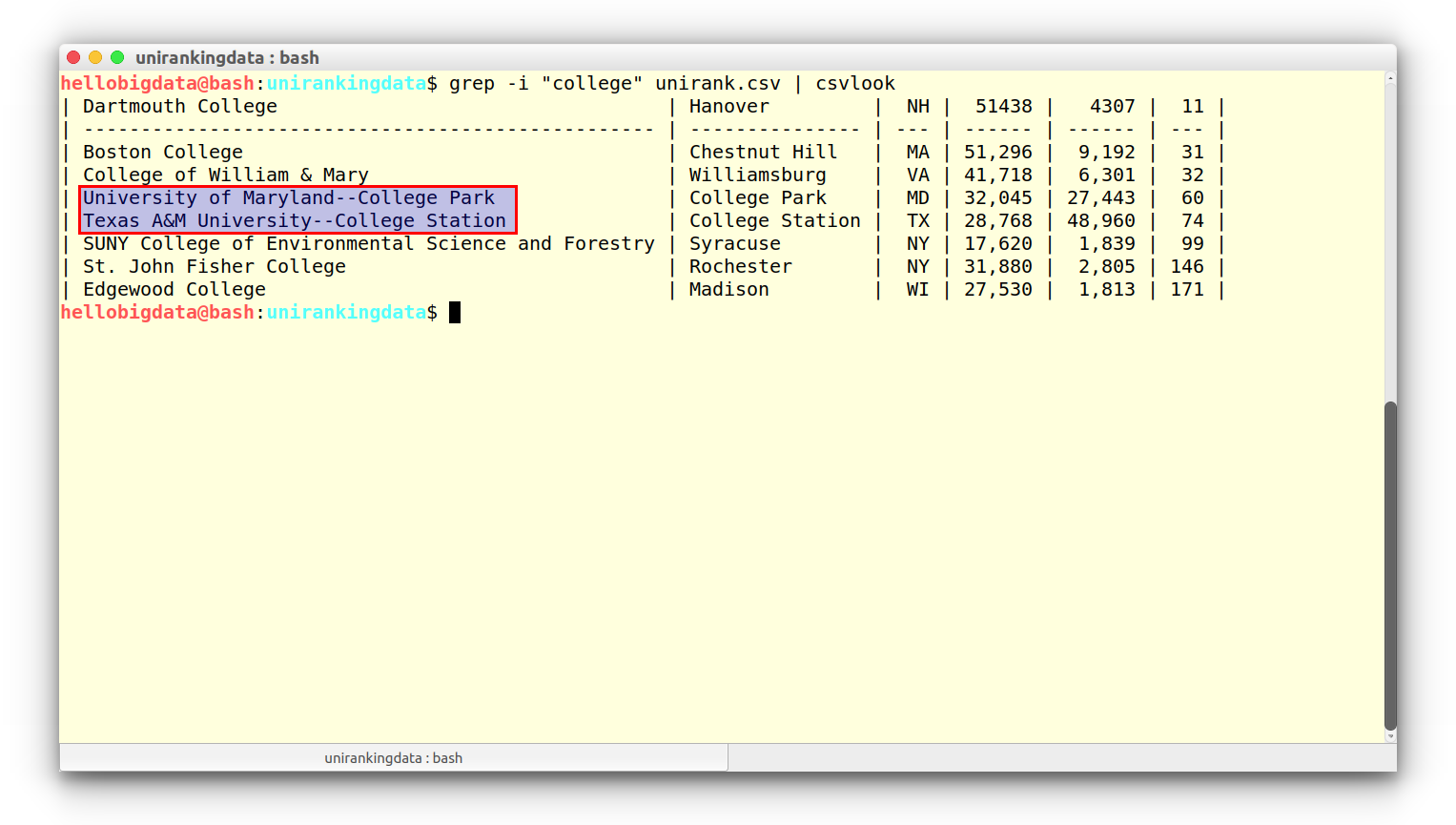
Note that we have put -i option to make the matching case insensative. Also, find that the logic by mistake identified two universities as college! due to the fact that their names contained the string (“college”). So, you need to be careful, while using grep in data analytics and particularly before reaching a decision!