Classes and Inheritance
Explore how to create and manage Python classes, understand inheritance to share variables and methods, and use object-oriented concepts like instances and self to build flexible programs.
We'll cover the following...
Class definition
A class describes a new type of object and bundles together the methods needed to work with objects of that type. Here is an analogy: a class is like a cake recipe, while objects are the cakes you can make by following the recipe.
Defining a class
The syntax for defining a class is
class ClassName(superclass):
 variable and method definitions
Introduction to inheritance
Every class (except the object class) has a
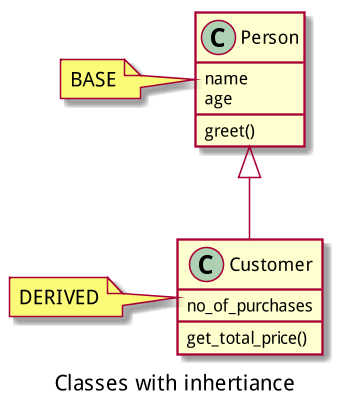
For example, you might define a class Person with the variables name and age and a method greet. Every object of this type will have its own copies of those variables, and its own reference to the greet method. If you then create a class Customer as a subclass of Person, every object of type Customer will have its own name and age variables and a greet method. Plus, it will have whatever additional variables and methods you declare in Customer (for example, a list of purchases).
Introduction to the object class
The special object class is the “root” of all classes. If you omit superclass when you define a class, it defaults to having the superclass object. Every class inherits from object, either directly or indirectly.
Terminology: As a noun, “instance” means the same as “object.” However, we usually use “instance” when talking about a particular object (
johnis an instance ofPerson), or when we are using the word as an adjective (nameis an instance variable of the classPerson).
Terminology: “Field” is another name for “instance variable."
Here’s an example of a class definition:
class Person(object):
  # defining variables of Person class
  name = 'Joe'
  age = 23

  # defining methods
  def say_hi(self):
    print("Hello, Joe.")
There are numerous things that we can do with the above example:
- To create an instance (object) of a class, we can use the name of the class as if it were a function name, for example,
p = Person(). - We can access the fields of object
pusing dot notation:p.nameis “Joe” andp.ageis 23. - We can modify the fields of
p, for example, by sayingp.name = 'Jack'. - We can also use the dot notation to “talk to” the object
por, more formally, “send a message to” the objectp:p.say_hi()tellsptosay_hi, andpwill respond by printingHello, Joe..
Convention: Class names always begin with a capital letter, and variable and function names always begin with a lowercase letter.
The following code-based example has been provided to help you better understand these concepts.
Unfortunately, every instance we create from this class will be exactly the same. We would like to create instances of Person with different values for name and age. To do this, we have to explore a special variable: self.