...
/Applying Convolutional Networks to Multivariate Time Series
Applying Convolutional Networks to Multivariate Time Series
Discover convolutional networks’ application in predicting rare events within multivariate time series data.
We'll cover the following...
The rare event prediction problem explored in this course is a multivariate time series. Let’s proceed with modeling it with convolutional networks.
Convolution on time series
Before modeling, let’s briefly explore the filters and convolution operation in the context of multivariate time series.
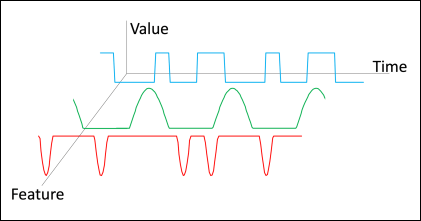
A multivariate time series structure is shown in the image below. It shows an illustrative example in which the x-, y-, and z-axis, show the time, the features, and the features’ values,
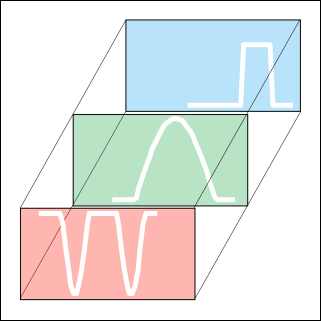
The time series in the illustration has three features with rectangular-, upward pulse-, and downward pulse-like movements. The features are placed along with the depth, making them the channels. A filter for such a time series is shown in the illustration below.
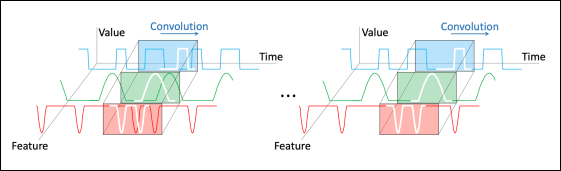
The convolution operation between the filter and the time series is shown in the illustration below. As time series has only one spatial axis along time, the convolution sweeps it over time. At each stride, a similarity between the filter and a section of the time series is emitted (not shown in the figure). The convolution variants, such as padding, stride , dilation, and , work similarly along the time axis.
Imports and data preparation
Like always, the modeling starts with importing the required libraries, including the user-defined ones.
The above code shows data split percent, random generator seed, and size of figures as an output.
The tensor shape of a multivariate time series in a convolutional network is the same as in an
The above shows clean data as output, displaying different dataset columns.
Baseline
As usual, modeling starts with constructing a baseline model. The baseline models the temporal dependencies up to a lookback of 20, which is the same as the LSTM models. The temporalization is done with this lookback in the code below. The resultant data in X is a (samples, timesteps, features) array.
lookback = 20
X, y = dp.temporalize(X=input_X ,
y=input_y ,
lookback=lookback)
# Divide the data into train , valid , and test
X_train , X_test , y_train , y_test = train_test_split(np.array(X),
np.array(y),
test_size=DATA_SPLIT_PCT ,
random_state=SEED)
X_train , X_valid , y_train , y_valid = train_test_split(X_train ,
y_train ,
test_size=DATA_SPLIT_PCT ,
random_state=SEED)
# Scaler using the training data.
scaler = StandardScaler().fit(dp.flatten(X_train))
X_train_scaled = dp.scale(X_train , scaler)
X_valid_scaled = dp.scale(X_valid , scaler)
X_test_scaled = dp.scale(X_test , scaler)
# Axes lengths
TIMESTEPS = X_train_scaled.shape[1]
N_FEATURES = X_train_scaled.shape[2]
print('TIMESTEPS:', TIMESTEPS)
print('\nNumber of features:', N_FEATURES)The above code shows a number of lookbacks and a number of features as an output.
The baseline is a simple network constructed with the Sequential() framework in the code below.
<center>
<img src="/score.png" height="240"/>
<br> </br>
<img src="/score1.png" height="240"/>
<br> </br>
<img src="/score2.png" height="240"/>
</center>Note: It takes time to complete code execution, but once that’s done, please open the link in the widget to observe the output
The above code shows the training steps of the model and its accuracy and loss at the end.
The network’s components are as follows.
Input layer
The shape of an input sample is defined in the Input() layer. An input sample here is a (timesteps, n_features) tensor due to the temporalization during the data processing.
Conv layer
The network begins with a Conv1D layer. The kernel_size is set to 4 and the number of filters is 16. Therefore, there will be 16 convolutional filters each being a (4, n_features) tensor.
Here n_features=69 and, therefore, each filter will have ...