Rendering Errors in Our App
Explore how to manage rendering errors in Nuxt 3 by creating custom error pages and using the NuxtErrorBoundary component for effective client-side error handling. This lesson shows you how to simulate errors, display user-friendly messages, and clear errors within your app for better user experience.
We'll cover the following...
Custom error page
When we have errors in our applications, we might want to provide a custom solution to display them to the user. The following code will fetch images using the Pixabay API. Inside pages/index.vue, we have simulated an error by commenting out apiKey:
<script setup>
const config = useRuntimeConfig()
// const apiKey = config.public.pixabayApiKey;

const { data: images } = await useFetch(
	`https://pixabay.com/api/?key=${apiKey}&q=sea`
);

</script>
<template>
	<ul class="images">
		<li v-for="image in images.hits" :key="image.id">
			<img class="img_preview" :src="image.webformatURL" />
		</li>
	</ul>
</template>Run the code to generate the link, and click it to see the error in the browser.
Line 3: We comment out
apiKey. This is required for the code to run correctly.Lines 5–7: This is an API call to Pixabay to fetch images. This requires a valid
apiKey.
Run the code and open the project in the browser, where you will see the default Nuxt error page:

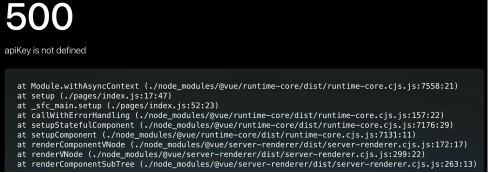
The number 500 is a server error code that occurs when an error prevents it from fulfilling the request. Followed by the message “apiKey is not defined” which gives us an indication of the issue. We can also create a custom error page using our own design and layout by adding a page called error.vue in the root of our project directory:
<script setup>
const props = defineProps({
  error: Object
})

function handleError() {
    // fix any errors then clear
    clearError({ redirect: '/' })
}
</script>

<template>
    <div>
        <p>URL: {{ error.url }}</p>
        <p>Status code: {{ error.statusCode }}</p>
        <p>Message: {{ error.message }}</p>
    </div>
    <button @click="handleError">Clear errors</button>
</template>Run the code to generate the link, and click it to see the error in the browser. Open the above link to see the error in the browser.
You will see the custom error page in the browser:


The error.vue file
Lines 2–4: A single
errorprop is passed to the component automatically.Lines 6–9: This function can be called from the template to fix any errors, and it can be passed a
clearErrorhelper function when we are ready to remove the error page.Lines 13–17: The
errorprop can be displayed in the template.Line 18: This button will call the
handleErrorfunction when clicked.
This code example still has the commented out apiKey which will cause an error. Run the code, and you will see the custom error.vue file.
The NuxtErrorBoundary component
The error.vue file can handle errors in both server-side rendering and single-page application mode. For handling errors only on the client-side (SPA mode), we can avoid rendering a new page and handle the error with the NuxtErrorBoundary component.
Lines 2–4: Error handling will not apply to code placed outside the
NuxtErrorBoundarycomponent.Lines 6–11: Error handling will apply to code inside the
NuxtErrorBoundarycomponent.Lines 8–10: The contents of the
#errorslot will render when an error has occurred. Theerroris also passed as a prop.
To clear the error, we can set the value to null:
Lines 2–4: This function will set the
errorvalue to benull, clearing the error.Line 15: We call the
clearErrorfunction when the button is clicked.
Here is a working example of how to use the NuxtErrorBoundary component:
<template>
	<button @click="throw createError('error created from component');">
		create error
	</button>
</template>
components/CreateError.vueLines 2–4: A button throws an error using the Nuxt
createErrorhelper method. This will create an error object which can be caught with our error boundary.
pages/index.vueLine 2: This
messageis added to let the user know when theerroris cleared.Line 16: The
@error="logError"is added to handle what happens when theerroris cleared. This could be useful for logging the error.Lines 13 and 18: The
CreateErrorcomponent is added twice. Since line 18 is the only occurrence inside the error boundary, this will trigger the#errorslot to render.
Run the code to observe the #error slot code when an error is detected.