Part 1: Universal Render Pipeline (URP) in AR
Explore how to implement the Universal Render Pipeline in Unity to enhance augmented reality scenes. Learn to set up URP assets, configure project settings, enable post-processing effects like Bloom, and create visual indicators to improve AR experience and performance.
In this lesson, we will explore how to enhance our AR scenes using URP. URP is a powerful rendering system that allows us to apply post-processing effects and optimize performance in our AR projects. We'll set up URP, configure the Render Pipeline settings, and add post-processing effects to create visually stunning AR experiences.
Prerequisites
Before starting this lesson, make sure that we have a fresh project set up for AR development. If we previously worked on a project, it’s recommended to create a new project specifically for this lesson to avoid compatibility issues.
Setting up the project
Create a new project named “AR URP” in Unity. We will begin with a 3D project, which will be eventually converted into a URP project.

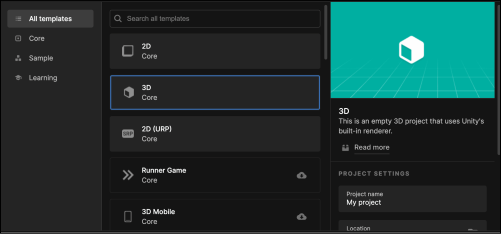
Switch the platform to Android if it is not already selected.
Import the necessary AR packages, including
AR Foundation,ARKit, andARCore, as we did in the previous lessons.

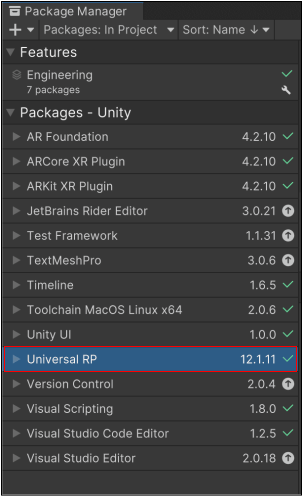
Additionally, install the
Universal RPpackage for URP compatibility. We can find it in the Unity Package Manager. ... ...