Retrieving Execution Logs
Explore how to retrieve AWS Lambda execution logs through CloudWatch and SAM CLI. Understand log groups and streams, learn how to filter logs by keywords and time, and use command-line tools for efficient debugging and monitoring of serverless functions.
Log groups and log streams #
The Monitoring tab also has a quick link to inspect CloudWatch logs. Click the View logs in Cloudwatch button, and you’ll see the CloudWatch log group for your function.
CloudWatch groups logs in two levels of hierarchy:
- log groups
- log streams
Log groups correspond to a logical service. AWS Lambda creates a log group for each function. A single log group can have multiple log streams, which typically correspond to a single running process. Lambda creates a log stream for each container instance (each cold start). If Lambda reuses the container for subsequent requests, the logs will appear in the same stream. If it creates a new container, the logs will appear in a new stream (refer to the figure below).
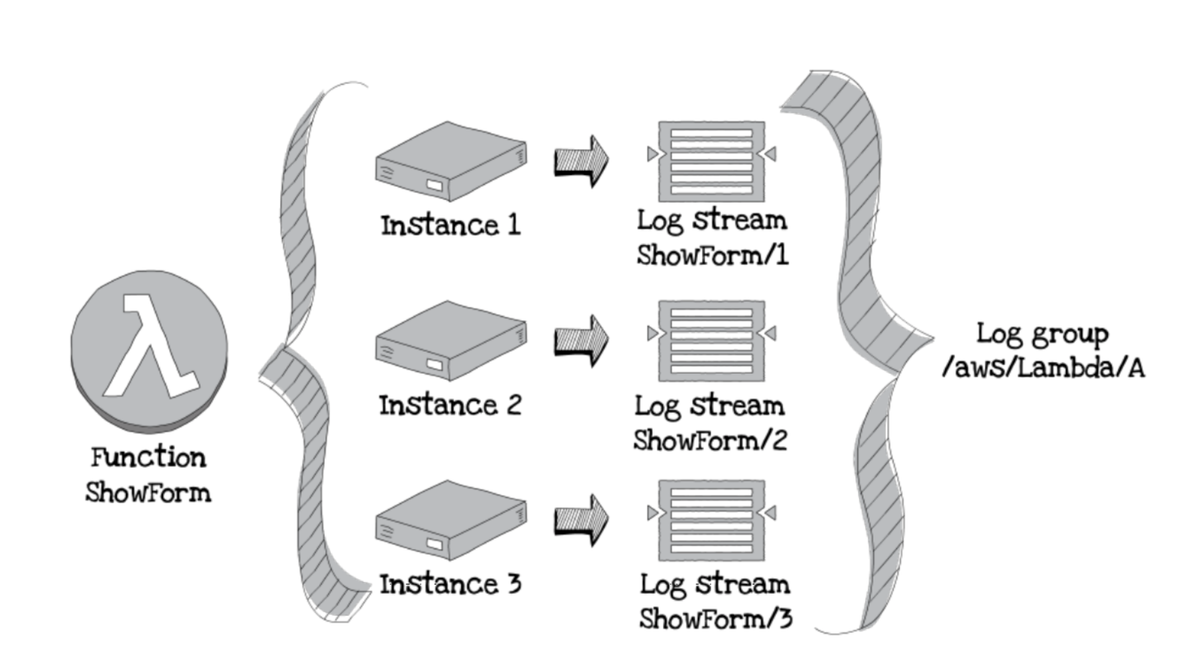
Click the most recent log stream link and you’ll see the details of the function execution, including the total time it took to run, how much memory it used, and the ID of the request (refer to the figure below). This information is incredibly useful if you start getting errors from an API. You can see if requests are timing out (if so, you need to increase the allowed time) or if they are ...