


The best software process model depends on the project requirements, team, and other factors. For highly flexible and iterative development, Agile is often preferred for its adaptability and frequent feedback loops. The Waterfall model can be effective for well-defined projects with clear requirements due to its structured approach.
Table of Contents
What is a software process model? Top 7 models explained
12 mins read
Apr 30, 2026
Share
Software processes are the activities for designing, implementing, and testing a software system. The software development process is complicated and involves a lot more than technical knowledge.
That’s where software process models come in handy. A software process model is an abstract representation of the development process.
In this article, we will introduce you to the top seven software process models and discuss when to use them.
What is a software process model?#
A software process model is an abstraction of the software development process. The models specify the stages and order of a process. So, think of this as a representation of the order of activities of the process and the sequence in which they are performed.
A model will define the following:
- The tasks to be performed
- The input and output of each task
- The pre and post-conditions for each task
- The flow and sequence of each task
The goal of a software process model is to provide guidance for controlling and coordinating the tasks to achieve the end product and objectives as effectively as possible.
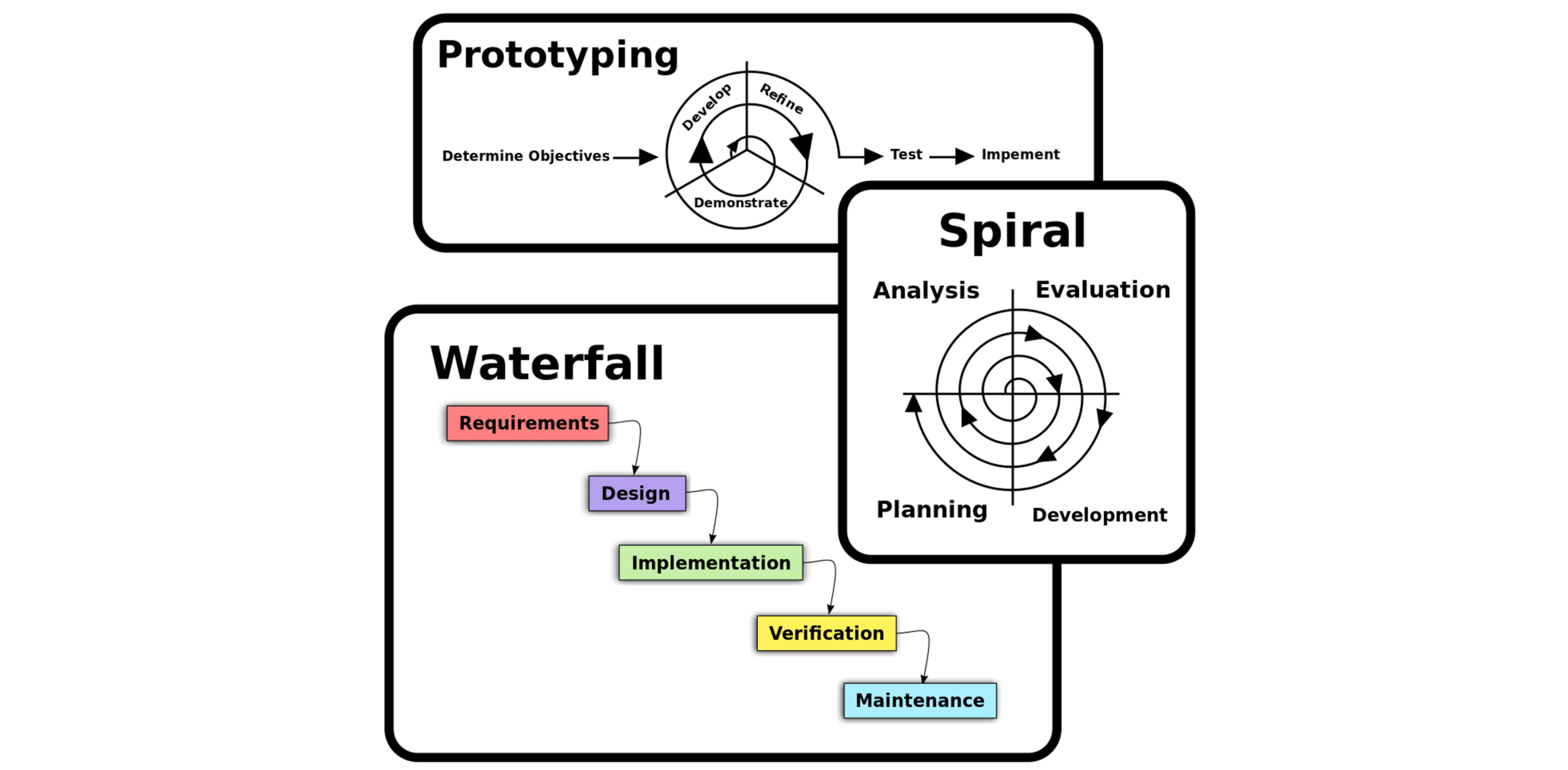
Software process model, Source: Omar Elgabry
There are many kinds of process models for meeting different requirements. We refer to these as SDLC models (Software Development Life Cycle models). The most popular and important SDLC models are as follows:
- Waterfall model
- V model
- Incremental model
- RAD model
- Agile model
- Iterative model
- Prototype model
- Spiral model
Model | Best For | Timeline | Team Size | Risk Level |
Waterfall | Stable, well-defined requirements | Fixed, sequential, long | Medium to large | Low |
V Model | Projects needing strong testing and validation | Fixed, structured | Medium to large | Low |
Incremental | Delivering features in parts over time | Flexible, staged | Medium | Medium |
Iterative | Evolving requirements with frequent improvements | Iterative, flexible | Small to medium | Medium |
RAD | Fast development with quick user feedback | Very fast | Small to medium | Medium |
Agile | Changing requirements and continuous delivery | Flexible, ongoing | Small to medium | Medium |
Prototype | Unclear requirements, early exploration | Short cycles | Small | High |
Spiral | High-risk, complex, research-heavy projects | Long, iterative | Medium to large | Very high |
Which model should I choose?#
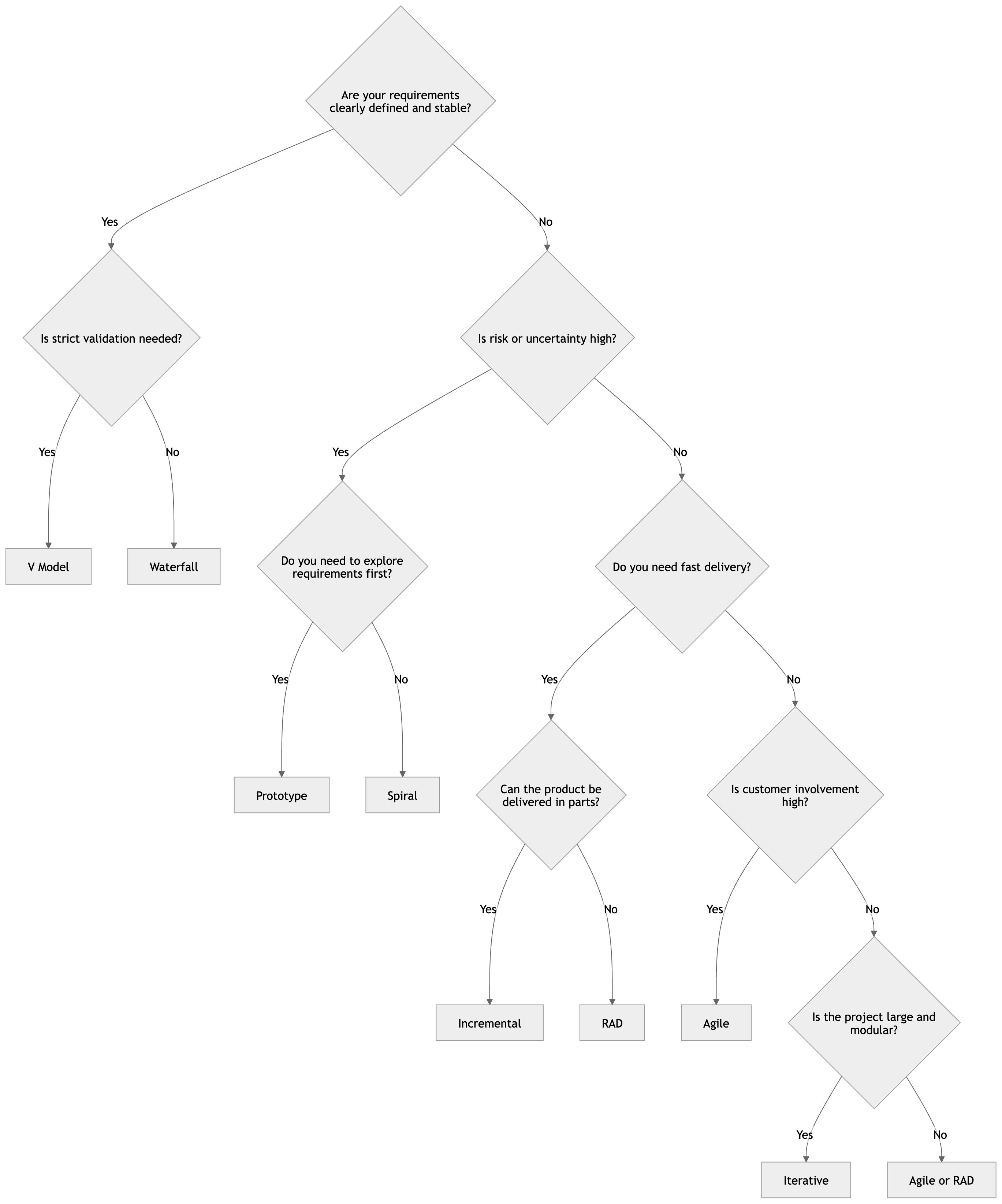
Use this decision tree as a quick starting point, not a strict rulebook. In real projects, teams often combine models—for example, using Agile delivery with prototypes early on, or an incremental plan for a larger System Design and implementation effort.
How do you choose the right process model?#
If your requirements are stable and unlikely to change → go with Waterfall or V Model
If your requirements are evolving → choose Agile or Iterative
If you’re dealing with uncertainty or high risk → use Spiral or Prototype
If you need to ship quickly → consider RAD or Incremental
Choosing the right process model is a key System Design decision—it directly impacts how your team builds, tests, and scales software over time.
Factors in choosing a software process#
Choosing the right software process model for your project can be difficult. If you know your requirements well, it will be easier to select a model that best matches your needs. You need to keep the following factors in mind when selecting your software process model:
Project requirements#
Before you choose a model, take some time to go through the project requirements and clarify them alongside your organization’s or team’s expectations. Will the user need to specify requirements in detail after each iterative session? Will the requirements change during the development process?
Project size#
Consider the size of the project you will be working on. Larger projects mean bigger teams, so you’ll need more extensive and elaborate project management plans.
Project complexity#
Complex projects may not have clear requirements. The requirements may change often, and the cost of delay is high. Ask yourself if the project requires constant monitoring or feedback from the client.
Cost of delay#
Is the project highly time-bound with a huge cost of delay, or are the timelines flexible?
Customer involvement#
Do you need to consult the customers during the process? Does the user need to participate in all phases?
Familiarity with technology#
This involves the developers’ knowledge and experience with the project domain, software tools, language, and methods needed for development.
Project resources#
This involves the amount and availability of funds, staff, and other resources.
Get hands-on with system design.
Scalability & System Design for Developers
As you progress in your career as a developer, you'll be increasingly expected to think about software architecture. Can you design systems and make trade-offs at scale? Developing that skill is a great way to set yourself apart from the pack. In this Skill Path, you'll cover everything you need to know to design scalable systems for enterprise-level software.
Types of software process models#
As we mentioned before, there are multiple kinds of software process models that each meet different requirements. Below, we will look at the top seven types of software process models that you should know.
Waterfall Model#
The waterfall model is a sequential, plan driven-process where you must plan and schedule all your activities before starting the project. Each activity in the waterfall model is represented as a separate phase arranged in linear order.
It has the following phases:
- Requirements
- Design
- Implementation
- Testing
- Deployment
- Maintenance
Each of these phases produces one or more documents that need to be approved before the next phase begins. However, in practice, these phases are very likely to overlap and may feed information to one another.
The software process isn’t linear, so the documents produced may need to be modified to reflect changes.
The waterfall model is easy to understand and follow. It doesn’t require a lot of customer involvement after the specification is done. Since it’s inflexible, it can’t adapt to changes. There is no way to see or try the software until the last phase.
The waterfall model has a rigid structure, so it should be used in cases where the requirements are understood completely and unlikely to radically change.
V Model#
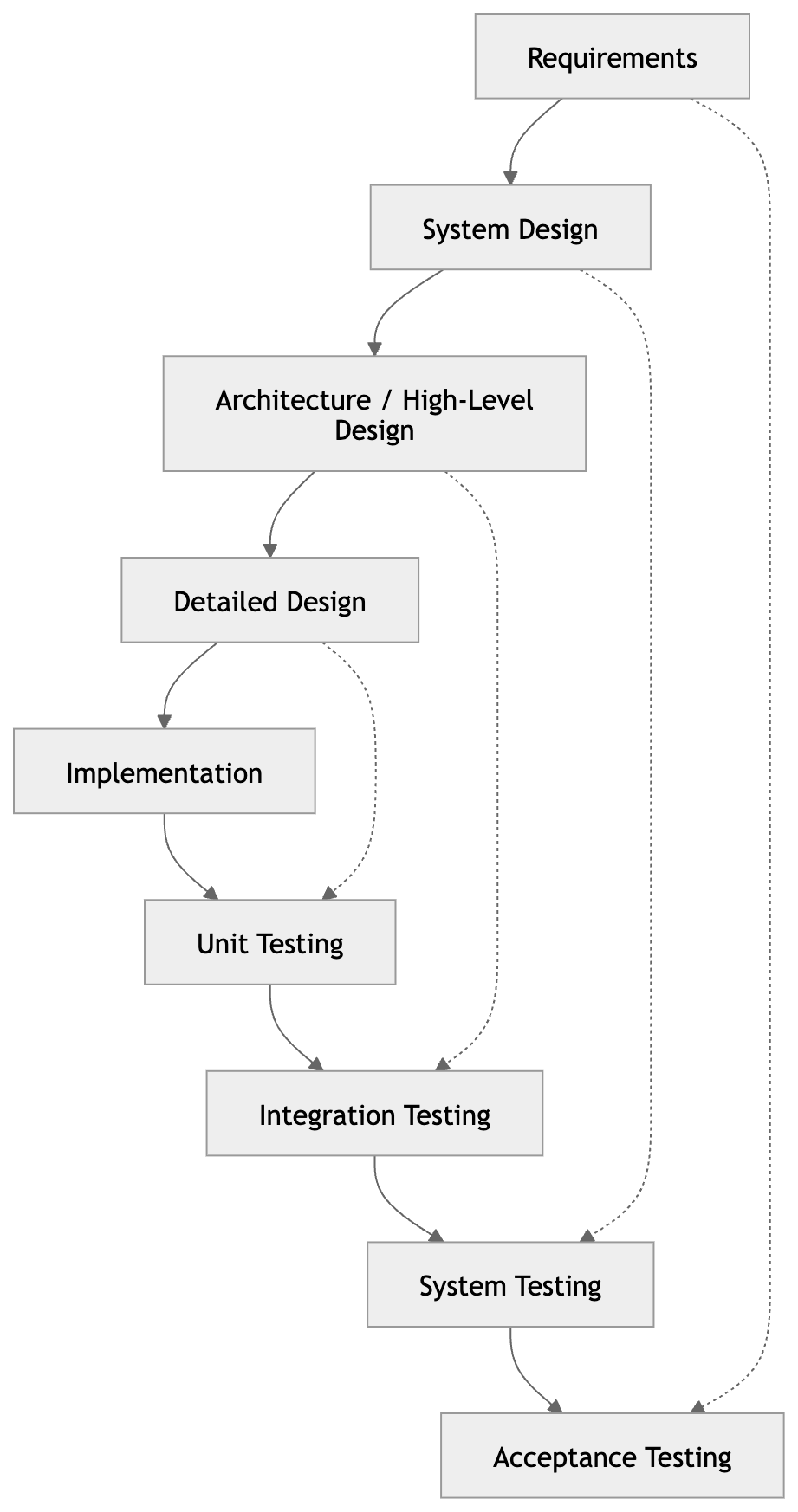
The V model (Verification and Validation model) is an extension of the waterfall model. All the requirements are gathered at the start and cannot be changed. You have a corresponding testing activity for each stage. For every phase in the development cycle, there is an associated testing phase.
The corresponding testing phase of the development phase is planned in parallel, as you can see above.
The V model is highly disciplined, easy to understand, and makes project management easier. But it isn’t good for complex projects or projects that have unclear or changing requirements. This makes the V model a good choice for software where downtimes and failures are unacceptable.
Incremental Model#
The incremental model divides the system’s functionality into small increments that are delivered one after the other in quick succession. The most important functionality is implemented in the initial increments.
The subsequent increments expand on the previous ones until everything has been updated and implemented.
Incremental development is based on developing an initial implementation, exposing it to user feedback, and evolving it through new versions. The process’ activities are interwoven by feedback.
Each iteration passes through the requirements, design, coding, and testing stages.
The incremental model lets stakeholders and developers see results with the first increment. If the stakeholders don’t like anything, everyone finds out a lot sooner. It is efficient as the developers only focus on what is important and bugs are fixed as they arise, but you need a clear and complete definition of the whole system before you start.
The incremental model is great for projects that have loosely coupled parts and projects with complete and clear requirements.
Iterative Model#
The iterative development model develops a system by building small portions of all the features. This helps to meet the initial scope quickly and release it for feedback.
In the iterative model, you start off by implementing a small set of software requirements. These are then enhanced iteratively in the evolving versions until the system is completed. This process model starts with part of the software, which is then implemented and reviewed to identify further requirements.
Like the incremental model, the iterative model allows you to see the results at the early stages of development. This makes it easy to identify and fix any functional or design flaws. It also makes it easier to manage risk and change requirements.
The deadline and budget may change throughout the development process, especially for large complex projects. The iterative model is a good choice for large software that can be easily broken down into modules.
RAD Model#
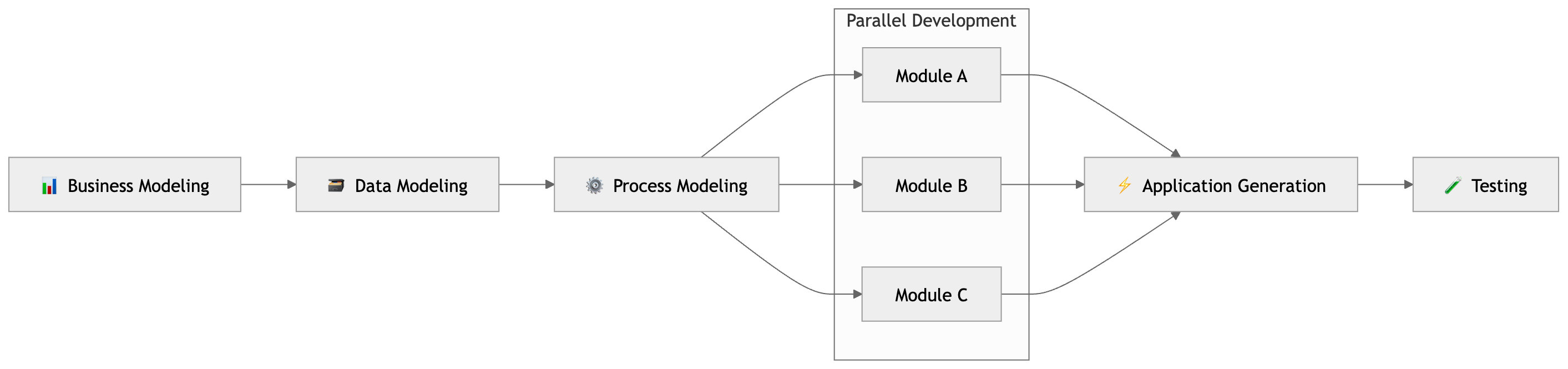
The Rapid Application Development (RAD model) is based on iterative development and prototyping with little planning involved. You develop functional modules in parallel for faster product delivery. It involves the following phases:
- Business modeling
- Data modeling
- Process modeling
- Application generation
- Testing and turnover
The RAD concept focuses on gathering requirements using focus groups and workshops, reusing software components, and informal communication.
The RAD model accommodates changing requirements, reduces development time, and increases the reusability of components. But it can be complex to manage. Therefore, the RAD model is great for systems that need to be produced in a short time and have known requirements.
Spiral Model#
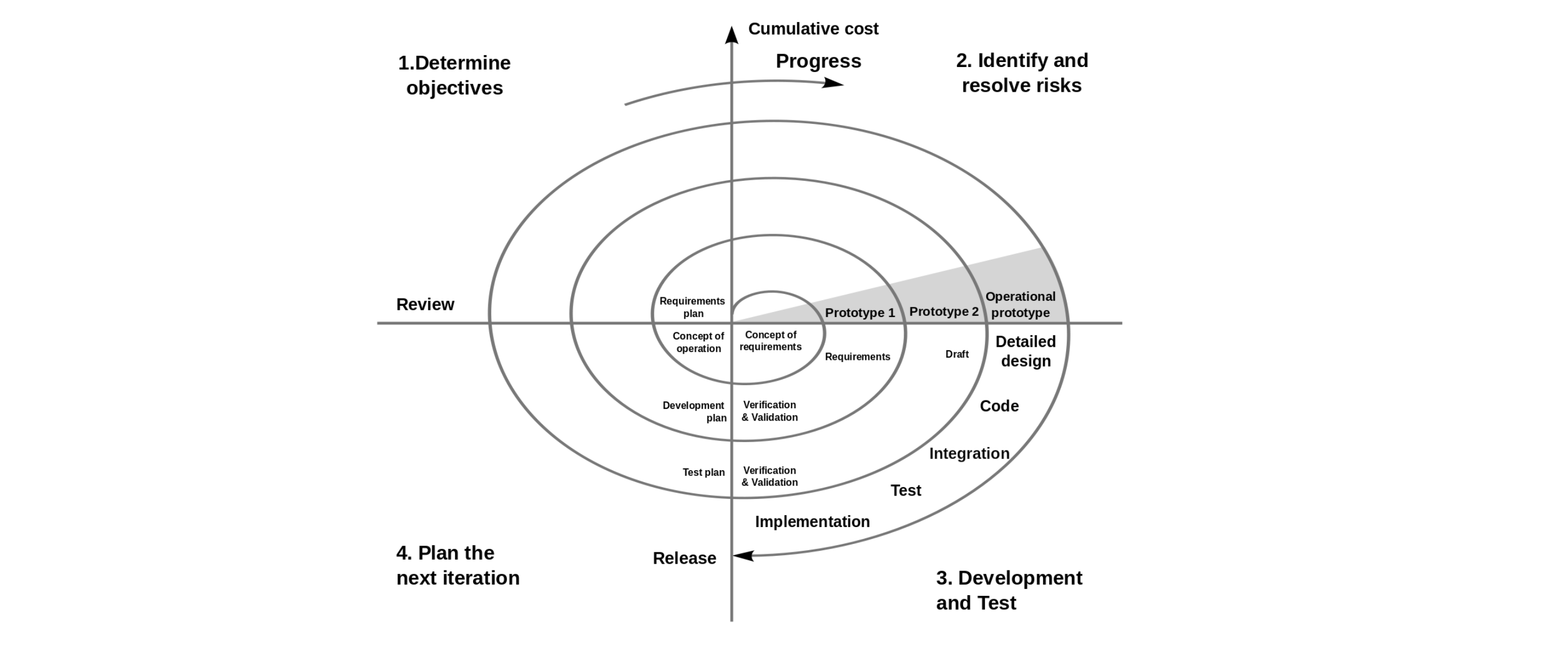
The spiral model is a risk driven iterative software process model. The spiral model delivers projects in loops. Unlike other process models, its steps aren’t activities but phases for addressing whatever problem has the greatest risk of causing a failure.
It was designed to include the best features from the waterfall and introduces risk-assessment.
You have the following phases for each cycle:
- Address the highest-risk problem and determine the objective and alternate solutions
- Evaluate the alternatives and identify the risks involved and possible solutions
- Develop a solution and verify if it’s acceptable
- Plan for the next cycle
Spiral Model
You develop the concept in the first few cycles, and then it evolves into an implementation. Though this model is great for managing uncertainty, it can be difficult to have stable documentation. The spiral model can be used for projects with unclear needs or projects still in research and development.
Agile model#
The agile process model encourages continuous iterations of development and testing. Each incremental part is developed over an iteration, and each iteration is designed to be small and manageable so it can be completed within a few weeks.
Each iteration focuses on implementing a small set of features completely. It involves customers in the development process and minimizes documentation by using informal communication.
Agile development considers the following:
- Requirements are assumed to change
- The system evolves over a series of short iterations
- Customers are involved during each iteration
- Documentation is done only when needed
Though agile provides a very realistic approach to software development, it isn’t great for complex projects. It can also present challenges during transfers as there is very little documentation. Agile is great for projects with changing requirements.
Some commonly used agile methodologies include:
- Scrum: One of the most popular agile models, Scrum consists of iterations called sprints. Each sprint is between 2 to 4 weeks long and is preceded by planning. You cannot make changes after the sprint activities have been defined.
- Extreme Programming (XP): With Extreme Programming, an iteration can last between 1 to 2 weeks. XP uses pair programming, continuous integration, test-driven development and test automation, small releases, and simple software design.
- Kanban: Kanban focuses on visualizations, and if any iterations are used they are kept very short. You use the Kanban Board that has a clear representation of all project activities and their numbers, responsible people, and progress.
Modern software process models you should know#
Traditional SDLC models are still useful, but modern software systems—especially cloud-native and large-scale applications—need faster iteration, better collaboration, and stronger feedback loops. That’s where newer models like DevOps, SAFe, and Shape Up come in.
DevOps lifecycle#
The DevOps lifecycle is all about continuous development and delivery. It combines development and operations into a single workflow, using automation and feedback loops to ship software faster and more reliably.
Key stages:
Plan
Code
Build
Test
Release
Deploy
Operate
Monitor
Best use cases:
Cloud applications
Microservices architectures
Products requiring frequent updates
Pros:
Faster releases through CI/CD
Strong collaboration between dev and ops teams
Continuous feedback improves quality
Limitations:
Requires cultural shift and tooling investment
Can be complex to set up initially
How it differs from traditional models:
Traditional models separate development and operations; DevOps integrates them
Focuses on continuous delivery instead of phased releases
SAFe (Scaled Agile Framework)#
SAFe is designed to scale Agile practices across large organizations. Instead of one small Agile team, it coordinates multiple teams working on the same product.
Key structure:
Agile teams (small, cross-functional units)
Program level (Agile Release Trains or ARTs)
Portfolio level (strategic alignment and funding)
Best use cases:
Enterprise systems
Large distributed teams
Complex, multi-team projects
Pros:
Aligns multiple teams toward a shared goal
Improves coordination and planning at scale
Brings structure to large Agile implementations
Limitations:
Can feel heavy or bureaucratic
Requires training and organizational buy-in
How it differs from traditional models:
Extends Agile beyond a single team to the entire organization
Adds structure and coordination layers missing in basic Agile
Shape Up (Basecamp’s model)#
Shape Up is a product-focused development model created by Basecamp. It emphasizes fixed timelines, flexible scope, and strong team ownership.
Key concepts:
6-week development cycles
Fixed time, flexible scope
Betting table (deciding what to build next)
Best use cases:
Product teams
Startups and small-to-medium teams
Teams that want focus and autonomy
Pros:
Encourages deep focus and fewer interruptions
Avoids endless backlogs
Gives teams more ownership
Limitations:
Less predictable scope
Not ideal for highly regulated environments
How it differs from traditional models:
Doesn’t rely on detailed upfront planning or backlogs
Prioritizes outcomes and time-boxed execution over rigid requirements
Quick comparison#
DevOps focuses on delivery, automation, and operations
SAFe focuses on scaling Agile across large organizations
Shape Up focuses on product thinking and execution cycles
These models reflect how modern software is actually built today—especially in cloud-native systems where System Design, deployment, and iteration all happen continuously.
Real-world examples: which companies use which model?#
It’s one thing to learn software process models in theory. It’s another to see how real companies apply them based on their product, scale, and risk level.
Here’s how some well-known companies are commonly associated with different models:
Company | Process model used | Why they use it | Type of product/system |
Amazon | DevOps / Agile | Continuous delivery, automation, microservices architecture | E-commerce platform, cloud (AWS) |
Agile / Iterative | Experimentation, rapid iteration, large-scale distributed systems | Search, cloud, AI systems | |
Microsoft | Agile / DevOps | Frequent releases, enterprise-scale coordination, cloud integration | Enterprise software, Azure, developer tools |
NASA | Waterfall / V Model | Strict validation, safety-critical requirements, high reliability | Space systems, mission-critical software |
Spotify | Agile (Squad model) | Team autonomy, fast iteration, decentralized decision-making | Streaming platform, user-facing apps |
Basecamp | Shape Up | Fixed cycles, product focus, minimal overhead | Project management software |
What can you learn from this?#
There’s no one-size-fits-all model. The right choice depends on your product, team size, and risk level.
Most companies combine models. For example, a team might use Agile for development and DevOps for deployment.
Process models evolve over time. As systems grow, companies often shift from simple Agile setups to more structured approaches like SAFe or DevOps pipelines.
Takeaway: Your process model is a System Design decision at the organizational level—it shapes how your team builds, tests, and scales software in the real world.
What to learn next#
Congratulations on making it to the end! I hope you now have a better understanding of what software models are and how you should use them. We covered the different process models and learned when to use each.
There’s still a lot to be learned when it comes to project and system design. Next, you should look at:
- Reuse-oriented Software Engineering
- RUP
- CMM
- CMMI
To get started with these concepts and learn how to design complex systems, check out Educative’s learning path Scalability & System Design for Developers. Through these curated modules, you’ll cover everything you need to know to design scalable systems for enterprise-level software.
This includes web application software architecture, microservices, AWS, and design considerations.
Happy learning!
Continue learning about project management#
Frequently Asked Questions
Which software process model is the best and why?
Which software process model is the best and why?
Written By:
Maryam Sulemani
Related Courses
Grokking Modern System Design InterviewSystem Design Deep Dive: Real-World Distributed SystemsGrokking the Mobile System Design InterviewGrokking the Fundamentals of System DesignSystem Design PatternsSystem Design Interview: Fast-Track in 48 HoursMachine Learning System DesignGrokking the Machine Learning System Design InterviewAgentic System DesignBecome the Highest Paid Engineer at Your CompanyAgentic System Design Crash CourseGrokking the API Design Interview Crash CourseSoftware Architecture in Java: Design & DevelopmentGrokking the Frontend System Design InterviewGrokking the Generative AI System Design
