
CLOUD LABS
Getting Started with Amazon Managed Streaming for Apache Kafka
In this Cloud Lab, you’ll create an Amazon MSK cluster and a client machine using EC2, giving it access to our MSK cluster through an IAM role. You’ll then create a topic in our cluster and add producers and consumers to it.
beginner
Certificate of Completion
Learning Objectives
Amazon Managed Streaming for Apache Kafka (Amazon MSK) is an Amazon managed service that allows you to run applications that use Apache Kafka as a communication system. Through this service, you can configure your clusters and launch brokers in various availability zones. In case a server or broker fails, Amazon MSK provides automatic failure detection and recovery. CloudWatch logs and alarms can also be created to monitor the clusters and brokers created through MSK.
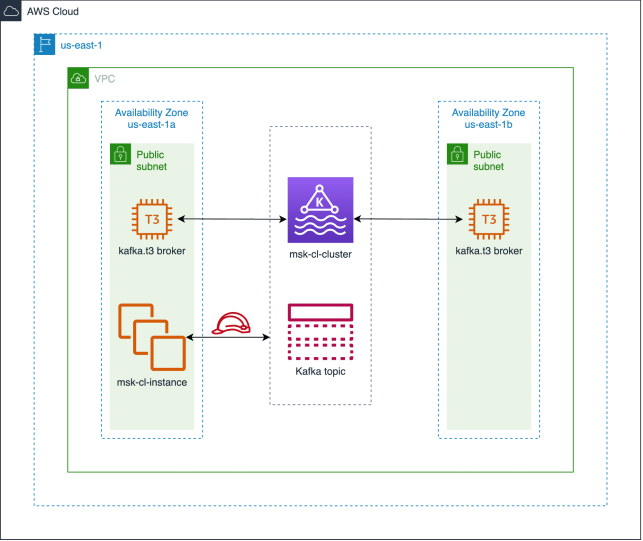
In this Cloud Lab, you’ll first create a VPC and a security group. You’ll then create an MSK cluster and configure it to launch one broker per availability zone. After this, you’ll attach an IAM role to an EC2 instance to give it permission to access the cluster you created. Finally, you’ll use the EC2 instance to launch a Kafka topic and add producers and consumers to this topic.
After the completion of this Cloud Lab, you’ll be able to create MSK clusters and configure the brokers it launches according to your requirements. You’ll also be able to create Kafka topics and add producers and consumers to them.
The following is the high-level architecture diagram of the infrastructure you’ll create in this Cloud Lab:

Why streaming systems matter
Modern systems increasingly operate on events, including user actions, transactions, logs, and sensor data. Instead of batch processing everything later, streaming lets you react in near real time, triggering workflows, updating dashboards, and powering product features immediately.
Apache Kafka is one of the most widely used streaming platforms because it’s durable, scalable, and built around a simple abstraction: an append-only log of events that many systems can read from independently.
What Amazon MSK changes (and what it doesn’t)
Kafka is powerful, but operating it can be complex, requiring tasks such as broker management, scaling, patching, monitoring, and ensuring reliability. Amazon Managed Streaming for Apache Kafka (Amazon MSK) reduces that operational load by offering Kafka as a managed service.
What doesn’t change is the core Kafka model. You still need to understand:
Topics, partitions, and replication.
Producer and consumer behavior.
Offsets and delivery semantics.
Retention and compaction concepts.
How scaling works through partitions and consumer groups.
In other words, MSK makes Kafka easier to run, but you still need Kafka fundamentals to use it well.
Core Kafka concepts that unlock real-world use cases
Topics and partitions: A topic is a named stream of events. Partitions are what make Kafka scalable: they parallelize reads and writes. Your partitioning strategy affects performance and ordering guarantees.
Producers: Producers publish events to topics. Real systems prioritize delivery guarantees, batching, idempotence, retries, and how keys influence partition placement.
Consumers and consumer groups: Consumers read events from topics. In a consumer group, Kafka distributes partitions across consumers so the group can scale horizontally. This is a foundational pattern for event processing systems.
Offsets and replayability: Kafka tracks consumer progress using offsets. Because events are retained for a period of time, consumers can replay from earlier offsets, useful for debugging, reprocessing, or building new downstream systems.
Common Kafka patterns you’ll see in production
Event-driven microservices communicating through topics.
Streaming ingestion pipelines into data lakes/warehouses.
Real-time analytics and monitoring.
Change Data Capture (CDC) streams for database updates.
Log aggregation and processing workflows.
The key benefit is decoupling: producers don’t need to know who consumes events, and consumers can evolve independently.
What to focus on when learning Kafka for the first time
Kafka becomes much easier when you focus on a few practical questions:
What event data is being produced, and how is it structured?
How should events be keyed and partitioned?
What ordering guarantees do you need (per key vs. global)?
How do you handle retries and duplicate events?
What retention policy matches your reprocessing needs?
These decisions are what separate “it runs” from “it’s reliable.”
Relevant Course
Use the following content to review prerequisites or explore specific concepts in detail.
Felipe Matheus
Software Engineer
Adina Ong
Senior Engineering Manager
Clifford Fajardo
Senior Software Engineer
Thomas Chang
Software Engineer
