Stream Query Results from Bedrock Knowledge Bases via Lambda

Stream Query Results from Bedrock Knowledge Bases via Lambda

CLOUD LABS


Stream Query Results from Bedrock Knowledge Bases via Lambda

In this Cloud Lab, you’ll build an AI-powered application that streams the response to the client using Lambda streaming to reduce the wait time and enhance the time to first byte (TTFB).

8 Tasks

intermediate

1hr 30m

Certificate of Completion

Desktop OnlyDevice is not compatible.
No Setup Required
Amazon Web Services

Learning Objectives

Hands-on experience creating a knowledge base by using the Amazon embedding model and S3 Vectors
The ability to create Lambda functions for both stream and buffered responses
Familiarity with response streaming using AWS Lambda and Amazon Bedrock
Working knowledge of integrating Bedrock powered Lambda functions with a Flask web application for interactive GenAI output

Technologies
Lambda logoLambda
Bedrock
Cloud Lab Overview

When working with large knowledge bases, responses from generative AI models can be lengthy and often take time to fully generate. In traditional setups, users must wait until the complete response is ready before seeing any output, causing delays and poor interactivity. This is where response streaming becomes important. By streaming data as it’s being generated, you can deliver responses chunk by chunk in real time, improving the user experience and making applications feel faster and more conversational.

In this Cloud Lab, you’ll learn how to stream query results from Amazon Bedrock Knowledge Bases using AWS Lambda response streaming. You’ll start by storing source documents in Amazon S3 and creating a knowledge base using an embedding model, which transforms input data into vector representations. You will then store these embeddings in an S3 vector bucket, ensuring structured and efficient storage for easy retrieval.

Next, you’ll build two AWS Lambda functions, one using response streaming and one using buffered responses, to query the knowledge base with a text model. Finally, you’ll integrate both functions into a Flask web app, allowing you to compare real-time streamed output with traditional buffered responses and clearly see how streaming improves interactivity in GenAI applications.

After completing this Cloud Lab, you’ll have a strong understanding of how response streaming works in AWS Lambda, how to use Amazon Bedrock Knowledge Bases for contextual question answering, and how to connect these services with a simple web frontend.

The following is the high-level architecture diagram of the infrastructure you’ll create in this Cloud Lab:
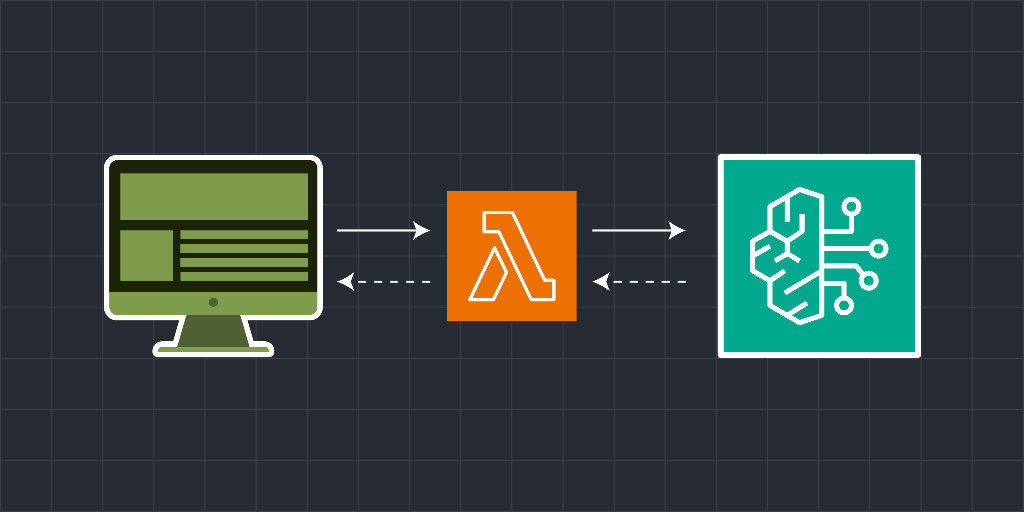
Real-time query response using Amazon Bedrock Knowledge Bases and AWS Lambda functions

Cloud Lab Tasks
1.Introduction
Getting Started
2.Set Up the Bedrock Knowledge Base
Create an S3 Bucket
Create a S3 Vector Bucket
Create the Amazon Bedrock Knowledge Base
3.Develop and Integrate the Response System
Create a Lambda Functions
Integrate Lambda Functions with Flask Application
4.Conclusion
Clean Up
Wrap Up
Labs Rules Apply
Stay within resource usage requirements.
Do not engage in cryptocurrency mining.
Do not engage in or encourage activity that is illegal.

Before you start...

Try these optional labs before starting this lab.

Relevant Courses

Use the following content to review prerequisites or explore specific concepts in detail.

Hear what others have to say
Join 1.4 million developers working at companies like