Create State Machine
Explore how to create a state machine in AWS Step Functions through the AWS Management Console. Understand the use of Workflow Studio, state definitions, and execution processes to build and run basic workflows. This lesson equips you with foundational skills to design and start your own state machine for task automation within AWS.
We'll cover the following...
As we already know the theory behind the AWS Step Functions, let's now learn how to create our first state machine within the AWS Console. We'll build it from scratch using the AWS Management Console's AWS Step Functions with a couple of approaches, including the Workflow Studio.
Previously, creating a state machine was only possible through the Amazon States Language. However, AWS now provides Workflow Studio, a visual tool that allows us to design workflows using a drag-and-drop interface. We will also build it from the templates provided by AWS.
Create a Hello World state machine
Let's navigate to the AWS Console and open the Step Functions service page.

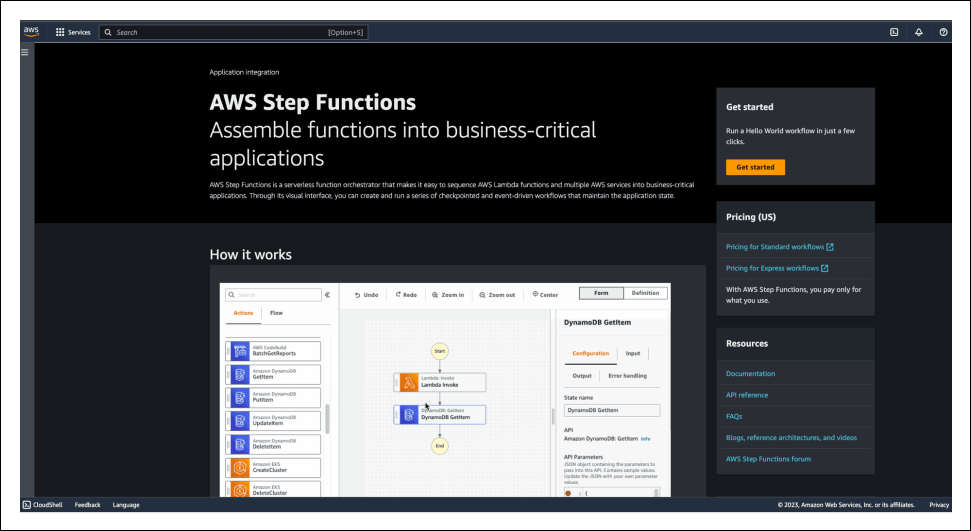
Click on “Get started.” We'll see the Hello World example with the ASL definition, which we can review. The example itself does not use any AWS services (like Lambda). It just uses different states, which we've gotten familiar with previously. This ...