Ordered Printing
Understand how to synchronize multiple Ruby threads to print output in a specific order using mutex locks and condition variables. This lesson guides you through implementing ordered printing with thread coordination, ensuring First, Second, and Third are printed sequentially regardless of thread execution order.
We'll cover the following...
Problem
Suppose there are three threads t1, t2 and t3. t1 prints First, t2 prints Second and t3 prints Third. The code for the class is as follows:
class OrderedPrinting

    def printFirst()
       puts "First"
    end

    def printSecond()
       puts "Second"
    end

    def printThird()
       puts "Third"

end
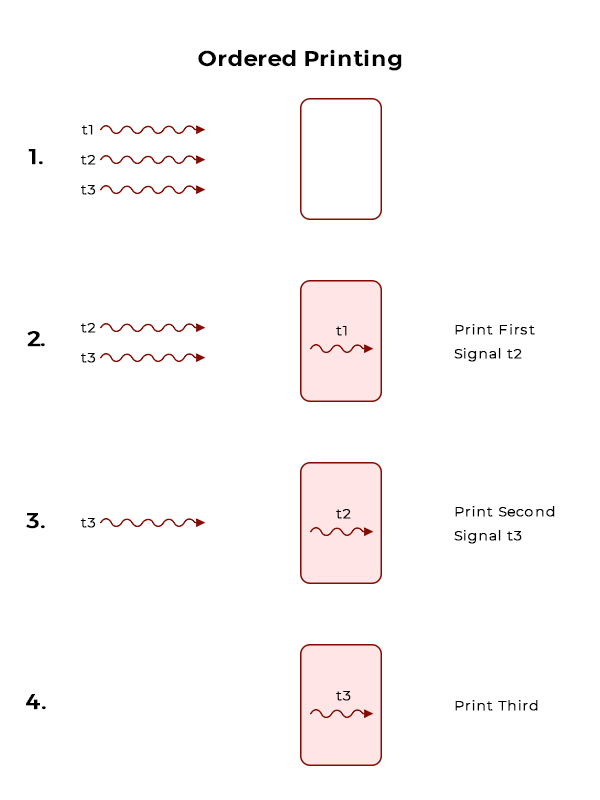
Thread t1 calls printFirst(), thread t2 calls printSecond(), and thread t3 calls printThird(). The threads can run in any order. You have to synchronize the threads so that the functions printFirst(), printSecond() and printThird() are executed in order.
The workflow of the program is shown below:
Solution
The class OrderedPrinting consists of one class variable job and two synchronization primitives offered by Ruby; mutex & condition variable (cv). Mutex is used to coordinate access to shared data from various parallel threads. Anything written within the synchronize{} block is locked until it completes execution.
Class variables can be defined as global variables within the context of a single class. They are shared among all instances of a class and are declared with the @@ sign. Global variable job is initialized with 0 so that "First" is always printed first. The basic structure of the class is displayed below:
class OrderedPrinting

	def initialize
		@mutex = Mutex.new
        @cv = ConditionVariable.new
        @@job = 0
	end

	def printFirst
	end

	def printSecond
	end

	def printThird
	end

end
The first method printFirst() starts with a mutex.synchronize block that locks the access to shared resources. It prints "First" and then increments the global variable job indicating Second's turn to be printed. Before releasing the mutex, cv broadcasts to all the waiting threads that the current thread is finished working and mutex is free to be acquired.
def printFirst
    #synchronize ensures only 1 method manipulates job.
    @mutex.synchronize do
        puts "First"
	    @@job+=1
	    @cv.broadcast
    end
end
The second method printSecond() works in the same manner as printFirst() with an addition of a while loop that checks if job is equal to 1. If it is, then the loop breaks and "second" is printed, otherwise the thread waits on the condition variable cv. After "second" is printed, job is incremented and cv notifies all the waiting threads.
def printSecond
    @mutex.synchronize do
        #if value of job is not 1 then wait
	    while (@@job != 1)
		    @cv.wait(@mutex)
	    end
        #if job is 1 then print, increment, broadcast and exit the loop.
        puts "Second"
    	@@job+=1
    	@cv.broadcast
    end
end
The while loop in printThird() checks if job is equal to 2. If it is, then "Third" is printed otherwise it goes into wait.
def printThird
    @mutex.synchronize do
        #if value of job is not 2 then wait
        while (@@job != 2)
    	    @cv.wait(@mutex)
        end
        #if job is 2 then print, brpadcast and exit the loop.
        puts "Third"
        @cv.broadcast
    end
end
To test our solution, we will create three threads and each thread will be passed the same object of OrderedPrinting. t1 will call printFirst(), t2 will call printSecond() and t3 will call printThird(). The output shows printing done in proper order irrespective of the calling order of threads.