What Gemini Flash 2.0 gets right (and wrong) in image generation
Google just dropped an update to its lightweight AI model, Gemini Flash 2.0, designed for speed, efficiency, and real-time use cases.
It supports multimodal inputs, handles massive context windows, and delivers low-latency responses, making it a solid option for devs building anything from workflow automation to AI-powered assistants.
But how well does it actually handle more complex tasks—like generating consistent characters across storybook pages, embedding readable text into images, or making fine-grained edits?
Today's newsletter breaks down:
What Gemini Flash 2.0 gets right—and where it still falls short
Practical use cases like AI-generated storybooks, embedded text, and iterative image editing
How it fits into a modern dev workflow, and what to watch as it evolves
If you’re exploring generative AI in your projects, this is a closer look at what Flash 2.0 can do—and what it can't do quite yet.
Let's go.
Gemini Flash 2.0: Quick feature snapshot#
Although this issue focuses on image generation and understanding, Gemini Flash 2.0 brings a broader set of capabilities to the table:
Multimodal inputs: Understands text, images, video, and audio
Text/Image-based outputs: Generates precise and context-aware responses
Massive context window: Supports 1M tokens for input, 8K for output
Real-time processing: Optimized for low-latency tasks and automation
Seamless integration: Available via Google AI Studio, Gemini API, Vertex AI, and the Gemini App
With those features in mind, let’s take a closer look at how Gemini Flash performs when applied to real-world image tasks—starting with the environment where most developers will be testing it out.
Exploring Google AI Studio#
Welcome to Google AI Studio, your command center for building with Gemini 2.0 Flash. Whether you’re experimenting with AI prompts, fine-tuning responses, or integrating structured outputs, this interface provides a seamless, developer-friendly environment to push the boundaries of AI.

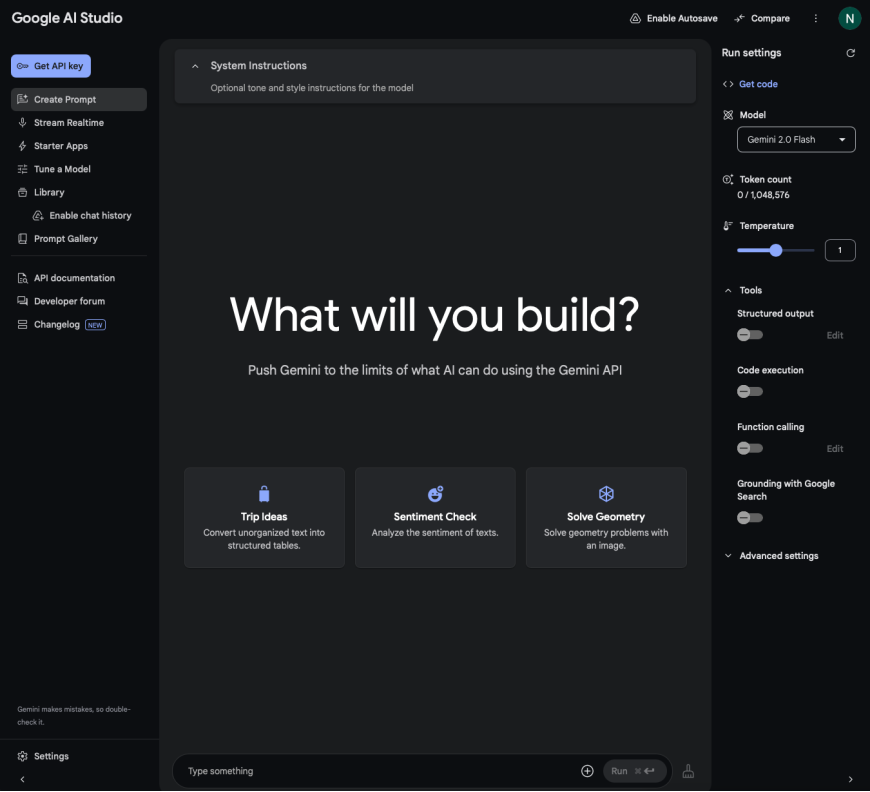
Google AI Studio also provides code that could be used to access Gemini Flash 2.0:
Can Gemini keep a storybook character consistent?#
AI image generation often struggles with consistency, making maintaining a uniform character across multiple images in illustrated storybooks challenging.
This inconsistency can disrupt the flow of visual storytelling, especially in children’s books where familiar characters help engage young readers.
What if editors and authors could leverage Gemini Flash 2.0 to generate a complete book while ensuring the character remains the same throughout?
With the right prompting techniques and iterative refinement, this AI model can create cohesive illustrations that evolve naturally across different scenes.
Example: A kid’s storybook on seasons#
Let’s try creating a 5-page children’s storybook where a single character explores the four seasons. We need the AI tool to ensure that the character remains the same while the backgrounds change to reflect spring, summer, autumn, and winter.
Here’s the prompt:
Create a 5-page illustrated children’s storybook featuring a single main character named Leo. The story should follow Leo as he experiences the beauty and changes of the four seasons through fun, playful adventures.
Each page should include:
A vibrant, child-friendly illustration that represents the current season
A short, engaging story text (2–3 lines) that describes the scene in simple, whimsical language for young readers
The final (fifth) page should tie everything together with a warm, heartfelt message about nature’s cycle and the joy of change.
Gemini Flash’s response:


This is quite good for a first attempt! Pretty cute.
Now, can Gemini Flash 2.0 embed text in images?#
What if we take AI-generated storybooks further by embedding text directly into the illustrations? Instead of placing text separately, integrating it within the image could make the visuals feel more polished, immersive, and engaging—just like traditional children’s books.
But can Gemini 2.0 Flash handle this? While the model is designed for high-quality image generation, embedding readable, well-placed text within those images is a different challenge. Current AI-generated images may struggle with precise text alignment, consistency in font style, or clarity at different resolutions. Let’s revise the prompt to embed text:
Continue the 5-page illustrated children’s storybook featuring Leo, who explores the beauty and changes of the four seasons through his adventures. Each page should include a vibrant, child-friendly illustration that reflects the season, with the story text playfully embedded within the artwork—as you’d find in a traditional picture book. The text should feel naturally integrated into the scene, not just placed on top.
Here’s what Gemini 2.0 Flash produced:


Clearly, Gemini Flash 2.0 struggled with this task. The results reveal a key limitation—it failed to embed text accurately within the images. Instead of clear, readable sentences, the AI-generated text appears garbled, with misplaced words and incorrect spellings.
This issue arises because most image-generation models prioritize visual coherence over precise typography. While they can create stunning, high-resolution images, they often lack control over structured text placement, making it difficult to generate legible, well-aligned words within illustrations. This model would require improvements in this area.
Editing AI-generated images#
Editing AI-generated images is a significant challenge. Unlike traditional graphic design tools, where elements can be modified individually, AI image models typically generate a complete image in a single pass.
This makes it difficult to tweak specific parts—such as changing a character’s expression, adjusting the background, or adding new details—without affecting the entire composition.
Can Gemini Flash do this? To answer this question, let’s take one image and attempt to make edits using Gemini 2.0 Flash.
The prompt:
Modify this image while keeping the character, background, and style consistent. Correct the spelling of “LEEO” to “LEO” with clear, well-aligned text. Change the character’s outfit by making the sweater red with white stripes and the shorts blue with star patterns. Keep the boots the same. Maintain the winter theme with a snowy background and soft lighting.


Here’s what Gemini 2.0 Flash produced:

Gemini 2.0 Flash removed the text entirely instead of correcting the spelling but successfully changed the lion’s outfit to a red-and-white striped sweater, red shorts with a star pattern, and matching mittens. The background includes a snowman, though it lacks a truly playful feel.
However, Gemini Flash preserved the overall composition and effectively applied image-related edits, making it a solid starting point for further refinements. This shows that adding text in images is still a weak point for Gemini Flash.
Can Gemini Flash remove watermarks?#
Watermarks are commonly used to protect image ownership, but removing them while preserving image quality is challenging for AI models. Traditional methods often involve manual editing or inpainting techniques, which attempt to fill in missing details based on surrounding pixels.
Recently, social media has been buzzing with claims that Gemini Flash successfully removes watermarks—but is this true? Let’s take an image and test Gemini Flash’s capabilities.


Gemini Flash successfully removed the watermarks, but in doing so, it also altered the background, turning it completely white. Additionally, some finer details from the original image were lost or modified, suggesting that the model may use aggressive inpainting techniques prioritizing seamless blending over content preservation.
While effective in watermark removal, Gemini Flash may not always preserve the integrity of the image, making it less reliable for tasks requiring high-fidelity restoration. It also adds Gemini’s watermark at the bottom left side.
Removing watermarks to bypass copyright protections or claiming ownership of someone else’s content can be illegal. Watermarks protect intellectual property, and unauthorized removal can violate copyright laws in many jurisdictions. As this model is experimental, Google might remove this feature in the future.
We’ve seen both the strengths and weaknesses of Gemini Flash 2.0. But this raises a critical question: Will publishers and illustrators be at risk of losing their jobs?
The impact on publishers and illustrators: Disruption or collaboration?#
As AI models like Gemini Flash 2.0 advance in image generation and editing, publishers and illustrators may wonder if they'll be replaced.
While AI can streamline workflows—generating concept art, modifying illustrations, or removing unwanted elements—it still lacks the creative intuition, storytelling depth, and human touch that illustrators bring to the table.
For publishers, AI offers the potential for faster turnaround on book layouts, cover designs, and marketing visuals. But instead of replacing artists, it may shift their role towards refining AI-generated content: ensuring consistency, enhancing visual tone, and layering in stylistic nuance that AI struggles to replicate.
Illustrators who treat AI as an assistant—not a threat—stand to benefit. With routine tasks offloaded, they can focus more on creative direction, storytelling, and the parts of the process that truly require a human touch.
Ultimately, AI in publishing and illustration isn’t about replacement but augmentation. The most successful professionals will be those who adapt, leveraging AI to enhance their work rather than fearing its rise.
Powerful, but not perfect#
Gemini Flash 2.0 showcases impressive capabilities in image editing—from modifying visual elements like outfits to removing watermarks with surprising ease. However, its limitations are just as clear, especially when it comes to embedding readable text and preserving image fidelity during edits.
The model’s watermark removal also raises important ethical and legal concerns, highlighting the need for responsible use as these tools become more accessible.
As AI-generated imagery continues to evolve, improving control over text placement, content preservation, and ethical safeguards will be key to its role in creative and professional workflows.
If you're curious to explore Gemini, start with Google Gemini for Beginners: From Basics to Building AI Apps for a solid foundation. When you're ready to go deeper, check out Building Multimodal RAG Applications with Google Gemini to create advanced, real-world applications.
