Implementing semantic caching with Amazon S3 allows you to encode user queries as vector embeddings and reuse previously generated LLM responses for queries with similar embeddings. Instead of generating a new response when a query is phrased differently but has a similar embedding, applications can retrieve cached responses by performing a similarity search over stored embeddings. This approach reduces response latency and LLM inference costs by avoiding repeated generation for queries that map to similar embeddings.
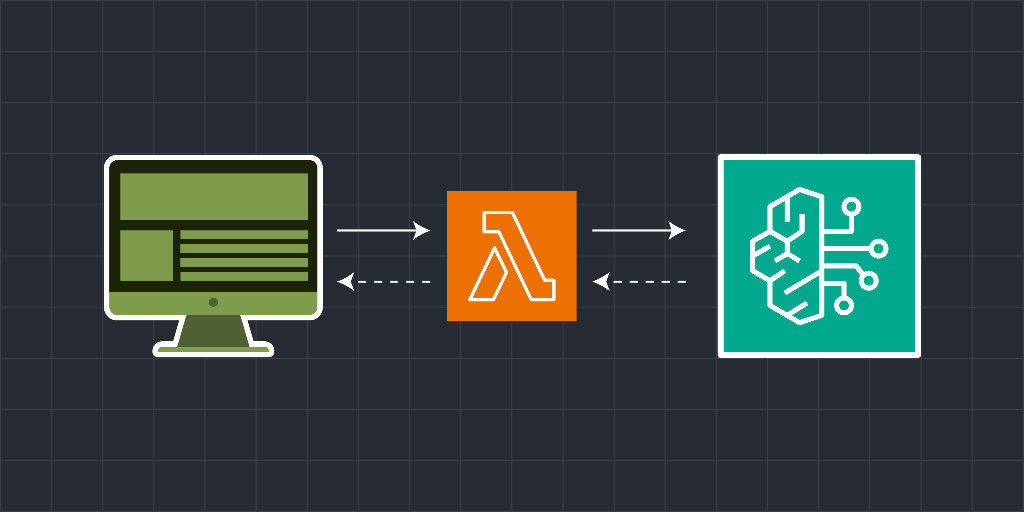
In this Cloud Lab, you will implement semantic caching for a generative AI application using AWS Lambda, Amazon Bedrock, and S3 Vectors. You will start by creating an S3 vector bucket and index to store query embeddings and their associated cached responses to support similarity search using a cosine distance metric. You will then build an AWS Lambda function that generates embeddings for each incoming query, queries the vector index for embeddings that are similar to the incoming query, and returns the cached response when the similarity score exceeds the configured threshold. If no similar embedding is found, the function invokes an Amazon Bedrock text model to generate a new response and stores the query embedding and generated response in the vector bucket for reuse.
Next, you’ll expose this semantic caching logic through an Amazon API Gateway HTTP API, making it accessible to a client application. Finally, you’ll integrate the backend with a Flask-based web application that allows users to submit questions and view responses in real time. The application will clearly indicate whether each response was served from the semantic cache or generated by the language model, making it easy to observe how semantic caching improves performance and lowers model invocation costs in generative AI applications.
After completing this Cloud Lab, you’ll have a strong understanding of how semantic caching works with vector embeddings, how to optimize generative AI workloads using AWS Lambda, Amazon Bedrock, and S3 Vectors.
The following is the high-level architecture diagram of the infrastructure you’ll create in this Cloud Lab: