Demo: Starting, Stopping, and Editing a Pipeline
Explore how to manage a CI/CD pipeline using AWS CodePipeline by starting, stopping, and editing pipelines. Learn to automate releases, disable stages, and use AWS CLI commands to control pipeline execution for smoother software delivery.
Once the release pipeline is created in AWS CodePipeline, we'll run it and deploy the application to our target servers. We make a minor change to the artifacts section of the buildspec.yml file to include all the files in the final artifact. We perform this change to include appspec.yml at the root directory of the compressed artifact produced by AWS CodeBuild when run from AWS CodePipeline. The deployment will fail if AWS CodeDeploy doesn’t see appspec.yml at the root location.

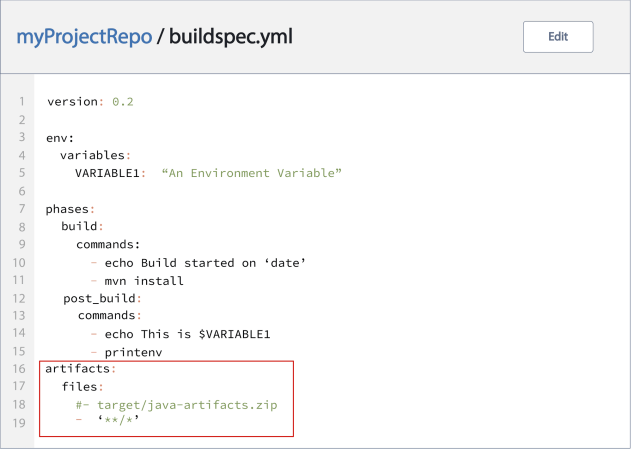
Starting the release pipeline
Let’s make a coding update to the main.html file and check it into AWS CodeCommit to automate the release process. Since our pipeline is configured with this branch and repository, CodePipeline will trigger the release process anytime a commit is performed.

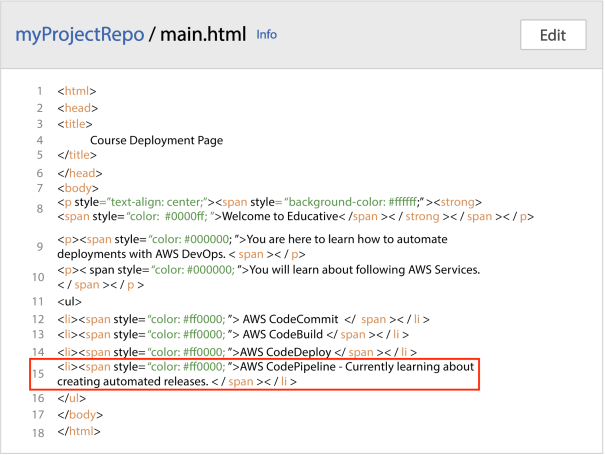
The release pipeline ...