AJAX
Explore how AJAX allows web pages to send and receive data asynchronously, improving user experience by updating content without page reloads. Understand practical examples, AJAX polling, and advanced techniques like long polling, WebSockets, and server-sent events for real-time updates.
Introduction
AJAX stands for Asynchronous JavaScript and XML. It is a combination of web development techniques used to send and retrieve data in the background without refreshing a webpage.
There are many practical examples of this. One of them is how Twitter and Tumblr show new posts. The number of new tweets or posts is on top of the home page for both, and these home pages get updated automatically without any reloading. Let’s look at Tumblr as an example.
Example: Tumblr
Tumblr has a home icon on the top right that shows the number of new posts. These posts aren’t loaded until the home button is clicked on. This number updates every 10 seconds or so as new posts get posted to your feed that you can choose to see.
Have a look at the image below. We have the network tab open on Safari. The home icon says ‘2,’ which means that there are 2 new unseen posts. We know that the image is a bit small, so please click on it to zoom in if need be.
A few seconds later, a new network request has fired off and the number of notifications has increased to 5. The page has not refreshed, but the number has updated asynchronously. This is the whole point of AJAX.
The request results in a JSON file, as shown below.
Explanation of the response
Tumblr uses the JSON response above to update the number of new posts on the home icon. In particular, it uses the ‘unread’ field on line 8, which now has a value of 5. This data is then used to update the HTML.
AJAX polling
This mechanism of the browser making XHR(XMLHttpRequest)/Ajax requests to a server at a regular interval (every 10 seconds as in the Tumblr example) to check for new data is called AJAX polling.
Polling, however, can waste resources. Each request requires a new TCP connection to be established and closed, which takes a few round trips, and therefore generates overhead. A new response is delivered over the network and is parsed, which also consumes resources. Quite often, no new information arrives. On Tumblr, for example, if no new posts come for 5 minutes, then that’s 30 requests for nothing.
Disclaimer: Tumblr doesn’t actually use AJAX. It actually uses
fetch. This was just for our demonstration, since they work the same way.
Anyway, let’s get back to learning how AJAX works. AJAX allows us to:
- Update a web page without reloading it.
- Request, send, and receive data from the server after page loading and rendering.
Here’s an example. Try running it, and you’ll see a button that when clicked updates the page with some text without reloading it at all. AJAX magic!
Example
Check out the following code example. A simple HTML page is rendered that gets updated with some content after 3 seconds using AJAX techniques.
You're going to ace that interview!
You're putting in the work and this ghost author is proud of you!
Explanation
frontend_interviews.txt is just a simple text file that we request with AJAX.
app.js is just our server code. You can safely ignore it.
index.html is what we really care about.
-
Line 6: A simple HTML paragraph that says “The content will change asynchronously in 3 seconds!”
-
Line 10: A function declaration for
sendDocument(). -
Line 11: This line creates an
XMLHttpRequestobject, or an ‘XHR’ object, calledxhttp. You’ll notice that AJAX requests are XHR type in the network tab. This object is used to create behind-the-scenes HTTP requests and send them. -
Line 12: The
onreadystatechangeproperty stores a function that gets called each time thereadyStateproperty changes. We initialize the function on this line, too. -
Line 13: The
readyStateholds a value that represents the status of the request. You’ll mostly never use any but4, as in this case. Here are the other values anyways:0: The request is not initialized.1: The request has been set up.2: The request has been received by the server.3: The request is in process.4: The request is complete and a response is ready.
-
Line 14: If the request is complete (the status is
4), the inner HTML is replaced with the response that the server sent, which, as you might guess, is in theresponseText. -
Line 17:
setTimeout()is given a function to execute after 3000 ms (check line 20). -
Line 18:
open(method, url, async, uname, pswd)specifies the request method (GETin this case), the URL (frontend_interviews.txt), if the request should be handled asynchronously or not (true), and login credentials if needed. -
Line 19:
send()sends the request off to the server.
Long polling
Long polling is when a server keeps a TCP connection open until new data is available or a timeout happens. After receiving a response, the client resends a request, which is also kept open until data is received, and so on. This helps reduce a lot of overhead for the client, as it manages far fewer connections.
WebSockets
The WebSocket API opens up ‘full-duplex’ connections that allow bi-directional communication between clients and servers. Full-duplex means that messages can be sent and received simultaneously over one connection. This is much like a regular phone call, where two people can talk simultaneously and still hear each other. This means that, unlike with long polling, servers don’t have to be polled, i.e., a new connection doesn’t have to be established when the server responds to the request.
WebSockets are distinct from HTTP, and so their URLs starts with ‘ws’ or ‘wss’ instead of http or https. A WebSockets URL would look like: ws://google.com or wss://google.com.
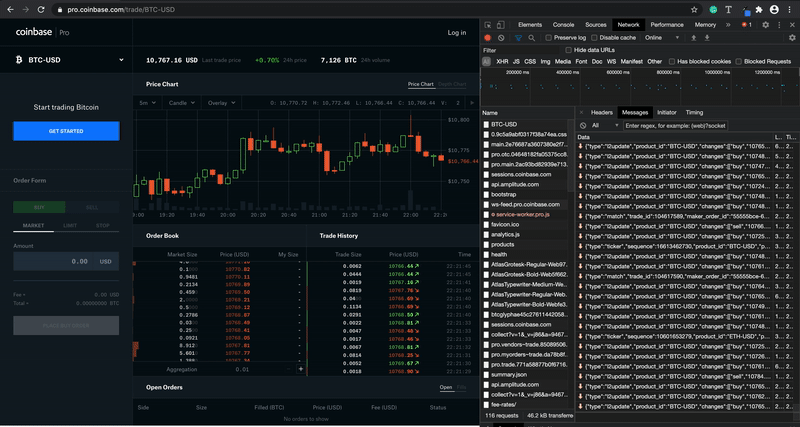
WebSockets are useful for real-time applications where the UI needs to be updated without reloading the page. They are also useful for gaming and chat applications. Let’s look at a real world example. Go to https://pro.coinbase.com/trade/BTC-USD to look at a Bitcoin trading interface. You’ll see that the Order Book and Trade History are getting updated constantly. These updates are happening over WebSockets! Open up the network tab and find a call that has a status of ‘101.’ Click on it to see the request URL that starts with wss:
Also, go to the ‘messages’ tab (on Chrome 85 at least) to see the updates flooding in from the server. Imagine the overhead of doing this with AJAX!
Server-sent-events
Server-sent-events are just like WebSockets, except they are unidirectional and use HTTP. So, messages are delivered in one direction: from the server to the client. They are incredibly useful in situations where the client doesn’t need to send any data, like social media news feeds, stock price updates, and reactions in live video streams. They are implemented through a JavaScript API called EventSource. The client requests a certain URL to receive a server-sent-event data stream.