Is OpenAI's AgentKit the best agentic workflow builder available?
Over the past year, large language models (LLMs) have evolved from simple chat systems into programmable reasoning engines. Developers have been using them to plan, retrieve data, and take structured actions. However, one challenge has remained consistent: building these agents reliably and safely required too much custom infrastructure.
Even advanced teams had to handle multiple layers manually, prompt logic, tool integration, UI design, evaluation pipelines, and deployment. This slowed down experimentation and made it difficult to manage versioning, safety, and monitoring at scale.
OpenAI’s AgentKit, introduced in October 2025, addresses that gap. It provides a unified platform for designing, evaluating, and deploying agents on top of OpenAI’s models, including GPT-4o.
The goal is to make agentic systems easier to build, understand, and maintain, whether they power a customer-support assistant, automate engineering workflows, or integrate with enterprise tools.
What do we mean by agents?#
An agent is a system that can reason about a goal, choose tools or APIs to use, and execute actions to achieve that goal.
In contrast to a single prompt-response interaction, an agent:
Maintains state across steps.
Uses tools and connectors (for example, APIs or file systems).
Follows logic or workflows that guide how it behaves.
These workflows can include conditionals, loops, guardrails, and integrations with real data sources.
OpenAI designed AgentKit to make each of these components built-in features rather than ad-hoc code. The result is a consistent environment for agent development, similar to what the OpenAI Playground did for prompts, but at the level of full systems.
The purpose of AgentKit#
AgentKit provides the essential components for the entire agent life cycle:


It allows teams to:
Visually design workflows.
Connect to internal and external systems through secure connectors.
Test agent decisions step-by-step.
Apply safety guardrails.
Embed agents directly into applications through standardized interfaces.
This design supports both individual developers experimenting with prototypes and organizations building production-grade automation.
What AgentKit includes and how it works#
AgentKit is a composable platform for building agents on top of OpenAI models. Each part is designed to handle one layer of the agent life cycle, from construction and testing to deployment and monitoring. The platform’s architecture reflects a principle OpenAI calls “agentic workflows,” where an agent is classified as a predictable system that can reason, act, and be evaluated within clear boundaries.
Below is an overview of the key components.
1. Agent builder#
The agent builder is the central workspace of AgentKit. It lets you visually design how an agent operates, using nodes to represent steps such as model reasoning, tool calls, conditional logic, and user interactions.


Each workflow is expressed as a directed graph.
Input nodes define what data the agent receives (for example, a user query or scheduled trigger).
Model nodes handle reasoning, summarization, or decision-making.
Tool nodes invoke APIs or connectors.
Branch nodes implement conditional flow (e.g., if X → do Y).
Guardrail nodes enforce safety and policy constraints.
All executions are traced, meaning every model output and tool call is logged for inspection. This traceability is critical for debugging and evaluation.
The agent builder supports both no-code composition and programmatic control through the OpenAI Agents SDK. Developers can design a flow visually and then export or embed it in code for production.
2. Connectors and MCP integration#
Agents often need access to external data or systems, GitHub, Gmail, Jira, internal APIs, and so on. AgentKit handles this through connectors and the Model Context Protocol (MCP).


A connector is a predefined integration that exposes APIs in a structured, tool-callable format.


The MCP standard allows anyone to host their own “MCP Server,” which securely exposes tools or data sources to any compliant agent.


In AgentKit, developers can browse or add these connectors inside the connector registry. The registry maintains access policies, authentication credentials, and permissions so that agents only act within approved scopes.
This design separates reasoning from capability: the model decides when to act, and the registry defines what it is allowed to use.
3. ChatKit#
ChatKit is a frontend toolkit that simplifies embedding agents into interactive chat experiences. It handles message streaming, multi-turn context, and history management, allowing teams to integrate an agent workflow into a web or in-product chat interface without building a custom UI layer.
ChatKit supports Markdown rendering, citations, and structured outputs from workflow nodes, ensuring that what users see aligns with the agent’s internal reasoning trace.
4. Evaluations for agents#
OpenAI extended its evaluation framework to support multi-step workflows. Evaluations for agents enable developers to run automated or semi-automated tests on entire workflows, for example:
Comparing expected vs. actual outputs.
Measuring reasoning correctness.
Tracking tool-use success rates.
Each node in a workflow can be graded independently. This supports fine-grained improvement of reasoning and decision steps, not just results.
Developers can run these evaluations periodically or automatically on new versions, ensuring that updates improve reliability instead of introducing regressions.
5. Guardrails and governance#
Safety is built into every AgentKit workflow. Guardrail nodes allow developers to enforce rules such as:
Restricting which connectors can be used in a given context.
Requiring human approval before performing sensitive actions.
Filtering inputs or outputs that may violate organizational policies.


AgentKit logs all actions and model outputs for later review and analysis. This makes it suitable for regulated environments or enterprise deployments, where reproducibility and auditing are essential.
6. Life cycle and deployment#
Once a workflow has been built and tested, it can be deployed through the OpenAI platform using the Responses API.


Deployed agents maintain version control and track data, allowing teams to monitor live runs, collect evaluation metrics, and roll back or iterate safely.


The life cycle looks like this:
Design: Compose nodes and define logic in the agent builder.
Test: Use sample inputs and evaluations for agents to verify correctness.
Deploy: Publish through the OpenAI API or embed via ChatKit.
Monitor: Inspect traces, success rates, and feedback.
Iterate: Update workflows based on evaluation results.
In summary, AgentKit offers a modular framework for developing end-to-end agents. It abstracts repetitive infrastructure work and replaces it with a governed, testable, and observable system for building reasoning-driven applications.
When should one use AgentKit, and who benefits from it?#
AgentKit is intended for teams and developers who need to move from one-off model prompts to structured, maintainable agentic systems. It introduces standards for safety, orchestration, and evaluation, features that become important as soon as an application needs to perform consistent actions across multiple steps or tools.
You should consider using AgentKit when your application involves any of the following conditions.
Multi-step reasoning or actions: If your agent must plan, call APIs, and react to intermediate outputs, the agent builder’s workflow model is a better fit than chained prompts or custom scripts.
Tool use or external data access: When your LLM must interact with real systems, databases, issue trackers, GitHub, Slack, or custom APIs, AgentKit provides a governed way to expose those tools. This is done via connectors and the Model Context Protocol (MCP).
Evaluation and improvement loops: Agents that run regularly (e.g., daily summaries or support automation) need measurable performance metrics. Evaluations for agents let you record traces and compare results over time.
Enterprise or regulated environments: AgentKit includes audit logging, approval nodes, and guardrails. These enable compliance with internal policies without requiring the rewriting of application code.
Collaborative agent development: When several roles, including engineers, data scientists, and product owners, must design logic together, the visual agent builder allows shared editing and clear trace inspection.
When simpler alternatives suffice: If your use case only requires static text generation or a single API call, the Responses API or Assistants API remains the simpler option. AgentKit adds the most value when workflows become dynamic, requiring the system to decide how to achieve a goal, rather than just producing text.
Who Benefits from AgentKit?
Role | Typical Goals | AgentKit Value |
AI Engineers | Build reasoning pipelines that combine models and APIs. | Visual workflow authoring, trace inspection, MCP integration. |
Product Managers | Prototype new agent features quickly and test user flows. | Low-code builder interface and ChatKit front-end templates. |
Engineering Managers | Maintain safe, observable automation for team operations. | Guardrails, version control, and evaluation dashboards. |
Enterprise IT and Security | Ensure that agents use only approved connectors. | Centralized connector registry and audit logs. |
Researchers/ Analysts | Study reasoning behavior of LLMs in complex tasks. | Step-level evaluations and trace data for reproducibility. |
How AgentKit fits into a broader architecture#
OpenAI positions AgentKit as part of a stack.
Models (GPT-4o and successors) handle reasoning and language.
Responses API provides structured model calls.
AgentKit adds workflow logic, connectors, and safety.
ChatKit embeds the resulting agent into an interactive UI.
Together, they support a continuous development loop: design → test → deploy → measure → refine.
In practice, AgentKit helps developers treat agents as software systems rather than experiments. It encourages predictable behavior, structured evaluation, and safe integration with external tools.
Building with AgentKit: A practical demonstration#
To illustrate how AgentKit’s components work together, let’s walk through a practical demonstration of building a common agentic workflow: an automated customer support triage agent.
The goal is to build an agent that can receive an unstructured, conversational support request, use internal knowledge to determine the customer’s priority, and then output a structured data object that a ticketing system like Jira or Zendesk can understand.
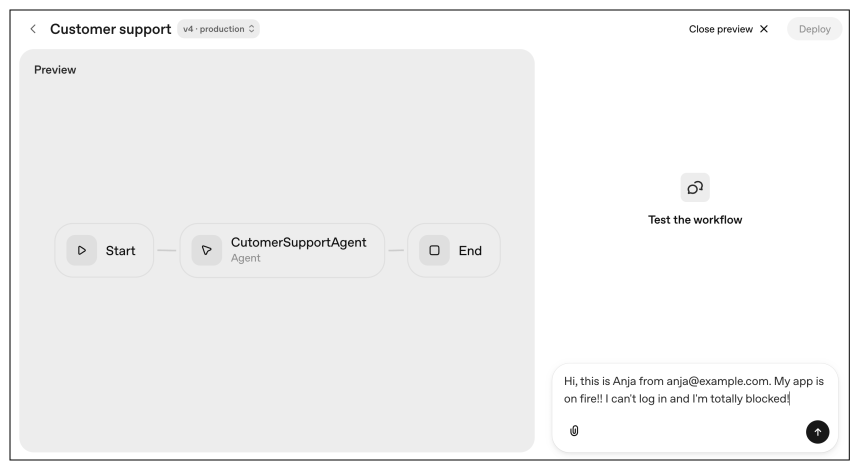
Step 1: Design the workflow in the agent builder#
We begin in the agent builder, the central workspace of AgentKit. We lay out a simple, three-node workflow:
[Start]–>[CustomerSupportAgent]–>[End]


The [Start] node receives the user’s query. The [CustomerSupportAgent] is a model node that will perform all the reasoning. The [End] node will receive the final, structured output.
Step 2: Add knowledge with a tool node#
Our agent needs access to external data to know which customers are high-priority.
Tool: We add a tool node by selecting the built-in File Search tool.


Knowledge: We create a vector store (an internal knowledge base) and upload a simple
customers.txtfile containing our customer list.
# Customer Data FileUser Profile: anja@example.comName: Anja SmithPlan: Enterprise---User Profile: bob@test.comName: Bob JohnsonPlan: Free—User Profile: cara@mail.comName: Cara WilliamsPlan: Enterprise
Result: The agent now has the ability to “look up” a user’s plan type, just like a human support agent would.
Step 3: Define the agent’s logic#
In the [CustomerSupportAgent] node, we provide a set of instructions. This guides the agent on how to reason:


Step 4: Enforce structured output#
The most critical step for automation is ensuring a predictable output. We configure the [TQUARE Agent] node to use a specific output schema. We define a JSON object with fields like email, category, priority, and description.


This transforms the agent from a chatbot into a reliable automation component. Its final output is not conversational text, but a machine-readable JSON object.
Step 5: Test and trace the workflow#
We use the “Preview” panel to test the agent with a sample query.
Query: “Hi, this is Anja from anja@example.com. My app is malfunctioning!! I can’t log in and I’m totally blocked!”
In the trace log, we can observe the agent’s full reasoning process:

Input: Receives the panicked, unstructured text.
Reasoning: Identifies the email
anja@example.com.Tool call: Invokes the File Search tool to look up
anja@example.com.Tool output: The tool returns the customer’s plan, “Enterprise.”
Reasoning: The agent applies its instructions,
Enterprise–>P1 - Urgent.Final output: The agent provides the perfect, structured JSON object:
{"output_text": "{\"email\":\"anja@example.com\",\"category\":\"Login Issue\",\"priority\":\"P1 - Urgent\",\"description\":\"Anja is experiencing a login issue with her application, which is blocking her access. Given her Enterprise plan, this is marked as an urgent priority.\"}","output_parsed": {"email": "anja@example.com","category": "Login Issue","priority": "P1 - Urgent","description": "Anja is experiencing a login issue with her application, which is blocking her access. Given her Enterprise plan, this is marked as an urgent priority."}}
The future of agentic development?#
The shift from simple chat systems to programmable reasoning engines marks a significant evolution in AI. As we’ve seen, building reliable, multi-step agents has historically been a challenge, requiring teams to manually construct complex and fragmented infrastructure.
OpenAI’s AgentKit addresses this gap directly by providing a unified, modular platform for the entire agent life cycle. It replaces ad-hoc code with a consistent environment, allowing developers to visually design complex workflows in the agent builder. It securely connects to external tools via the connector registry, and embeds agents using ChatKit.
Most importantly, AgentKit encourages developers to treat agents as predictable software systems rather than unpredictable experiments. By building in features for fine-grained evaluation, version control, and auditable guardrails, the platform makes it possible to build, test, and deploy agentic automation at scale.
As demonstrated, whether for automating customer support, managing internal workflows, or integrating with enterprise tools, AgentKit provides the essential components to make agentic systems easier to build, understand, and maintain.
Agentic System Design
Agentic system design is rapidly redefining how modern AI systems are built, moving from single-model interactions to autonomous, multi-step systems that can reason, plan, and act. As large language models evolve, the real challenge is no longer just using them, but orchestrating them into reliable, goal-driven agents that operate safely and effectively in real-world environments. I built this course from my work in adaptive AI and intelligent systems, where designing autonomous behavior requires more than model accuracy. It demands structured reasoning, control, and safety. A recurring pattern I observed was that teams could experiment with LLMs, but struggled to design cohesive agentic systems that could handle ambiguity, coordinate tasks, and remain aligned with user intent. This course is designed to bring that structure. You will study real-world examples, including the Multi-Agent Conversational Recommender System (MACRS), NVIDIA’s Eureka for reward generation, and advanced agents navigating live websites and creating complex images. Drawing on insights from industry deployments and cutting-edge research, you will gain the foundational knowledge to confidently start designing your agent-based systems. Engineers and researchers are already using these patterns to build next-generation AI systems. If you want to design agents that go beyond prompts and into action, this is where to begin.
