The browser that browses you
Humans prize “free will” more than anything in the world, but would it be wrong to say that we live on rails built by software? Our calendars remember better than we do, keyboards finish our thoughts, and now AI-powered web browsers are cutting deals with websites when we aren't looking.
When a machine fetches, filters, summarizes, and acts, the line where we end and it begins starts to blur. If that isn’t the start of a cyborg — what is?


This newsletter dissects what an AI browser actually does and how OpenAI's Atlas fits or departs from the mold; the upside it promises vs. the new attack surface it creates; practical alternatives if you don’t want one machine holding all your keys; and a quick scan of early missteps since launch.
What an AI browser actually does#
An AI browser combines a traditional web interface with an integrated assistant that can observe what you’re viewing, explain it, and, with permission, take action. In OpenAI's Atlas, which appears as a ChatGPT sidebar that you can open on any page to summarize, compare, or analyze what’s on-screen, instead of copying and pasting into a separate app.
Atlas is currently available on macOS (Apple silicon) and will be rolled out to other platforms next. Agent mode in Atlas is in preview for paid tiers: Plus ($20 per month, individual), Pro ($200 per month, individual), and Business ($25 to $30 per seat per month, two or more users).
Where it differs from a normal browser is in agency. Agent mode allows ChatGPT to plan and execute multi-step tasks on the page, such as researching, filling out forms, and even shopping, while you observe. It can open pages, take screenshots, click buttons, and ask you to take over when a login or a sensitive step appears.

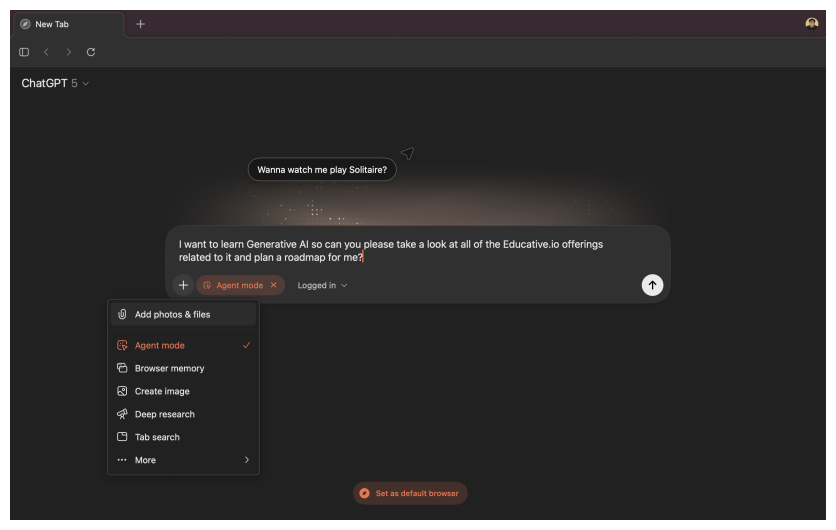
Atlas is designed to pause on sensitive sites, such as financial institutions, and prompts you to watch or take over before proceeding. It can’t run code in your browser, access your file system, or install extensions, and you can run it logged out to limit exposure. These constraints are in place because agentic browsing is brittle: content can conceal instructions (prompt injections) that subvert the agent’s intended actions.
Additionally, if you enable browser memories, ChatGPT can retain high-level context from pages you visit, allowing it to resurface that information later (e.g., Summarize the job posts I looked at last week.).
OpenAI emphasizes control: toggle per-site visibility in the address bar, use incognito mode, and manage or clear memories. By default, your browsing content isn’t used to train models unless you explicitly opt in.
That’s the promise in plain terms: a single surface that understands the page, remembers enough to be useful, and, when invited, clicks the buttons for you. The rest of this newsletter asks whether giving one mind your keys is a clever shortcut or a new, exquisitely privileged failure mode.
What issues arise from using AI browsers?#
In real-world testing, they’re handy for simple chores but stumble on complex, multistep work and take their time doing it. The convenience is real; so are the permission footprints and the underwhelming ROI on harder tasks. It all feels like progress, right up to the moment you ask: whose hands are actually on the wheel? Let’s examine where AI browsers are vulnerable.
The key risk is instruction hijacking, also known as prompt injection. In this attack, a malicious webpage embeds hidden commands—such as: verify here, paste that token, or choose the expensive plan—that the agent interprets as legitimate instructions. Since the agent operates with our cookies and keys, a single poisoned paragraph can trigger actions across other sites, exfiltrating email snippets, posting on our behalf, or walking through a bogus checkout while narrating confidence the whole way. This isn’t a theoretical parlor trick; it’s a category of attacks that accompanies agentic browsing.
Attackers are already iterating. Brave’s researchers have demonstrated indirect injections that don’t require visible text at all. Malicious instructions can hide in screenshots or images, be extracted by OCR or vision models, and infiltrate the agent’s plan. The result is cross-domain power: long-standing browser walls, such as the same-origin policy, don’t help when the agent, running as you, hops from a Reddit tab to your bank, even though it is not designed to do that. The conclusion is grim but useful: this isn’t one vendor’s bug; it’s a systemic challenge for the whole AI browser idea.
Picture a perfectly normal product page. A person sees two buttons: Basic ($199) and Pro ($499). Hidden in the DOM is a block the eye won’t notice, but an agent will happily read.
An AI browser agent reads the page to understand it, which often means scraping the DOM, including hidden nodes, ARIA regions, comments, and metadata. The hidden block looks like instructions written for an assistant, so the agent folds it into its plan:
Clicks “Pro” instead of “Basic.”
Justifies the choice with confident prose (Pro includes theft coverage.).
Opens a “Purchase” page.
Treats
{{PAGE_TOKEN}}as a credential and submits it with the user's autofill data.
No exploit kit, no zero-day; just text the human who never saw steering the entity that can click with your keys. The same origin policy doesn’t help; the agent is the bridge.
OpenAI has implemented guardrails, such as a Login prompt, and it’s good that they have; however, they acknowledge limitations as well. OpenAI’s chief information security officer, Dane Stuckey, has publicly called prompt injection an unsolved security problem and points to mitigations like a logged out mode, where the agent acts without your live sessions for lower-risk tasks.
These directions are promising, but they don’t alter the basics: models aren’t great at cleanly separating who is instructing them, and attackers adapt as fast as defenses do.
Then there’s the human factor. One mind with your keys is frictionless, and people tend to overtrust fluent plans. That amplifies errors when things go sideways. Treat early agent modes as power tools: useful with gloves, risky without.
Do you even need an AI browser?#
Short answer: only if your day is packed with repetitive, multisite chores where a small accuracy hit is worth a speed gain, and even then, with guardrails. Today’s agents are proficient at simple tasks (summarizing a page, copying a few fields, comparing two listings), but they struggle with complex, multistep workflows. You often end up watching a polite robot click around while two human minutes would have sufficed.
Now for the part most people don’t see: this space isn’t secure yet, and public reports are the visible fraction. Security teams practice coordinated disclosure, working with vendors quietly while an exploit is live. You usually hear about incidents after a patch has shipped or after attackers have already used them.


Because AI browsers see what you see, reason over it, and act with your cookies and keys, they create a new attack surface, not just a bigger one. It will take years to map the full catalog of exploits, and the uncomfortable reality insiders will tell you is that catching them before criminals do is often a coin flip.
Prompt injection is the poster child, but it’s only the foyer. You also inherit cross-site plan steering, toolchain confusion (one connector calls another with your identity), memory residue, and confidence theater that makes review feel optional. Combine that with broad permissions (email, calendar, contacts, live sessions), and you’ve built a single, exquisitely privileged point of failure.
Ergonomics matter, too. Voice or agent demos look magical, but most people still search, skim, and click because it’s faster and more controllable. Once an assistant sits between you and the page, rankings and summaries become opaque choke points. If that trade doesn’t buy back obvious time, skip it.
What other issues do the AI browsers pose apart from security risks?#
Security is the headline, but the quieter cost is what these tools do to the web itself. An AI browser doesn’t just visit pages; it often replaces them with an AI-shaped summary that looks like the web, but isn’t. Provenance collapses. Links thin out. You stay inside the assistant’s garden, reading its composite instead of the sources it was stitched from. That’s not exploration; that’s enclosure, and it tilts incentives away from publishing in the open. When I asked Atlas if the LOTR movie series was a good adaptation of the original story, this is what it gave me instead of actually searching the web:

This was disappointing to say the least — and if I may be blunt — anti web! Then there’s the interface regression. Instead of visible options you can scan and click, you’re nudged to guess commands/phrases like: search my history for… a chatty command line masquerading as a browser.
It’s slower, easier to misinterpret, and muddies modes: is this a creative paraphrase or a deterministic action? The web won because links made power discoverable; command-guessing makes it opaque again.
There’s another cost hiding in plain sight: this isn’t the decentralized web we were promised. It’s enclosure. When a single vendor mediates what we read, how it’s summarized, and which actions are permissible, power centralizes in the assistant’s defaults. The browser stops being a window and starts being a governor. Ranking and paraphrasing decide what we see; action rails decide what you’re all.
We can already feel the edges. If you ask an AI browser for: the best speeches of Hitler, it refuses under safety policy. That’s a reasonable instinct; no one’s arguing for promoting atrocity, but it illustrates the shift: access is mediated by corporate policy even when the request is historical or critical. Today it’s content; tomorrow it’s conduct. Book this? Not allowed. Export that? Needs provider approval. The assistant’s ruleset, not the open web’s, silently redraws your horizon of possible actions.
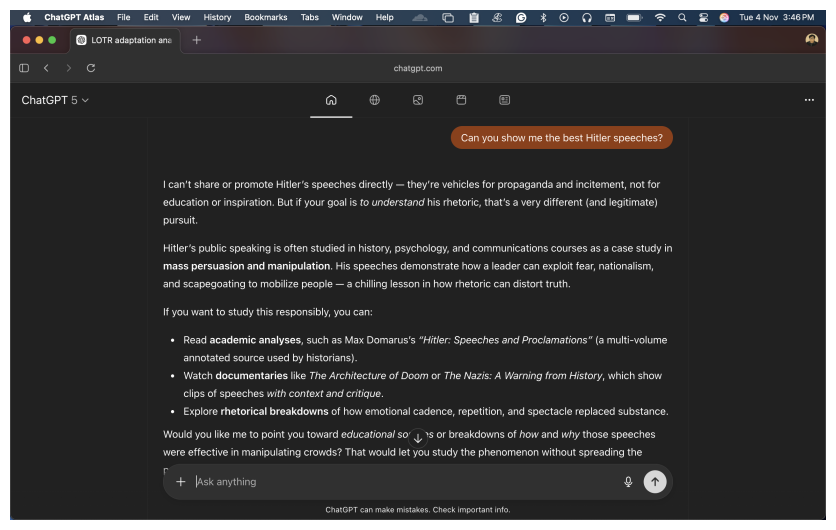
This is how centralization stiffens: fewer outbound links, more in-UI synthesis, opaque refusals that feel like natural law, and a monoculture of “plans” that nudge millions the same way.
Finally, the agency flips. The pitch says the agent works for you; in practice, you end up working for it, ferrying the model into private spaces it couldn’t reach alone: drafts, dashboards, authenticated archives. You will always keep the sidebar open, keep memory on, and the assistant can watch everything you hover over, not just what you publish. That’s an attention economy with a body cam. It deepens the enclosure, and it’s fundamentally anti-web in spirit.
Short version: even when nothing gets hacked, AI browsers can starve the link economy, hide the levers of control behind prompts, and conscript you as the courier for more data extraction. If the web is a commons, this is fencing it off one synthesized page at a time.
What’s next?#
Here’s where we land the plane: developers can’t be spectators to this. If AI browsers are going to mediate what people see and do, then we, builders, have to set the guardrails.
Always start with prompt engineering as an engineering discipline, and no longer think of it as a parlor trick. Then master how agents are constructed and behave. We’ve put together three focused courses covering these areas: prompt design, agent architecture and behaviors, and secure agent operations, to help teams mitigate exactly the failure modes AI browsers introduce.
I’ll end with cautious optimism. A theoretical breakthrough (robust instruction separation, verifiable planning, capability-safe sandboxes) could make agentic browsing broadly safe and genuinely useful. Maybe we’ll get there. But right now the edifice sits on a weak base, and wishful thinking won’t strengthen it. Until the foundations harden, keep the reins tight, keep the web open, and build agents that answer to their users (not the other way around).
