CloudWatch opens a new window into agentic AI performance
When a customer-facing generative AI (GenAI) agent starts giving incorrect answers, engineering teams know they're in for a serious troubleshooting session.
Is the large language model (LLM) hallucinating? Is the vector database feeding it irrelevant context? Or is a critical tool in the agent’s workflow failing silently?
Organizations are encountering significant challenges as they push generative AI applications from exciting prototypes into production-critical systems. Traditional monitoring tools, built for predictable microservices, are not equipped to monitor the complex, non-deterministic web of interactions within a modern AI stack.
This struggle has created a significant operational bottleneck, forcing developers to manually review disparate logs or build difficult-to-maintain custom monitoring solutions.
In response to this critical need, Amazon Web Services has introduced Amazon CloudWatch generative AI observability (preview), a purpose-built suite of tools designed to provide comprehensive insights into the performance, health, and accuracy of your AI applications. This launch indicates a maturation of the GenAI market, shifting from impressive demos to the operational realities of reliability, performance, and quality. These tools provide the visibility needed to confidently move from experimentation to production.
We'll explore this new capability, covering:
The core architecture and its reliance on open standards.
Details on the multiple dashboards for models, agents, sessions, and traces.
How the feature integrates with the broader CloudWatch ecosystem.
Guidance on instrumenting your agents.
A unified view built on open standards#
The new CloudWatch capability is designed for flexibility and ease of adoption. It provides a single pane of glass for monitoring generative AI applications, whether they run on Amazon Bedrock AgentCore, Amazon EKS, Amazon ECS, or on-premises infrastructure.
The solution is built upon the OpenTelemetry (OTEL) standard, ensuring compatibility with the tools developers already use. Popular open-source agentic frameworks like Strands Agents, LangGraph, and CrewAI can seamlessly send their telemetry data to CloudWatch.
Adoption is further simplified by the AWS Distro for OpenTelemetry (ADOT) SDK, which can automatically instrument your AI agents, often without code changes. This SDK captures and sends all telemetry data, including traces, metrics, and logs, directly to CloudWatch endpoints, removing the need for additional collectors. By embracing open standards, AWS has positioned CloudWatch as a proprietary silo — rather than a scalable backend for the entire generative AI ecosystem.
Exploring the CloudWatch generative AI observability console#
The generative AI application emits telemetry data into a dedicated section within the Amazon CloudWatch console: the GenAI observability (Preview). This specialized console provides developers with a comprehensive view of their AI application’s health, performance, and accuracy.
The GenAI observability (Preview) section is divided into two main dashboards, each offering a different layer of insight: Model invocations and Bedrock AgentCore.
Model invocations dashboard#
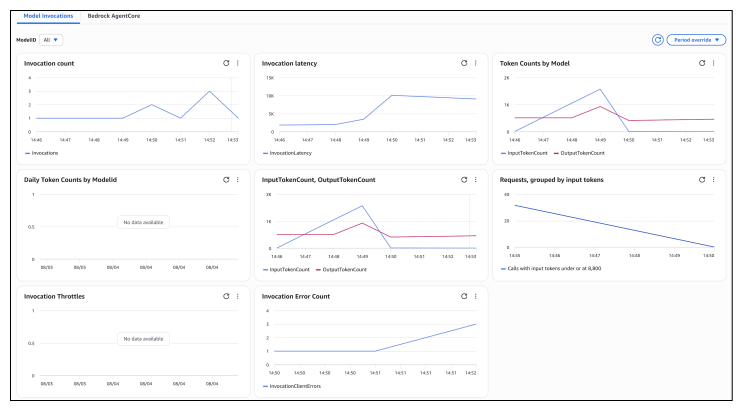
This dashboard provides an out-of-the-box view focused specifically on the LLMs your applications use. It tracks key metrics such as invocation count, token usage, and error rates. For further analysis, you can enable model invocation logging, which allows drilling down into individual requests by selecting a request ID.
This detailed view reveals the exact input prompt sent to the model and the corresponding response it generated, offering crucial visibility for debugging model-specific issues.

Bedrock AgentCore agents dashboard#
This is the central hub for monitoring your fleet of AI agents. It provides a comprehensive overview of agent performance and behavior, broken down into several views:
Runtime metrics: This section displays high-level metrics for the AgentCore runtime, including the total number of active sessions, invocations, errors, and throttles. It’s the first stop for assessing the overall health of the agent environment.
Agents view: This view lists every registered agent, providing a fleet-level performance summary. You can quickly see the number of active agents, sessions, traces, errors, and throttles associated with each one. This allows you to move from troubleshooting individual failures to proactively managing the health of the entire agent population.
Sessions view: Here, you can analyze the complete flow of user interactions for any session. This view helps understand how a user interacts with an agent over time and how the agent responds, which is invaluable for improving user experience and identifying behavioral patterns.
Traces view: This is a powerful debugging tool in the new suite. It provides a comprehensive, distributed trace for every agent interaction. You can filter and sort traces to identify performance bottlenecks and understand the complete end-to-end execution flow of a request. Selecting a specific trace gives you a detailed timeline of every span, from the initial prompt to tool calls, knowledge base lookups, and the final LLM invocation. This makes it easy to find the exact source of an error or delay.
Dashboard / View | Key Function | What It Helps to Answer |
Model Invocations | Tracks LLM usage, latency, and errors. Drills down to specific prompts and responses. | Is my LLM performing correctly? What was the exact input that caused a bad output? |
Agents View | Provides a fleet-level overview of all deployed agents and their health metrics. | Which of my agents are experiencing the most errors or throttles? |
Sessions View | Analyzes the end-to-end flow of user interactions with an agent over time. | How are users interacting with my agent? Where in the conversation do they run into problems? |
Traces View | Visualizes the entire step-by-step journey of a single request through the AI stack. | A request failed. Was it a slow API, a bad knowledge base retrieval, or an LLM hallucination? |
Integration with the broader CloudWatch ecosystem#
This new observability feature does not operate in isolation; it is deeply integrated with existing CloudWatch capabilities, allowing extension of current monitoring workflows to generative AI workloads.
Application signals: You can navigate directly from the Bedrock AgentCore dashboard to application signals for enhanced observability. This provides insights into call volume, availability, latency, faults, and errors, and displays a service map of related dependencies.
Logs insights: Trace data can be queried using Logs Insights for advanced analytics. You can run complex queries on the AWS/spans log group to identify common patterns, detect anomalies, or troubleshoot issues by grouping traces by
traceId,sessionId, oruserId.Alarms, dashboards, and more: The feature seamlessly connects with standard CloudWatch tools like alarms and dashboards, allowing comprehensive monitoring and alerting strategies that cover AI applications and the underlying infrastructure.
2 practical tracing examples for generative AI with Amazon CloudWatch#
CloudWatch’s new observability features enable full-stack tracing and diagnostics for generative AI workloads.
When using Amazon Bedrock natively or hosting a custom model agent on a VM or Kubernetes cluster, you can now capture prompts, latencies, responses, and fine-grained trace metadata. Below are two example setups, one native to AWS and one external, that illustrate real-world integration with trace visibility.
1. Amazon Bedrock Agent with CloudWatch tracing#
In this setup, you use Amazon Bedrock Agent to orchestrate a question-answering bot that accesses tools and documents. CloudWatch’s built-in tracing support automatically captures the flow from the user input to the final model response, along with latency, model confidence, and token counts.
By default, CloudWatch trace views include session timelines, prompt parameters, agent function calls, and retry chains. Developers can add trace_attributes such as the user’s region or the knowledge base used to contextualize debugging. This makes it easier to isolate bottlenecks in tool invocations, response formulation, or grounding steps.


2. LangChain RAG app on EC2 with OpenTelemetry and CloudWatch#
For workloads running outside of managed AWS AI services—such as a LangChain retrieval-augmented generation (RAG) app on EC2 or Fargate, you can use AWS Distro for OpenTelemetry (ADOT) to export spans to CloudWatch. Each span in the trace could represent a model call, chunk retriever access, or even a vector DB lookup.
OTEL_PYTHON_AUTO_INSTRUMENTATION is a feature from OpenTelemetry that lets Python applications automatically capture tracing data like timing and flow without manual trace code addition. You can then use span.set_attribute() to tag each trace span with meaningful metadata such as query_topic: finance or retrieved_docs: 5. These attributes provide context about what your app is doing, making it easier to trace user actions, debug issues, and optimize performance even when third-party APIs like OpenAI are involved. It brings visibility into each step of a GenAI interaction pipeline.


Wrapping up#
As generative AI systems transition from experimentation to production, deep observability ensures reliability, accuracy, and trust. With Amazon CloudWatch’s new generative AI observability features, AWS equips developers with tools to monitor, debug, and optimize their AI applications at every level.
The roadmap for teams working with GenAI is becoming clearer: adopt OpenTelemetry-compatible frameworks to future-proof observability stacks, instrument traces with meaningful business and user context for faster diagnostics, and make full use of CloudWatch’s stack-wide views ranging from individual agent performance to end-to-end session traces.
Teams that embrace these best practices and engage with AWS’s official hands-on walk-throughs will be best positioned to move fast without compromising trust, elevating GenAI debugging from guesswork to a disciplined, data-driven workflow.
For more on Generative AI and AWS, expand your learning with the following courses:
