DeepSeek has landed on AWS––here's why it's a game-changer
Exciting news, developers: DeepSeek is now available on AWS.
The model has made serious waves in AI, disrupting competitors like ChatGPT with cutting-edge natural language processing (NLP) and code generation.
And now, you can tap into all that power...without dealing with infrastructure headaches.
So whether you’re a developer looking to supercharge applications with real-time AI, a data scientist fine-tuning models for advanced analytics, or a business leader leveraging AI for automation and deeper insights—AWS makes it effortless to integrate DeepSeek at scale.


In this newsletter, we’ll cover:
How to get started with DeepSeek on AWS
Where to access DeepSeek models on AWS
Resources to master GenAI on AWS
Best practices for deploying DeepSeek efficiently
Let's dive in.
Getting started with DeepSeek on AWS#
DeepSeek offers a range of distilled models optimized for efficiency and performance, making them well-suited for various AI applications.
These models leverage knowledge distillation, where a smaller model learns from a larger one, retaining strong capabilities while reducing computational costs.
Whether you need a lightweight model for resource-constrained environments or a high-performance model for complex reasoning tasks, DeepSeek provides multiple options tailored to different needs.
Here are the DeepSeek models available on AWS:
Model Name | Base Architecture | Parameter Count | Features |
DeepSeek-R1-Distill-Qwen-7B | Qwen | 7 billion | Balanced performance and efficiency for general applications |
DeepSeek-R1-Distill-Qwen-32B | Qwen | 32 billion | Outperforms OpenAI’s o1-mini across various benchmarks, achieving new state-of-the-art results |
DeepSeek-R1-Distill-Qwen-14B | Qwen | 14 billion | Enhanced reasoning capabilities with moderate computational requirements |
DeepSeek-R1-Distill-Qwen-1.5B | Qwen | 1.5 billion | Compact model suitable for resource-constrained environments |
DeepSeek-R1-Distill-Llama-8B | Llama | 8 billion | Efficient model with a focus on reasoning tasks |
DeepSeek-R1-Distill-Llama-70B | Llama | 70 billion | High-performance model designed for complex reasoning and instruction-based tasks |
These models are available in the “US East (Ohio)” and “US West (Oregon)” regions on AWS.
Now that we know which models are available and what they are capable of, let’s see how we access these models in our AWS environment.
Accessing DeepSeek models on AWS#
Getting started with DeepSeek on AWS is easier than you might think.
Whether you’re looking to fine-tune a model, deploy it for real-time inference, or integrate it into your applications, AWS provides the infrastructure to make it seamless. You can access DeepSeek models through Amazon SageMaker, AWS Inferentia instances, or containerized deployments on EC2, allowing you to choose the best approach for your needs.
Not sure where to start? Suppose you want to experiment with pretrained DeepSeek models before full-scale deployment. In that case, AWS Bedrock and SageMaker JumpStart offer quick and easy access, allowing you to test capabilities in just a few clicks.
Let’s dive into the step-by-step process of setting up DeepSeek on AWS.
Access DeepSeek models using Bedrock#
Amazon Bedrock is a managed service that provides API access to foundation models from leading providers, eliminating the need for infrastructure setup, scaling, or maintenance. It offers a plug-and-play experience, making it ideal for businesses seeking rapid deployment.


Here’s a step-by-step guide on how you can deploy access DeepSeek models on AWS Bedrock:
1. Open Amazon Bedrock:
Navigate to the AWS Management Console and search for “Bedrock” in the search bar.
Click the “Amazon Bedrock” option from the search results to open the dashboard.
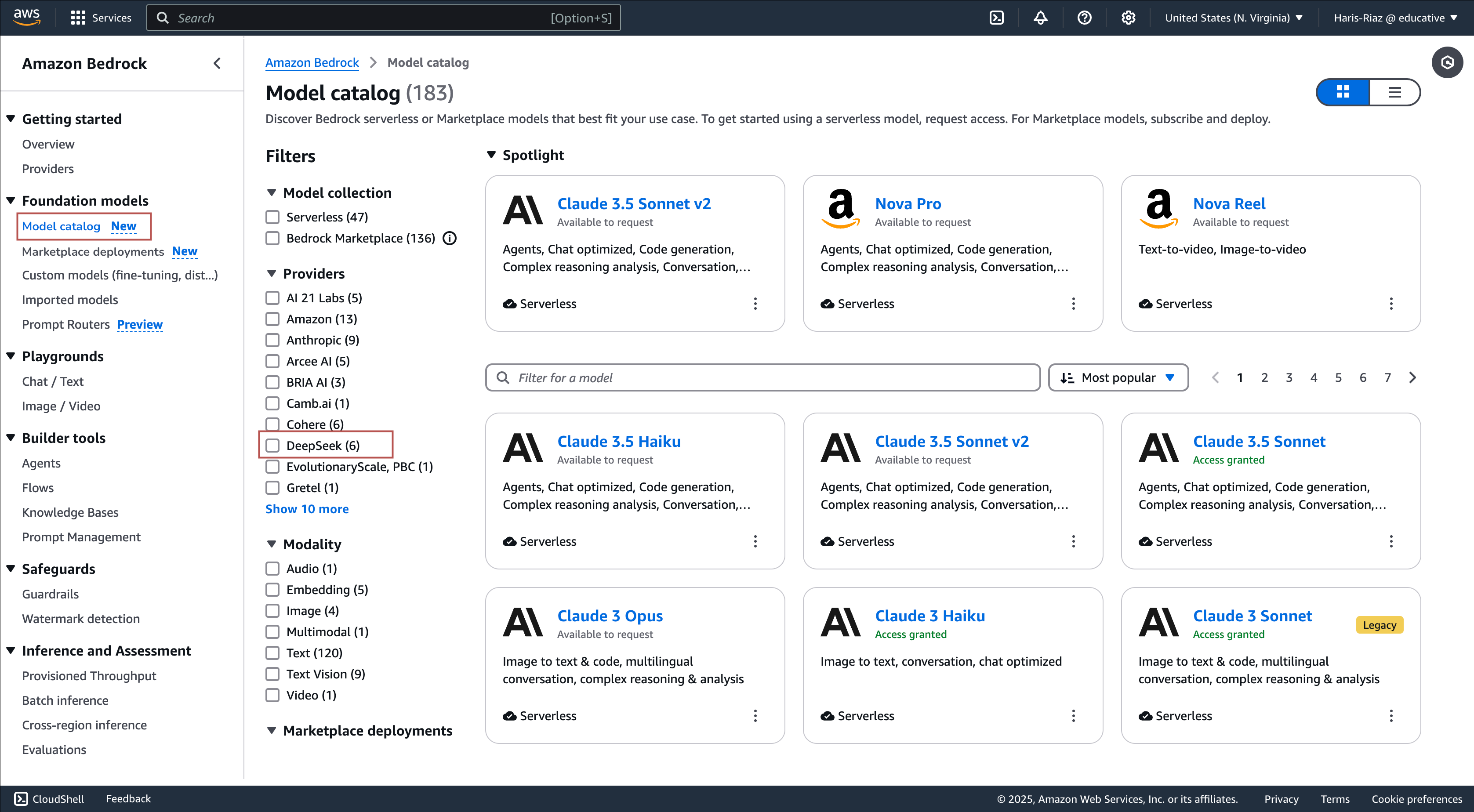
2. Access the model catalog:
In the left sidebar menu, select “Marketplace deployments.”
Click the “View model catalog” button to browse available models.
3. Find DeepSeek models:
Scroll down to the “Providers” section to locate DeepSeek models.
If DeepSeek is not listed, click the “See more” button to expand the provider list.
Select “DeepSeek” to view available models.
4. Select a DeepSeek model:
Browse the list of available DeepSeek models and select the one that best fits your requirements.
Click the model to open its details page, where you can review information about its capabilities and use cases.
5. Deploy the model
On the model’s details page, click the “Deploy” button.
This will take you to the model deployment page, where you can configure deployment settings.
6. Configure the deployment settings:
Instance type allows us to choose an instance type that meets our performance and cost requirements.
The advanced settings section allows us to configure service roles, VPC settings, and encryption keys.
7. Start the deployment:
Click the “Deploy” button to initiate the deployment process.
You will be redirected to the “Managed deployments” page, where the status will show “Creating.”
The deployment process may take a few minutes. Once complete, the status will update to “In Service.” The illustrations below demonstrate deploying the DeepSeek model on the AWS dashboard.

8. Test the model in the playground
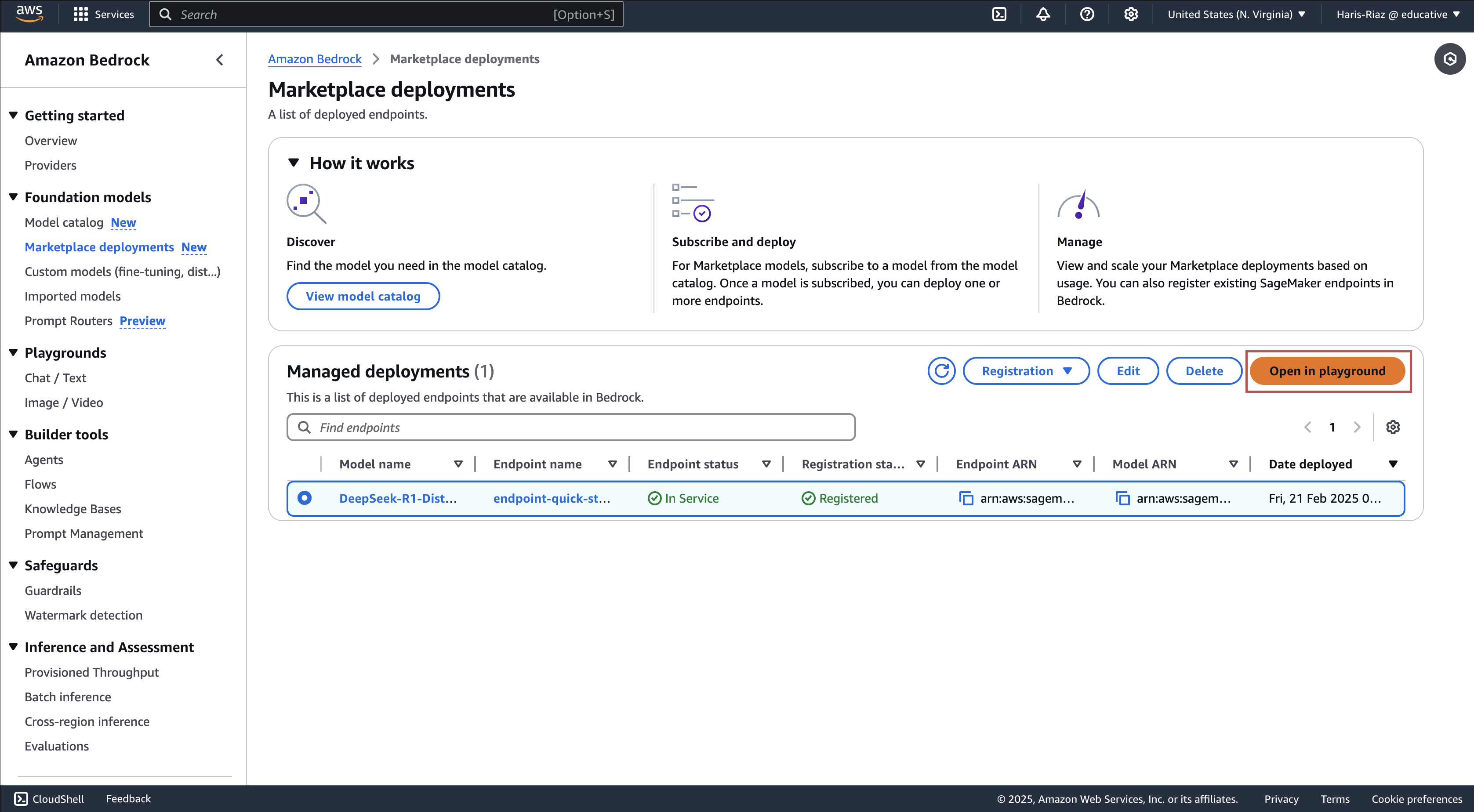
Select the deployed model from the “Managed deployments” page.
Click “Open in Playground” to interact with the model.
Choose between “Single Prompt” or “Chat Mode” to test its responses. The illustration below shows how we can test the deployed model.
Access DeepSeek models using SageMaker#
Amazon SageMaker is a comprehensive machine learning platform that allows developers and data scientists to customize, fine-tune, and train models from scratch. Unlike Bedrock, it supports extensive model control and covers all stages of the ML life cycle, making it ideal for beginners and experts.

Here’s a step-by-step guide to deploy a DeepSeek model on SageMaker:
1. Open Amazon SageMaker:
Navigate to the AWS Management Console and search for “SageMaker AI.”
Click the “Amazon SageMaker AI” option from the search results to open the SageMaker dashboard.
2. Set up a domain:
In the left-side menu, select “Domains.”
Click the “Set up” button to create a new SageMaker domain.
Wait for the status to change from “Pending” to “Ready.”
3. Create a user profile:
Once the domain is ready, go to the “User profiles” tab.
Click the “Add user” button to create a new user profile.
4. Launch SageMaker Studio:
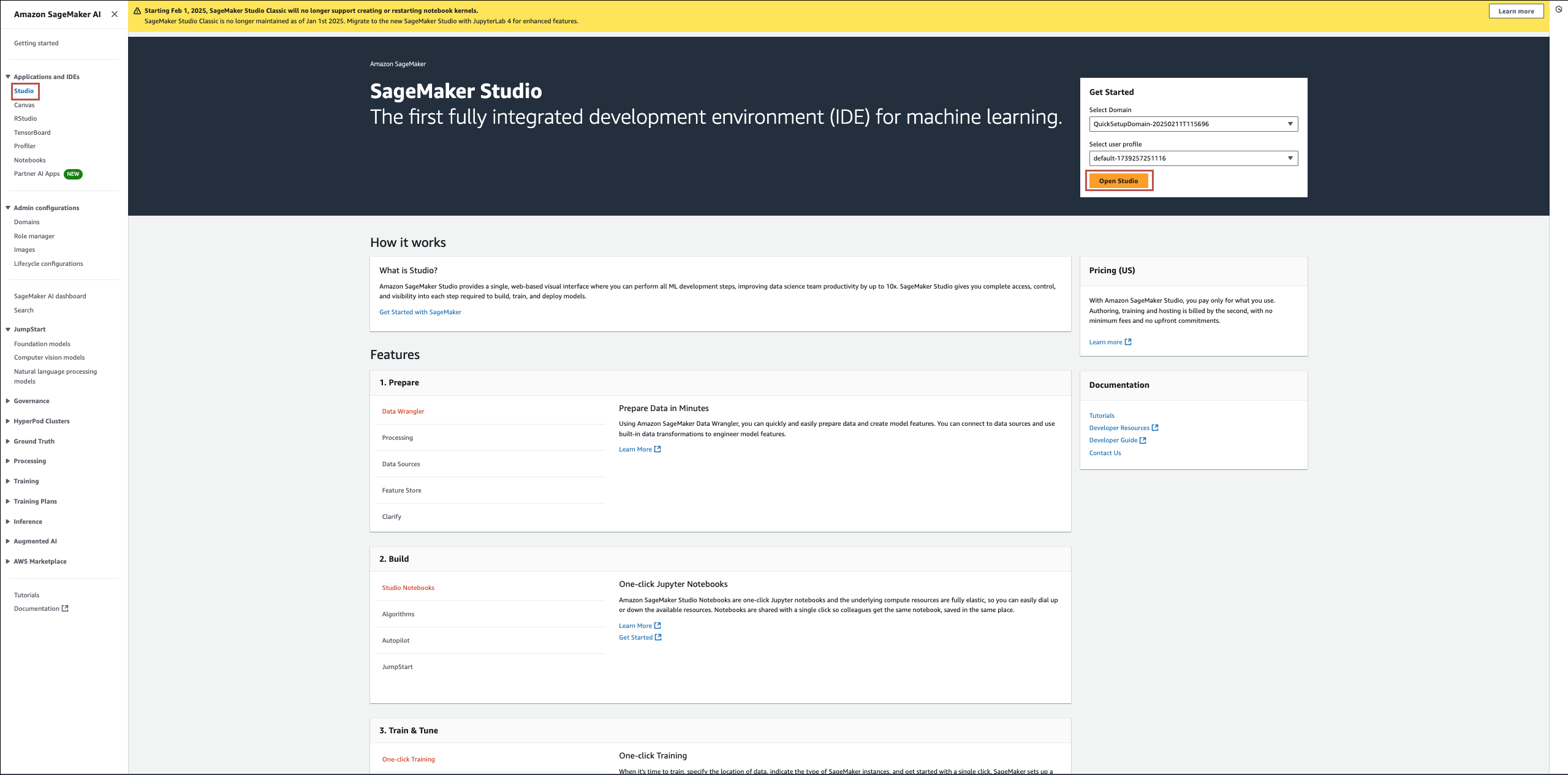
In the left-side menu, select “Studio.”
Choose the “Domain” and the “User profile” you created from the “Get Started” section.
Click the “Open Studio” button to launch SageMaker Studio in a new tab.
5. Access DeepSeek models:
In SageMaker Studio, click “JumpStart.”
On the “JumpStart” page, search for and click “DeepSeek.”
This will take you to the list of available DeepSeek models.
6. Deploy a DeepSeek model
Select your desired DeepSeek model from the list.
On the model’s details page, click the “Deploy” button.
Configure the deployment by selecting the appropriate instance type.
The advanced settings section allows us to configure service roles, VPC settings, and encryption keys.
7. Start the deployment
Click the “Deploy” button on the “Deploy model to endpoint” page.
Wait for the deployment status to change from “Creating” to “InService.”
8. Test the model inference
Once the endpoint is in service, navigate to the “Test inference” tab.
Select “Test the sample request” and click “Send Request.”
The model will process the request and generate a response.
The illustration below demonstrates how you can enable DeepSeek models using the AWS dashboard after you have configured your domain:

Now you can use this endpoint in your applications to fully harness the capabilities of the DeepSeek models.
Other options for using DeepSeek on AWS#
You’re not limited to the approaches above to access DeepSeek-R1-Distill on AWS.
Whether you prefer a fully managed setup or a customized, performance-optimized deployment, AWS offers multiple options to suit your needs. You can also resort to one of the following approaches to access DeepSeek models in your environment:
Amazon Bedrock custom model import: Amazon Bedrock enables seamless deployment of DeepSeek-R1-Distill models (1.5B–70B parameters) using its “Custom Model Import” feature. This approach eliminates infrastructure management, optimizes performance, and ensures enterprise-grade security. With support for direct imports from Amazon S3 or SageMaker Model Registry, users can efficiently deploy and test models using Bedrock’s interactive playground. Check out this AWS blog post for more details.


AWS Trainium and Inferentia for cost-optimized performance: If you need greater control over performance and cost, deploy DeepSeek-R1-Distill on AWS Trainium (trn1 instances) or Inferentia (inf2 instances). Launch a “Deep Learning AMI Neuron” instance, install
vLLM A virtual large language model (vLLM) is a library of open-source code maintained by the vLLM community. It helps large language models (LLMs) perform calculations more efficiently and at scale.


But that’s not all! You can also explore Amazon SageMaker, AWS Lambda for serverless inference, or containerized deployments on Amazon ECS or EKS—AWS gives you the flexibility to run DeepSeek the way that best fits your needs.
Now that we’ve explored how to access DeepSeek models on AWS, let’s explore how these services function and where to seek support when facing challenges.
Resources for mastering GenAI on AWS#
To help you maximize the power of DeepSeek on AWS, we’ve compiled some top resources to get you started—from detailed documentation to hands-on labs. Whether you’re a beginner or an advanced user, there’s something for everyone.
While DeepSeek-specific labs are still on the horizon, you can strengthen your GenAI skills with the following AWS Cloud Labs:
Retrieval-Augmented Generation (RAG) with Amazon Bedrock: This lab enhances LLM responses by integrating external knowledge sources.
Building Generative AI Workflows with Amazon Bedrock: Get hands-on experience orchestrating GenAI-powered workflows.
Performing Automatic Hyperparameter Tuning in SageMaker: Optimize model performance using SageMaker’s built-in tuning capabilities.
Creating Machine Learning Model using Amazon SageMaker: Learn how to deploy a machine learning model with Amazon SageMaker.
While these labs don’t specifically focus on DeepSeek, they cover key AWS services that provide access to DeepSeek models. Suppose you’re eager to deepen your understanding of GenAI on AWS. In that case, these labs offer valuable insights and hands-on experience with foundational tools and techniques that can enhance your AI workflows.
Best practices for using DeepSeek on AWS#
While accessing powerful AI tools like DeepSeek-R1 on AWS is straightforward, managing them efficiently can be challenging.
Factors like cost, security, and scalability can quickly become pain points if not carefully considered. Without proper optimization, you might overspend on compute resources, expose your deployment to security risks, or face performance bottlenecks. That’s why following best practices is essential—to ensure your DeepSeek deployment remains efficient, secure, and cost-effective.
And AWS can help guide you, too. The organization continually rolls out workshops, webinars, and training sessions to help you stay ahead.
(And if you ever hit a roadblock, don’t worry—you can turn to AWS re:Post and Community Forums to connect with AWS experts, AI practitioners, and GenAI enthusiasts. Get real-world insights, troubleshooting tips, and best practices to keep moving forward.)
To get the most out of DeepSeek-R1 on AWS, it’s crucial to fine-tune your deployment strategy for efficiency, scalability, and cost optimization.
Here are some expert-backed best practices to help you maximize performance while keeping operational costs in check.
1. Choose the right instance for performance and cost efficiency#
DeepSeek-R1 is a powerful model, but its efficiency depends largely on selecting the right compute instance. The ideal choice varies depending on the workload and user requirements.


For developers building real-time applications, responsiveness is key. GPU-accelerated instances like g5 offer a balance between performance and cost, making them ideal for interactive AI-powered applications such as chatbots and recommendation engines.
On the other hand, high-throughput workloads requiring low-latency inference, such as video processing or fraud detection, benefit from p4 instances, which provide superior computational power.
Data scientists in batch processing or fine-tuning large models should consider AWS Trainium (trn1) and Inferentia (inf2) instances. These instances are purpose-built for AI workloads and offer a better price-to-performance ratio than traditional GPUs. This makes them ideal for training models on extensive datasets while optimizing costs.
The cost of full-scale deployments can concern business innovators and startups experimenting with AI-driven solutions. In such cases, Amazon SageMaker Studio Lab provides a low-cost environment for prototyping and testing before scaling up.
Pro tip: If cost is a concern, use Spot Instances to save up to 90% on compute costs for non-time-sensitive tasks.
2. Scale dynamically with Auto Scaling#
As workloads fluctuate, inefficient resource provisioning can drive up costs or lead to sluggish performance. Implementing Auto Scaling ensures that DeepSeek-powered applications adapt to demand in real time.
For developers integrating DeepSeek into production workloads, Amazon SageMaker Auto Scaling adjusts compute resources dynamically based on request volume, preventing unnecessary over-provisioning. Similarly, Bedrock Model Invocation Auto Scaling for AI-driven SaaS applications ensures that inference tasks are handled efficiently without excessive infrastructure costs.
Pro tip: Set up CloudWatch alerts to monitor usage and optimize your scaling policies.
3. Optimize API calls and response time#
For AI-driven applications, every millisecond counts. Excessive API calls or redundant processing can quickly escalate costs and degrade user experience. Developers working with real-time applications should implement response caching, allowing frequently used outputs to be stored and retrieved instantly, reducing unnecessary compute usage.
Batch processing multiple API requests in a single call can significantly enhance efficiency, particularly for data scientists running large-scale inferencing jobs. Rather than processing individual requests, consolidating multiple inputs within a single request minimizes overhead and speeds up execution.
For interactive AI solutions such as virtual assistants or content generation platforms, streaming responses enable faster partial results, improving user experience by delivering outputs progressively instead of waiting for full computation.
Pro tip: AWS Lambda and Amazon Bedrock can be a great combination for cost-efficient, event-driven inference without maintaining always-on infrastructure.
4. Secure your DeepSeek deployment#
While efficiency and cost optimization are crucial, security remains a top priority when deploying AI models in production. Developers must ensure that IAM Role policies follow the principle of least privilege, restricting access to only necessary resources within Bedrock and SageMaker.
AWS KMS encryption safeguards input and output data for businesses handling sensitive customer data, ensuring compliance with security and privacy regulations. Additionally, leveraging VPC endpoints via AWS PrivateLink helps prevent exposure of API calls over the public internet, reducing the risk of data interception.


Pro tip: Monitoring and auditing are equally important for enterprise deployments. Setting up CloudTrail logging enables real-time tracking of API calls, helping detect anomalies and unauthorized access attempts before they become security threats.
By carefully selecting the right instances, scaling dynamically, optimizing API usage, and securing deployments, organizations can maximize the benefits of DeepSeek on AWS while maintaining efficiency, cost-effectiveness, and security.
Bringing DeepSeek to life on AWS#
With DeepSeek-R1 now on AWS, developers and businesses can harness open-source AI at scale—without the infrastructure headaches. Whether you're building AI-powered chatbots, automating workflows, or pushing the limits of large-scale NLP, AWS gives you the tools to deploy, scale, and optimize seamlessly.
And if you want to get hands-on with more AWS services, check out Cloud Labs—where you can explore cloud services without the hassle of setup.