Faster, smarter, and cheaper AI with Amazon S3 Vectors
It shouldn't be surprising that over 70% of organizations regularly use generative AI in at least one business function. This widespread adoption is changing how businesses operate, with a focus on improving efficiency and customer experience.
AI-powered chatbots, virtual assistants, and knowledge bases are transforming how businesses provide support. These systems offer immediate responses and 24/7 availability, a major benefit for customers seeking quick answers. The effectiveness of these tools depends on a comprehensive, well-structured knowledge base—a centralized repository of information, articles, and FAQs.
To deliver accurate and relevant answers, an AI must understand the customer’s query and retrieve the correct information from the knowledge base. This is where vector search becomes essential. Unlike traditional keyword-based searches, which can fail to grasp context, vector search analyzes the semantic meaning of a query. It converts both the customer’s question and the knowledge base content into numerical representations (vectors) and then finds the closest matches, ensuring the AI can handle complex, nuanced questions and provide more human-like responses.
Amazon S3 Vectors provides a purpose-built architecture that integrates native vector search directly into S3, the industry’s most widely used cloud storage service. This innovation simplifies vector data management, significantly reduces costs, and provides native, high-scale search capabilities. Amazon S3 Vectors delivers major benefits: offering up to a 90% cost reduction for vector workloads, eliminating the need for complex and time-consuming ETL (Extract, Load, Transform) processes, providing seamless integration with the broader AWS ecosystem (including Amazon Bedrock, Amazon OpenSearch, and Amazon SageMaker), and significantly accelerating the time-to-market for new AI applications.


This article is a definitive guide for technical managers and developers. It provides a detailed analysis of the architectural shift, a quantitative cost and performance breakdown, and a clear roadmap for leveraging this service for tapping into the value of enterprise data and accelerating generative AI projects.
A foundational challenge in modern AI#
The rise of generative AI has made vector search a foundational technology for a wide range of applications, from Retrieval-Augmented Generation (RAG) to semantic search and recommendation engines. However, the infrastructure required to support these applications at scale has been a significant hurdle.
The market for vector databases has been described as a “wild west” of competing solutions, with vendors such as Pinecone, Weaviate, and Qdrant offering specialized services. Organizations had to deploy and manage a separate, dedicated vector database for their AI workloads, a process that required significant engineering effort and expertise.
This traditional model carries high operational overhead. To achieve the millisecond-level latency often touted by these solutions, the underlying architecture is anchored in high-performance compute resources, such as CPU, RAM, and SSDs. This means provisioning and maintaining a running instance or cluster around the clock, even during periods of low or no query volume. Paying for idle capacity creates major cost inefficiencies, making large-scale vector projects economically feasible only for the most well-resourced companies.
Adding to this complexity is the costly and time-consuming ETL bottleneck. In a typical pre-S3 Vectors workflow, unstructured data—such as documents, images, and video resides in a data lake like Amazon S3. To become “AI-ready,” this data must be extracted, converted into numerical vectors (embeddings), and loaded into a separate vector database. This multi-step process increases latency, introduces architectural complexity, and requires robust error-handling to address data inconsistencies and pipeline failures.
The economics of latency and idle compute#
The fundamental architectural problem with traditional vector databases is the coupling of compute and storage. Their design is optimized for ultra-low latency, and relies on memory-intensive data structures and algorithms, such as Hierarchical Navigable Small World (HNSW) or Inverted File Index with Product Quantization (IVF-PQ). While this approach is effective for applications requiring real-time performance (e.g., fraud detection), it creates a significant and often unnecessary cost for most enterprise vector data.
For many companies, most unstructured data is old, archived, or rarely used. These datasets can be huge, tens of millions to billions of vectors, but are only searched occasionally. The traditional model makes organizations pay for a running compute instance all the time, even when query demand is low or fluctuating. This raises costs, lowers the return on investment for large AI projects, and slows innovation for AI-powered features. The high cost of storing this knowledge is a major barrier to wider AI adoption across industries.
Applying a better solution with Amazon S3 Vectors#
This solution can be explored across three dimensions: its architecture, technical design, and strategic significance.
A new architecture model: Storage-compute separation#
Amazon S3 Vectors is a game-changing innovation that addresses these foundational challenges. It is the first cloud object store to natively support vector storage and search at scale, representing a new architectural model. The core concept is storage-compute separation for vector data. Instead of relying on expensive compute, S3 Vectors is built on durable, low-cost storage, with compute costs for queries and insertions applied only when the service is in use. This serverless model is fundamentally different from traditional vector databases and is optimized for the typical enterprise workload where data volume is high but query frequency is low. With no servers to provision or manage, developers can simply create a vector bucket and start working with their data.
Core technical components and functionality#
The service introduces two key, purpose-built components: vector buckets and vector indexes. A vector bucket is a new type of S3 bucket designed specifically for vector data. Within each bucket, a vector index is a logical grouping that organizes vectors for efficient similarity search queries. This structure provides massive scalability, with each vector bucket supporting up to 10,000 indexes, and each index capable of holding tens of millions of vectors. This enables virtually infinite storage scalability.
Developers interact with the service through a dedicated set of APIs:
create-vector-bucket: It is used to create a new vector bucket. It establishes the dedicated storage location where all your vector data will reside, setting the stage for subsequent operations.create-index: It is used to create a vector index within a vector bucket. An index acts like a logical grouping or a directory for your vectors, organizing them for efficient similarity searches. For example, you might create an index for “product images” and another for “user profiles,” all within the same vector bucket. This API call is crucial for structuring and managing your vector data, making it searchable.put-vectors: It is used to add vectors to a specific vector index. This is the data ingestion API where you upload your vector data points into the system. For each vector, you can also attach key-value metadata, such as a timestamp, unique ID, or category. This metadata is essential for performing hybrid searches later on, which combine vector similarity with attribute filtering.query-vectors: This is the core API for performing similarity searches. You use it to submit a query vector and retrieve the most similar vectors from a specified vector index. The API also supports filtering based on the metadata you attached to the vectors. This powerful hybrid search capability allows you to refine your search results, for example, by finding similar items from only a specific category or a particular date range.
This API-first approach eliminates the need for managing the underlying infrastructure, allowing developers to focus on building applications.
Market disruption and strategic positioning#
With S3 Vectors, Amazon is making a key AI technology more accessible and affordable. By building vector search directly into S3, a service that is a de facto standard for cloud data lakes, AWS is directly challenging the business models of dedicated vector database vendors. This puts significant pressure on companies like Pinecone and Weaviate, whose businesses rely on selling managed, high-performance vector databases.
This move turns vector search from a niche technology into core infrastructure. By offering a cost-effective, serverless alternative for handling large-scale, infrequently accessed vector data, AWS forces specialized vendors to re-evaluate their market position. These vendors are now expected to focus on high-performance, high-QPS “hot” data use cases, where their millisecond-level latency and advanced features still provide a competitive advantage. This shift benefits customers by offering a broader range of solutions tailored to specific performance and cost requirements, accelerating AI adoption across industries.
The economics of AI: A detailed cost and performance analysis#
This section explores the real costs and performance considerations behind AI infrastructure, moving past surface-level claims to uncover practical trade-offs.
Cost-effectiveness: Beyond the 90% claim#
Amazon’s announcement of “up to 90% savings” on vector storage and query costs has captured attention. While this figure is accurate for specific use cases, a closer look at the data reveals important nuances for enterprise implementations. The following table provides a detailed cost and performance comparison for a typical enterprise RAG system with a dataset of 10 million vectors, each with 1,536 dimensions.
Solution | Annual Cost | Average Query Latency | Ideal Use Case |
AWS S3 Vectors | ~ $65 | 100-500 ms | Cold storage, batch, and RAG |
Pinecone Enterprise | ~ $13,000 | 50-100 ms | Real-time, High-QPS Applications |
Self-Hosted Qdrant | ~ $12,000 | 30-80 ms | Real-time, High-QPS Applications |
The quantitative analysis of using a self-managed S3 Vector solution reveals a remarkable 99.5% cost reduction in specific, highly optimized scenarios compared to a managed service like Pinecone. However, it’s important to set realistic expectations. Research indicates that real-world enterprise savings are more commonly in the 60-80% range. This is due to the practical challenges of building and maintaining a custom solution, including the increased development time needed to implement complex tiered data strategies and create custom query orchestration layers that ensure both performance and reliability.
Performance trade-offs and the right tool for the job#
While S3 Vectors offers a massive cost advantage, it’s crucial to understand its performance profile. The service is designed for “sub-second query performance” with typical latencies in the range of 100–500ms. This performance level works well in a wide range of applications, such as a RAG chatbot or an internal document search engine, where a fraction of a second of latency can be an acceptable trade-off for substantial cost savings. The service is not optimized for low-latency, high queries per second (QPS) real-time workloads that require sub-50 ms response times.
For critical applications like real-time product recommendations or fraud detection, where every millisecond counts, dedicated in-memory vector databases remain the optimal solution.
The distinction between S3 Vectors and traditional solutions is about purpose-built design. S3 Vectors is a cost-optimized foundation for long-term storage and infrequent access, while traditional databases are optimized for high-throughput, low-latency search.
The AWS AI ecosystem: A unified approach#
This section highlights how AWS brings together its AI services into a cohesive ecosystem, enabling seamless integration, efficient data management, and developer-focused tools.
Seamless integration with Amazon Bedrock: Simplified RAG architecture#
A major strength of S3 Vectors is its native integration with the broader AWS ecosystem, which streamlines the development of AI applications. The seamless connectivity with Amazon Bedrock Knowledge Bases is a prime example, offering a one-stop solution for building cost-effective RAG architectures. Developers no longer need to provision or manage a separate vector database. Instead, they can simply upload their documents to an S3 bucket, configure the Bedrock Knowledge Base to use S3 Vectors as the data source, and let Bedrock automatically handle document chunking, embedding generation, and synchronization. This workflow greatly lowers the technical barrier to building and scaling RAG applications.


The hot-cold tiering strategy with OpenSearch#
S3 Vectors also enables a powerful hot-cold data tiering strategy through its integration with Amazon OpenSearch Service. This architectural pattern provides a flexible balance between cost and performance.
Cold tier (S3 Vectors): Organizations can use S3 Vectors as a highly cost-effective and durable storage layer for large-scale vector data that is rarely queried.
Hot tier (OpenSearch): For high-priority data that requires ultra-low latency and complex query capabilities (e.g., hybrid search), a dedicated OpenSearch cluster can work as the hot tier.
While this tiered approach is powerful, it is important to note that the tiering is not yet fully automated and still requires some work from developers. For example, API support facilitates the process of “hydrating” an OpenSearch instance with a copy of the vector index from S3, but it is manual. This transparency is a key consideration for enterprise architects when planning data migration and query routing strategies.
Developer productivity with Amazon SageMaker#
Beyond RAG and OpenSearch, S3 Vectors also integrates into Amazon SageMaker Unified Studio. This provides a single environment for building, managing, and testing generative AI applications that leverage Amazon Bedrock, all within a single interface. This results in streamlined development workflows and a faster path from prototype to production by providing an integrated, scalable, and shareable AI development environment.
Strategic use cases and business value#
This section explores how organizations can maximize the business impact of AI by applying it efficiently to real-world challenges.
Leveraging enterprise data#
Amazon S3 Vectors is more than a technical upgrade; it enables access to the organization’s vast repositories of unstructured data. This includes petabytes of documents, images, audio, and video that were previously too expensive to convert and make searchable at scale. By significantly lowering the cost of vector storage, S3 Vectors makes it economically feasible for businesses to turn their entire data lakes into searchable knowledge repositories.
Practical applications made affordable#
From chatbots to healthcare, S3 Vectors enables a wide range of real-world AI applications, making advanced capabilities accessible without high costs.
Retrieval-augmented generation (RAG): The service makes it practical to build RAG-powered chatbots that provide accurate, grounded responses by pulling information from proprietary knowledge bases. For example, an organization could upload its HR policy documents to an S3 vector bucket, enabling a chatbot to answer complex employee questions with precise and authoritative information.
Semantic search: S3 Vectors enables advanced semantic search capabilities across diverse data types.
Smart document search: Employees can query for a document based on its meaning or intent—for instance, asking for contracts related to a specific agreement, such as the Microsoft deal, and receive relevant results quickly even if the exact keywords are not present. This reduces the time spent on manual searches.
Medical breakthroughs: In healthcare, radiologists can upload a new chest X-ray and query a massive dataset of medical images to identify visually and structurally similar past cases, accelerating diagnosis and supporting better patient outcomes.
Video content discovery: Media companies can index millions of hours of video footage and use natural language queries to find specific scenes, such as every instance of “sunset beach scenes” across their archives.
Recommendation engines: The service allows e-commerce businesses to move beyond simple rules-based “people also bought” recommendations. By embedding product images and user behavior data as vectors, they can build advanced recommendation engines that suggest items based on visual similarity or contextual relevance, leading to more personalized shopping experiences.
AI agent memory: S3 Vectors provides a cost-effective solution for enabling AI assistants and agents to retain persistent memory. By storing past conversations and user preferences as vectors, the agent can maintain context across sessions and consistently provide personalized and relevant responses over time.
The most effective enterprise strategy is not to fully replace existing solutions, but to implement a phased, hybrid approach. S3 Vectors is a foundational service, designed to complement, not completely replace, existing architectures. The optimal solution involves keeping traditional vector databases for real-time, high-QPS queries, while migrating historical and archival data to S3 Vectors to achieve considerable cost savings. A custom query routing layer can then be implemented to route queries to the appropriate vector store, with the option to use the OpenSearch integration to “warm up” data from S3 for limited, high-performance projects.
Getting started today: A clear call-to-action#
For developers and technical teams, the path to getting started with Amazon S3 Vectors is designed to be simple and direct. The service’s no-provisioning, API-driven model greatly reduces the time from ideation to production.
To begin, developers can follow these three high-level steps:
Create a vector bucket: Navigate to the AWS S3 console and create a new vector bucket, a specialized storage container for AI data.
Create a vector index: Within the new bucket, create a vector index. This is where the vectors will be stored and queried. It is crucial to specify the correct vector dimension and distance metric (e.g., Cosine or Euclidean) based on the chosen embedding model, as these settings cannot be changed later. These settings are immutable once the index is created. If you choose the wrong configuration, you’ll need to delete and recreate the index.

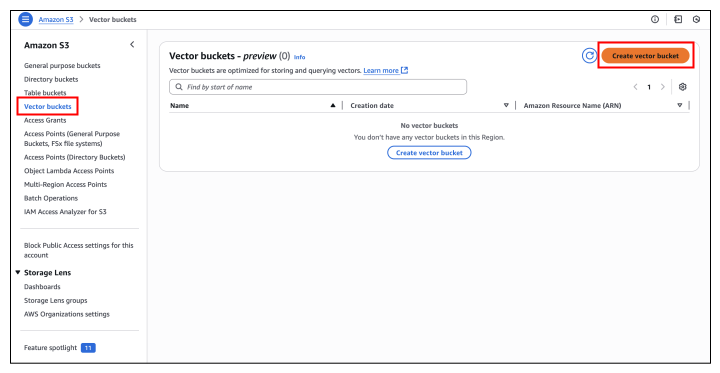
Insert and query vectors: To insert new vectors and perform similarity searches, utilize the AWS SDKs (such as Python’s Boto3), the AWS CLI, or the S3 REST API.
You can use the following embed text and store it as vectors in the S3 vector index:
This takes the plain text "Hello, from Educative!", generates its embedding using the Amazon Titan Text Embeddings V2 model, and stores that vector inside the index edu-vector-index in the bucket educative-vector-bucket.
II. You can also process the local text files:
This reads the contents of ./folder/sample.txt, converts the text into an embedding with the Amazon Titan Text Embeddings V2 model, and saves the vector in edu-vector-index under educative-vector-bucket.
III. You can then use the following command to query from vector database:
This takes the query "query text here", embeds it with the Nova Pro model, and compares it against all stored vectors in edu-vector-index, and returns the top 10 most similar matches.
The future of vector infrastructure#
The introduction of Amazon S3 Vectors marks a major milestone in the evolution of AI infrastructure by tackling the long-standing challenges of data preparation and knowledge storage costs, making scalable vector technology accessible to organizations of all sizes.
Its purpose-built architecture aligns cost with actual usage, balancing performance and efficiency for common enterprise AI workloads, while integrations with services like Amazon Bedrock and Amazon OpenSearch consider it an important component of the AWS AI ecosystem. S3 Vectors is a foundational service designed to make every document, image, and video a searchable knowledge source, enabling new data-intensive AI applications. As AWS Distinguished Engineer Andrew Warfield noted, this is only the beginning of what vectors are capable of.
Curious to learn more about the intersection of AWS and Generative AI? Explore the following Cloud Labs:
