Scaling Without Slowing: Performance Efficiency on Cloud
Imagine you have a strong startup idea: one you believe can grow to the scale of major players like Amazon. You launch lean with a clean website, a few products, and a growing list of marketing tasks. Gradually, traffic starts to build.
Then, your campaign goes viral.
But instead of celebrating, you see your site slow to a crawl. Pages take too long to load, checkouts fail, and users leave frustrated. The momentum faded almost as quickly as it came.
For many great business ideas that crash, the issue isn't product or messaging: it's infrastructure.
But this kind of breakdown is preventable if you plan accordingly.
Luckily there are proven architectural practices that can help avoid such fails.
One of the most effective guidelines is the AWS Well-Architected Framework: a set of principles and practices that ensure your infrastructure can scale, adapt, and perform efficiently as your business grows.
The AWS Well-Architected Framework is built around six pillars:

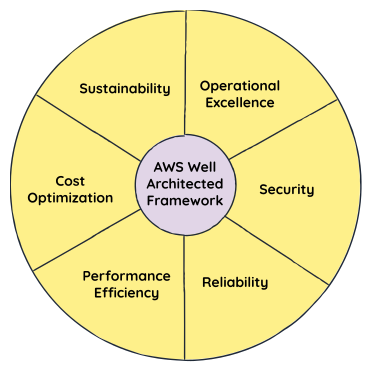
Among the pillars, performance efficiency is key in helping you scale without losing speed or overspending, so you can design systems that stay responsive, resilient, and cost-effective, even when usage surges or tech evolves.
In this newsletter, you’ll learn about the following:
Cloud native design principles that provide the philosophy and strategic direction for scaling smoother and smarter.
5 best practices that give you the specific steps and tools to achieve those principles in a practical, scalable way.
By the end, you’ll have a clear and practical framework for building systems that grow as fast as your ambitions.
Let's get started.
5 design principles behind performance efficiency#
The performance efficiency pillar outlines how to design with intent, using the cloud’s flexibility to your advantage.
AWS outlines five core principles to this end, which we'll review now. Instead of focusing on theory, we’ll focus on what they mean in practice, and how they help you stay fast as you grow.
Principle 1: Outsource complexity#
Tip: Let your team focus on value, not infrastructure.
Instead of building from scratch, take advantage of managed services. Doing so reduces operational overhead, increases development speed, and minimizes risk. Here are a few examples of how you can hand over the complex tasks to a cloud vendor:
Instead of Building | Use This AWS Service | How Does It Reduce Complexity? |
NoSQL infrastructure from scratch | Amazon DynamoDB | Eliminates the need to manage servers, replication, backups, and scaling. |
Your own media transcoding pipeline | AWS Elemental MediaConvert | Removes the need to provision encoding clusters or write custom pipelines. |
Custom ML infrastructure | Amazon SageMaker | Handles training, tuning, deployment, and monitoring, so your team can focus on models, not MLOps. |
By outsourcing complex tasks to a cloud vendor, you can reduce development time, eliminate operational overhead, and free up your team to focus on other tasks.
Principle 2: Deploy close to users#
Remember: Performance isn’t just about backend speed. If your users are in Europe but your app lives in a single US Region, latency will eat away at your UX.
Global deployment used to be complex. Now, it’s just a few clicks with the help of services like:
Amazon CloudFront, which caches content at edge locations across the globe. Making it accessible to end users at high speeds.
AWS Global Accelerator, which uses smart routing for user requests based on health and proximity of the resources.
Lower latency equates to higher conversions, better UX, and less churn. You don’t have to redesign your app. All you need to do is deploy smarter.
Principle 3: Use serverless when you can#
Tip: Scale your infrastructure with traffic to handle unpredictable growth.
When scaling your architecture efficiently, serverless services offer a game-changing advantage. They scale with your traffic, making them ideal for unpredictable growth.
Here are some of the AWS serverless services that you can use in your infrastructure:
AWS Lambda to run your backend application code in response to events, without the need to provision or manage servers.
Amazon API Gateway to expose APIs at scale.
Amazon S3 for static websites and storage that scales with files and requests.
Amazon EventBridge for event-driven workflows without custom polling logic.
Serverless pricing is based on usage, not uptime. You don’t pay for idle capacity. And when traffic spikes, services scale without any manual intervention. This creates a win-win situation: customers benefit from cost-efficiency and elasticity, while AWS benefits from higher infrastructure utilization and increased usage-based revenue.
Principle 4: Test often and use real data#
Remember: Performance tuning is not a one-time task; it’s an ongoing experimentation, testing, and iteration process.
To ensure your system is always running at its peak, you need to constantly tweak and optimize different layers of your architecture. Here’s how you can approach it:
Area | What to Experiment With | Example | Why Does It Matter? |
Instance types | Test different EC2 instance families based on workload requirements. | Compute-optimized vs. memory-optimized instances | Select the right instance type for your workload to optimize performance and cost. If your workload is CPU-intensive, go for compute-optimized instances; if it’s memory-heavy, memory-optimized instances will provide better performance. |
Storage options | Test the best storage solution for your access patterns. | EBS vs. S3 vs. FSx | Choose storage that aligns with your needs.
|
Database engines | Experiment with various database engines for specific needs. | Aurora, DynamoDB, RDS | Match your database to your use case for better performance.
|
You’ll need the right tools to gather performance insights and make real-time adjustments to avoid guessing and move toward data-driven optimization. Here are some key tools you can leverage:
AWS Compute Optimizer recommends better EC2 instance families based on actual usage.
Amazon CloudWatch and X-Ray help visualize latency, errors, and throughput across your stack.
Without experimentation, you risk sticking with a suboptimal configuration. With telemetry and tuning, you can evolve your architecture alongside your traffic.
Principle 5: Match design to reality#
Note: Great performance often comes down to alignment. Understand your app’s patterns and pick services that match them.
Here are a few examples that’ll help you understand this principle better:
If your app makes thousands of tiny reads per second, a scalable serverless database, like DynamoDB, may be better than a monolithic SQL database.
If you deliver many static assets (images, CSS, JS), serving them from S3 and CloudFront is far more efficient than running a web server.
If you stream logs and process them in near real time, use Kinesis over polling an SQS queue.
Performance problems often stem from a mismatch between your workload and the service you’re using. So it’s always best to design with awareness of how your system behaves, not how you think it would behave.
5 best practices for building efficient infrastructure#
Building an efficient and scalable infrastructure doesn’t happen by accident. You need a clear strategy and a commitment to optimizing each layer of your stack, from architecture to data management. Here are the five best practice areas to guide your performance efficiency journey.
1. Lay a strong foundation#
The first step to scaling without sacrificing performance is to select the right architecture. Your architecture should embed the core principles of the performance pillar to get the optimal result. This means designing for elasticity and scalability from the get-go rather than just adding more resources as you grow.
Start by defining clear performance requirements: What does success look like at scale? How do you measure speed, responsiveness, and uptime?
Avoid overengineering: The goal is simplicity and flexibility. For instance, using services like Amazon RDS or Amazon Aurora for relational databases lets you scale without reinventing the wheel. Instead of maintaining complex database setups, you can focus on building features.
Use microservices and containers: These isolate components and reduce resource contention across your application.
The architecture you choose determines how well your infrastructure scales, adapts, and performs under load. A solid foundation today saves you from costly redesigns tomorrow.
2. Maximize resource efficiency#
Your compute layer is where most of the action happens. The more efficient your compute resources, the better your application will perform. Here’s how to make the most of your cloud resources:
Strategy | Description | Benefit |
Use Auto Scaling. | Use auto-scaling services for your compute instances or serverless compute based on demand. | Prevents over-provisioning during low traffic and under-provisioning during spikes. |
Choose the right instance size. | Use Compute Optimizer to select the compute types based on workload requirements. | Ensures you only pay for what you need, optimizing both performance and cost. |
Efficient use of compute resources means lower costs and faster performance. Right-sizing ensures you get the best performance at the best price.
3. Optimize your data flow#
You could build the fastest app in the world, but users will still feel the slowdown if your data layer lags. Modern applications need data systems that are not just fast; they need to be smart about how data is stored, accessed, and delivered.
To optimize your data flow, do the following:
Start by understanding your data access patterns: For read-heavy workloads, consider data stores optimized for low-latency reads. If you’re dealing with real-time streams, use platforms designed for high-throughput ingestion rather than batch processing.
Optimize how you store and retrieve data: Use intelligent storage solutions that automatically shift data between tiers based on access frequency, and choose architectures that allow you to query large datasets directly where they live, rather than moving them around.
Reduce pressure on your databases with caching: Serving frequently accessed data from a cache can dramatically cut response times and improve the user experience.
Efficient data management reduces latency and ensures users get the right information at the right time, without unnecessary delays.
4. Deliver fast, always#
Network performance is often the bottleneck that prevents cloud applications from meeting performance expectations. A delay in data transmission, whether due to poor routing, traffic spikes, or server overloads, can lead to a frustrating user experience. Here are the strategies you can employ to improve your network performance and avoid any bottlenecks that can cause delays:
Strategy | Description | Benefit |
Use a content delivery network (CDN). | Cache static content closer to users with services like Amazon CloudFront. | Reduces latency and speeds up content delivery across the globe. |
Route traffic efficiently. | Use services like AWS Global Accelerator to direct user requests to the nearest healthy endpoint. | Improves availability and performance through intelligent traffic routing. |
Optimize VPC and subnet design. | Design your network layout to reduce hops and simplify traffic flow. | Minimizes latency and ensures reliable, scalable data transmission. |
Speed and responsiveness rely heavily on how you route and deliver content. Optimizing your network ensures customers can access your site without delays, even during traffic spikes.
5. Foster a performance-first mindset#
Finally, performance efficiency isn’t just a matter of infrastructure; it’s about how your team builds and maintains that infrastructure. Fostering a culture of performance optimization requires commitment and regular practice.
Strategy | Description | Benefit |
Automate testing and deployment. | Use CI/CD pipelines with cloud-based CI/CD services. | Ensures every deployment is consistent, tested, and optimized for performance. |
Establish a feedback loop. | Monitor KPIs like latency, errors, and throughput using monitoring services offered by the Cloud providers. | Provides real-time insights to guide performance improvements. |
Encourage experimentation. | Run A/B tests, load tests, and try different configurations using cloud flexibility. | Identifies the most efficient setups without disrupting production environments. |
Building efficient systems is a continuous effort. By embedding performance into your workflows and organizational culture, you ensure your application evolves and adapts as efficiently as possible.
Scalability without sacrificing performance#
Designing a performance-efficient system isn’t just about picking the right tools; it’s about aligning your architecture with real-world usage patterns, leveraging managed services, and continuously testing and optimizing.
By following the principles and best practices, you can:
Scale effectively as your business grows
Maintain responsiveness during traffic surges
Optimize costs without compromising performance
Putting principle into action#
Now that you know how to design a performance-efficient system, it’s time to get hands-on experience with the AWS services that will help you bring your designs to life.
Our Educative Cloud Labs let you work directly with AWS tools we discussed today to optimize resources for cost-effective scaling, implement performance testing, fine-tune your architecture, and more.
Here are just a few of the Cloud Labs that will get you hands-on with the tools we discussed today:
Cloud Labs give you instant, hands-on access to real AWS services—without the hassle of billing, provisioning, or tearing anything down afterward. Whether you’re learning about serverless architecture, scalable storage, or distributed databases, you can experiment confidently in a sandboxed environment built for learning.
