New CloudWatch tools that boost your observability
2:13 AM. Your phone buzzes. Another system failure.
You crack open your laptop. Twenty minutes later, you’ve traced the root cause — something that could’ve been caught earlier.
Every dev has been there.
And that’s exactly the kind of pain AWS is targeting with its latest Amazon CloudWatch upgrades, announced at re:Invent 2024.
Already a staple for AWS monitoring, CloudWatch is evolving into a full-blown observability powerhouse — with new tools to detect, diagnose, and resolve issues before your users ever notice.
Understand what observability really means (and why you need more than just dashboards)
Monitor Aurora and RDS at scale with CloudWatch Database Insights
Navigate your infrastructure visually using Unified Navigation
Analyze logs in real-time with zero-ETL OpenSearch integration
Debug distributed apps faster with Span Analytics
Use Amazon Q Developer Ops Assistant for AI-powered troubleshooting
Let’s take a look at what’s new.
What is observability?#
Observability measures a system’s internal state based on the data it generates, such as logs, metrics, and traces. It helps teams understand how a system is functioning, diagnose issues, and improve performance without requiring direct access to its internals.


Observability is not just monitoring; it goes beyond predefined dashboards and alerts by providing deeper insights into why a system behaves a certain way. It is a crucial aspect of modern distributed systems, microservices, and cloud environments, where complexity makes traditional monitoring insufficient.
Key pillars of observability include:
Metrics: Numeric measurements collected over time
Logs: Time-stamped, structured (JSON), or unstructured (plain text) messages
Traces: Capture a request’s journey across multiple services
How CloudWatch features supercharge observability#
CloudWatch offers a rich set of features designed to enhance observability. These features help ensure you’re always in control of your cloud environment.
CloudWatch was already a staple tool for many organizations, but 2024's AWS re:Invent rolled out new, groundbreaking updates for the tool.
Here’s a quick breakdown of the most important announcements from AWS re: Invent and how you can use them to revolutionize your cloud environment.
Let’s get started!
More coverage with CloudWatch Database Insights#
Amazon CloudWatch has introduced CloudWatch Database Insights, a powerful tool for monitoring and troubleshooting Amazon Aurora and Amazon RDS databases at scale. It unifies logs and metrics from multiple databases and applications into a consolidated AWS CloudWatch view.
Before these updates, diagnosing database issues in Amazon Aurora and Amazon RDS was a headache— scattered metrics, navigation through multiple consoles, and guesswork.
With built-in metrics, dashboards, and telemetry, Database Insights enables users to monitor the health of entire database fleets and individual instances through guided troubleshooting workflows.
As a fully managed service, CloudWatch Database Insights enables monitoring for your existing databases within minutes, simplifying observability and performance analysis.
Easier correlation using CloudWatch Unified Navigation#
Modern applications consist of multiple interconnected components. For instance, a simple API hosted on an EC2 instance might be fronted by an Application Load Balancer while relying on EBS volumes and RDS databases in the backend. In such setups, identifying correlations and troubleshooting issues can be challenging.
However, AWS has introduced a game-changing solution—CloudWatch Unified Navigation. This feature streamlines observability by automatically mapping connected components and visualizing the dependency tree in an interactive topology graph.
See it here:

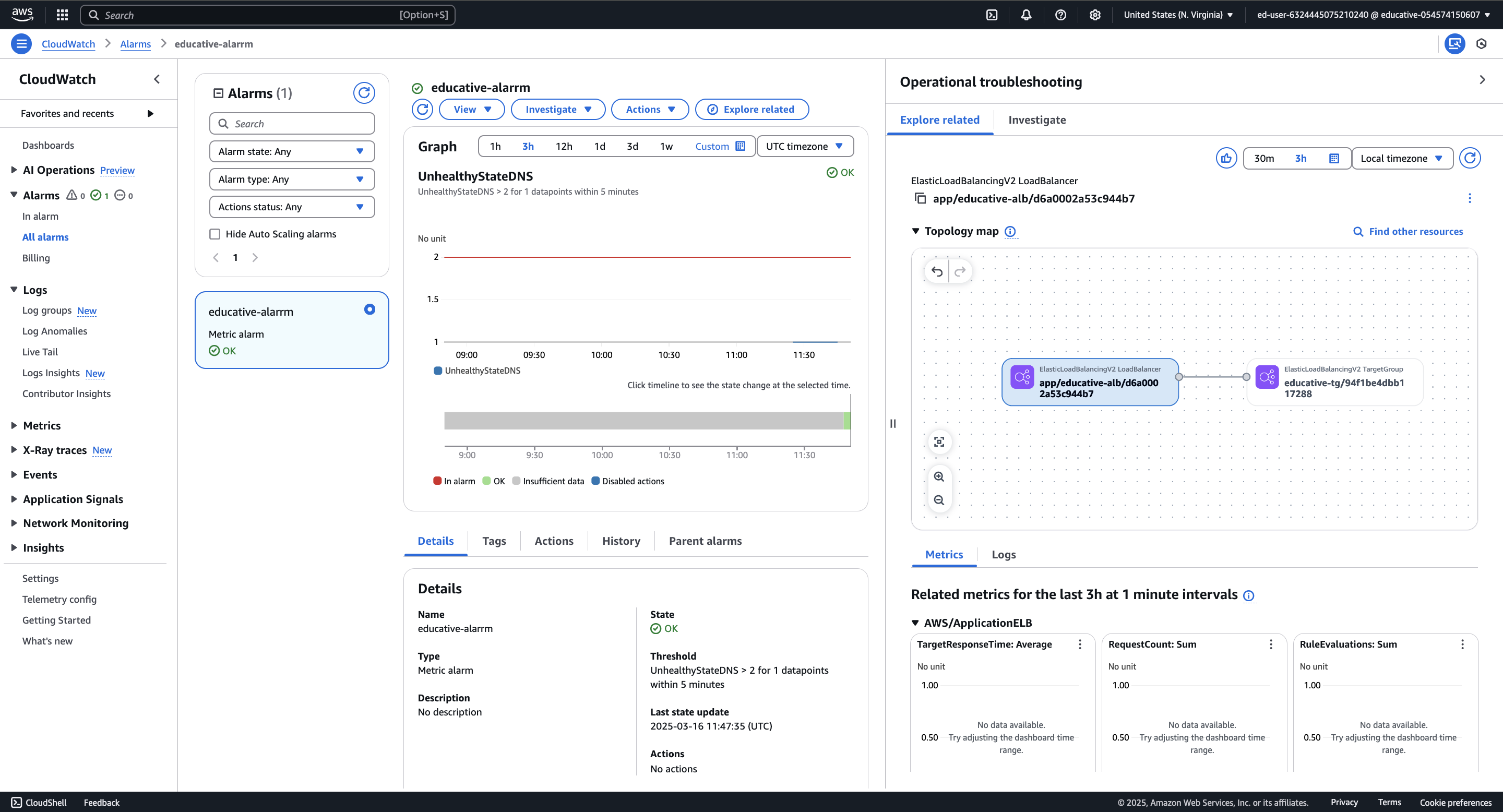
Before these new updates, identifying correlations and troubleshooting issues in modern applications with multiple interconnected components, such as APIs, load balancers, and databases, was challenging due to the complexity of tracking metrics and dependencies across various services.
Unified Navigation allows users to expand components to view their respective metrics without switching between multiple AWS consoles. Best of all, this functionality is accessible from any AWS service console.
Remove silos with OpenSearch and CloudWatch#
As applications scale, data often gets siloed—your application data might live in OpenSearch, while logs are scattered across CloudWatch, creating visibility gaps and making troubleshooting more complex.
CloudWatch now integrates with OpenSearch to bridge this gap and enhance its analytical capabilities. Users can directly search and analyze application logs stored in CloudWatch with simple queries.
Traditionally, to analyze CloudWatch logs with OpenSearch, we would need to set up an ETL pipeline. The illustration diagram below shows one such pipeline:


This pipeline collects logs from AWS resources using CloudWatch Logs, filters them with a subscription filter, and processes them using a Lambda function. The transformed logs are then sent to the OpenSearch Ingestion pipeline, which enriches and prepares the data before storing it in an OpenSearch collection for search, analysis, and visualization.
Though the pipeline delivers near real-time performance, it’s still difficult to maintain it. AWS now offers a zero-ETL integration between Amazon CloudWatch and Amazon OpenSearch Service, eliminating the need for data duplication and complex ETL pipelines.
Here are some of the key benefits of Zero-ETL Integration:
No data movement: Logs are automatically available in OpenSearch without needing Lambda, Firehose, or OpenSearch Ingestion.
Lower latency: Direct integration ensures faster log access and near real-time analytics.
Reduced maintenance: No need to manage intermediate AWS services, reducing operational overhead.
Improved security and cost efficiency: Fewer moving parts mean better security posture and lower data transfer costs.
Deeper distributed tracing with CloudWatch span analytics #
CloudWatch Span Analytics helps you trace requests across distributed systems and spot issues fast—by comparing spans over time and drilling into failures with structured, visualized data.
Instead of bouncing between log groups and guessing which service broke, you get a clear view of what changed and where things went sideways.
Let’s say your API starts throwing 5xx errors. With traditional logs, you're stuck piecing things together across services. With Span Analytics, you get an interactive dashboard and can:
Compare current spans to historical ones to spot anomalies
Trace requests end-to-end across your stack
Zoom in on slow or failing spans to find the root cause
No more guessing.
Amazon Q Developer Ops Assistant: Let AI do the heavy lifting#
CloudWatch now integrates with Amazon Q Developer—introducing the AI-powered Ops Assistant built to help you troubleshoot faster.
Instead of manually digging through logs and metrics, you can feed relevant CloudWatch data (like CPU utilization, latency, or error rates) directly into the assistant. It analyzes the patterns, correlates signals, and helps pinpoint root causes—no prompt engineering required.


Unlike a typical AI chatbot that waits for you to ask the right questions, Amazon Q Developer Ops Assistant works differently—you simply provide relevant CloudWatch metrics, and it does the heavy lifting.
It’s a great way to supplement your investigations. Just feed your data as you work through your investigation.
For instance, while debugging an API application, you can supply Amazon Q Developer with CPU utilization metrics alongside other key data. It will analyze the information and help pinpoint the root cause, making problem-solving faster and more efficient.
Less firefighting, more foresight#
AWS CloudWatch is more than just a monitoring tool—it’s your proactive observability partner in maintaining system reliability and performance.
With new features like CloudWatch Database Insights, Unified Navigation, and OpenSearch integration, AWS makes it easier to detect, diagnose, and resolve issues before they impact your users.
Whether optimizing cloud performance or troubleshooting distributed applications, these advancements ensure you stay ahead of system failures.
Ready to get hands-on?
If you're interested in exploring CloudWatch for yourself, Educative has a number of interactive courses and Cloud Labs to guide your journey. Check them out below.
Happy learning!
