NumPy vs. pandas: What’s the difference?
In the realm of data science and scientific computing, Python stands out as a powerful and versatile programming language. Python seems to have an expanse of libraries available for these use case, but two of the most widely used are NumPy and pandas.
If you’re stuck choosing between Numpy and pandas, it’s very understandable. Both libraries have become indispensable tools for data scientists, analysts, and engineers, providing robust functionality for numerical computations and data manipulation. However, that choice will be easier once you learn where each tool excels, and therefore: which is the best for your data.
Let’s dive in!
We’ll cover the following
|
What is NumPy?#
NumPy, short for Numerical Python, is a library that provides support for large, multi-dimensional arrays and matrices, along with a collection of mathematical functions to operate on the arrays. It was created in 2005 by Travis Oliphant, building on the earlier Numeric and Numarray libraries to create a more complete and efficient package for array computing.
NumPy’s core functionality revolves around the ndarray object, a powerful


Strengths of NumPy#
NumPy is renowned for its efficiency in handling numerical computations and its ability to process large datasets swiftly. It's implemented in C, which gives NumPy a significant speed advantage over pure Python code.
Numerical computations: NumPy offers a comprehensive suite of mathematical functions for operations such as linear algebra, random number generation, Fourier transforms, and statistical computations. Its functions are implemented in C, providing a significant speed advantage over pure Python code.
Handling of n-dimensional arrays: The
ndarrayobject is designed to handle a variety of data shapes and sizes, from simple 1-dimensional arrays to complex-dimensional datasets. This flexibility makes NumPy an essential tool for scientific computing, where data often comes in multi-dimensional forms. Broadcasting: NumPy’s broadcasting feature allows arithmetic operations to be performed on arrays of different shapes and sizes without requiring explicit replication of data, making code more efficient and easier to write.
What is pandas?#
Pandas is a powerful data manipulation and analysis library for Python created by Wes McKinney in 2008. It was developed to address the need for a flexible, high-performance tool for working with structured data, which was lacking in the existing scientific Python ecosystem at the time.
The pandas library introduces two primary data structures:
Series
DataFrame.
A Series is a one-dimensional labeled array capable of holding any data type, while a DataFrame is a two-dimensional, size-mutable, and potentially heterogeneous tabular data structure with labeled axes (rows and columns).


Strengths of pandas#
pandas is highly regarded for its versatility in data manipulation and ability to easily handle complex transformations, thanks to its intuitive syntax and robust set of functions.
Data manipulation: It provides a wide range of functions for data manipulation, including filtering, merging, reshaping, and aggregation. Its intuitive syntax makes it easy to perform complex data transformations and cleaning tasks.
Handling tabular data: The DataFrame structure is particularly well-suited for working with tabular data, similar to the structure of a database table or an Excel spreadsheet. This makes pandas an ideal tool for data analysis tasks in domains such as finance, economics, statistics, and many others.
Data alignment: It excels in handling missing data and aligning data from different sources based on their indexes. This capability is crucial for real-world data analysis, where data often comes with gaps or needs to be integrated from multiple sources.
Time series analysis: It offers powerful tools for time series analysis, including date range generation, frequency conversion, moving window statistics, and more, making it an excellent choice for analyzing time-based data.
NumPy vs. pandas: The core differences#
Understanding the core differences between NumPy and pandas is crucial for determining which library to use for specific tasks. Here, we will dive into two key aspects:
Data structures
Indexing mechanisms
Data structures#
With NumPy, we get arrays, and pandas gives us Series and DataFrames. Depending on the data you're working with, data structures of each library may be your deciding factor.
Let's explore which use cases each data structure excels in.
NumPy arrays#
NumPy’s primary data structure is the array. This array object is homogeneous, meaning all elements are of the same type, and provides a range of functionalities for numerical computations.
NumPy Data Structure | Properties | Use Cases |
|
|
|
|
| |
|
|
The following code creates a 2D NumPy array and performs element-wise squaring, demonstrating how an array can be used for efficient numerical operations:
Code explanation:
Line 1: We import the NumPy library and assign it the alias
np.Line 4: We create a 2D NumPy array (which can be thought of as a matrix) using
np.array()function. The array is initialized with the values[[1, 2, 3], [4, 5, 6]]. This means it has 2 rows and 3 columns.Line 5: We use
print()to display a message"2D array (matrix):\n"followed by the contents ofarray_2d. The\nin the string is a newline character.Line 8: We perform an element-wise operation on
array_2d. In NumPy, operations like** 2on an array mean each element of the array is squared individually. Soarray_2d ** 2squares each element ofarray_2dand stores the result inarray_squared.Line 9: We use
print()to display a message"2D array (matrix) after performing element-wise operation:\n"followed byarray_squared.
pandas Series and DataFrames#
The pandas library introduces two core data structures: Series and DataFrame. These structures are designed to handle labeled data intuitively and efficiently.
Series and DataFrames
pandas Data Structure | Properties | Use Cases |
Series |
|
|
DataFrame |
|
The following code demonstrates creating a pandas Series with a custom index and a DataFrame from a dictionary, showcasing the flexibility and intuitive handling of labeled data in pandas:
Code explanation:
Line 1: We import the
pandaslibrary and assign it the aliaspd.Line 4: We create a pandas Series using the
pd.Series()function. Here, we pass a list[10, 20, 30]as data and specifyindex=['a', 'b', 'c']to label each element in the Series.Line 5: We use
print()to display a message"Series:\n"followed by the contents ofseries. The\nin the string is a newline character.Lines 8–9: We create a pandas DataFrame using the
pd.DataFrame()function. Here, data is a dictionary where keys are column names ('Name'and'Age') and values are lists representing the data in each column (['Alice', 'Bob', 'Charlie']and[25, 30, 35], respectively).Line 10: We use
print()to display a message"DataFrame:\n"followed by the contents ofdf.
2. Indexing and selection#
NumPy indexing#
NumPy arrays allow for both basic and advanced indexing techniques. Basic indexing involves using integers, slices, or boolean arrays to access elements.
The following code shows how to access and modify elements in a NumPy array using basic indexing techniques:
Code explanation:
Line 10: We print the message
"Accessing the third element: "followed byarray_1d[2]. This accesses and displays the third element (index 2) ofarray_1d.Line 13: We print the message
"Accessing elements from index 1 to 3: "followed byarray_1d[1:4]. This performs slicing onarray_1d, accessing elements from index 1 (inclusive) to index 4 (exclusive) and displaying them.Line 16: We print the message
"Accessing elements greater than 25: "followed byarray_1d[array_1d > 25]. This uses boolean indexing to filter elements inarray_1dthat are greater than 25 and display them.
pandas indexing#
The pandas library provides more flexible and powerful indexing options. It supports both label-based and location-based indexing through .loc and .iloc.
Label-based indexing (
.loc): Access elements by labels.Location-based indexing (
.iloc): Access elements by integer location.
The following code demonstrates accessing elements in a pandas DataFrame using both label-based and location-based indexing:
Code explanation:
Line 11: We print the message
"Accessing row with label 'b': "followed bydf.loc['b']. This uses label-based indexing (loc) to access and display the row labeled'b'in the DataFramedf.Line 14: Prints the message
"Accessing the second row (index 1): "followed bydf.iloc[1]. This uses location-based indexing (iloc) to access and display the second row (index 1) in the DataFramedf.
Tip: You can get hands-on with NumPy and pandas in the course below.
Python Data Analysis and Visualization

With over 400 billion gigabytes of data out there and more every day, companies are paying top dollar to those who can leverage it. Strong data skills are becoming increasingly valuable - even if you choose not to become a professional data scientist. This path will help you master the skills to extract insights from data using a powerful (and easy to use) assortment of popular Python libraries.
NumPy vs. pandas functionality#
NumPy and pandas each provide a rich set of functionalities that cater to different needs in data science and analysis. As such, your specific needs will influence your choice of library.
We’ll dive into specific capabilities of each library, focusing on :
Mathematical operations
Loading data from file/dataset
Data manipulation
Mathematical operations#
Mathematical operations are fundamental in data analysis and scientific computing, enabling tasks like statistical calculations and modeling.
NumPy: Mathematical operations#
NumPy excels in numerical computations, providing a wide array of mathematical functions that are optimized for performance. These functions make it a powerful tool for tasks involving linear algebra, random sampling, and Fourier transforms.
Linear algebra#
NumPy offers comprehensive support for linear algebra operations, including:
Matrix multiplication
Decomposition
Inversion
Eigenvalue calculations
These functionalities are essential for solving systems of linear equations and performing various mathematical transformations.
Code explanation:
Lines 18–22: Perform various matrix operations on
matrix_a:Transpose:
np.transpose(matrix_a)calculates and prints the transpose ofmatrix_a.Determinant:
np.linalg.det(matrix_a)computes and prints the determinant ofmatrix_a.Inverse:
np.linalg.inv(matrix_a)computes and prints the inverse ofmatrix_a.Trace:
np.trace(matrix_a)computes and prints the trace (sum of diagonal elements) ofmatrix_a.
Lines 25–27: We perform matrix multiplication using
np.dot(matrix_a, matrix_b). Store the result inresult_multand print it.Lines 30–35: We perform QR decomposition of
matrix_ausingnp.linalg.qr(matrix_a). We store the matricesq(orthogonal/unitary matrix) andr(upper triangular matrix) and print them.Lines 38–40: We compute the inverse of
matrix_ausingnp.linalg.inv(matrix_a). We store the result inresult_invand print it.Lines 43–48: We compute the eigenvalues and eigenvectors of
matrix_ausingnp.linalg.eig(matrix_a). We store the eigenvalues ineigenvaluesand eigenvectors ineigenvectors, and print them. This computes and prints the eigenvalues and corresponding eigenvectors ofmatrix_a.
Random sampling #
NumPy’s random module allows for generating random numbers, creating random samples, and performing random sampling from different distributions.
Code explanation:
Line 4: We use the
np.random.normal()function to generate an arrayrandom_numbersofrandom numbers drawn from a normal distribution: loc=0: Mean of the distribution (centered at 0)scale=1: Standard deviation of the distributionsize=5: Number of random numbers to generate
Fourier transforms #
NumPy provides functions to compute the discrete Fourier transform, which is useful in signal processing.
Code explanation:
Line 8: We compute the Fourier transform of
signalusingnp.fft.fft(signal). The result is stored infourier_transform.
pandas: Mathematical operations#
Unlike NumPy, pandas is not designed for advanced mathematical computations. Instead, it offers powerful tools for data aggregation, merging, reshaping, and handling missing data, which are essential for data analysis.
Data aggregation #
pandas provide functions for summarizing data, such as groupby, sum, mean, and count.
Code explanation:
Line 11: We use the
groupby()method ondfto group data by the'Name'column, and then calculate the mean using themean()method. The result is stored ingrouped.
Merging#
pandas allows for merging and joining DataFrames using various methods like merge, join, and concat.
Code explanation:
Line 12: We use the
pd.merge()function to mergedf1anddf2based on the'Name'column. The result is stored inmerged_df.
Reshaping#
pandas offers functions like pivot, melt, and stack for reshaping DataFrames.
Code explanation:
Line 11: We use the
pd.melt()function to melt (unpivot) the DataFramedf:id_vars=['Name']: Specifies the'Name'column as the identifier variable (unchanged).value_vars=['Math', 'Science']: Specifies the'Math'and'Science'columns to melt.var_name='Subject': Renames the variable column to'Subject'.value_name='Score': Renames the value column to'Score'.The result is stored in
melted.
Line 15: We use the
stack()method to pivot the DataFramedfby stacking columns into rows:set_index('Name'): Sets the'Name'column as the index.stack(): Pivots all remaining columns into rows.reset_index(name='Score'): Resets the index and renames the resulting stacked column to'Score'.rename(columns={'level_1': 'Subject'}): Renames the column previously holding column names to'Subject'.The result is stored in
stacked.
Line 19: We use the
pivot()method on themeltedDataFrame to pivot it back to the original form:index='Name': Sets the'Name'column as the index.columns='Subject': Specifies the'Subject'column values to pivot.values='Score': Specifies the'Score'column values to populate the pivoted DataFrame.reset_index(): Resets the index to convert'Name'from the index back to a regular column.The result is stored in
unmelted.
Handling missing data#
pandas provides functions to detect, remove, or fill missing data in DataFrames.
Code explanation:
Line 11: We use the
fillna()method on the'Score'column ofdfto fill missing values (None) with the mean of existing values in the column:df['Score'].mean(): Computes the mean of non-missing values in'Score'.inplace=True: Modifiesdfin place rather than returning a new DataFrame.The filled DataFrame is stored back into
df['Score'].
Loading data from file/dataset#
Loading data from external files or datasets is a fundamental operation in data analysis and scientific computing. Both NumPy and pandas provide capabilities to read data from various file formats, each tailored to different use cases.
NumPy: Loading data#
NumPy primarily deals with numerical data in the form of arrays. It provides basic functionalities to load data from text files, such as CSV files, but it stores the data in its own ndarray format, which is homogeneous and optimized for numerical computations.
The following is an example of loading data with NumPy:
Code explanation:
Line 4: We use the
np.loadtxt()function to load data from a CSV file'data.csv'into a NumPyndarraydata_np:'data.csv': Specifies the path to the CSV file to be loaded.delimiter=',': Specifies that the data in the CSV file is separated by commas.
pandas: Loading data#
pandas excels in handling structured data, including loading data from various file formats such as CSV, Excel, SQL databases, and more. It stores the data in DataFrame objects, which are flexible and capable of handling heterogeneous data types.
The following is an example of loading data with pandas:
Code explanation:
Line 4: We use the
pd.read_csv()function to load data from a CSV file'data.csv'into a pandas DataFramedf:'data.csv': Specifies the path to the CSV file to be loaded.
Data manipulation#
Effective data manipulation is crucial in preparing data for analysis and ensuring it meets the requirements of various computational tasks.
NumPy: Data manipulation#
NumPy offers a range of functionalities for basic data manipulation, including slicing, reshaping, and broadcasting.
Slicing #
Slicing in NumPy allows you to extract parts of an array.
Code explanation:
Line 10: We use the slicing to create a new array
sliced_arrayfromarray:array[1:4]: Retrieves elements starting from index1(inclusive) to index4(exclusive) fromarray.The sliced elements
[20, 30, 40]are assigned tosliced_array.
Reshaping#
NumPy allows you to change the shape of an array without changing its data.
Code explanation:
Line 10: We use the
reshape()method to reshapearrayinto a 2x3 NumPy arrayreshaped_array:reshape(2, 3): Reshapesarrayinto a 2 rows by 3 columns array.The reshaped array
reshaped_arraywill have a shape of(2, 3).
Broadcasting #
Broadcasting allows NumPy to perform arithmetic operations on arrays of different shapes.
Let’s explore how broadcasting works with NumPy arrays in various scenarios:
Code explanation:
The code demonstrates different scenarios of addition between NumPy arrays (
Z1) and other operands (Z2) of different shapes:Lines 4–14 (case 1): Addition of a 3x3 array (
Z1) and a scalar (Z2= 1).Lines 17–27 (case 2): Addition of a 3x3 array (
Z1) and a 3x1 array (Z2).Lines 30–40 (case 3): Addition of a 3x3 array (
Z1) and a 1D array (Z2).
pandas: Data manipulation#
pandas offers advanced tools for data manipulation, including data cleaning, merging, grouping, and time series manipulation.
Data cleaning#
pandas provides functions to clean and preprocess data, such as dropna and fillna.
Code explanation:
Line 11: We use the
dropna()method to create a new DataFramecleaned_dfby dropping rows fromdfthat contain the missing values.Line 15: We use the
fillna(0)method to create a new DataFramefilled_dfby filling the missing values indfwith the value0.
Merging#
pandas allow for complex data merging operations.
Code explanation:
Line 14: We use the
pd.merge(df1, df2, on='Name')to mergedf1anddf2on the column'Name', resulting in a new DataFramemerged_dfcontaining all columns from both DataFrames where'Name'matches.
Grouping #
pandas’ groupby function enables the grouping of data for aggregation.
Code explanation:
Line 11: We group the DataFrame
dfby the'Name'column and calculate the mean of the'Score'for each group, resulting in a new DataFramegrouped.
Time series manipulation#
pandas excels in handling time series data, providing functions for resampling, shifting, and rolling window operations.
Code explanation:
Line 12: We use
df.resample('M').sum()to resample the DataFramedfto a monthly frequency and calculate the sum of sales for each month, resulting in a new DataFramemonthly_sales.
Integration and ecosystem#
Both NumPy and pandas are integral parts of the Python data science ecosystem. They are designed to seamlessly integrate with other libraries, enhancing their capabilities and providing a comprehensive toolkit for data analysis and scientific computing.
Interoperability#
Effective interoperability ensures that NumPy and pandas can collaborate seamlessly with other libraries, enhancing their utility in diverse analytical and scientific applications.
NumPy: Interoperability#
NumPy is designed to work well with other scientific libraries in Python. Its interoperability allows it to serve as the foundation for a wide range of scientific and analytical tools.
SciPy #
SciPy builds on NumPy to provide additional functionality for scientific and technical computing, including modules for optimization, integration, interpolation, eigenvalue problems, and other advanced mathematical tasks.
Code explanation:
Lines 5–6: We define a quadratic function
f(x)that takes an inputxand returns the value of the quadratic expressionx**2 + 4*x + 4.Line 9: We use
optimize.minimize(f, x0=0)to find the minimum of the functionf(x), starting from the initial guessx0=0, and stores the result in the variableresult.
Matplotlib#
Matplotlib is a plotting library that works closely with NumPy arrays to produce a variety of static, animated, and interactive visualizations.
Code explanation:
Line 5: We use
np.linspace(0, 2 * np.pi, 100)to create an arrayxof 100 evenly spaced values ranging from0to2 * np.pi.Line 6: We use
np.sin(x)to compute the sine of each value in the arrayx, resulting in an arrayy.Line 9: We use
plt.plot(x, y)to create a plot ofyvs.x.Line 10: We use
plt.title('Sine Wave')to set the title of the plot to'Sine Wave'.Line 11: We use
plt.xlabel('x')to label the x-axis as'x'.Line 12: We use
plt.ylabel('sin(x)')to label the y-axis as'sin(x)'.Line 13: We use
plt.show()to display the plot.
pandas: Interoperability#
pandas is also highly interoperable with a variety of other data tools and libraries, making it a versatile choice for data manipulation and analysis.
SQL databases#
pandas can read from and write to SQL databases, allowing for efficient data retrieval and storage. The read_sql and to_sql functions facilitate this integration.
Code explanation:
Line 5: We use
sqlite3.connect(':memory:')to create an in-memory SQLite database and establishes a connection to it, assigned toconn.Line 8: We create a dictionary
datawith sample data.Line 9: We use
pd.DataFrame(data)to create a DataFramedffrom the dictionarydata.Line 12: We use
df.to_sql('people', conn, index=False)to write the DataFramedfto a SQL table named'people'in the SQLite database connected to byconn.Line 15: We use
pd.read_sql('SELECT * FROM people', conn)to read the data back from the SQL table'people'into a new DataFramedf_from_sql.
Matplotlib #
pandas integrates smoothly with Matplotlib, making it easy to generate plots directly from DataFrames.
Code explanation:
Line 5: We create a dictionary
datawith sample data.Line 6: We use
pd.DataFrame(data)to create a DataFramedffrom the dictionarydata.Line 9: We use
df.plot(x='Month', y='Sales', kind='bar')to create a bar plot with'Month'on the x-axis and'Sales'on the y-axis.Line 10: We use
plt.title('Monthly Sales')to set the title of the plot to'Monthly Sales'.Line 11: We use
plt.xlabel('Month')to label the x-axis as'Month'.Line 12: We use
plt.ylabel('Sales')to label the y-axis as'Sales'.Line 13: We use
plt.show()to display the plot.
Seaborn#
Seaborn is a statistical data visualization library built on top of Matplotlib that works well with pandas DataFrames. It provides high-level interfaces for drawing attractive and informative statistical graphics.
Using the above code, we will get the following output:

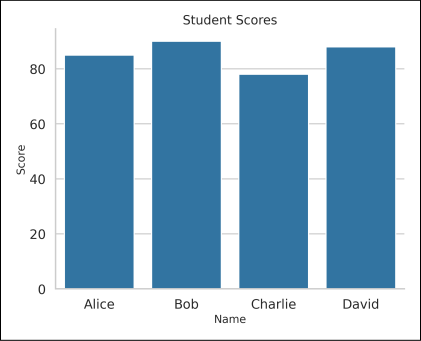
Code explanation:
Line 6: We create a dictionary
datawith sample data.Line 7: We use
pd.DataFrame(data)to create a DataFramedffrom the dictionarydata.Line 10: We use
sns.set_context("talk")to set the plotting context to"talk", which adjusts the size of the plot elements.Line 11: We use
sns.set_style("whitegrid")to set the plot style to"whitegrid", which adds grid lines on a white background for aesthetics.Line 14: We use
sns.barplot(x='Name', y='Score', data=df)to create a bar plot (barplot) with'Name'on the x-axis and'Score'on the y-axis, using data from the DataFramedf. The resulting plot axis object is stored inax.Line 17: We use
ax.set_xlabel('Name', fontsize=14)to set the x-axis label to'Name'with a font size of 14.Line 18: We use
ax.set_ylabel('Score', fontsize=14)to set the y-axis label to'Score'with a font size of 14.Line 19: We use
ax.set_title('Student Scores', fontsize=16)to set the plot title to'Student Scores'with a font size of 16.Line 22: We use
sns.despine()to remove the top and right spines from the plot for better aesthetics.Line 23: We use
plt.show()to display the plot using Matplotlib’s show function.
Use cases of NumPy and pandas#
Understanding the specific use cases for NumPy and pandas helps in selecting the right tool for your data processing tasks. Here, we’ll outline the primary use cases for each library, providing a clear comparison of their strengths and applications.
Library | Use Cases | Description |
NumPy | Scientific computing | NumPy is the preferred library for performing scientific calculations that require high precision and performance. |
Machine learning | It provides the foundational data structures and mathematical operations essential for machine learning algorithms. | |
Numerical simulations | NumPy is used for creating simulations that require handling large amounts of numerical data efficiently. | |
pandas | Data analysis | pandas is particularly effective in handling and analyzing structured data, making it perfect for tasks like exploring data and creating reports. |
Data preprocessing for machine learning | It provides tools for cleaning and preparing data, including handling missing values and transforming data formats. | |
Financial modeling | pandas’ robust data manipulation capabilities are perfect for building and analyzing financial models. |
Pros and cons: NumPy vs. pandas#
When choosing between NumPy and pandas, it’s essential to understand their strengths and limitations. Here, we’ll outline the pros and cons of each library, providing a clear comparison to help you make an informed decision.
Library | Pros | Cons |
NumPy |
|
|
|
| |
|
| |
pandas |
|
|
|
| |
|
|
Comparison between NumPy and pandas#
The table below presents a comparison between NumPy and pandas:
NumPy vs. pandas
Feature | NumPy | pandas |
Data structures | Homogeneous arrays (single data type) | Heterogeneous DataFrames (mixed data types) |
Performance (Numerical) | Generally faster | Slower for raw calculations, but convenient functions |
Memory usage | Memory efficient | Potentially higher memory usage |
Strengths | Efficient numerical computations, vectorized operations | Data cleaning, manipulation, analysis, time series |
Common use cases | Scientific computing, machine learning (numerical data), image processing | Data loading, cleaning, EDA, feature engineering, time series analysis |
Indexing | Basic (integer-based, slices, and boolean indexing) | Advanced indexing (label-based, location-based) |
Missing value handling | Limited (manual replacement) | Flexible ( |
Data types | Supports various numerical data types (integer, float, complex) and boolean | Supports various numerical data types, strings, categorical data, and custom data types |
Math functions | Rich collection of element-wise mathematical functions (arithmetic, trigonometric, linear algebra) | Offers functions for common data analysis tasks (e.g., mean, standard deviation, correlation) |
Time series functionality | Limited | Specialized functionalities (date/time objects, resampling) |
Multidimensional data | Efficient handling of n-dimensional arrays | Less efficient for high-dimensional data |
Learning curve | Easier to learn due to simpler data structures | Steeper learning curve due to richer features and functionalities |
Interoperability | Integrates seamlessly with other scientific Python libraries (SciPy, Matplotlib) | Integrates well with NumPy and other data science libraries (Matplotlib, scikit-learn, and Seaborn) |
Conclusion#
Now that you know about both of Python data manipulation tools, we hope you feel ready to make a choice about which one to pick.
NumPy shines in numerical computations and high-performance scientific computing, making it the preferred choice for tasks involving large-scale numerical data and complex mathematical operations.
pandas, on the other hand, is particularly effective in data manipulation and analysis, providing intuitive tools for handling and transforming structured data, which is invaluable for data cleaning, exploration, and preprocessing in machine learning.


Whether you choose to work with one tool, or have decided to learn both, you can get hands-on with NumPy and pandas in our comprehensive Skill Path:
Python Data Analysis and Visualization
With over 400 billion gigabytes of data out there and more every day, companies are paying top dollar to those who can leverage it. Strong data skills are becoming increasingly valuable - even if you choose not to become a professional data scientist. This path will help you master the skills to extract insights from data using a powerful (and easy to use) assortment of popular Python libraries.
You can keep building your data science skills with our Data Science resources. Check it out and consider exploring advanced tools like SciPy for scientific computing, Matplotlib and Seaborn for visualization, and scikit-learn for machine learning. Diving into databases such as SQL or NoSQL can also broaden your ability to manage diverse datasets effectively.
