What is the Zoom System Design
Want to master Zoom system design for interviews? Learn how real-time media, latency trade-offs, scalability, and failure handling actually work in production systems. Build answers that show judgment, not buzzwords.

Zoom feels deceptively simple when it works well. You click a meeting link, your camera turns on, and within seconds, you are talking to colleagues, clients, or classmates scattered across the world. There is no visible delay, no obvious lag, and no sense of the enormous technical effort happening behind the scenes.
That apparent simplicity hides one of the hardest problems in modern System Design: real-time, low-latency, highly reliable video communication at massive scale. Designing a Zoom-like system forces engineers to confront challenges that do not appear in traditional backend-heavy systems. Every millisecond matters. Network conditions are unpredictable. Failures are instantly visible to users. Small architectural mistakes turn into frozen screens, robotic voices, or dropped calls.
This is precisely why Zoom System Design is a favorite System Design interview question at top tech companies. It tests your ability to reason about real-time data flow, network constraints, global scalability, fault tolerance, and user experience simultaneously. More importantly, it reveals how you think about trade-offs rather than how many buzzwords you can recall.
Grokking Modern System Design Interview
For a decade, when developers talked about how to prepare for System Design Interviews, the answer was always Grokking Modern System Design Interview. This is that course — updated for the current tech landscape. As AI handles more of the routine work, engineers at every level are expected to operate with the architectural fluency that used to belong to Staff engineers. That's why System Design Interviews still determine starting level and compensation, and the bar keeps rising. I built this course from my experience building global-scale distributed systems at Microsoft and Meta — and from interviewing hundreds of candidates at both companies. The failure pattern I kept seeing wasn't a lack of technical knowledge. Even strong coders would hit a wall, because System Design Interviews don't test what you can build; they test whether you can reason through an ambiguous problem, communicate ideas clearly, and defend trade-offs in real time (all skills that matter more than ever now in the AI era). RESHADED is the framework I developed to fix that: a repeatable 45-minute roadmap through any open-ended System Design problem. The course covers the distributed systems fundamentals that appear in every interview – databases, caches, load balancers, CDNs, messaging queues, and more – then applies them across 13+ real-world case studies: YouTube, WhatsApp, Uber, Twitter, Google Maps, and modern systems like ChatGPT and AI/ML infrastructure. Then put your knowledge to the test with AI Mock Interviews designed to simulate the real interview experience. Hundreds of thousands of candidates have already used this course to land SWE, TPM, and EM roles at top companies. If you're serious about acing your next System Design Interview, this is the best place to start.
In this guide, we will walk through the Zoom System Design step by step. Instead of chasing unrealistic perfection, we will focus on structured thinking, clear assumptions, and practical engineering decisions, the same qualities interviewers look for in strong System Design candidates.
Understanding the Core Problem Zoom Solves#
Before drawing architecture diagrams or naming technologies, it is essential to clearly understand what Zoom actually does. Zoom is not simply a video app. It is a real-time communication platform that must function across unreliable networks, diverse devices, and global regions while maintaining a smooth user experience.
At its core, Zoom enables synchronized media exchange between participants in real time. Audio, video, screen sharing, and chat must all work together without noticeable delay. Unlike systems where occasional latency is acceptable, video conferencing is brutally unforgiving. Humans immediately perceive delays in conversation flow, audio distortion, or video freezes.
The table below summarizes the fundamental capabilities Zoom must support at a high level.
Capability | Description |
Real-time audio | Low-latency, continuous voice communication |
Real-time video | Live video streams with adaptive quality |
Screen sharing | High-resolution, dynamic content streaming |
Messaging | Chat messages synchronized with meetings |
Recording | Persistent capture and playback of sessions |
Each capability introduces its own constraints, but they all share one central requirement: real-time delivery with minimal delay and graceful degradation under poor network conditions.
Defining Functional Requirements#
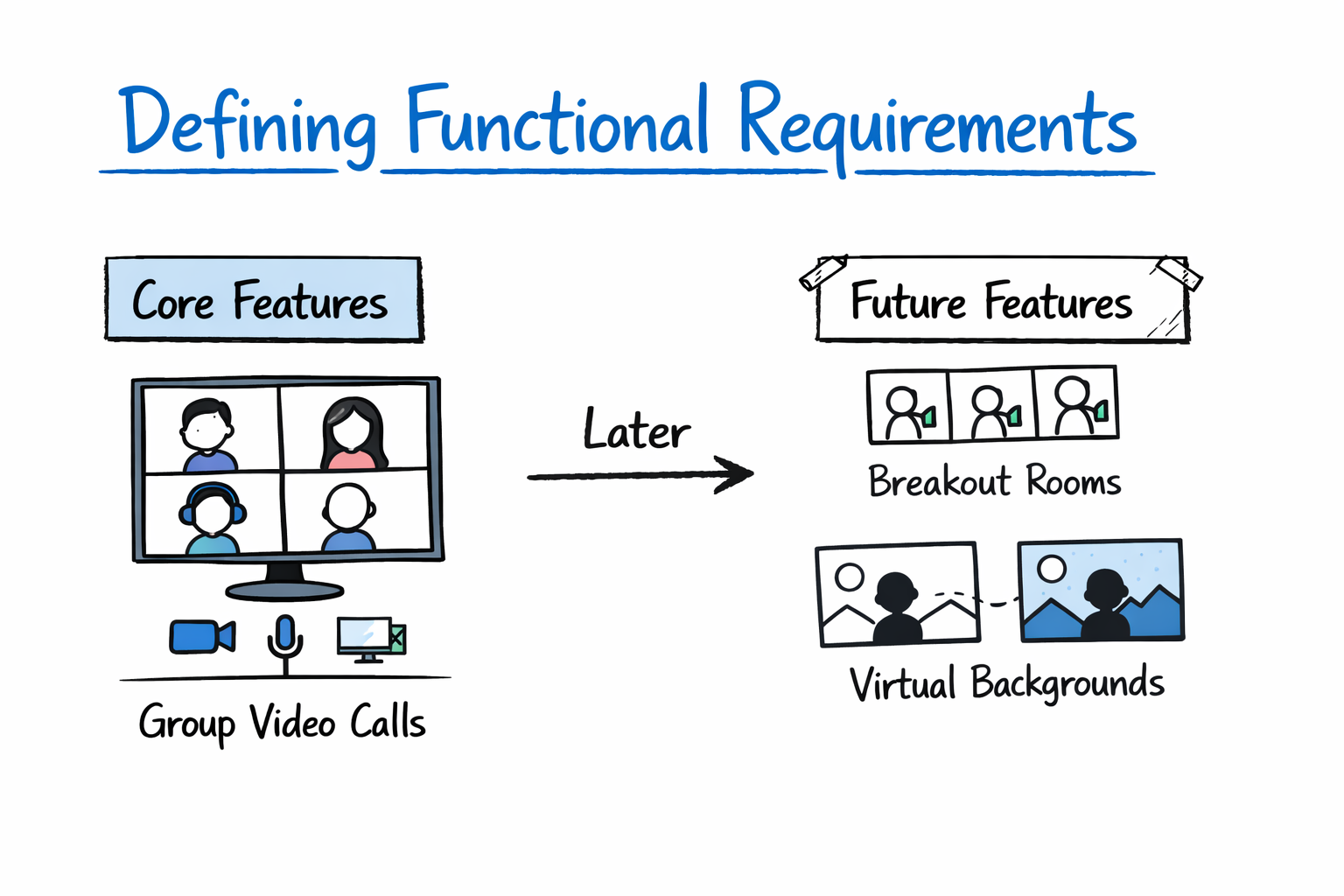
A strong Zoom System Design begins with clearly defined functional requirements. These requirements describe what the system must do from a user’s perspective, independent of how it is implemented.
Rather than overwhelming the design with every possible feature, interviewers expect you to define a reasonable initial scope. For Zoom, that typically means focusing on group video calls and deferring advanced features such as breakout rooms or virtual backgrounds.
The following table outlines the essential functional requirements for a Zoom-like system.
Function | User Expectation |
Meeting creation | Users can create meetings and generate join links |
Meeting participation | Users can join meetings with audio and video |
Media exchange | Participants can send and receive audio and video streams |
Screen sharing | Users can share screens during meetings |
Participant control | Hosts can mute, unmute, and manage participants |
Recording access | Users can record meetings and access recordings later |
Stating these requirements explicitly demonstrates structured thinking and prevents the design discussion from drifting into unnecessary complexity.
System Design Deep Dive: Real-World Distributed Systems

Modern software systems are expected to operate at a massive scale while meeting strict reliability and latency requirements. Whether it’s a feed refresh, a payment request, or a real-time analytics query, users expect systems to respond instantly and consistently. That expectation has raised the bar for engineers today, understanding that System Design isn’t optional. It’s a core skill for building and evaluating production-grade systems. I built this course from my experience working on large-scale distributed systems at Microsoft (Azure) and Meta (Scuba), and from interviewing hundreds of candidates across both companies. The pattern I kept seeing was this: candidates understood individual components, but struggled to combine them into a coherent system. They knew what a cache or load balancer was, but not when or why to use it. This course is designed to bridge that gap. We start with the foundational building blocks of System Design, including databases, caching layers, load balancing, and messaging systems, and focus on how they interact under real-world constraints. From there, we analyze systems built by companies like Google, Facebook, and Amazon, breaking them down to understand the trade-offs behind each design decision. The goal is not just to learn concepts, but to develop the ability to reason through them in practice. This approach has helped a large number of engineers build stronger intuition for System Design and perform better in interviews. If you want to understand how real systems are designed and be able to design them yourself, this course gives you a clear, practical path forward.
Non-Functional Requirements#
While functional requirements define what the system does, non-functional requirements define how well it must do it. This is where Zoom System Design becomes genuinely challenging.
Unlike many backend systems, Zoom is extremely sensitive to performance. Latency, jitter, and packet loss directly affect the user experience. A system that is technically correct but slow is effectively unusable.
The table below captures the most important non-functional requirements and why they matter.
Requirement | Why It Matters |
Ultra-low latency | Conversations must feel natural and uninterrupted |
High availability | Meetings are time-sensitive and cannot easily be retried |
Global scalability | Millions of users across continents must be supported |
Fault tolerance | Single failures should not end active meetings |
Security and privacy | Sensitive conversations must remain protected |
Surfacing these constraints early shows interviewers that you understand the real-world pressures shaping the architecture.
High-Level Architecture Overview#
At a high level, Zoom is best designed as a distributed, globally deployed system with clear separation of responsibilities. One of the most important architectural insights is recognizing that signaling traffic and media traffic are fundamentally different and should be handled separately.
The core architectural components of a Zoom-like system can be summarized as follows.
Component | Responsibility |
Client applications | Capture, encode, decode, and render media |
Signaling servers | Manage sessions, authentication, and meeting state |
Media servers | Route and optimize audio and video streams |
Messaging services | Handle chat and control messages |
Recording services | Capture and store meeting recordings |
Storage systems | Persist recordings and metadata |
Separating signaling from media handling is a critical design decision. Control messages require reliability and consistency, while media streams demand ultra-low latency and adaptive behavior. Mixing them would create unnecessary coupling and performance issues.
Scalability & System Design for Developers

As you progress in your career as a developer, you'll be increasingly expected to think about software architecture. Can you design systems and make trade-offs at scale? Developing that skill is a great way to set yourself apart from the pack. In this Skill Path, you'll cover everything you need to know to design scalable systems for enterprise-level software.
Client-Side Responsibilities in Zoom System Design#
In Zoom System Design, the client is far more than a passive consumer of video streams. Modern video conferencing systems push significant responsibility to the client to improve scalability and performance.
Clients are responsible for capturing raw audio and video from hardware devices, encoding that media using efficient codecs, and adapting bitrate and resolution based on network conditions. They must also decode incoming streams and render them smoothly on screen.
This design choice has important implications. By offloading encoding and some optimization to clients, Zoom reduces server load and avoids becoming a centralized bottleneck. At the same time, clients must be robust enough to handle fluctuating bandwidth and packet loss without crashing or freezing.
This balance between client intelligence and server assistance is a recurring theme in strong System Design answers.
Signaling and Session Management#
Signaling is the control plane of the Zoom system. It handles everything that is not raw media. This includes user authentication, meeting creation, participant lists, permissions, and role changes.
Unlike media streaming, signaling traffic is relatively lightweight and not extremely latency-sensitive. Reliability and consistency are far more important than speed, measured in milliseconds. As a result, signaling is typically implemented using traditional APIs or persistent connections that can survive transient network issues.
The table below highlights the distinction between signaling and media traffic.
Aspect | Signaling | Media |
Data size | Small messages | Large continuous streams |
Latency sensitivity | Moderate | Extremely high |
Reliability | Critical | Best-effort with adaptation |
Failure impact | Loss of control | Immediate UX degradation |
Making this distinction explicit shows interviewers that you understand the different performance characteristics within the same system.
Media Streaming Architecture#
Media streaming is the most complex and performance-critical part of Zoom System Design. This is where architectural trade-offs become unavoidable.
For very small meetings, peer-to-peer communication can work. However, as the number of participants grows, pure peer-to-peer approaches quickly become impractical. Each participant would need to send and receive streams from every other participant, causing bandwidth usage to grow exponentially.
Zoom addresses this by using media servers that receive streams from participants and forward them intelligently. These servers act as intermediaries, reducing bandwidth requirements and enabling centralized optimization.
The table below compares common media routing approaches.
Approach | Strengths | Limitations |
Peer-to-peer | Low server cost for small calls | Does not scale beyond a few users |
Centralized media server | Simplified routing | The server becomes a bottleneck |
Selective forwarding units | Efficient scaling and flexibility | Increased system complexity |
Zoom’s design favors server-assisted routing with selective forwarding, which allows the system to scale while maintaining acceptable latency.
Handling Audio and Video Streams Differently#
A key insight in Zoom System Design is that audio and video do not have equal importance. Humans are far more sensitive to audio delay than to reduced video quality. A frozen video with clear audio is tolerable. Clear video with delayed audio is not.
As a result, Zoom prioritizes audio packets over video packets and dynamically adjusts video quality when network conditions degrade. Adaptive bitrate algorithms continuously monitor packet loss, latency, and jitter, scaling video resolution up or down as needed.
This prioritization ensures that conversations remain intelligible even when network conditions are poor. Designing for graceful degradation is one of the strongest signals of real-world engineering maturity.
Scaling Large Meetings and Webinars#
Supporting hundreds or thousands of participants introduces a new layer of complexity. Sending every participant’s video to every other participant would overwhelm both clients and servers.
Zoom addresses this challenge by limiting which streams each participant receives. Typically, users see high-quality video only from active speakers, while other participants’ video is downscaled or omitted entirely.
To handle very large meetings, Zoom may also use hierarchical media server deployments, where streams are distributed across multiple layers of servers. This prevents any single server from becoming a bottleneck and allows the system to scale horizontally.
These strategies illustrate a broader principle in System Design: optimize for perceived experience rather than theoretical completeness.
Chat, Reactions, and Control Messages#
Chat messages, reactions, and participant controls might seem trivial compared to video streaming, but they introduce different consistency requirements. Users expect chat messages to be delivered reliably and in order, even if they arrive slightly later.
Because these features are not latency-critical in the same way as audio, they are typically handled by separate services. This decoupling keeps the media pipeline focused on real-time performance while allowing chat services to prioritize durability and consistency.
This separation also improves maintainability and enables independent scaling of different system components.
Recording and Playback Architecture#
Recording adds another dimension to Zoom System Design. The system must capture media streams without disrupting live meetings, store large video files efficiently, and support playback and downloads.
Recording is often handled asynchronously by dedicated services that subscribe to media streams. These services can composite audio and video, encode recordings in standard formats, and upload them to persistent storage.
By isolating recording from live media routing, Zoom ensures that recording failures do not affect active meetings, a critical reliability consideration.
Global Deployment and Latency Optimization#
Zoom operates on a global scale, making geographic distribution essential. To minimize latency, users are connected to the nearest data center whenever possible. Media servers are deployed regionally, and traffic is dynamically routed based on network conditions.
This global architecture reduces round-trip times and improves call quality. It also adds complexity in terms of synchronization, failover, and monitoring. However, without geographic distribution, real-time communication at scale would be impossible.
Failure Handling and Reliability#
Failures are inevitable in distributed systems, especially real-time ones. A robust Zoom System Design anticipates failures and minimizes their impact.
Common failure scenarios include server crashes during meetings, network partitions, and client disconnects. Techniques such as stateless signaling servers, redundant media servers, and automatic reconnection logic allow meetings to recover gracefully rather than failing catastrophically.
Designing for failure is not optional in real-time systems. It is a core requirement.
Security and Privacy Considerations#
Security is critical for a platform like Zoom. Meetings often involve sensitive business discussions, personal conversations, or confidential data.
A high-level System Design should address encryption of media streams, secure key exchange, access control for meetings, and protection against unauthorized joins. Even without diving into cryptographic details, acknowledging these concerns demonstrates real-world awareness.
How Interviewers Evaluate Zoom System Design Answers#
When interviewers ask about Zoom System Design, they are not testing your knowledge of specific codecs or protocols. They are evaluating how you reason about real-time constraints, how you decompose complex systems, and how clearly you communicate trade-offs.
Strong answers focus on architecture, priorities, and failure handling rather than exhaustive technical detail. Clear thinking consistently matters more than naming specific technologies.
Final Thoughts#
Zoom System Design is challenging precisely because it exposes weaknesses in superficial System Design thinking. You cannot hide behind databases and queues when milliseconds matter.
A strong answer emphasizes real-time media flow, separation of concerns, adaptive behavior under poor network conditions, and graceful failure handling. If you approach the problem as a structured journey rather than a diagram dump, you demonstrate the engineering judgment that interviewers value most.
