Flutter coding interview questions
Flutter interviews test deep understanding of Flutter’s architecture, state management, and performance—not just UI building. Strong candidates show clear reasoning, clean widgets, and real-world experience avoiding common pitfalls.
Senior Flutter interviews are evaluated as architectural judgment exercises, not widget syntax tests. Interviewers assess whether you can reason about Flutter's rendering pipeline, state ownership, and async resilience the way you would in a real production codebase.
Core principles
- Rendering mental model: Flutter's three-tree architecture (widget, element, and render object) means rebuilding widgets is cheap, but layout and paint work carries real frame budget cost.
- State ownership: Ephemeral state belongs close to the widget that needs it, while shared or long-lived state belongs above the UI layer where it can be tested and observed independently.
- Async error handling: Loading, success, and error states should be modeled explicitly so that async failures never leave the widget tree in an inconsistent or silent state.
- Performance profiling: Strong candidates reference concrete tools like Flutter DevTools, the widget rebuild profiler, and the 16ms frame budget rather than offering generic optimization advice.
- Accessibility as a constraint: Semantic widgets, predictable focus order, sufficient contrast, and minimum hit-target sizes should be treated as System Design requirements from the start, not retrofitted after the UI is built.
Flutter coding interviews rarely focus on how fast you can draw pixels on the screen. What interviewers are really evaluating is whether you understand how Flutter works under the hood, how you structure apps for growth, and how you reason about performance, correctness, and resilience when things go wrong. At senior levels, Flutter interviews look less like UI exercises and more like system design discussions constrained to a client runtime.
This blog reframes common coding interview questions as architectural conversations. Instead of memorizing APIs, you’ll learn the mental models interviewers expect—and how to articulate them clearly under time pressure.
Grokking the Coding Interview Patterns
I created Grokking the Coding Interview because I watched too many talented engineers fail interviews they should have passed. At Microsoft and Meta, I saw firsthand what separated the candidates who succeeded from the ones who didn't. It wasn't how many LeetCode problems they'd solved. It was whether they could look at an unfamiliar problem and know how to approach it the right way. That's what this course teaches. Rather than throwing hundreds of disconnected problems at you, we organize the entire coding interview around 28 fundamental patterns. Each pattern is a reusable strategy. Once you understand two pointers, for example, you can apply them to dozens of problems you've never seen before. The course walks you through each pattern step by step, starting with the intuition behind it, then building through increasingly complex applications. As with every course on Educative, you will practice in a hands-on way with 500+ challenges, 17 mock interviews, and detailed explanations for every solution. The course is available in Python, Java, JavaScript, Go, C++, and C#, so you can prep in the language you'll actually use in your interview. Whether you're preparing for your first FAANG loop or brushing up after a few years away from interviewing, this course will give you a repeatable framework for cracking the coding interview.
What Flutter coding interviews really test#
At a high level, Flutter interviews test whether you can build maintainable, performant, and testable applications, not just demos. Interviewers are listening for how you reason about trade-offs, explain constraints, and recover when requirements change mid-discussion.
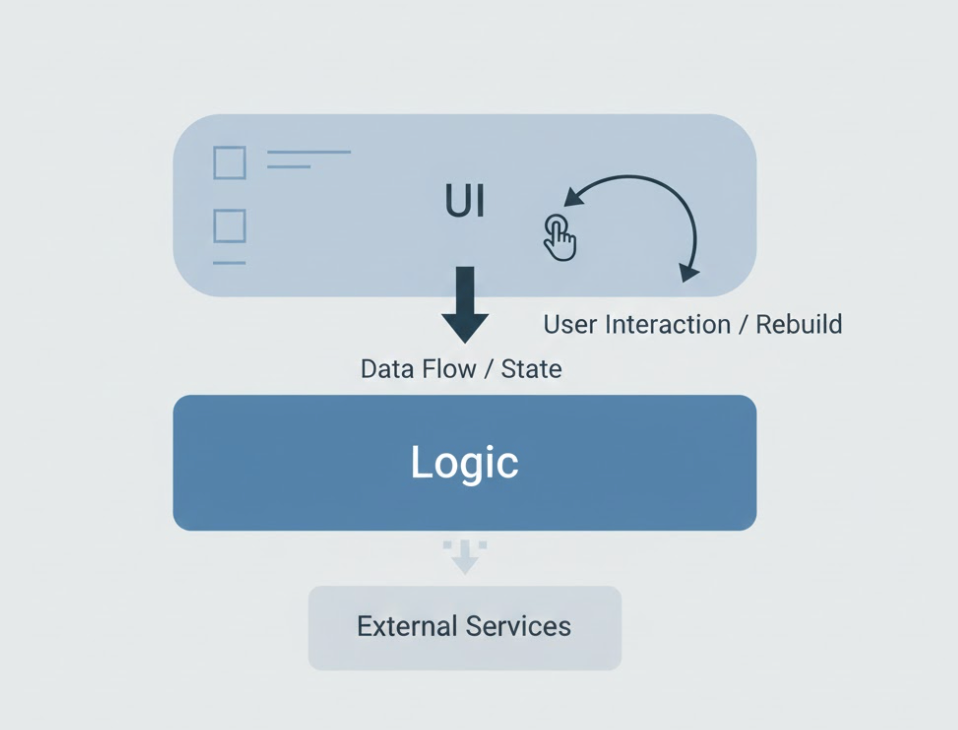
Strong candidates demonstrate confidence across several dimensions. They understand Flutter’s rendering and rebuild model well enough to predict performance behavior before running code. They can explain how data flows through an app, where state should live, and how that state evolves over time. They also show awareness of accessibility, async failure handling, testing strategy, and debugging workflows—because those concerns dominate real Flutter work far more than widget syntax.
What interviewers are actually testing
Whether you understand Flutter as a reactive UI system with lifecycle, constraints, and costs—not just a widget toolkit.
Flutter’s rendering and rebuild mental model#
A deep understanding of Flutter’s rendering pipeline is one of the strongest senior signals in interviews. Flutter’s UI is built on three tightly connected trees, and explaining how they interact demonstrates that you can reason about rebuilds, state retention, and performance costs instead of relying on trial and error.
The widget tree is declarative and immutable. Widgets describe what the UI should look like at a given moment, not how it is rendered. Because widgets are cheap, Flutter encourages frequent rebuilds—but only when rebuilds are scoped narrowly. Interviewers listen closely for whether you understand that rebuilding widgets is not inherently expensive.
The element tree is where identity and continuity live. Elements connect widgets to render objects and preserve state across rebuilds. This is why keys matter: they instruct Flutter how to reconcile old and new widget configurations. Incorrect key usage often leads to bugs like lost state, flickering UI, or broken animations—issues that surface quickly in interviews.
The render object tree is where work becomes expensive. Layout, painting, and hit testing happen here, and these operations are bounded by the frame budget. Excessive layout passes or unnecessary paints are common causes of jank.
Tree | Responsibility | Cost characteristics |
Widget tree | UI configuration | Cheap to rebuild |
Element tree | Identity and lifecycle | Medium |
RenderObject tree | Layout and paint | Expensive |
A strong answer sounds like this:
“I’m comfortable rebuilding widgets often, but I design my widget boundaries to minimize layout and paint work.”
State management and data flow#
State management questions are high-signal because they reveal how you think about ownership, isolation, and testability. Interviewers are less interested in which package you use and more interested in how you prevent state from becoming tangled across the UI.
Local, ephemeral state belongs as close as possible to the widget that owns it—things like text field input, animation controllers, or scroll position. Shared or long-lived state belongs above the UI layer, where it can be tested independently, reused across screens, and observed predictably. Side effects such as network calls, persistence, and analytics should be coordinated by controllers or services, not triggered inside build().
Strong candidates can articulate why certain patterns fit certain scopes:
Pattern | Strength | Trade-off |
Provider | Simple and familiar | Can become implicit at scale |
Riverpod | Explicit and testable | Higher conceptual overhead |
BLoC / Cubit | Predictable state transitions | More boilerplate |
MobX / GetX | Fast iteration | Hidden coupling and magic |
Common pitfall:
Choosing a state library first and then forcing the app to fit it.
Navigation and app structure#

Navigation questions test whether you can reason about app-wide state and flows. While small apps can rely on Navigator 1.0 imperatively, larger applications benefit from treating navigation as part of state.
Interviewers expect you to understand deep linking, back-stack restoration, and how navigation interacts with authentication, onboarding, or feature flags. A thoughtful answer explains why route state often belongs alongside domain state and how declarative routing simplifies reasoning about edge cases like app restarts.
Accessibility as a system requirement#
Accessibility is no longer optional, and Flutter interviews increasingly reflect that reality. Interviewers expect you to treat accessibility as a system-level constraint, not a post-hoc checklist.
Strong candidates talk about accessibility as part of component design: semantic widgets by default, meaningful labels, predictable focus order, sufficient contrast, and minimum hit-target sizes. They also understand how async UI updates should be announced to screen readers without overwhelming users.
What interviewers are testing:
Whether accessibility remains intact as the UI grows and refactors—not just whether you know the APIs.

Get ready to unlock the potential of Flutter and Dart as you learn to craft visually stunning and high-performance applications for both Android and iOS. This course will teach you to plan, build, and deploy interactive Flutter applications. You’ll start by developing user interfaces and handling gestures. Next, you’ll explore navigation and routing to smoothly move around your app. You’ll then dive into networking and HTTP to connect your app to the internet and implement data persistence. You’ll use Firebase services for authentication and storing data. State management comes next, helping you manage the different pieces of your app efficiently. Then, you’ll focus on testing, analytics, and crash reporting. You’ll then explore accessibility and internationalization, making your app usable by everyone and suitable for different languages. Lastly, you’ll learn app deployment. The course wraps up with a project: you will create an online furniture store, combining all the skills you’ve learned.
Typical live coding prompt walkthrough#
Live coding prompts in Flutter interviews test how you think under constraints. A common task is building a searchable, paginated list with a detail view and local persistence.
Strong candidates begin by clarifying requirements and sketching structure: where state lives, how pagination works, how errors surface, and how loading states behave. They separate UI from logic early and design with testability in mind, even if tests are not written during the session.
A strong interview move:
Explicitly stating trade-offs and deferring non-essential features to keep the solution clean.
Common pitfalls and how to avoid them#
Most Flutter interview failures stem from architectural blind spots rather than syntax errors. Doing heavy work inside build(), rebuilding entire subtrees unnecessarily, or forgetting to dispose of controllers and streams all signal limited lifecycle awareness.
The deeper issue is misunderstanding where work belongs. Rendering code should describe UI, not orchestrate logic. Async operations should expose state, not trigger side effects directly.
Quick recap of avoidable mistakes
Heavy computation in
build()Unscoped rebuilds
Missing disposal of resources
Overuse of
GlobalKeyIgnoring error and empty states
Performance profiling and debugging in Flutter#
Performance questions separate intermediate from senior candidates. Interviewers want to hear how you measure performance, not just how you guess at fixes.
Flutter DevTools is central here. Strong answers reference the widget rebuild profiler, frame rendering charts, and timeline events. You should understand the 16ms frame budget, how missed frames manifest as jank, and how rebuilds, layouts, and paints contribute differently to frame cost.
Candidates who stand out can walk through how they would diagnose a slow screen step by step rather than jumping to optimizations.
Scalable Flutter app architecture and folder structure#
As Flutter apps grow, structure matters more than individual widgets. Interviewers expect you to reason about feature boundaries, ownership, and dependency direction.
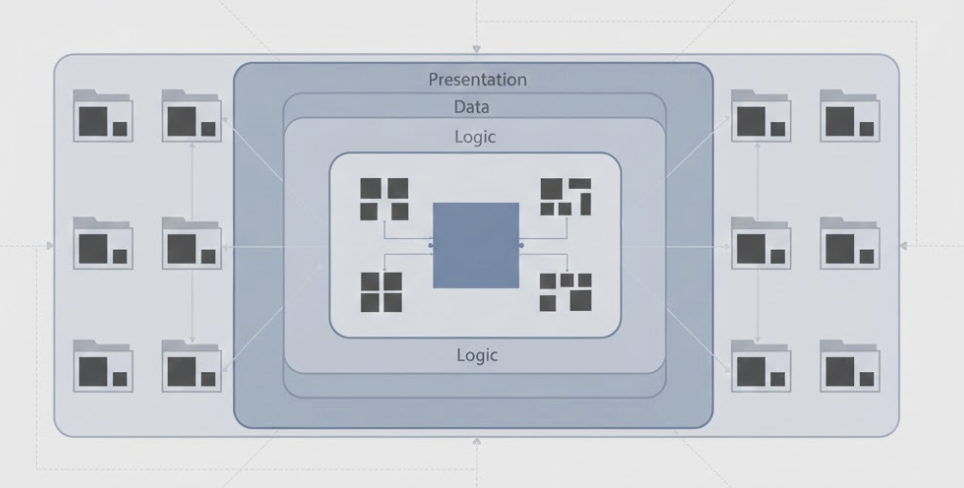
Feature-based folder structures scale better than layer-based ones because they keep related UI, state, and logic together. Shared services—API clients, analytics, persistence—should remain centralized, while feature state stays close to its domain.
Trade-off to mention:
Feature-based organization improves scalability but requires discipline around shared abstractions.
Async error handling and resilience#
Async handling is one of the most underestimated Flutter interview topics. Widgets like FutureBuilder and StreamBuilder are easy to misuse, especially when failures are treated as rare edge cases.
Strong designs model loading, success, and error states explicitly. They support retries, cancellation, graceful degradation, and offline-friendly behavior where appropriate. Async failures should not crash the widget tree or leave the UI in an inconsistent state.
Common pitfall:
Assuming Futures only fail during development, not in production.
What impresses Flutter interviewers#
Flutter interviewers are impressed by candidates who reason clearly, not quickly.
At a senior level, interviewers are not scoring you on how many Flutter APIs you can recall. They are listening for signals that you can own a Flutter codebase over time, make trade-offs under pressure, and explain your decisions in a way that other engineers can trust.
One of the strongest signals is having crisp mental models. Candidates who can explain why rebuilding widgets is cheap but layout is expensive, or why certain state belongs above the widget tree, come across as calm and deliberate. This kind of reasoning shows that you are not guessing—you are predicting system behavior.
Another key signal is intentional state ownership. Strong candidates talk naturally about where state lives, who owns it, and how it changes. They avoid vague phrases like “just put it in a provider” and instead describe how state is scoped to a feature, how it is tested, and how it avoids leaking across screens.
Performance awareness is also a major differentiator. Interviewers are impressed when you reference concrete tools and metrics—DevTools, rebuild counts, frame timing—rather than generic advice like “optimize rebuilds.” Walking through how you would debug a slow screen step by step often matters more than fixing the issue during the interview.
Accessibility shows maturity. Candidates who treat semantics, focus order, and contrast as first-class design constraints—not afterthoughts—signal that they have built apps for real users. This is especially important for roles at companies with large or diverse user bases.
Finally, composure matters. Flutter interviews often introduce ambiguity or change requirements mid-stream. Candidates who pause, restate assumptions, and adapt their design without becoming defensive stand out immediately. Calm handling of async failures, error states, and edge cases communicates senior-level confidence.
Strong signals interviewers consistently notice:
Clear, predictive mental models of rendering and rebuilds
Explicit reasoning about state ownership and boundaries
Performance decisions grounded in measurement, not instinct
Accessibility treated as a system requirement
Structured handling of async errors and partial failure
Willingness to explain trade-offs instead of chasing perfection
Final thoughts#
Flutter coding interviews are less about memorizing widgets and more about demonstrating architectural judgment. When you understand how Flutter renders, how state flows, and how real apps fail, your answers become clearer, calmer, and more convincing.
Happy learning!
Flutter coding interviews are less about memorizing widgets and more about demonstrating architectural judgment. When you understand how Flutter renders, how state flows, and how real apps fail, your answers become clearer, calmer, and more convincing.
Happy learning!
