
If you want to learn C or C++, you have many options. You can start with beginner-friendly courses offered by platforms like Educative, attend coding boot camps, or even pursue online degree programs. Each resource offers unique benefits and can help you build a strong foundation in these programming languages.
Table of Contents
Learn C++ from scratch: The complete guide for beginners
24 mins read
Jun 09, 2026
Share
Note: This post was originally published in 2020 and has been updated as of Dec. 16, 2021.
Software development in C++ notoriously has a steep learning curve, but taking the time to learn to code in this language will do wonders for your career and will set you apart from other developers. You’ll have an easier time picking up new languages, you’ll form real problem-solving skills, and build a solid foundation on the fundamentals of programming and software engineering.
C++ will help you instill good programming habits (i.e. clear and consistent coding style, comment the code as you write it, and limit the visibility of class internals to the outside world), and because there’s hardly any abstraction, you’re required to define just about every attribute to make your code work.
In this post, we will guide you through a beginner’s roadmap to learn to code in C++, ensuring you feel confident as you embark on this exciting journey.
Here’s what we’ll cover today:
- Brief history of C++
- Overview of C++ tools and software
- Introduction to C++ language and syntax
- C++ frequently asked questions
- Next steps
Let’s get started!
Get hands-on with C++ today.
Learn C++
This beginner-friendly course teaches C++ through a practical, hands-on approach. You’ll begin by learning how to communicate with the machine through input/output, simple calculations, and variables. Then, you’ll build programs to make decisions and repeat actions using conditionals and loops. You’ll also practice prompting AI to generate, refine, and debug code, building syntax skills and confidence with AI-enabled workflows. As you progress, you’ll learn how to organize your code using functions, store data with arrays and vectors, and apply your knowledge by building mini projects like a number guessing game and a contact book. These exercises are designed to help you build confidence and reinforce your understanding. In the final section, you’ll build a complete project that combines all your skills in a creative, interactive program. Whether starting a tech career or just curious about coding, this course will give you a solid foundation in procedural C++ programming.
Brief history of C++#
A great way to get started with C++ is to learn about its history. C++ is one of the oldest programming languages, so there are many different versions. Having a sense of this history will situate you in the community of C++ programmers and give you a sense of its capabilities.
The C++ programming language was invented in 1979 by Bjarne Stroustrup while working on his PhD thesis at Bell Labs. C++ was designed to be an extension of the programming language C, hence its original name, “C with Classes”. Stroustrup’s goal was to add flexibility and OOP (object-oriented programming) to the C language. He included features such as classes, strong type checking, default function arguments, and basic inheritance. The name was changed to C++ in 1983, which derives from the ++ operator.
C++ was released for commercial use in 1985, but it was not yet standardized. In 1990, Borland’s Turbo C++ compiler was released, which added many new features. The first international standard for C++ was published in 1998, known as C++98.
This included The Standard Template Library, providing common programming functions and data structures. Based on feedback, the committee revised those standards in 2003, and the updated language was renamed to C++03.
The language saw another revision in 2011 when C++11 was completed. This version includes features such as Regex support, new libraries, new syntax for loops, the auto keyword, and new container classes, amongst other things. Since that time, two more revisions have been released, C++14 and C++17.
Learning Modern C++: C++17 and C++20#
If you're learning C++ today, you're not learning the same language that developers used in the 1990s or early 2000s. Modern C++ has evolved significantly through standards such as C++11, C++14, C++17, and C++20, introducing features that make code safer, cleaner, and easier to maintain.
This is important because many beginner tutorials still teach older C++ patterns that are rarely recommended for new projects. While you'll encounter legacy code during your career, most modern development teams expect developers to understand contemporary C++ practices and use the standard library effectively.
The good news is that modern C++ is often easier to learn than older C++ because it removes much of the manual memory management and repetitive code that made the language intimidating for beginners.
If you're learning C++ today, target C++17 first and become familiar with major C++20 features.
Why Modern C++ matters#
Modern C++ has become the standard across industries ranging from game development and finance to embedded systems and cloud infrastructure.
There are several reasons beginners should focus on modern C++:
Most production codebases use C++17 or newer.
Technical interviews increasingly expect familiarity with modern syntax.
Modern features reduce common programming mistakes.
Smart pointers help prevent memory leaks.
The language is more expressive and easier to read.
Modern code is generally easier to maintain and scale.
Learning modern practices from the beginning helps you avoid habits that you'll later need to unlearn.
Traditional C++ vs Modern C++#
Traditional C++ | Modern C++ | Why it matters |
Raw pointers (new / delete) | Smart pointers (std::unique_ptr) | Reduces memory leaks and ownership bugs |
Manual loops with indices | Range-based for loops | Cleaner and less error-prone |
Explicit type declarations everywhere |
type inference | Improves readability and reduces repetition |
Macros (#define) |
| Safer compile-time constants |
C-style arrays |
| Dynamic sizing and safer memory management |
Manual resource cleanup | RAII | Automatic resource management |
Function pointers | Lambda expressions | More flexible and readable callbacks |
auto age = 25;auto price = 19.99;auto name = std::string("Alice");
This reduces verbosity and makes code easier to refactor. Most modern C++ codebases use auto extensively.
2. Range-based for loops#
Instead of manually managing loop counters, you can iterate directly over elements.
#include <vector>#include <iostream>int main() {std::vector<int> numbers{1, 2, 3, 4, 5};for (int number : numbers) {std::cout << number << " ";}}
This approach is shorter, easier to read, and avoids indexing mistakes.
3. Smart pointers#
Smart pointers automatically manage memory and eliminate many common memory bugs.
#include <memory>auto ptr = std::make_unique<int>(42);
The two most important smart pointers are:
std::unique_ptr— single ownerstd::shared_ptr— shared ownership
For most beginners, std::unique_ptr should be the default choice.
4. Lambda expressions#
Lambdas allow you to define small functions inline.
auto square = [](int x) {return x * x;};std::cout << square(5);
They're commonly used with STL algorithms and event-driven programming.
5. std::optional#
Sometimes a function may or may not return a value. Traditionally, developers used special values such as -1 or nullptr.
Modern C++ provides a safer alternative:
#include <optional>std::optional<int> findUser() {return 42;}
std::optional makes missing values explicit and improves code clarity.
What's new in C++20?#
C++20 introduced some of the largest language improvements since C++11.
As a beginner, you don't need to master these immediately, but you should know why they exist.
Concepts#
Concepts improve template error messages and make generic code easier to understand.
They help developers express requirements more clearly when writing reusable libraries.
Ranges#
Ranges simplify data processing by making algorithms more readable and composable.
Instead of manually creating loops, developers can chain operations together in a more declarative style.
Coroutines#
Coroutines provide a simpler way to write asynchronous and concurrent code.
They make tasks like networking, event processing, and asynchronous workflows easier to express.
Modules#
Modules are designed to replace traditional header files and improve compilation times.
They also reduce dependency-management complexity in large projects.
Old vs modern code examples#
Manual memory management#
Old style#
int* ptr = new int(42);// Use pointerdelete ptr;
Modern style#
auto ptr = std::make_unique<int>(42);
for (int i = 0; i < vec.size(); i++) {std::cout << vec[i] << "\n";}
Modern style#
for (const auto& value : vec) {std::cout << value << "\n";}
The modern version is shorter, safer, and easier to read.
Should beginners learn old C++ first?#
No.
The best approach is to learn modern C++ from the start.
That doesn't mean you should ignore older syntax entirely. You'll eventually encounter legacy code that uses raw pointers, manual memory management, and older language patterns. Being able to read that code is valuable.
However, when writing new code, you should follow modern best practices whenever possible. This mirrors how most contemporary teams build and maintain C++ applications.
Recommended learning roadmap#
Beginner#
Start by building a solid foundation in the language.
Focus on:
Variables and data types
Functions
Classes and objects
std::vectorBasic STL usage
Intermediate#
Once you're comfortable with the fundamentals, learn the features that define modern C++.
Focus on:
Smart pointers
STL containers
Algorithms
Lambda expressions
Error handling
RAII
Advanced#
Finally, explore the topics used in large-scale and high-performance systems.
Focus on:
Concurrency and multithreading
Templates
Concepts
Coroutines
Performance optimization
Advanced STL techniques
A practical roadmap#
C++ Fundamentals↓Classes and OOP↓STL and Modern Features↓Smart Pointers and RAII↓Concurrency and Templates↓Modern C++ Engineering
Modern C++ is not just "new syntax"—it's a fundamentally better way to write C++. Features such as smart pointers, range-based loops, lambdas, and std::optional make programs safer, more expressive, and easier to maintain.
If you're starting your C++ journey today, learn C++17 as your foundation, stay aware of major C++20 features, and build habits around modern best practices from the very beginning. Future employers, open-source projects, and modern codebases will expect it.
C++ vs Python for beginners#
If you're just starting your programming journey, one of the first questions you'll encounter is whether to learn C++ or Python. Both are popular, widely used languages with strong communities, but they were designed with different goals in mind.
Python prioritizes simplicity and developer productivity. It allows beginners to write useful programs quickly with minimal syntax. C++, on the other hand, prioritizes performance and system-level control. It gives developers a deeper understanding of how software interacts with hardware, memory, and operating systems.
The good news is that there isn't a universally "correct" choice. The best language depends on your goals, interests, and the types of software you want to build.
C++ vs Python comparison#
Category | C++ | Python |
Learning curve | Steeper | Easier |
Syntax complexity | Higher | Lower |
Performance | Very high | Moderate |
Memory management | Developer has more control | Mostly automatic |
Development speed | Slower initially | Faster |
Job opportunities | Systems, gaming, finance, embedded systems | AI, data science, automation, web development |
Beginner friendliness | Moderate | High |
Game development | Widely used (Unreal Engine) | Limited |
AI and machine learning | Used for high-performance libraries | Dominant ecosystem |
Systems programming | Excellent | Limited |
Interview preparation | Strong focus on algorithms and data structures | Common but less systems-focused |
print("Hello, World!")
C++#
#include <iostream>int main() {std::cout << "Hello, World!" << std::endl;return 0;}
numbers = [1, 2, 3, 4, 5]for number in numbers:print(number)
C++#
#include <iostream>#include <vector>int main() {std::vector<int> numbers{1, 2, 3, 4, 5};for (int number : numbers) {std::cout << number << std::endl;}}
def square(x):return x * xprint(square(5))
C++#
#include <iostream>int square(int x) {return x * x;}int main() {std::cout << square(5) << std::endl;}
Both languages support functions in similar ways, but C++ requires explicit type declarations, while Python handles types dynamically.
Why many beginners start with Python#
Python has become one of the most popular first programming languages for a reason.
Its syntax is clean and easy to read, allowing beginners to focus on programming concepts rather than language details. The feedback loop is also fast—you can write a few lines of code and see results immediately without worrying about compilation.
Python also benefits from:
A massive beginner community
Thousands of learning resources
Strong support for automation, web development, and AI
Less boilerplate code than many other languages
For many learners, Python provides the quickest path from "I don't know how to code" to building useful projects.
Why learning C++ can make you a stronger programmer#
Although C++ is often harder to learn, it teaches concepts that many higher-level languages hide.
When you learn C++, you gain exposure to:
Memory management
Data structures and algorithms
Performance optimization
How software interacts with hardware
The fundamentals of operating systems and computer architecture
These concepts can make it easier to understand what's happening behind the scenes in other languages.
Many developers find that once they understand C++, learning languages such as Java, C#, Go, Rust, or Python becomes much easier.
Which language should you learn first?#
The answer depends on your goals.
Choose Python if:#
You want to learn programming quickly
You're interested in AI or machine learning
You want to automate tasks
You enjoy rapid prototyping
You want immediate productivity
Choose C++ if:#
You're interested in game development
You want to understand how computers work
You're preparing for technical interviews
You're interested in systems programming
You want to build performance-critical software
Neither choice is wrong—the best language is the one that aligns with your interests and keeps you motivated to learn.
Can you learn both?#
Absolutely.
Many developers start with Python because it's approachable and then learn C++ later when they want a deeper understanding of programming and computer systems.
At the same time, many computer science programs introduce C++ early because it teaches foundational concepts that apply across many languages.
The most important thing to remember is that you're not choosing a side. You're choosing a starting point.
If your goal is software engineering, learning both Python and C++ can be a powerful combination.
Python helps you move quickly and build projects, while C++ helps you understand performance, memory, and systems-level thinking.
Final takeaway#
The best first language isn't necessarily the easiest one—it's the one that helps you achieve your goals.
Python is excellent for beginners who want rapid results, while C++ provides a deeper understanding of how software works under the hood. Both are valuable, both are widely used, and both can lead to successful software engineering careers.
Ultimately, learning programming fundamentals matters far more than choosing the "perfect" first language. Once you understand variables, functions, loops, data structures, and problem-solving, learning additional languages becomes much easier.
Overview of C++ tools and software#
C++ is a high-level, general-purpose programming language created as an extension of the C programming language. It is known for its powerful features, including object-oriented programming (OOP), generic programming, and low-level memory manipulation capabilities.
C++ balances high-level abstraction and close-to-hardware control, making it suitable for various applications, such as system software, game development, embedded systems, and performance-critical applications. It remains a popular choice among programmers for its versatility and efficiency.
In order to properly make C++ programs, you’ll need to be familiar with a few tools and softwares: a text editor, a C++ compiler, a linker, and libraries.
Text Editors In order to write a C++ program, you need a text editor. Think of this as a blank Microsoft Word document; it is where you will actually write your code. Any text editor will do, and there are even some that come built into your computer, but we recommend using a text editor designed for coding. There are many options out there, but some of the most common text editors for C++ developers are:
-
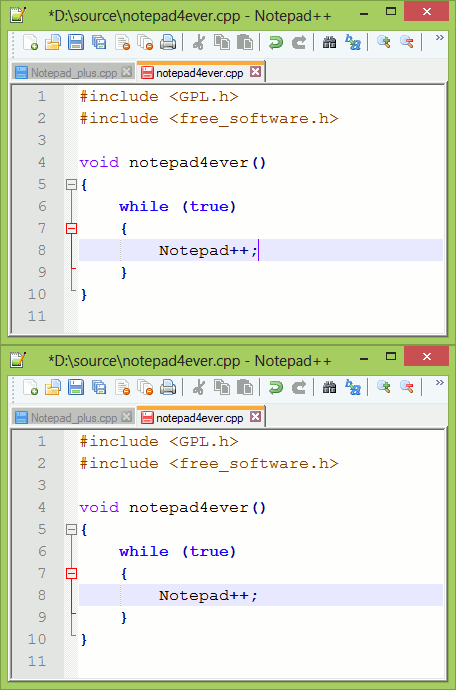
Notepad++: open-access, lightweight, simple
-
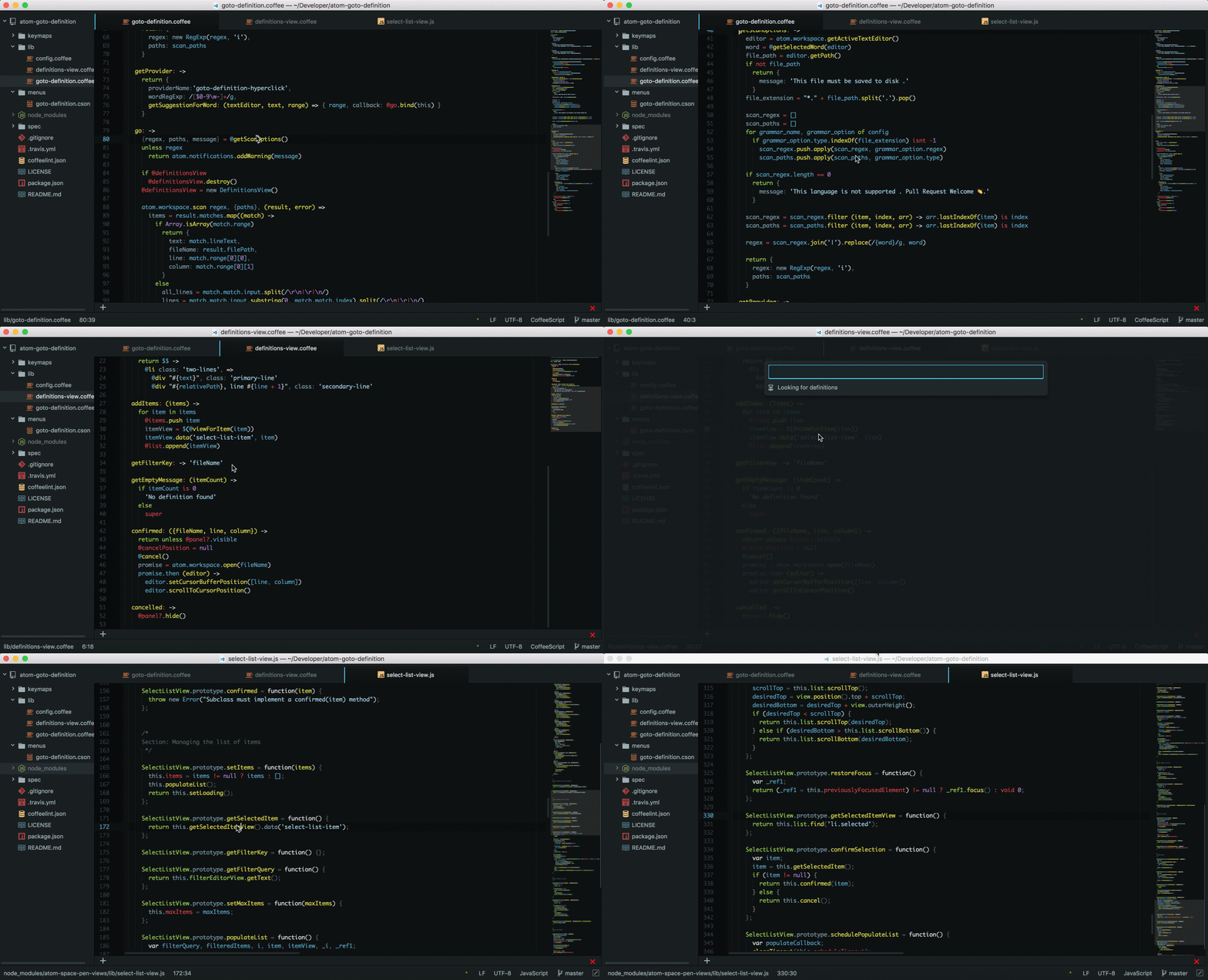
Atom: free, supports many languages, limited plugins
-
Sublime Text: $80, unique features, simple layout
-
Bluefish: lightweight, fast, multi-platform, supports many languages
Atom Source Image: https://github.blog/2022-06-08-sunsetting-atom/
Compilers#
A compiler goes through your source code to accomplish two important tasks: first, it checks that your code follows the C++ language rules; second, it translates your code into an object file. Some well-known compilers are GCC, Clang, and the Visual Studio C++ compiler. We don’t recommend Turbo C++, since it’s a bit out of date.
Linker#
Once the compiler does its magic, the object file is sent to a linker program which completes three tasks: first, it combines all your object files into a single program; second, it links library files to your program; and third, it exposes any cross-file naming or reference issues.
Libraries#
A library is essentially a prepackaged bundle of code that can be reused. The C++ library is called the C++ Standard Library, and this is linked to almost every C++ program. You can also add other libraries to your program if you have needs not met by the C++ Standard Library.
Integrated Development Environment (IDE)#
Many C++ programmers use a C++ IDE instead of a text editor and compiler. An IDE is a one-stop-shop for C++ programming. It includes a text editor, linker, compiler, and libraries. There is no right or wrong compiler to use. It all comes down to your needs and what layout is best for you. Some of the best C++ IDEs include:
- Code::Blocks: free, in-demand features, plugins by users
- Visual Studio Code: open source, great features, cross-platform
- Eclipse: open source, simple, cross-platform, need to install C++ components
For more of the top IDEs, check out our blog on the best 11 C++ IDEs for 2022.
Introduction to C++ language and syntax#
C++ is an object-oriented programming language. C++ programs are modeled around objects and classes, which you can control and manipulate by applying functions. OOP languages offer a clear structure to a program and help developers model real-world problems.
The language is designed to provide you with a lot of freedom and power, which is both good and bad. You’re in full control of how your system utilizes resources; there is no automatic memory management like in Java.
You have the ability to choose between how memory is allocated (i.e. stack or heap); there is no interpreter in C++ to stop you from writing buggy code.
In order to get started with C++, you need to familiarize yourself with the syntax. This will pave the way for the rest of your C++ journey and help you create optimized programs that are safe and bug-free.
Enjoying the article? Scroll down to sign up for our free, bi-monthly newsletter.
Let’s look at some C++ code!#
Looking at the code below, you may be wondering what all this is and what it means. Welcome to C++ syntax.
What is syntax?
Syntax is like the grammar of a programming language. It is the basic foundation for everything you’ll write in C++.
These are the rules that define how you write and understand C++ code. Let’s look at an example of some code to familiarize ourselves with the syntax.
The syntax explained
#include <iostream> is a header file library. A header file imports features into your program. We’re basically asking that the program copy the content from a file called <iostream>. This stands for input and output stream, and it defines the standards for the objects in our code.
using namespace std means that we are using object and variable names from the standard library (std). This statement is often abbreviated with the keyword std and the operator ::. The int main ( ) is used to specify the main function.
It is a very important part of C++ programs. A function essentially defines an action for your code. Anything within the curly brackets { } will be executed.
cout is an object (pronounced see - out). In this example, it defines our outputs: the strings of words. We write a new object using cout on the second line. The character \n makes the text execute on a different line.
Including two \n\n creates a blank space. By writing return 0, we are telling the program that nothing will return. We are only outputting strings of text. Note that we use the << operator to name our objects. The semi colon ; functions like a period.
Get hands-on with C++ today.
Learn C++
This beginner-friendly course teaches C++ through a practical, hands-on approach. You’ll begin by learning how to communicate with the machine through input/output, simple calculations, and variables. Then, you’ll build programs to make decisions and repeat actions using conditionals and loops. You’ll also practice prompting AI to generate, refine, and debug code, building syntax skills and confidence with AI-enabled workflows. As you progress, you’ll learn how to organize your code using functions, store data with arrays and vectors, and apply your knowledge by building mini projects like a number guessing game and a contact book. These exercises are designed to help you build confidence and reinforce your understanding. In the final section, you’ll build a complete project that combines all your skills in a creative, interactive program. Whether starting a tech career or just curious about coding, this course will give you a solid foundation in procedural C++ programming.
C++ terms and vocabulary#
Now that we have a sense of what C++ code looks like, let’s define some of the terms we mentioned and introduce you to a few more.
Keywords#
Keywords are predetermined names that can be used to identify things in your code. Keywords are identifiers for particular objects, variables, or actions. You can also make your own keywords. Here are a few examples of keywords:
gotofloatpublicclass(1)int
Variables#
Variables are like containers that store values. To declare a variable, you must give it a value and a type using the correct keyword. All variables in C++ need a name, or identifier. There are some basic syntax rules to follow when making identifiers.
- Names are case sensitive
- Names can contain letters, numbers, and underscores
- Names must begin with a letter or an underscore
- Names cannot contain whitespaces or special characters (!, #, @, etc.)
- Names cannot use reserved keywords
There are six different types of variables:
int myNum = 5;               // Stores integers (whole numbers)
float myFloatNum = 5.99;     // Stores decimals loating point number
double myDoubleNum = 9.98;   // Floating point number
char myLetter = 'D';         // Stores single characters
bool myBoolean = true;       // Stores Boolean, values with a true or false state
string myText = "Hello";     // Stores strings of text
Data types#
Data types are the classifications for different kinds of data you can use in a program. Data types tell our variables what data they can store. There are three data types in C++:
- Primitive data types: these are the built-in data that you can use to declare variables. They include
integer,character,boolean,floating point,double floating point,void, andwide character. - Derived data types: these are derived from the primitive data types. They include
function,reference,array, andpointer. - User-Defined data types: these are defined by you, the programmer.
Strings#
Strings are objects in C++. They are a set of characters within ” “ quotes, like our ”Hello World” string. Since they are objects, we can perform functions to them, like the length ( ) function, which determines the length of a string.
Operators#
Operators are symbols that manipulate our data and perform operations. In C++, we can overload operators to make them work for programmer-defined classes. Overloading an operator basically means that an operator can have more than one function at a time. There are four kinds of operators in the C++ language:
-
Arithmetic Operators are used for mathematical operations. These work just like algebraic symbols.
-
Assignment Operators are for assigning values to our variables
-
Comparison Operators compare two values.
-
Logical Operators determine the logic between values
cout << x + y // This adds x to y
int x = 10 // This defines x as 10
x <= y // Determines x is greater than or equal to y
x < 4 && x <9 // Will return true if both statements are true about x
Objects#
An object is a collection of data that we can act upon. An object in C++ has an attribute (its traits) and method (its abilities). You construct objects using a class. Think of this like a blueprint for an object.
You create a class using the class keyword. You must define an access specifier, such as public, private, or protected. The public keyword states that class is accessible from outside that class. Once you define your class, you can define your attributes and objects. Take a look below at an example of a class and object.
Functions#
Functions are blocks of code that run when they are invoked. They are the workhorse for your program and are used to perform operations and manipulations on your code.
They are extremely important for code reusability and help to better modularize your code. Think of these like actions that you initiate. In C++, there are predetermined functions, like the main ( ) of our initial example.
To create a function, you have to give it a name (called the declaration) and parentheses ( ). You can then invoke this function at any point by using that name ( ).
There are a lot of ways to use functions. You can also attach return values to your functions, which determine if a function should output any information. The void keyword states that there will be no return. The return keyword, on the other hand, will call for a data type output.
Conditional statements#
These allow you to perform checks on whether a block of code should be executed or not. There are four conditional statements in C++:
-
if: a certain action will be performed if a certain condition is met -
else: a certain action will be performed instead if that condition is not met -
else if: a new condition will be tested if the first is not met -
switch: tests a variable against a list of values
Loops#
Loops are similar to conditional statements. They execute blocks of code as long as a certain condition is reached. There are two types of loops in C++:
-
whileloops: this loop will continue to iterate through your code while a condition returnstrue. -
forloops: this is used when you know the exact number of times you want to loop in your code
Now that you have a basic understanding of C++ syntax, let’s go over some FAQ and resources to get you started on your C++ journey.
C++ FAQ#
How long does it take to learn C++?#
Well it really depends on what is meant by “learn”. If you’re serious about this language, then your learning is never done. Developers can devote their entire career to C++ and still feel as though they have more to learn.
With that said, if you put in the work, you can learn enough C++ in 1-2 years and still be a great developer.
In short, there is no one right answer to this question, and it largely depends on your learning style, goals, educational plan, and prerequisite knowledge.
What is C++ used for?#
C++ is focused on large system performance, so it is used in a wide variety of programs and problems where performance is important. This includes, but is not limited to, operating systems, game development, 3D animation, web browsers (it is used in Firefox and Chrome), software for offices, medical software, and more. C++ is used in all Blizzard games, most console games, Adobe Photoshop, Mozilla Thunderbird, PDF technologies, and MRI scanners.
C++ is widely used in high-performance computing, such as financial systems, scientific simulations, and data analysis. Its ability to handle complex calculations efficiently, coupled with the rich Standard Template Library (STL), makes it suitable for these computation-intensive tasks.
What is the difference between C and C++?#
The main difference is that C++ is an object-oriented language while C is a procedural programming language. C does not allow for functions to be defined within structures, while C++ does. C and C++ also have some different functions, keywords, and memory allocation procedures.
What is the difference between C++ and C#?#
C# is a much newer language (created by Microsoft in 2000), and is built off of C++, so they share similar syntaxes. One major difference between the two is their flexibility. C# shows you compiler warnings as you write code to help reduce errors, while C++ does not.
C# only runs on Windows OS, while C++ can be run on any platform (MacOS, Linux, Windows, etc.). C# is great for mobile and web applications, while C++ is known for performance and programs that work directly with hardware. They also handle memory management a bit differently.
Is C++ similar to other programming languages?#
C++ is the foundation for many other object-oriented programming languages like Java, JavaScript, Python, PHP, Rust, C#, and more. Learning the syntax of C++ will make it easier to learn to code in other programming languages.
What’s the best programming language to learn?#
There’s really no one answer to this question, and every developer will tell you something different. It depends on what kinds of jobs interest you, your prerequisite knowledge, and your career goals. The truth is, every programming language is challenging to learn, but you are capable of learning any of them.
A few benefits to starting with C++ are: the syntax is widespread, you’re forced to think about memory management, and it introduces you to multiple programming paradigms, which is a great way to expand your thinking and search for new approaches to problems.
Why use C++?#
- C++ is an object-oriented programming language, and that is why it supports concepts like classes, objects, inheritance, and polymorphism, enabling developers to write modular, organized, and reusable code.
- C++ is a compiled language which means faster execution and better performance.
- C++ offers low-level control over memory and hardware, allowing developers to optimize code for specific use cases.
- C++ has a large community that provides extensive resources, libraries, and support for developers.
- C++ is the language for developing performance-intensive applications like gaming, real-time simulations, financial systems, and embedded systems.
- Thanks to its compatibility with different operating systems and hardware architectures, C++ code can run on different platforms with minimal or no modifications.
Is C++ in demand? Does C++ pay well?#
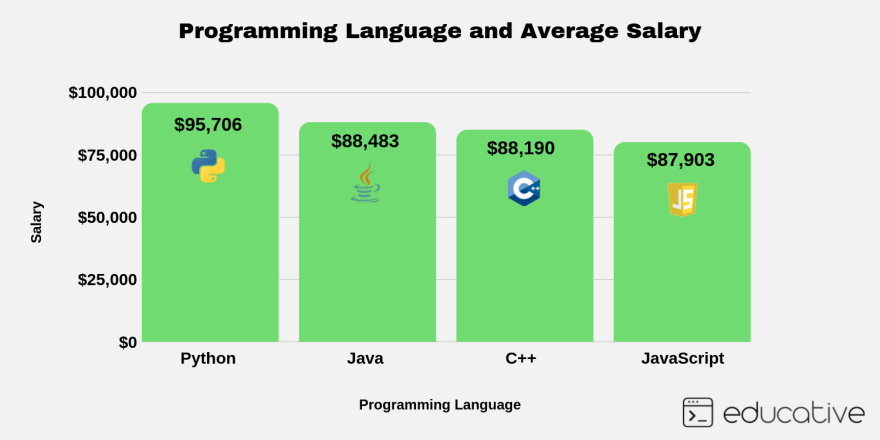
Yes, and yes. If you put in the time, you will be rewarded. C++ developers already have high-paying salaries, and it’s expected that the salary will grow in the coming years. C++ is experiencing a resurgence of popularity since it is great for robust applications like self-driving cars and VR. Since C++ has a steeper learning curve than most languages, the skills you obtain will set you apart when you’re applying to jobs.
Next steps for learning C++#
Congrats! You’ve learned the C++ basics! You’re well on your way to becoming a hire-able C++ programmer.
Educative’s free C++ tutorials and C++ courses are the ideal places to start for beginners. Educative’s Learn C++ is a text-based, highly-interactive course that begins with an introduction to the fundamental concepts and proceeds to cover more complex ideas such as multidimensional arrays, constructors, polymorphism, algorithms, and more.
Once you complete our from Scratch course, you’ll know what to learn next with the click of a button! Your journey to becoming a C++ developer begins today.
Continue learning about C++ and System Design#
Preview Educative’s most popular C++ courses#
Online C++ courses for every level. Start learning today and get 7 days free.
Learn C++ for Programmers
Become a C++ Programmer
C++ is a robust and flexible language commonly used for games, desktop, and embedded applications development. This Skill Path is perfect for beginners eager to learn C++ and embark on a programming journey. You’ll explore C++ fundamentals, starting with basic syntax and functionality to create programs, and then dive into more complex concepts like dynamic memory allocation in C++. The latter half focuses on C++ programming with a detailed overview of object-oriented programming (OOP), which includes classes in C++, data hiding in C++, encapsulation in C++, abstraction in C++, inheritance in C++, and polymorphism in C++. Hands-on practice with algorithms and data structures will empower you to write real-world programs confidently, paving your way as a C++ developer.
Ace the C++ Coding Interview
Ace the C++ Coding Interview
C++ is a general purpose, low-level, objected-oriented language. C++ is widely used in various fields such as game development, virtual reality, automotive and avionics, financial systems, medical equipment, and even the space industry. The compatibility of C++ makes it a perfect language for developing operating systems, game engines, desktop and mobile applications, and high-performance computing systems. This Skill Path will take you through all that you need to know to crack your C++ interviews with confidence. You’ll cover everything from data structures to Object-oriented design. You will also get to know the essential patterns behind popular coding interview questions. By the time you’re done with this Skill Path, you’ll be ready to ace the interview of any company.
C++ Fundamentals for Professionals
C++ Fundamentals for Professionals
C++ is a common first choice for software developers when optimal performance and high safety are necessary. Learning the rich core language and the many libraries, however, can be a neverending story. This course has one goal: ending that story. This course is a combination of new material and material pulled from my other C++ courses, giving you all the most crucial information in one place. You will learn the necessary information you need to be a professional C++ programmer, including the current C++17 standard. You’ll explore memory management, inheritance, templates, vectors, threads, tasks, and much more. Once you're done, you’ll have all the necessary skills to take advantage of the potential of C++ in your day-to-day work.
Frequently Asked Questions
What’s the fastest way to learn C++?
What’s the fastest way to learn C++?
Written By:
Amanda Fawcett
Related Courses
Learn C++: The Complete Course for BeginnersC++20 STL CookbookC++ Fundamentals for ProfessionalsCompetitive Programming in C++: The Keys to SuccessC++ Programming for Experienced EngineersLearn to Code: C++ for Absolute BeginnersData Structures for Coding Interviews in C++Modern CMake for C++Learning OpenCV from Scratch with C++Data Structures with Generic Types in C++Mastering Algorithms for Problem Solving in C++Beginner to Advanced Computing and Logic BuildingDecode the Coding Interview in C++: Real-World ExamplesCompetitive Programming - Crack Your Coding Interview, C++Implementing an Advanced Huge Integer Class
