How to set up an MCP server for your project
Ready to move beyond demos? Learn how to design and deploy an MCP server that’s secure, scalable, and production-ready, covering tools, transport, auth, and real-world architecture decisions you won’t regret later.
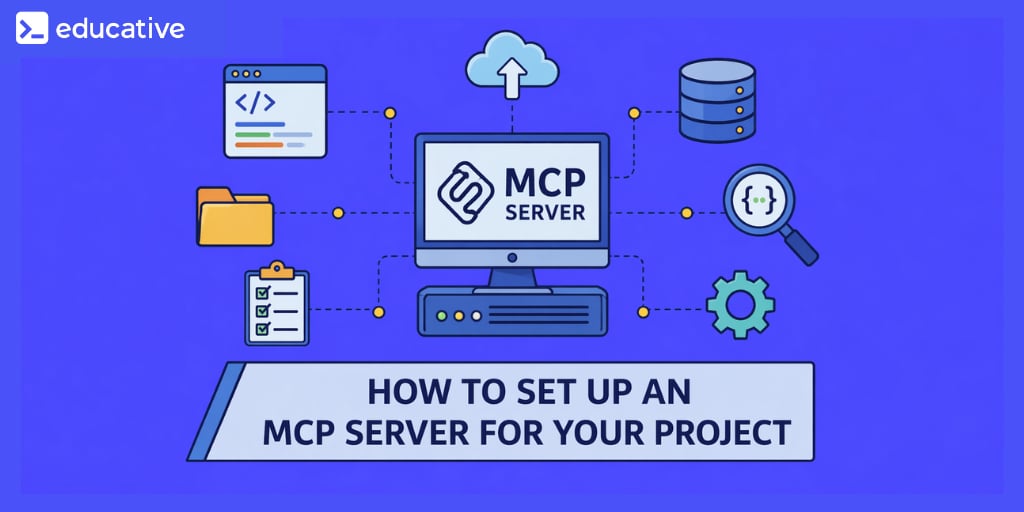
If you’re asking, How do I set up an MCP server for my project?, you’re probably past the “hello world” phase and into the uncomfortable part: deciding what the server should expose, where it should run, and how you’ll keep it safe and observable once it’s wired into real developer workflows. MCP (Model Context Protocol) isn’t just another web service you deploy; it’s a boundary layer that lets an AI client discover and invoke capabilities, tools, resources, and prompts through a standardized protocol. That means your design choices show up as real actions in real systems, which is why architecture matters more than quickstart snippets.
This blog is a guided walkthrough of the decisions I’d make as a backend engineer: what MCP servers actually do, what the benefits of using MCP in AI development are, how their pieces fit together, why transport and auth choices change everything, and how to deploy in a way you won’t regret six weeks later.
MCP Fundamentals for Building AI Agents
MCP is widely discussed, but practical guidance for production-oriented implementations is still relatively limited. The protocol provides a clear foundation for connecting AI applications with tools and context, but the documentation often assumes familiarity with underlying concepts and implementation patterns, and the ecosystem is still evolving. A common challenge is knowing how to move from the protocol specification to a working implementation. This course is designed to address that gap. Drawing on experience researching and teaching AI systems, from neural networks and adaptive systems to production-oriented generative AI architectures, I wanted to create a resource that provides the structured path I wanted when I started working with MCP: a clear, hands-on progression from core concepts to a working MCP application. You'll start with the fundamentals: why agentic systems need a protocol like MCP in the first place, and how MCP's architecture (host, server, client) solves the integration problems that have plagued AI tooling. From there, you'll build. You'll code an MCP server, wire up a client, add prompt and resource capabilities, and see your agent dynamically discover and use tools through the protocol. Everything runs in-browser. No local setup required. This course is designed for engineers who want to move beyond surface-level understanding and actually build with MCP. By the end, you’ll know how to implement the protocol, debug it, and understand where it fits in real GenAI architectures. If you’re serious about working with agentic systems and want a practical, grounded entry point into MCP, this course gives you a clear place to start and the confidence to go further.
What an MCP server actually does#
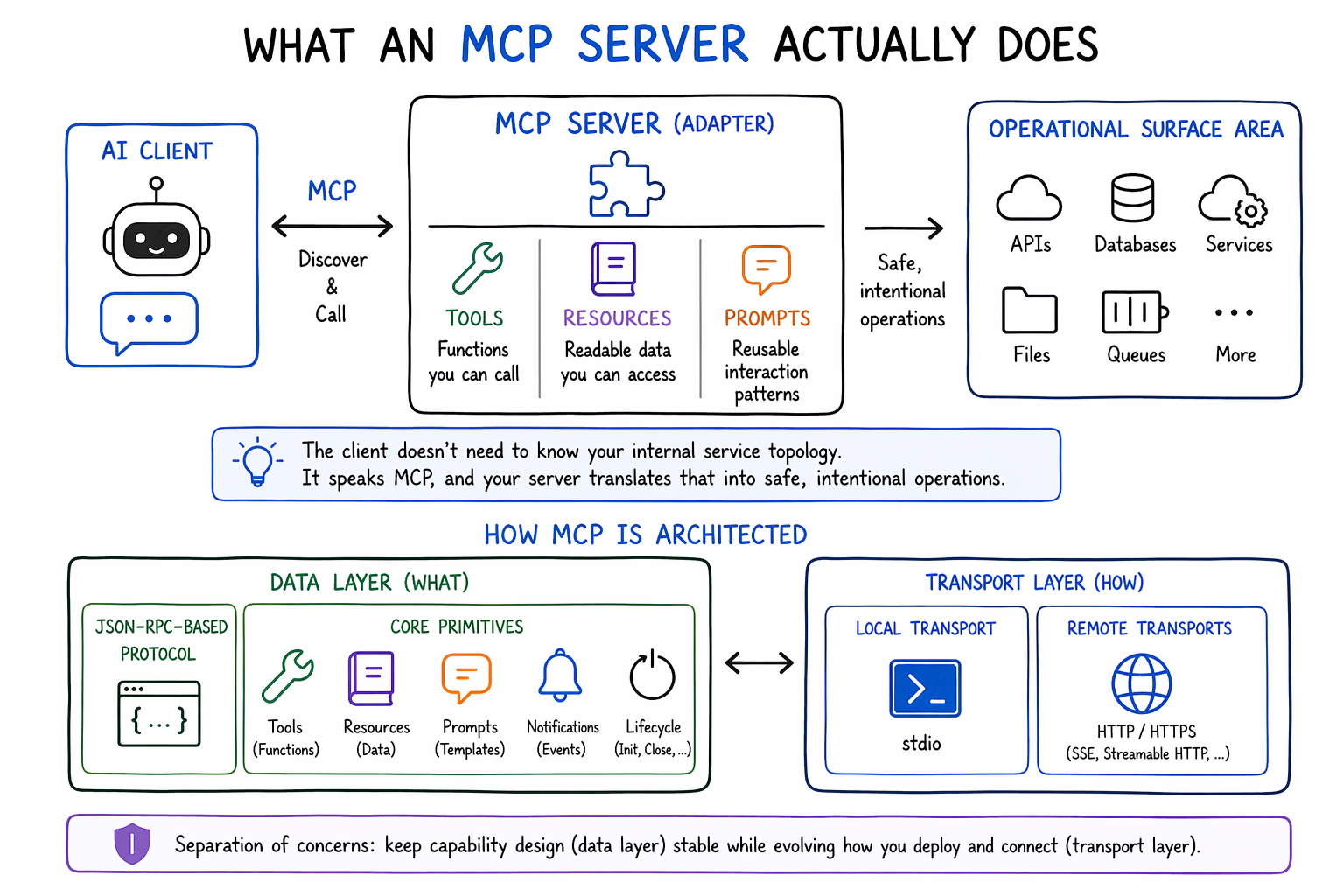
At a practical level, an MCP server is an adapter between an AI client and your project’s “operational surface area.” Instead of the model scraping APIs ad hoc, MCP gives you a structured way to publish capabilities the client can discover and call: functions (tools), readable artifacts (resources), and reusable interaction patterns (prompts). The client doesn’t need to know your internal service topology; it speaks MCP, and your server translates that into safe, intentional operations.
Architecturally, MCP is split into a data layer and a transport layer. The data layer defines a JSON-RPC–based protocol and the core primitives (tools, resources, prompts, notifications, lifecycle). The transport layer defines how messages move, locally through stdio or remotely over HTTP-style transports. That separation is important: you can keep your capability design stable while evolving your deployment model over time.
A subtle but important point: an MCP server isn’t “a model.” It shouldn’t contain your AI logic. It’s a capability boundary. The model (or agent) remains on the client side, choosing which tools to call and when. Your server’s job is to provide a reliable, least-privilege interface to systems the client can’t access directly.
Mastering MCP: Building Advanced Agentic Applications
The Model Context Protocol (MCP) is emerging as a foundational layer for building reliable, context-aware AI systems. As LLM-powered applications grow more complex, the limitation is how effectively you manage context, orchestrate tools, and ensure consistent behavior across systems. Mastering MCP is quickly becoming essential for anyone serious about production-grade AI. I built this course from my work in adaptive AI systems and intelligent orchestration, where managing context across distributed components is often the defining challenge. A consistent pattern I observed was that developers could build isolated AI features, but struggled to design systems that maintain coherence, memory, and control at scale. MCP provides that missing structure, and this course is designed to make it practical. You’ll learn the Model Context Protocol (MCP) through its architecture, life cycle, and communication patterns, then apply it in hands-on projects including single- and multi-server systems. You’ll integrate MCP with frameworks like LlamaIndex, implement retrieval-augmented generation (RAG), and build observability through authentication, logging, and debugging, culminating in a multimodal Image Research Assistant. Developers are already using MCP to build scalable AI systems. If you want to move from demos to production-ready architectures, this is where you start.
The architectural components you’ll end up building#
Most production MCP servers are small in code size but large in responsibility. You’re building an interface that connects probabilistic reasoning (an AI client) to deterministic systems (databases, CI, ticketing, feature flags). The trick is to make that interface narrow, predictable, and observable.
You can think in five components, regardless of language or SDK:
Capability definitions: the tools/resources/prompts you expose, with clear schemas and explicit side effects.
Transport adapter: stdio for local, HTTP/SSE or streamable HTTP for remote, multi-client use cases.
Policy and auth layer: authentication, authorization, scope enforcement, and request validation. MCP’s docs emphasize authorization flows and security best practices because the protocol is designed to connect to sensitive systems.
Integration connectors: thin clients for your internal APIs (Git provider, CI, incident management, etc.), with timeouts, retries, and circuit breaking.
Observability and ops: logs, metrics, traces, auditing, and redaction, because you need to know what the AI asked for, what you did, and why.
This framing helps you avoid the most common early mistake: treating MCP like a “tool wrapper” where you shove everything into one handler and call it a day. The surface area grows quickly, and without policy and observability, you’ll end up with a server that is powerful but ungovernable.
A common mistake is exposing “convenient” tools (filesystem access, shell commands, broad Git operations) without strict scoping and authorization, assuming the client will behave. In production, you have to design for prompt injection, misuse, and tool chaining, even if every user is well-intentioned.
That warning isn’t hypothetical. There have been real security discussions around MCP servers and how vulnerabilities can chain when powerful tools are combined.
Local vs cloud: Choosing a transport is choosing an operational model#
Transport is not a detail. It’s a statement about who runs the server, who upgrades it, what it can access, and how many clients will use it at once.
A local stdio server is the simplest operationally: the client spawns the server as a child process and communicates via stdin/stdout. This is great when the server needs access to the developer’s machine (local repos, local files, local credentials) and when you want low latency with minimal networking. The tradeoff is distribution: every developer needs the binary and dependencies installed and updated.
A remote server over HTTP-style transport flips that. You deploy once, and many clients connect. It’s easier to roll out fixes and add observability centrally, and it can access shared infrastructure (databases, internal services) without depending on local developer environments. But now you’re operating a network service: auth, rate limiting, multi-tenant boundaries, and uptime become your problem.
There’s also a hybrid pattern you’ll see in practice: keep sensitive, user-local capabilities on stdio (like “search my repo”), while hosting shared, org-level capabilities remotely (like “query staging metrics” or “open incident”). A proxy or bridge layer can help when you must expose a local-style server over the network, but that should be a conscious decision because it changes your threat model.
Deployment options in plain terms#
Here’s the comparison I use when deciding where to run an MCP server:
Deployment Option | When to Use It | Tradeoffs | Operational Complexity |
Local stdio (per developer) | Tools need local machine access; single-user workflows | Easy setup, harder distribution; local secrets and permissions vary | Low to Medium |
Remote container service (HTTP/SSE or streamable HTTP) | Shared tools; centralized updates; multi-client access | Requires auth, multi-tenancy boundaries, uptime, rate limits | Medium to High |
Kubernetes service (internal) | Org-scale shared tools; needs network policy and observability | Strong control plane, but heavier ops and complexity | High |
Serverless + proxy/bridge | Spiky workloads; lightweight endpoints; constrained environments | Transport limitations, cold starts, careful state handling | Medium to High |
The point of the table isn’t to “pick the best.” It’s to force you to name what you’re optimizing for: developer ergonomics, centralized governance, access to internal networks, or simplicity.
Authentication and API integration: Where MCP gets real#
Once your server touches real systems, auth becomes the backbone.
At a minimum, you need authentication for clients (who are calling) and authorization for actions (what they can do). MCP’s ecosystem discussions lean heavily on OAuth-style patterns and security best practices because an MCP server can become a high-value control point: it has access to tools that can read and change state.
Practically, I’d design auth at two layers:
Client-to-MCP server#
This is your perimeter. For remote deployments, you want strong identity (OAuth/OIDC), short-lived tokens, and explicit scopes. For local stdio, identity often comes from the OS user context, but you still need to treat tool execution as privileged and scope accordingly.
MCP server-to-downstream APIs#
This is where teams get sloppy. The easiest approach is to give the server a broad service account and let it do everything. That’s also how you end up with “the AI can do anything” by accident. Instead, prefer scoped tokens per integration, and separate read-only from write actions. If your server can mutate state (merge PRs, toggle feature flags, restart deployments), make those tools explicit, gated, and audited.
There’s also the question of data handling. Your MCP server will see code, logs, tickets, and potentially secrets. Treat this like any other service handling sensitive data: redact logs, avoid storing prompts by default, add allowlists for what can be fetched, and define retention policies.
Scaling and monitoring: Design for the boring failures#
Most MCP servers don’t fail because the model “got it wrong.” They fail because the system around them was built like a demo.
Scaling concerns show up in a few predictable places. Tool calls can fan out into many downstream API requests, especially when the client is exploring. If you don’t rate-limit and cache, you can overload internal services. If you don’t enforce timeouts, you’ll pin worker threads and create cascading failure. If you don’t bound payload sizes, a single tool call can become an accidental stress test.
Monitoring is where you earn the right to operate this safely. You want:
Structured logs with request IDs and tool names (but careful redaction).
Metrics per tool: latency, error rate, and downstream dependency timeouts.
Tracing across your API calls so you can see where time is spent.
Audit events for any state-changing tool, including who invoked it and what it touched.
I also like an explicit “dry run” mode for dangerous tools. Not because it’s perfect, but because it gives reviewers and operators a way to validate behavior without committing changes.
Configuration: Make it maintainable before it becomes necessary#
Configuration is the hidden cost center of MCP servers.
Early on, you’ll be tempted to hardcode: tool lists, endpoints, tokens, and feature flags. That works until you need different behavior per environment (dev/staging/prod) or per tenant/team. Then you end up with branching logic scattered throughout handlers.
A maintainable approach separates configuration into layers:
Static capability schema: tool names, input/output JSON schema, and safety classification (read-only vs write).
Environment config: base URLs, credentials, timeouts, rate limits, log redaction policies.
Policy config: which tools are enabled, who can call them, and what scopes are required.
This gives you a stable “public interface” while allowing operational changes without code edits. It also enables safer rollout patterns: you can deploy code with a tool disabled, then enable it gradually once monitoring confirms behavior.
If you want a single rule of thumb: make “what the tool can do” obvious from configuration and from logs.
A narrative walkthrough: How I’d design and deploy one for a real project#
Let’s say I’m working on a realistic backend project: a multi-tenant SaaS with a Node/Go backend, PostgreSQL, a CI pipeline, and a GitHub-based workflow. The team’s pain is not writing code, it’s the friction around incidents, debugging, and review. People lose time hopping between dashboards, looking up feature flags, and answering repeated questions in PRs.
I’d start by defining what we actually want the agent to do, not what would be cool. In this scenario, I’d aim for a narrow MCP server that supports three workflows: “explain this diff,” “triage this alert,” and “find the right operational context.” That translates into a small set of tools:
A read-only “repo context” tool that can fetch diffs and file snippets for a PR.
A “runbook search” resource that exposes operational docs in a safe, indexed way.
A “metrics query” tool that can fetch a limited set of dashboards or time-series queries.
A tightly gated “feature flag inspect” tool (read-only first), with explicit tenant scoping.
Notice what’s missing: no shell execution, no broad filesystem access, no “restart production” tool. Not because those are impossible, but because you should earn that power after you’ve built guardrails and auditability.
Next, I’d choose deployment based on who needs access. If this is for a team, I’d host it remotely as a service so updates and monitoring are centralized. Remote hosting also makes it easier to integrate with internal APIs and observability systems without requiring every developer to configure credentials locally. The transport choice follows: use an HTTP-based transport suitable for multi-client use, and put it behind the same identity system the company already uses.
Then I’d design the auth model. I’d require user identity at the edge (so audit logs map actions to a person), and I’d use scoped downstream credentials per integration. For GitHub reads, I’d use an app/token with minimal scopes. For metrics, I’d use a read-only API key. Every tool call would carry a request ID, and every downstream call would be traced.
Now we get to the operational posture. I’d implement strict timeouts and concurrency limits, and I’d cache safe read-only calls (like “fetch PR diff”) for short windows to avoid repeated load. I’d add a policy layer: some tools are available to everyone, some only to on-call, and anything that could mutate state is disabled by default. That’s also where I’d add content controls: if a tool might return secrets, it doesn’t exist until we have a redaction strategy.
Finally, I’d operationalize it like any other backend service. I’d deploy with dashboards showing tool-level latency and error rate. I’d add alerts for downstream dependency failures. I’d track the distribution of tool calls so I can see whether the server is helping or just generating noise.
Once the read-only workflow is stable, then I’d consider adding write-capable tools, like “create a Jira incident” or “open a rollback PR”, but only with explicit approvals and audit trails. The goal is gradual capability expansion under observed behavior, not a big-bang “agent can do everything” release.
Four design guardrails I actually enforce#
Keep the first version mostly read-only, and require explicit enablement for any state-changing tool.
Treat auth and scoping as part of the tool contract, not a perimeter afterthought.
Make every tool observable: metrics, traces, and audit logs tied to identity.
Bound everything: timeouts, concurrency, payload size, and downstream rate limits.
Choosing between Claude-style conversational use and MCP tool use#
A final nuance: many teams confuse “using an LLM” with “deploying an MCP server.”
If your primary goal is code generation or explaining code, a chat assistant plus copy/paste might be enough. MCP becomes valuable when you want standardized, repeatable, tool-driven access to systems: retrieving resources safely, calling APIs consistently, and making those actions observable and governable.
In other words, MCP is less about better text and more about safer integration.
That’s also why MCP server design looks like backend engineering: boundaries, contracts, auth, reliability, operations. The protocol gives you a standard way to connect tools; it doesn’t remove the need to engineer the system around them.
Conclusion#
If you treat MCP as a quick wrapper around some scripts, you’ll get something that works briefly and then becomes risky to operate. If you treat it like an integration boundary, capabilities, transport, policy, observability, you can build a server that scales from a single developer workflow to a team-wide system without turning into a security and reliability headache.
The best way to answer How do I set up an MCP server for my project? is to start by designing the smallest useful capability surface, choose a deployment model that matches your operational reality, and invest early in auth, scoping, and monitoring, because those are the things you can’t retrofit cleanly later.
