How to switch from Ruby to Python? 2026 guide
Transition from Python to Ruby with confidence. Learn Ruby syntax, blocks, mixins, Enumerable, tooling, web frameworks, and the Ruby-first programming mindset that helps developers write clean, idiomatic Ruby code.
Ruby is a dynamic, object-oriented programming language that shares many similarities with Python but differs in key areas like mutable strings, mixin support, block-based iteration, and the absence of primitive data types. Python developers transitioning to Ruby will find familiar concepts such as keyword arguments, hash (dictionary) structures, and flexible syntax, though Ruby favors method chains and the Enumerable module over list comprehensions.
Key takeaways
Everything is an object: Ruby has no primitive data types, and only
falseandnilevaluate to false, which changes how you write conditionals and type checks compared to Python.Blocks replace comprehensions and context managers: Ruby uses blocks with
yield, procs, and lambdas instead of Python's list comprehensions andwithstatements for iteration and resource management.Mixins over multiple inheritance: Ruby uses modules as mixins (including the powerful
Enumerablemodule) rather than supporting multiple class inheritance like Python does.Familiar tooling with different names: Bundler maps to pip, rbenv to pyenv, RuboCop to flake8/black, and RSpec to pytest, making the ecosystem shift straightforward for Python developers.
Web frameworks are comparable but ML is not: Ruby on Rails and Django are both strong MVC frameworks, but Python remains the dominant choice for machine learning and data science workloads.
Ruby is a general-purpose, dynamic, open source programming language that focuses on simplicity and productivity. The Ruby programming language is frequently compared to Python for their similarities. Many developers say that learning Ruby is easier if you know Python due to their similarities. However, these two languages differ in major ways.
We’ve created this basic introduction to help you make the transition from Python to Ruby. We’ll go over their main differences and then take a dive into Ruby’s syntax so you can get hands-on with Ruby code quickly.
Start building with Ruby code. This introductory course offers tons of hands-on practice with interactive illustrations exercises for all the fundamentals you need to know to be working with Ruby in no time.
Ruby vs Python#
Ruby and Python are both popular programming languages known for their speed, simplicity, and user-friendly syntax. Both languages are flexible, object-oriented , dynamic, and have a lot of useful frameworks and libraries to use, particularly for web applications and web development (Ruby on Rails for Ruby or Django for Python).
Ruby is a high-level, interpreted programming language, created in 1995 by Yukihiro Matsumoto. His goal was to make an object-oriented scripting language that improved on other scripting languages of the time.
Ruby also allows for functional programming and is known for being very similar to written human languages, making it easy to learn.
Python is an interpreted, high-level general-purpose language, created by Guido van Rossum with the goal of code readability. Python is know well-loved for its robust standard library.
Ruby | Python |
No primitive data types. Everything is an object. | Has primitive types and objects |
Mixins can be used | Mixins cannot be used |
Less available functions. Relies mostly on methods. | Lots of available functions |
Cannot modify built-in classes | Can modify built-in classes |
Supports Tuples with Rinda. Other collections include Arrays, Hash, Set, and Struct. | Supports Tuples, Sets, Dictionary (Hash), and Lists |
Iterators less common | Iterators are very common |
Career#
Both languages are used by big companies. Companies that use Python include YouTube, Instagram, Spotify, Reddit, Dropbox, while Ruby is used at Hulu, Basecamp, GitHub, and Airbnb. Ruby developers also tend to make higher salaries than Python developers. StackOverflow’s 2020 survey lists Ruby’s global average salary at $71k and Python’s at $59k.
Machine Learning#
Python is currently the go-to language for machine learning (ML) and artificial intelligence (AI) due to its extensive libraries and visualization tools. Ruby does offer some competitive options, but there is a long way to go before it will hold a torch to Python. So, if you are looking to work in data science, Python is the winner.
Web Frameworks#
The main web frameworks for both Ruby and Python, Django and Ruby on Rails, are rather similar. Both are based on the classic model-view-controller (MVC) pattern, and they both provide similar repositories (PyPi for Python and RubyGems for Ruby). Both frameworks perform well and are easy to learn.
Testing Environment#
Test-driven development (TDD) is pretty standard for both Ruby and Python, but Ruby does offer behavior-driven development (BDD) while Python does not, which may be useful in some cases
Community#
Both languages have large, active communities, which Python’s community being a bit larger, namely because Ruby is most popular for its development tool Ruby on Rails. Both communities seem to be equally active and supportive.
One benefit to Ruby is that there are unique Ruby forums and job boards since the language is more specialized in some regards.
Summary of Main Code Differences#
Now that we understand the difference between Ruby and Python at a high level, let’s dive into the main code differences between the two. We’ve compiled the main things that differ from Python below.
In the Ruby programming language:
Strings are mutable
You can make constants
Parentheses for most method calls are optional
There’s only one mutable list container (Array)
There are no “new style” or “old style” classes
Only
falseandnilevaluate to false, and everything else istrueYou never directly access attributes. Instead, we use method calls.
We use
elsifinstead ofelifWe use
requireinstead ofimportWe use mixins instead of multiple inheritance
yieldexecutes another function that is passed as the final argument, then it resumesWe use
public,private, andprotectedfor access
Common mistakes Python developers make when learning Ruby#
One of the biggest challenges when switching from Python to Ruby isn't learning new syntax. It's learning a different programming mindset. Because the two languages share many concepts, developers often assume that writing Ruby is simply a matter of translating Python code line by line.
In practice, idiomatic Ruby tends to emphasize expressiveness, method chaining, and object-oriented design more heavily than Python. New Ruby developers often write explicit loops where Ruby developers would use methods from the Enumerable module such as map, select, or group_by. Others avoid blocks and lambdas because they initially feel unfamiliar, even though blocks are one of Ruby's most powerful features.
Another common mistake is overusing conditional logic when Ruby's object-oriented design encourages pushing behavior into classes and objects. Instead of repeatedly checking an object's type, Ruby developers often rely on polymorphism and duck typing to make code more flexible and readable.
As you learn Ruby, focus less on translating Python patterns directly and more on understanding why Ruby developers structure code the way they do. Adopting Ruby idioms will make your code easier to read, maintain, and collaborate on within the Ruby ecosystem.
Python Habit | Common Ruby Alternative |
Explicit for loops | Enumerable methods (map, select, reduce) |
List comprehensions | Method chaining with Enumerable |
Type checking | Duck typing and polymorphism |
Utility functions | Object-oriented methods |
Context managers (with) | Blocks with automatic cleanup |
Multiple inheritance patterns | Mixins through modules |
Hello World with Ruby#
Now that we understand how Ruby and Python differ at the code level, let’s look at some actual Ruby code, starting with the classic Hello World program. Take a look below and note how simply Ruby’s syntax is here.
Here, the puts keyword is used to print. Remember: Ruby’s code is very readable, designed to emulate spoken English language.
There’s even a simpler way to do this. Ruby comes with a built-in program that will show the results of any statements you feed it, called Interactive Ruby (IRB). This is the best way to learn Ruby. First, open IRB:
macOS: open Terminal and type
irb. Hit enter.Linux: open up a shel, type
irb, and hit enter.Windows: open Interactive Ruby from the Start Menu (see the Ruby section)
If you type:
"Hello World"
You will get the following:
irb(main):001:0> "Hello World"=> "Hello World"
The second line tells us the result of the last expression. We can print this using the puts command we learned before.
irb(main):002:0> puts "Hello World"Hello World=> nil
Here, => nil is the result of the expression, since puts always returns nil.
Ruby Syntax Quick Guide#
Let’s now quickly go over the basics of Ruby’s syntax that may be different from what you’re used to in Python. Note how Ruby differs and how it is similar as you read.
Variable Assignment#
In Ruby, you assign a name to a variable using the assignment operator =, like so:
puts number = 1
Here is a list of the different kinds of variables in Ruby:
Local variables (
something)Instance variables (
@something)Constants (
SomethingorSOMETHING)Global variables (
$something)
Identifiers and Keywords#
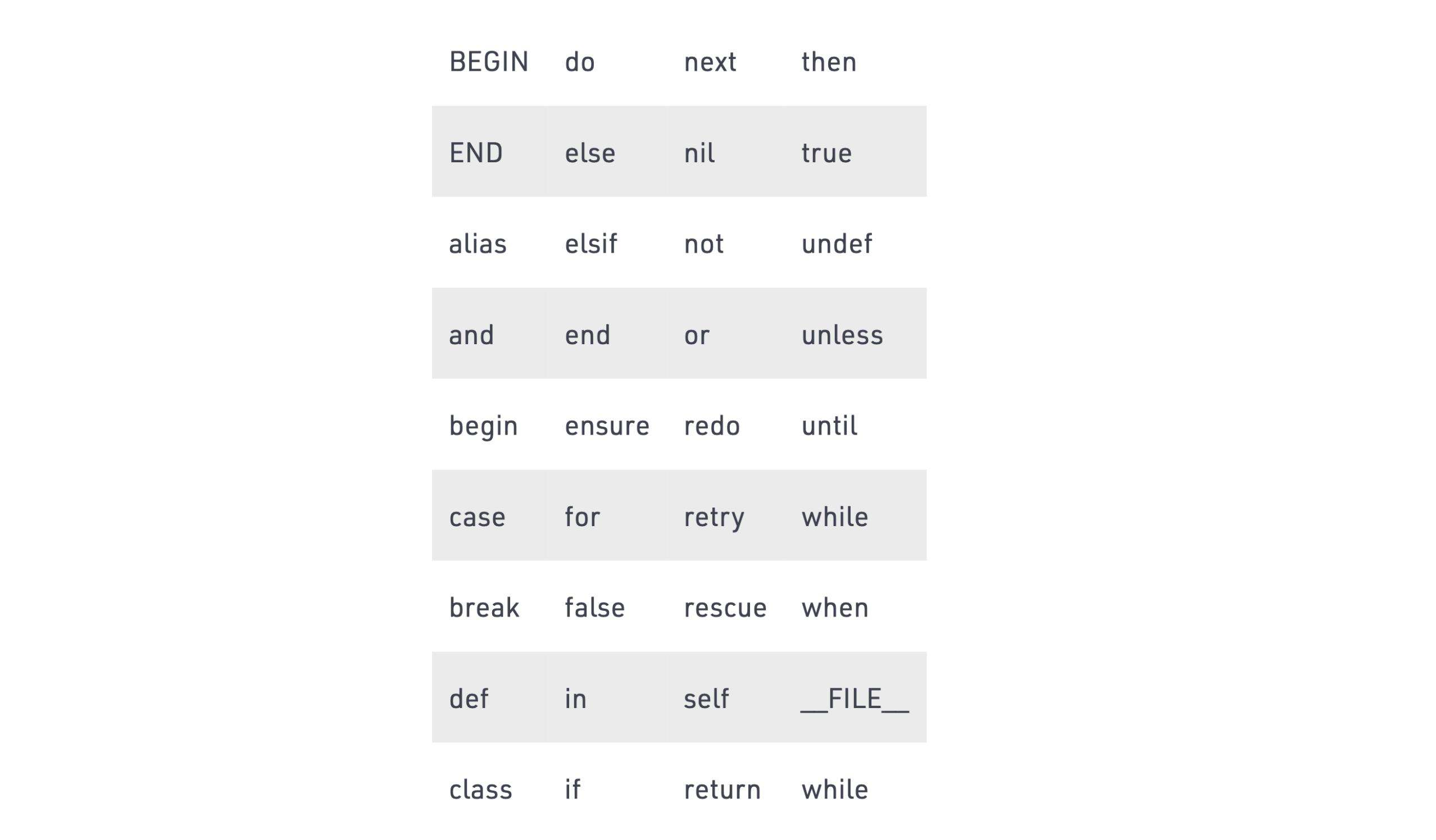
Keywords and identifiers are similar to Python. Identifiers are case sensitive, and they may consist of alphanumeric characters and underscore _.
Ruby’s reserved keywords include the following:
Strings#
In Ruby, a string is a sequence of characters inside quotation marks " ". We can also use single quotation marks.
You can concatenate strings with the plus sign +.
In Ruby, multiplying a String by a number will repeat a String that many times.
Some important methods for Ruby strings include:
sizeempty?include?gsubsplit
Hashes#
In Ruby, you can create a Hash by assigning a key to a value with =>. We separate these key/value pairs with commas and enclose the whole thing with curly braces.
{ "one" => "eins", "two" => "zwei", "three" => "drei" }
This defines a Hash with three key/value pairs, so we can look up three values (the strings "eins", "zwei", and "drei") using three different keys (the strings "one", "two", and "three").
Some important methods for Ruby hashes include:
key?fetchmergenew(for default values)
Array#
In Ruby, we create an Array by separating values with commas and enclosing this list with square brackets, like so:
[1, 2, 3]
Like in Python, there are all sorts of things you can do with Arrays. The most important methods being:
sizeempty?push/popjoinflatten
Here is an example of the intersection operator &, which finds the intersecting parts of our arrays:
Symbols, kwargs, and modern hash syntax#
You’ll see symbols everywhere in Ruby — they’re immutable, interned identifiers:
person = { name: "Ada", role: :engineer } # symbol keys are idiomatic
Keyword arguments feel familiar to Python:
def greet(name:, excited: false)msg = "Hello, #{name}"excited ? "#{msg}!" : msgendgreet(name: "Ada") # => "Hello, Ada"greet(name: "Ada", excited: true)
Ruby 3 tightened kwargs, so prefer the explicit name: style.
For pass-through:
def wrapper(**kwargs) = greet(**kwargs)
Modern conveniences you’ll meet quickly:
Safe navigation
&.(like Python’sobj and obj.attridiom):Numbered block params:
Pattern matching (see below) for destructuring complex hashes/arrays.
user&.profile&.city
%w[a b c].map { _1.upcase }
Parenthesis#
In Ruby, parenthesis and semicolons are not required, but we can use them. However, we follow these basic rules:
Do use parenthesis with method arguments:
def foo(a, b, c)Do use parenthesis to change the priority of an operation:
(a.size + b.size) * 2Don’t use parenthesis when defining a method that has no arguments:
def foo
Commenting#
There are three main ways we can add comments to a Ruby program.
# Single line comment
# Multiple# Lines
=beginBlock fashionCommenting=end
Methods#
In Ruby, we define methods using the def keyword followed by method_name. IT ends with the end keyword.
def method_name# Statement# Statement..end
We pass parameters to our methods in parentheses.
def method_name(var1, var2, var3)# Statement# Statement..end
Blocks, yield, procs, and lambdas#
Blocks are Ruby’s “little functions” that ride along with method calls:
def with_timerstart = Time.nowresult = yield # calls the attached blockputs "Took #{Time.now - start}s"resultendwith_timer { sleep 0.1; 42 } # prints time, returns 42
Turn blocks into objects when you need to pass them around:
adder = ->(a, b) { a + b } # lambda with arity checkProc.new { |x| x * 2 } # proc (looser arity)
Use a block when a method naturally does something with your resource (I/O, locks, DB sessions).
Prefer a lambda/proc when you need a first-class callable (store in a variable or pass multiple callables).
Classes#
In Ruby, we create classes using the class keyword followed by the name of the class.
class Class_nameend
In Ruby, objects are created with the new method.
object_name = Class_name.new
Conditionals#
Conditional statements are similar to most other languages with a few slight differences. Take a look at the examples below to get at sense of how they look in Ruby.
Ruby also has a shorthand for working with conditional statements. So, we could write this bit of code:
number = 5if number.odd?puts "The number is odd."end
As this instead:
number = 5puts "The number is odd." if number.odd?
File.open("notes.txt", "w") { |f| f.puts "hello" } # file auto-closes
Exceptions:
beginrisky()rescue SpecificError => ewarn e.messagerescue => ewarn "Unknown error: #{e.class}"ensurecleanup()end
You can also raise:
raise ArgumentError, "bad input"
This mirrors try/except/finally while keeping Ruby’s block idioms for safe cleanup.
From comprehensions to Enumerable (and ranges)#
Python leans on list/dict comprehensions; the Ruby way is Enumerable.
Any collection that mixes in Enumerable gains fluent methods:
# squares of even numbers 1..10(1..10).select(&:even?).map { _1 * _1 } # => [4, 16, 36, 64, 100]# build a hash (like a dict comprehension)%w[alice bob carol].each_with_object({}) { |name, h| h[name] = name.size }# => {"alice"=>5, "bob"=>3, "carol"=>5}
Use reduce (aka inject) for folds, group_by for bucketing, and tally for frequencies:
[1,2,2,3,3,3].tally # => {1=>1, 2=>2, 3=>3}
Ruby also has lazy evaluation:
(1..Float::INFINITY).lazy.select(&:odd?).map { _1 * _1 }.first(5)# => [1, 9, 25, 49, 81]
This gives you generator-like pipelines similar to Python’s iterators.
Tooling, testing, and environments (Python → Ruby Mental Map)#
Packages:gem install and Gemfile + Bundler for per-project dependencies (Python’s pip / requirements.txt).
Run scripts with bundle exec to lock to the project’s versions.
Environments:
Use rbenv or rvm to manage Ruby versions (like pyenv).
REPL:irb ships with Ruby; pry offers richer introspection.
Lint/format:
RuboCop fills the role of flake8/black, enforcing the community style guide.
Testing:
Minitest is in the standard library; RSpec is the popular BDD framework.
If you come from pytest, you’ll likely enjoy RSpec’s readable matchers and describe/it style.
Performance & concurrency:
MRI has a GIL-like global VM lock; threads are great for I/O.
Ruby fibers and non-MRI runtimes exist, but for CPU-bound tasks, prefer native extensions or processes — the same calculus you’d make in Python.
What to learn next with Ruby#
Now that you know the basics of Ruby and know how it differs from Python, you’re ready to cover more advanced topics. We recommended studying the following concepts next:
Ruby inheritance
Using Ruby libraries
Nested arrays
Ruby blocks
To get started with these concepts and get hands-on with Ruby, check out Educative’s course Learn Ruby. This introductory course offers tons of hands-on practice on all the need-to-know topics, including variables, built-in classes, objects, conditionals, blocks and much more!
By the end, you’ll be a confident Ruby developer, ready to take on complex projects!
Happy learning!
