Adobe System Design Interview
Master Adobe System Design by learning to architect real-time collaboration, scalable asset storage, GPU rendering pipelines, AI inference systems, and global sync workflows. Design like a platform engineer and stand out in your Adobe interview.
Preparing for the Adobe System Design interview means understanding how Adobe builds creative, collaborative, and cloud-native platforms at a global scale. Adobe powers Photoshop, Illustrator, Premiere Pro, Acrobat, Firefly, Lightroom, Figma, Creative Cloud, and a massive suite of enterprise tools. These involve real-time collaboration, asset management, rendering workflows, document processing, and AI-driven generative features.
This isn’t a conventional CRUD-product interview. The Adobe System Design interview focuses on real-time editing, versioning, collaboration, content rendering, media pipelines, cloud storage, AI/ML inference, creative workflows, and multi-device sync. You must demonstrate a strong understanding of systems that combine real-time interaction, heavy compute, and high reliability across millions of creators.
Grokking Modern System Design Interview
For a decade, when developers talked about how to prepare for System Design Interviews, the answer was always Grokking System Design. This is that course — updated for the current tech landscape. As AI handles more of the routine work, engineers at every level are expected to operate with the architectural fluency that used to belong to Staff engineers. That's why System Design Interviews still determine starting level and compensation, and the bar keeps rising. I built this course from my experience building global-scale distributed systems at Microsoft and Meta — and from interviewing hundreds of candidates at both companies. The failure pattern I kept seeing wasn't a lack of technical knowledge. Even strong coders would hit a wall, because System Design Interviews don't test what you can build; they test whether you can reason through an ambiguous problem, communicate ideas clearly, and defend trade-offs in real time (all skills that matter ore than never now in the AI era). RESHADED is the framework I developed to fix that: a repeatable 45-minute roadmap through any open-ended System Design problem. The course covers the distributed systems fundamentals that appear in every interview – databases, caches, load balancers, CDNs, messaging queues, and more – then applies them across 13+ real-world case studies: YouTube, WhatsApp, Uber, Twitter, Google Maps, and modern systems like ChatGPT and AI/ML infrastructure. Then put your knowledge to the test with AI Mock Interviews designed to simulate the real interview experience. Hundreds of thousands of candidates have already used this course to land SWE, TPM, and EM roles at top companies. If you're serious about acing your next System Design Interview, this is the best place to start.
This blog breaks down exactly what the Adobe System Design interview questions evaluate, the common design prompts, and the structured approach you should use to deliver a top-tier answer.
Understanding Adobe’s System Design Expectations#
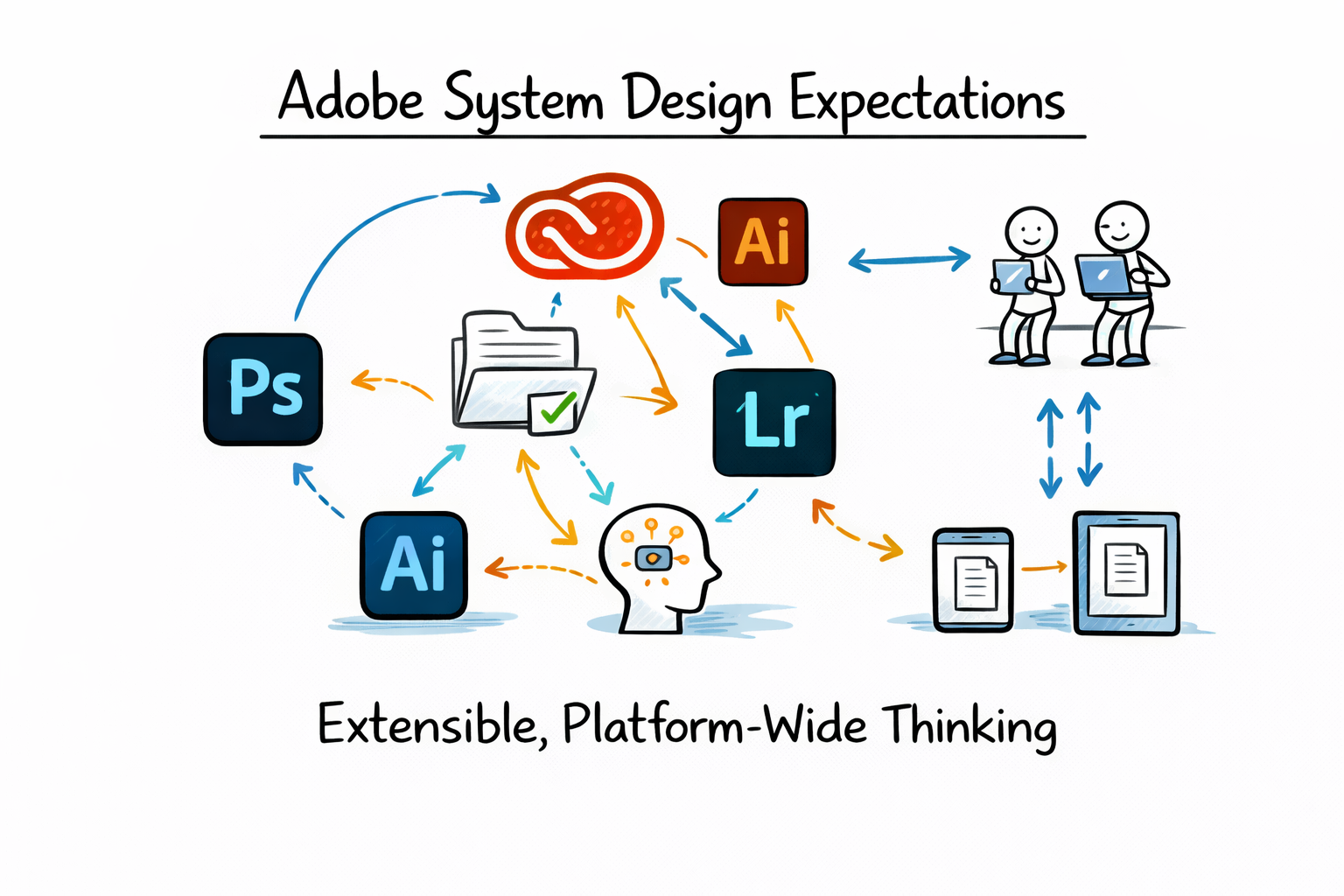
Adobe products are deeply interconnected. A document created in Photoshop may be synced through Creative Cloud, shared with collaborators, processed by AI features, rendered into previews, and accessed across multiple devices.
Interviewers want to see that you understand platform-level design rather than single-service thinking. Your architecture should feel extensible across products and capable of supporting evolving creative workflows.
Core Engineering Domains Adobe Cares About#
Adobe’s System Design interviews typically test the following domains. Each domain maps directly to real product infrastructure.
Major System Areas in Adobe Design Interviews#
Area | Real-World Examples | Architectural Focus |
Real-time collaboration | Cloud documents, Figma-style editing | State synchronization, conflict resolution |
Asset storage | PSD files, RAW images, video assets | Chunking, deduplication, versioning |
Rendering pipelines | Video export, image rasterization | GPU orchestration, job scheduling |
AI/ML systems | Firefly, Sensei features | Inference pipelines, GPU autoscaling |
Document processing | PDF, OCR, e-sign | Correctness, security, auditing |
Multi-device sync | Desktop to mobile editing | Delta sync, offline handling |
Permissions & sharing | Enterprise collaboration | ACLs, policy enforcement, audit logs |
This table provides a high-level map of what interviewers expect you to reason about during the conversation.
System Design Deep Dive: Real-World Distributed Systems

Modern software systems are expected to operate at a massive scale while meeting strict reliability and latency requirements. Whether it’s a feed refresh, a payment request, or a real-time analytics query, users expect systems to respond instantly and consistently. That expectation has raised the bar for engineers today, understanding that System Design isn’t optional. It’s a core skill for building and evaluating production-grade systems. I built this course from my experience working on large-scale distributed systems at Microsoft (Azure) and Meta (Scuba), and from interviewing hundreds of candidates across both companies. The pattern I kept seeing was this: candidates understood individual components, but struggled to combine them into a coherent system. They knew what a cache or load balancer was, but not when or why to use it. This course is designed to bridge that gap. We start with the foundational building blocks of System Design, including databases, caching layers, load balancing, and messaging systems, and focus on how they interact under real-world constraints. From there, we analyze systems built by companies like Google, Facebook, and Amazon, breaking them down to understand the trade-offs behind each design decision. The goal is not just to learn concepts, but to develop the ability to reason through them in practice. This approach has helped a large number of engineers build stronger intuition for System Design and perform better in interviews. If you want to understand how real systems are designed and be able to design them yourself, this course gives you a clear, practical path forward.
Real-Time Collaboration and Editing#

Adobe increasingly supports real-time collaborative editing across documents. This includes cloud Photoshop files and vector-based designs similar to Figma workflows.
A collaborative editor must synchronize user edits in near real time while preserving document consistency. The key challenge is not storage but state coordination.
Modeling Document State#
Instead of treating documents as blobs, you should model them as structured graphs of objects such as layers, shapes, masks, and effects. This allows updates to be transmitted as operations rather than full-file rewrites.
Operations are smaller, more efficient, and easier to reconcile across collaborators. This also enables partial re-rendering instead of full recomputation.
Conflict Resolution#
Concurrent edits must converge into a consistent document state. Two common approaches are operational transforms and CRDTs.
OT vs CRDT in Creative Editing Systems#
Approach | Strength | Design Consideration |
Operational Transforms | Centralized ordering | Requires server transformation logic |
CRDTs | Strong convergence | Metadata overhead and compaction |
Interviewers want to see that you understand convergence and deterministic replay, not algorithm implementation details.
Scalability & System Design for Developers

As you progress in your career as a developer, you'll be increasingly expected to think about software architecture. Can you design systems and make trade-offs at scale? Developing that skill is a great way to set yourself apart from the pack. In this Skill Path, you'll cover everything you need to know to design scalable systems for enterprise-level software.
Handling Offline Mode#
Users frequently disconnect or switch devices mid-session. A robust system buffers operations locally and replays them upon reconnection.
The server maintains authoritative sequencing while allowing optimistic UI updates on the client side. This combination preserves responsiveness without sacrificing consistency.
Asset Storage and Cloud Document Architecture#
Adobe stores large creative assets, but not all data behaves the same. Raw assets, metadata, and derived previews should not live in the same storage layer.
Separating blob storage from structured metadata improves scalability and query performance.
Data Layer Separation in Adobe-Style Systems#
Data Type | Storage Pattern | Purpose |
Raw assets | Object storage with chunking | High-throughput storage |
Metadata | Structured database | Fast queries and permissions |
Previews | Async-generated assets | Performance optimization |
Version history | Append-only log | Auditing and rollback |
This layered approach improves durability and makes multi-region replication simpler.
Chunking and Deduplication#
Large files are split into chunks during upload. Each chunk is hashed and stored independently.
Content-addressable storage enables deduplication across versions and even across documents. This significantly reduces storage overhead for iterative creative workflows.
Versioning Strategy#
Creative documents require a full version history. A version pointer model can track document states efficiently without duplicating entire files.
Append-only version logs improve auditability and simplify rollback operations.
Rendering and Media Pipelines#
Adobe Systems must distinguish between interactive rendering for live previews and batch rendering for exports.
Interactive rendering should remain lightweight and local when possible. Batch rendering should move to distributed GPU-backed pipelines.
Rendering Pipeline Design#
A rendering service typically uses job queues that dispatch work to worker nodes. Workers may rely on GPU acceleration for video encoding, color processing, or complex image effects.
The pipeline should support retries, checkpointing, and intermediate caching. This ensures that failed rendering jobs can resume rather than restart from scratch.
GPU Orchestration#
GPU workloads are expensive and require careful scheduling. Autoscaling policies should balance cost and performance.
GPU Workload Strategies#
Strategy | Benefit | Trade-off |
Autoscaling GPU pools | Elastic capacity | Scaling delay |
Batch inference | High utilization | Slight latency increase |
Caching outputs | Faster repeat access | Additional storage cost |
This framing shows cost-awareness alongside performance reasoning.
AI and ML Integration#
Adobe Firefly and Sensei features rely on cloud-based inference pipelines. Models are hosted behind APIs and invoked by creative tools.
Inference requests should be queued, batched where possible, and routed to GPU-backed compute clusters.
Model Lifecycle Management#
Model updates must be versioned and rolled out gradually. Observability should track accuracy, latency, and resource consumption.
Embedding generation for search and tagging should run asynchronously to avoid blocking creative workflows.
Safety and Moderation#
Generative systems require moderation filters and policy enforcement. Safety checks should run both pre- and post-generation.
Audit logs are essential for enterprise environments and compliance requirements.
Document Processing Systems#
Adobe Acrobat workflows involve parsing PDFs, extracting text, indexing metadata, and enabling search.
OCR pipelines must be accurate and fault-tolerant, especially when processing large document batches.
Signature and Audit Trails#
E-signature systems require strict correctness and traceability. Each signing event must be logged immutably.
Audit trails ensure compliance and enterprise trust.
Multi-Device Synchronization#
Full-file syncing is inefficient for large creative documents. Instead, delta-based synchronization transmits only changed components.
This reduces bandwidth consumption and improves responsiveness across devices.
Conflict Handling Across Devices#
When edits occur offline on multiple devices, the system must reconcile conflicts intelligently.
Structured document models and version vectors help detect and merge concurrent changes safely.
Permissions and Sharing#
Adobe Enterprise environments require role-based and document-level permissions.
Access control checks must be enforced consistently across APIs and collaboration services.
Sharing and Revocation#
Link-based sharing must support expiration and revocation. Audit logs should record every permission change.
Security and compliance are core to enterprise adoption.
Structuring Your Interview Answer#
Step 1: Clarify Requirements#
Start by asking about file types, collaboration requirements, AI integration, offline support, and enterprise constraints.
A clear scope definition prevents over-engineering and shows product awareness.
Step 2: Identify Non-Functional Requirements#
Adobe-level systems require low latency, high throughput for large assets, strong consistency for document state, and global availability.
Security and auditability should be mentioned explicitly.
Step 3: Present High-Level Architecture#
Your architecture should clearly connect collaboration services, storage layers, rendering pipelines, AI services, metadata systems, authentication, and observability.
Explain how requests flow from client to backend and how state transitions occur.
Step 4: Deep Dive into a Critical Component#
Choose one subsystem and analyze it thoroughly, such as collaboration or storage.
Depth signals senior-level thinking more than breadth.
Step 5: Address Failures#
Discuss collaborator disconnects, rendering job crashes, metadata corruption, region outages, and AI overload scenarios.
Graceful degradation separates strong candidates from average ones.
Step 6: Explain Trade-Offs#
You should articulate trade-offs such as CRDT versus OT complexity, strong consistency versus availability, GPU autoscaling versus cost, and caching versus storage overhead.
Thoughtful trade-offs demonstrate architectural maturity.
Example: Adobe-Style Cloud Document Editor#
A cloud-based document editor should support real-time collaboration, offline mode, versioning, preview generation, and AI-assisted enhancements.
Clients establish WebSocket connections to collaboration servers, and edits are converted into operations that synchronize across participants. Asset chunks are stored in content-addressable storage, while metadata is stored separately for efficient querying.
Rendering services generate previews asynchronously, and AI inference enhances content on demand. All components replicate across regions to provide low latency and resilience.
Final Thoughts#
The Adobe System Design interview tests your ability to design cloud-native creative systems that combine heavy compute, real-time collaboration, large asset management, AI-powered workflows, and robust multi-device sync. The strongest candidates show mastery of collaboration models, storage architecture, rendering pipelines, and AI integration, while still considering UX, reliability, and performance.
If you follow the structured approach in this blog, clarify requirements, design modular creative pipelines, deep-dive into collaboration and asset storage, justify trade-offs, and ensure resilient scaling, you’ll stand out as a top-tier candidate.
