Google Photos System Design
Explore how Google Photos scales global media backup and AI-powered search. This deep dive covers ingestion pipelines, durable storage, metadata indexing, and how billions of photos stay searchable and safe.
Google Photos feels deceptively simple. You take photos on your phone, and they just appear, backed up, organized, searchable, and available on every device. You search for “beach,” “dog,” or even “wedding,” and results appear instantly, often better than you remember capturing them.
Behind that smooth experience lies one of the most sophisticated consumer System Design challenges at Google. Photos System Design must handle massive-scale media ingestion, durable storage, AI-powered indexing, near-instant search, cross-device synchronization, and strict privacy guarantees, while serving billions of users worldwide.
This makes Google Photos a powerful System Design interview topic. It tests whether you can design systems that combine high-throughput data ingestion, machine learning pipelines, distributed storage, and low-latency retrieval, all at planetary scale. In this blog, we’ll walk through how a Google Photos–like system can be designed, focusing on architecture, data flow, and real-world trade-offs rather than UI or ML model internals.
Grokking Modern System Design

For a decade, when developers talked about how to prepare for System Design Interviews, the answer was always Grokking Modern System Design Interview. This is that course — updated for the current tech landscape. As AI handles more of the routine work, engineers at every level are expected to operate with the architectural fluency that used to belong to Staff engineers. That's why System Design Interviews still determine starting level and compensation, and the bar keeps rising. I built this course from my experience building global-scale distributed systems at Microsoft and Meta — and from interviewing hundreds of candidates at both companies. The failure pattern I kept seeing wasn't a lack of technical knowledge. Even strong coders would hit a wall, because System Design Interviews don't test what you can build; they test whether you can reason through an ambiguous problem, communicate ideas clearly, and defend trade-offs in real time (all skills that matter more than ever now in the AI era). RESHADED is the framework I developed to fix that: a repeatable 45-minute roadmap through any open-ended System Design problem. The course covers the distributed systems fundamentals that appear in every interview – databases, caches, load balancers, CDNs, messaging queues, and more – then applies them across 13+ real-world case studies: YouTube, WhatsApp, Uber, Twitter, Google Maps, and modern systems like ChatGPT and AI/ML infrastructure. Then put your knowledge to the test with AI Mock Interviews designed to simulate the real interview experience. Hundreds of thousands of candidates have already used this course to land SWE, TPM, and EM roles at top companies. If you're serious about acing your next System Design Interview, this is the best place to start.
Understanding the Core Problem#
At its core, Google Photos is a global media backup, organization, and retrieval platform. Users upload photos and videos from multiple devices, expect them to be stored safely forever, and want to find them easily, often without remembering when or where they were taken.
Unlike traditional file storage systems, Google Photos is content-aware. It doesn’t just store files; it understands them. Every photo is analyzed, categorized, and indexed so users can search semantically rather than by filename.
The system must continuously answer several critical questions. How do we ingest millions of photos per second globally? How do we store them durably and cheaply? How do we run AI models at scale without blocking uploads? How do we make search feel instantaneous across decades of media?
These questions define the heart of Google Photos System Design.
System Design Deep Dive: Real-World Distributed Systems

Modern software systems are expected to operate at a massive scale while meeting strict reliability and latency requirements. Whether it’s a feed refresh, a payment request, or a real-time analytics query, users expect systems to respond instantly and consistently. That expectation has raised the bar for engineers today, understanding that System Design isn’t optional. It’s a core skill for building and evaluating production-grade systems. I built this course from my experience working on large-scale distributed systems at Microsoft (Azure) and Meta (Scuba), and from interviewing hundreds of candidates across both companies. The pattern I kept seeing was this: candidates understood individual components, but struggled to combine them into a coherent system. They knew what a cache or load balancer was, but not when or why to use it. This course is designed to bridge that gap. We start with the foundational building blocks of System Design, including databases, caching layers, load balancing, and messaging systems, and focus on how they interact under real-world constraints. From there, we analyze systems built by companies like Google, Facebook, and Amazon, breaking them down to understand the trade-offs behind each design decision. The goal is not just to learn concepts, but to develop the ability to reason through them in practice. This approach has helped a large number of engineers build stronger intuition for System Design and perform better in interviews. If you want to understand how real systems are designed and be able to design them yourself, this course gives you a clear, practical path forward.
Core Functional Requirements#
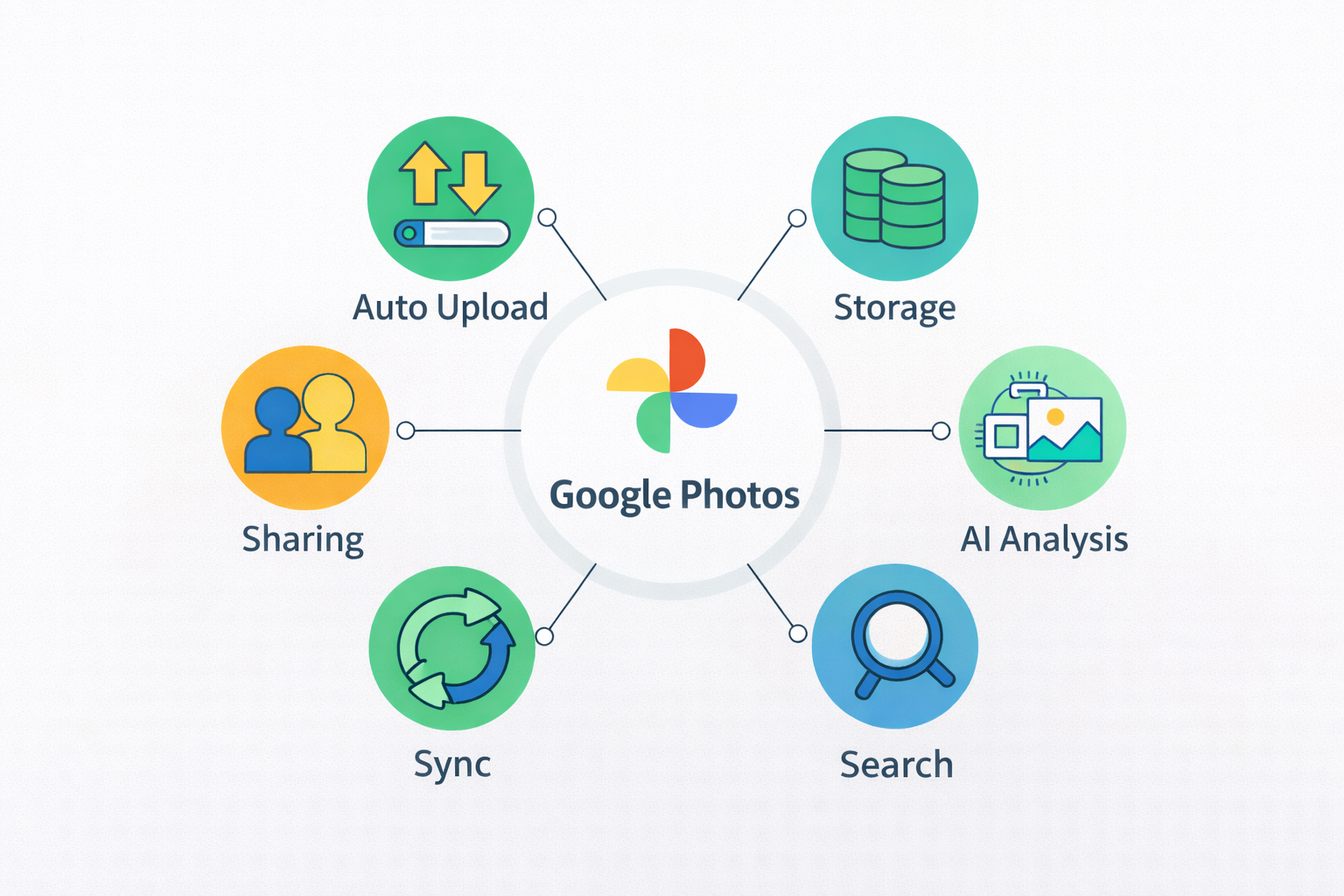
To ground the design, we start with what the system must do.
From a user’s perspective, Google Photos must automatically back up photos and videos, sync across devices, organize media, enable fast search, and support sharing. From a platform perspective, it must ingest large media files, store them reliably, extract metadata and features, and serve search queries with low latency.
More concretely, the system must support:
Automatic photo and video uploads
Durable, long-term media storage
AI-based image and video analysis
Semantic search and browsing
Cross-device sync and sharing
What makes this system challenging is that uploads are write-heavy and continuous, while search is read-heavy and latency-sensitive, and both must work at a global scale.
Non-Functional Requirements That Shape the Design#
Google Photos System Design is driven heavily by non-functional requirements.
Google Photos Non-functional requirements#
Requirement | Why it matters | Design implications |
Durability | Photos are irreplaceable | Multi-region replication |
Availability | Continuous background uploads | Always-on ingestion |
Latency | Instant search experience | Precomputed indexes |
Privacy | Highly personal content | Strong access isolation |
Scalability | Trillions of photos | Horizontally scalable services |
Durability is critical. Users expect their photos to be safe indefinitely. Losing user media is unacceptable. Availability matters because uploads happen continuously in the background across time zones.
Latency is important for search and browsing. Users expect search results to appear instantly, even when their libraries contain tens of thousands of items. Privacy and security are non-negotiable because photos often contain highly personal content.
Scalability is perhaps the defining challenge. The system must support billions of users and trillions of photos, growing continuously.
System Design Interview: Fast-Track in 48 Hours

I created this System Design interview prep crash course after spending years interviewing engineers at companies like Meta and Microsoft. I kept seeing the same pattern: candidates who were strong in coding would struggle the moment the System Design interview began. It was because they didn’t have a clear way to approach System Design under pressure. That’s exactly why I built this course to help you master System Design in a hurry, without feeling overwhelmed. System Design interviews aren’t about memorizing architectures or listing technologies. They’re about how you think. Can you break down an ambiguous problem? Can you make the right trade-offs? Can you communicate your decisions clearly? The candidates who succeed are the ones with a structured approach they can rely on. In this course, I’ve distilled that approach into a simple, repeatable framework. Instead of scattered topics, you’ll learn System Design step by step, from understanding requirements to designing scalable systems and explaining your choices with confidence. Each lesson builds your intuition and prepares you for real interview scenarios. This is the same mindset I’ve seen successful candidates use to stand out. Whether you’re preparing for your first System Design interview or trying to level up quickly, this course gives you a practical path forward. By the end, you’ll know how to apply System Design concepts effectively, even when time is limited and the pressure is high.
High-Level Architecture Overview#
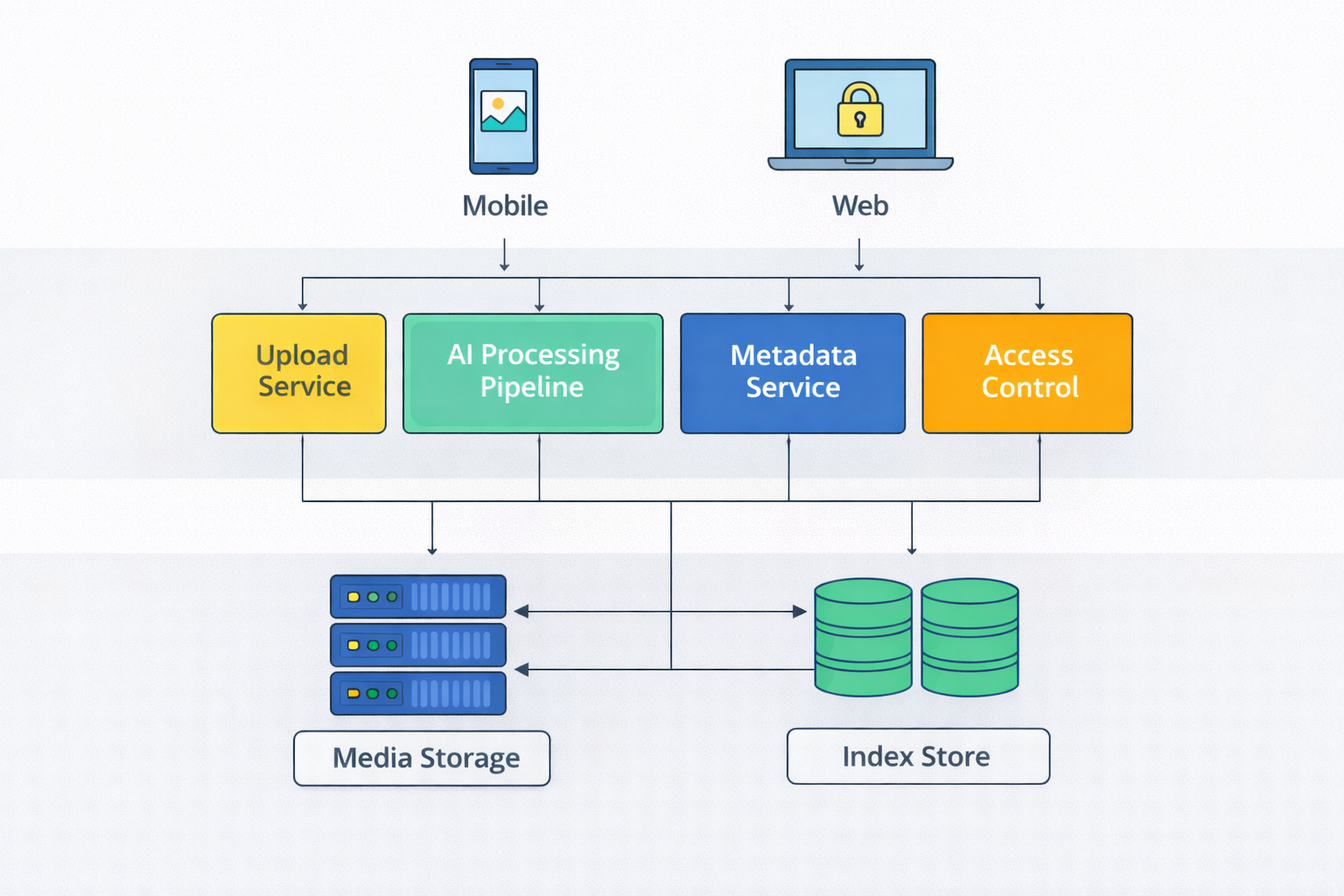
At a high level, Google Photos can be decomposed into several major subsystems:
A global upload and ingestion service
A durable media storage system
An AI processing and feature extraction pipeline
A metadata and indexing service
A search and retrieval system
A sharing, sync, and access control layer
Each subsystem is optimized for different workloads, but they are carefully decoupled to avoid cascading failures.
Media Upload and Ingestion#
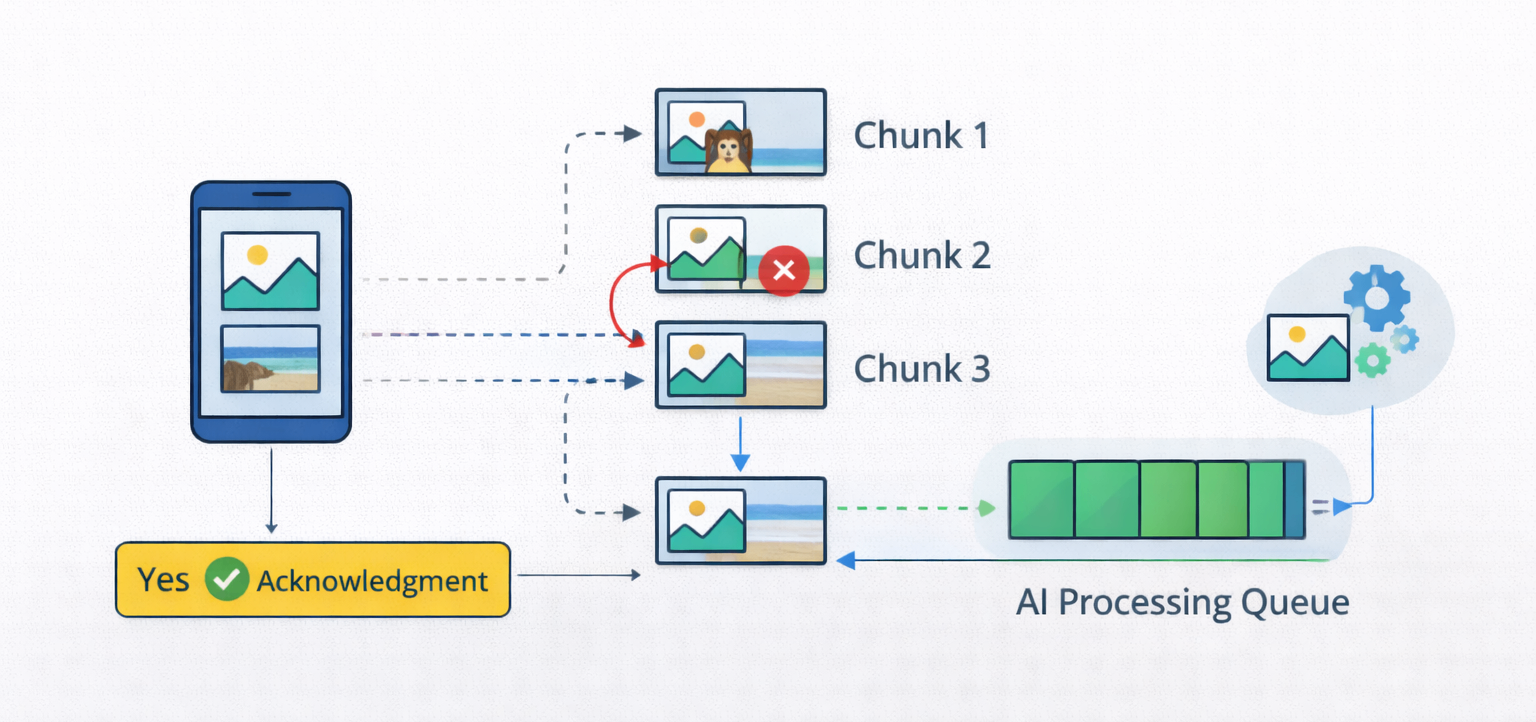
Uploads are the entry point into Google Photos.
Photos and videos are uploaded from mobile devices, web clients, and third-party integrations. Uploads may happen over unreliable networks, often in the background.
The ingestion system must support resumable uploads, deduplication, and idempotency. If a device retries an upload, the system must not create duplicates.
Uploads are acknowledged quickly, but full processing does not happen synchronously. This keeps the upload path fast and resilient, even under poor network conditions.
Durable Media Storage#
Once uploaded, media files must be stored durably and cost-effectively.
Google Photos stores original media in highly durable object storage systems with multiple replicas across regions. This ensures protection against hardware failures, data center outages, and regional disasters.
Media storage is write-once and read-many. Files are rarely modified after upload. This immutability simplifies consistency guarantees and supports aggressive caching for popular content.
Media storage characteristics#
Aspect | Design choice |
Mutability | Write-once, read-many |
Replication | Multi-region copies |
Latency | Secondary concern |
Cost optimization | Tiered storage |
Recovery | Replica rebuild |
Durability and correctness are prioritized over latency in this layer, because storage failures have irreversible consequences.
AI Processing and Feature Extraction#
What differentiates Google Photos from basic cloud storage is intelligence.
After upload, photos and videos are processed by AI pipelines that extract features such as objects, scenes, faces, text, timestamps, and locations. These pipelines run asynchronously and may take seconds or minutes to complete.
Extracted feature types#
Feature category | Examples |
Objects & scenes | Beach, food, vehicles |
Faces | Face embeddings, clusters |
Text | OCR from images |
Context | Time, location, device |
Extracted signals:
Objects and scenes (e.g., beach, food, car)
Faces and people clusters
Text and contextual metadata
This asynchronous design ensures that uploads are never blocked by heavy ML computation.
Metadata Management and Indexing#
Extracted features are stored as metadata associated with each media item.
This metadata forms the backbone of search and organization. It includes both system-generated signals (AI tags) and user-provided data (albums, favorites, edits).
Metadata is much smaller than raw media and is optimized for fast reads. It is indexed aggressively to support queries like “photos of dogs in 2019” or “screenshots from last week.”
The system treats metadata as eventually consistent. Delays in indexing are acceptable as long as they resolve quickly.
Semantic Search and Retrieval#
Search is where Google Photos truly shines.
Users can search by keywords, people, locations, dates, or combinations of these. Search queries are executed against metadata indexes rather than raw files, making them fast even at massive scale.
Search results must be ranked intelligently, combining relevance, recency, and user behavior. The system must return results in milliseconds, even when scanning millions of metadata entries.
Search execution pipeline#
Stage | Purpose |
Query parsing | Interpret user intent |
Index lookup | Fetch candidate results |
Ranking | Relevance, recency |
Result serving | Cached delivery |
Search is a read-heavy workload and relies heavily on caching and precomputed indexes.
Albums, Organization, and User Actions#
Users can create albums, mark favorites, archive items, or delete media.
These actions update metadata and must be reflected consistently across devices. Strong consistency is not required, but eventual convergence is essential.
User actions are recorded as events and propagated asynchronously. This allows the system to scale without introducing locks or blocking operations.
The system prioritizes responsiveness over immediate global consistency.
Face Grouping and Identity Sensitivity#
Face recognition is one of the most sensitive features in Google Photos.
Faces are detected and clustered automatically, but labeling and naming are user-controlled. The system must ensure that face data is handled carefully, respecting privacy and regional regulations.
Face clustering models may evolve over time. The system must support reprocessing without breaking the user organization.
This feature demonstrates how ML pipelines must coexist with strong privacy guarantees.
Face recognition constraints#
Constraint | Reason |
User control | Privacy expectations |
Regional compliance | Legal requirements |
Reprocessing | Model improvements |
Isolation | Avoid cross-user leakage |
Cross-Device Sync and State Consistency#
Users access Google Photos from phones, tablets, and browsers.
Watch state equivalents, such as edits, albums, and deletions, must sync across devices reliably. Updates are propagated asynchronously and cached aggressively.
Short delays are acceptable. Lost updates are not. The system uses versioning and idempotent updates to prevent conflicts.
Cross-device consistency is critical for user trust.
Sharing and Access Control#
Sharing introduces another dimension of complexity.
Users can share photos and albums with others, either publicly or privately. Access control must be enforced consistently across devices and regions.
Shared content must respect ownership, revocation, and privacy settings. These checks must be fast, because they gate media retrieval.
Access control logic is kept separate from storage to reduce coupling and improve security.
Performance Optimization and Caching#
Google Photos is extremely read-heavy.
Thumbnails, previews, and metadata are cached aggressively at multiple layers. Different resolutions are pre-generated to optimize bandwidth and rendering speed.
Cache invalidation is conservative. Slightly stale thumbnails are acceptable if they preserve responsiveness.
Cache layers#
Layer | Cached content |
Client | Recent photos |
CDN | Thumbnails |
Backend | Metadata |
Search | Query results |
This caching strategy is essential for serving billions of daily requests efficiently.
Failure Handling and Graceful Degradation#
Failures are inevitable at this scale.
AI pipelines may lag. Indexing jobs may fall behind. Some metadata may be temporarily unavailable. Google Photos is designed so that core access to media remains available, even if advanced features degrade.
If AI processing is delayed, photos still appear. If search indexes lag, users can still browse chronologically.
The system prioritizes access to user memories over feature completeness.
Scaling Globally#
Google Photos operates at a planetary scale.
Uploads and searches happen continuously across continents. The system must route traffic efficiently, replicate data intelligently, and isolate failures regionally.
Global control planes coordinate metadata, while regional services handle ingestion and serving. This hybrid architecture allows Google Photos to scale without central bottlenecks.
Data Integrity and User Trust#
Trust is fundamental to Google Photos.
Users trust that their memories are safe, private, and accessible whenever they need them. This trust is built through conservative design, strong durability guarantees, and predictable behavior.
Google Photos System Design consistently favors safety and correctness over aggressive optimization.
How Interviewers Evaluate Google Photos System Design#
Interviewers use Google Photos to assess your ability to design large-scale, data- and ML-driven consumer platforms.
Interview evaluation criteria#
Area | What interviewers look for |
Ingestion | High-throughput design |
Storage | Durability guarantees |
AI pipelines | Async decoupling |
Search | Index-based retrieval |
Privacy | Strong boundaries |
They look for strong reasoning around ingestion pipelines, durable storage, asynchronous processing, indexing, and search. They care less about ML model details and more about system architecture.
Clear articulation of why uploads are decoupled from processing is often a strong signal.
Final Thoughts#
Google Photos System Design demonstrates how infrastructure, intelligence, and user experience converge at scale.
A strong design emphasizes resilient ingestion, durable storage, asynchronous AI processing, fast metadata search, and careful privacy controls. If you can clearly explain how Google Photos stores trillions of memories while making them instantly searchable, you demonstrate the system-level judgment required to build planet-scale consumer platforms.
