How does Gemini 2.5 integrate with GitHub Copilot?
Curious how Gemini 2.5 integrates with GitHub Copilot? Learn how to combine deep AI reasoning with in-editor coding assistance to streamline architecture, debugging, and development workflows effectively.
If you are exploring advanced AI-assisted development workflows, you may have found yourself asking a practical question rather than a theoretical one: how does Gemini 2.5 actually integrate with GitHub Copilot?
At first glance, the answer might seem straightforward. Gemini 2.5 is a powerful general-purpose model developed by Google, while GitHub Copilot is an IDE-native coding assistant built on OpenAI models. They come from different ecosystems, different APIs, and different product strategies. So do they integrate directly?
The short answer is that there is no native, built-in integration where Gemini 2.5 replaces or embeds itself inside Copilot. However, the more meaningful answer is that developers can create an effective workflow-level integration by deliberately combining both tools in complementary ways.
This blog walks you through what integration really means in this context, how you can structure a practical workflow that leverages both systems, what technical options exist today, and how you can avoid common inefficiencies. By the end, you will understand not only whether integration exists, but how to design it yourself in a way that meaningfully improves your development process.
Master GitHub Copilot

GitHub Copilot is redefining how modern software is written, shifting developers from manual coding to AI-assisted development where code is generated, reviewed, and refined in real time. As engineering teams move faster and systems grow more complex, knowing how to effectively use GitHub Copilot is becoming a core productivity skill, not just an advantage. I built this course from my work in intelligent systems and developer tooling, where integrating AI into real development workflows is often the hardest step. A consistent pattern I observed was that developers treated Copilot as autocomplete, rather than a collaborative partner. The difference in outcomes was significant. This course is designed to help you use GitHub Copilot deliberately, guiding it with structured prompts and workflows. You’ll learn GitHub Copilot through hands-on integration in your IDE and CLI, covering inline completions, Copilot Chat, prompt design, unit test generation, debugging, and refactoring. You’ll also explore how Copilot fits into Git workflows, code reviews, and pull request management in real projects. Developers are already using GitHub Copilot to accelerate delivery and improve code quality. If you want to code with AI effectively, this is where you start.
Clarifying what “integration” actually means#
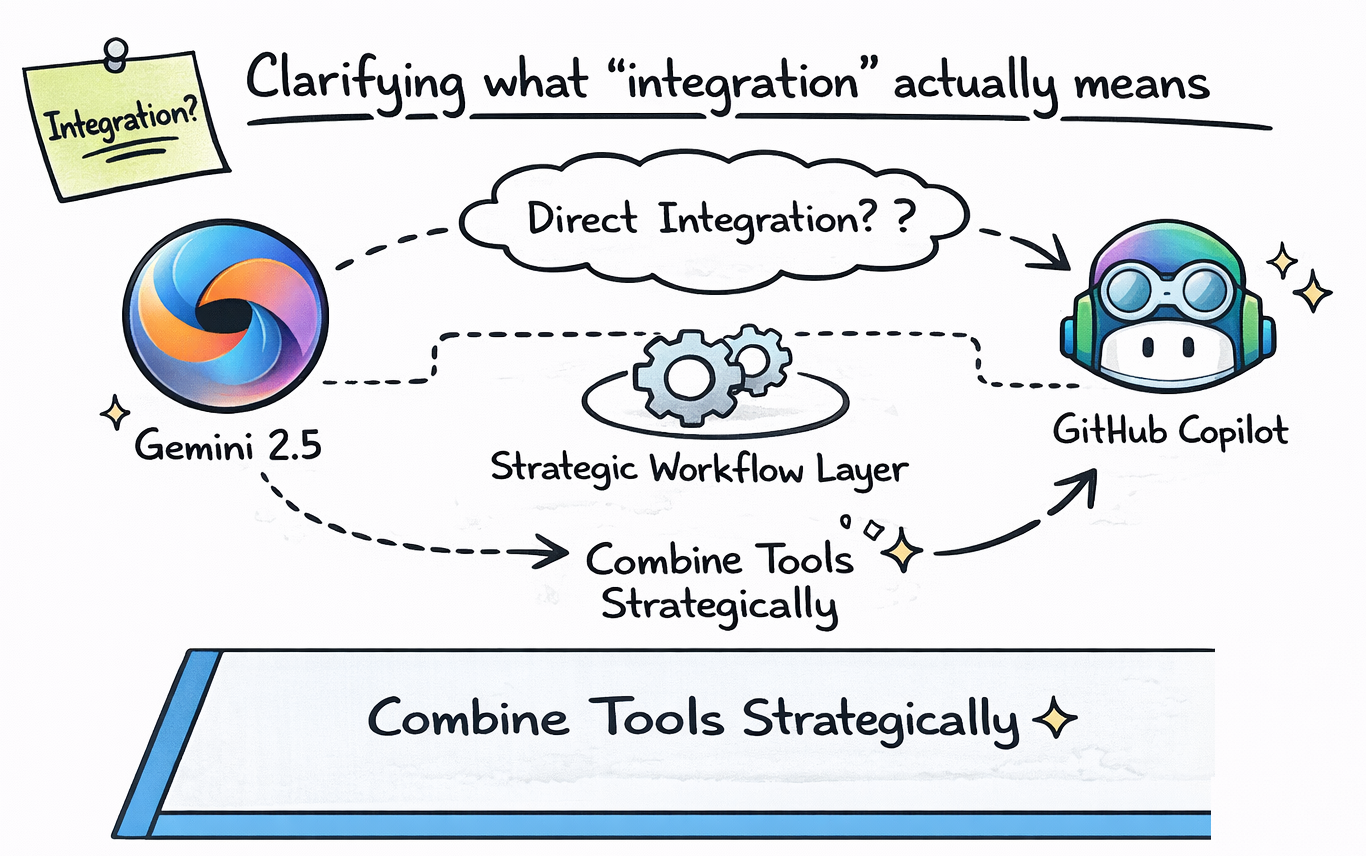
Before discussing mechanisms, you need to define what integration implies in this scenario.
A direct integration would mean that Gemini 2.5 is selectable as a backend model inside GitHub Copilot. As of now, that is not how Copilot works. Copilot uses OpenAI-derived models and is tightly integrated into Microsoft’s AI ecosystem.
However, integration does not have to mean embedded replacement. In modern development workflows, integration often happens at the workflow layer rather than the product layer. In other words, you combine tools strategically instead of merging their architectures.
When developers ask how Gemini 2.5 integrates with GitHub Copilot, they are typically asking how they can use both tools together without creating friction or redundancy.
That is where practical workflow design becomes more important than direct API embedding.
GitHub Copilot for Professionals
This intermediate-to-advanced course is designed for developers familiar with software development who want to integrate Copilot more deeply into their professional workflows. You’ll begin by exploring the Copilot ecosystem, configuring advanced IDE setups, and understanding the ethical use of AI. Next, you’ll explore prompt engineering techniques for prototyping, debugging, and generating clean, production-ready code. You’ll learn to use Copilot for code reviews, architectural refactoring, and security standards. The course also covers GitHub Copilot’s role in team collaboration: writing pull requests, automating CI/CD pipelines, and enhancing developer productivity through the Copilot. You’ll explore the future of autonomous AI agents, learn how to apply organization-wide usage policies, and foster a culture of responsible AI adoption. By the end of this course, you’ll be equipped to use Copilot as a powerful AI partner (not just a code generator) across all stages of software development.
Understanding GitHub Copilot’s role in your workflow#
GitHub Copilot, compared to other AI assistants, is designed as a contextual assistant that lives inside your IDE. Its strength lies in inline autocomplete, repository-aware reasoning, test generation, refactoring suggestions, and contextual chat features.
When you are actively writing code, Copilot predicts likely continuations based on your current file and nearby context. It excels at reducing keystrokes, scaffolding repetitive patterns, and helping you stay in flow.
Copilot’s integration is deep because it is embedded directly into development environments like VS Code and JetBrains IDEs. It observes the file you are working on and provides suggestions without requiring you to leave your editor.
This makes it highly effective at micro-level assistance, but it also means it is optimized for speed and contextual proximity rather than extended architectural reasoning.
Understanding Gemini 2.5’s strengths#
Gemini 2.5, by contrast, is designed for deep reasoning, long context handling, and structured analysis across large conceptual domains. It is not inherently tied to your IDE, but it excels at high-level problem solving.
When you use Gemini 2.5, you are typically engaging in tasks such as architectural planning, performance analysis, algorithmic reasoning, or cross-system debugging discussions. Its strength lies in synthesizing information and exploring tradeoffs rather than predicting the next line of code.
If Copilot accelerates implementation, Gemini 2.5 enhances strategic thinking.
Here is a high-level comparison that clarifies their roles:
Capability | GitHub Copilot | Gemini 2.5 |
Inline autocomplete | Strong | Not IDE-native |
File-level reasoning | Strong | Strong if context provided |
Architectural planning | Moderate | Very strong |
Multi-step logical analysis | Good | Excellent |
Long context synthesis | Limited by IDE context | Strong |
Multimodal reasoning | Limited | Advanced |
This comparison makes it clear that integration is less about overlap and more about complementarity.
Workflow-level integration: the most practical approach#
The most effective integration between Gemini 2.5 and GitHub Copilot happens at the workflow level rather than the product level.
Imagine you are starting a new feature that affects multiple services. Before writing code, you might use Gemini 2.5 to evaluate architecture decisions. You explore service boundaries, data modeling strategies, and performance implications. This reasoning session provides conceptual clarity.
Once you enter your IDE, you rely on Copilot to implement that architecture efficiently. It scaffolds endpoints, generates tests, and refactors repetitive logic.
This layered integration looks like this:
Development Stage | Primary Tool |
System design discussion | Gemini 2.5 |
Tradeoff evaluation | Gemini 2.5 |
Code scaffolding | Copilot |
Test generation | Copilot |
Refactoring refinement | Both |
Performance debugging | Gemini 2.5 |
In this model, integration is deliberate and role-based. You do not attempt to make both tools do the same thing.
Technical integration via APIs and extensions#
For more advanced users, there are technical pathways to create closer integration.
Gemini 2.5 is accessible via APIs. Developers can build custom tooling, browser extensions, or CLI utilities that connect to Gemini for architectural reasoning while continuing to use Copilot inside the IDE.
For example, you might create a script that sends project documentation to Gemini 2.5 for architectural feedback. The output could then inform how you structure your implementation inside your editor with Copilot.
Although this is not a native Copilot integration, it creates a feedback loop between reasoning and implementation.
In such cases, integration becomes developer-orchestrated rather than vendor-provided.
Debugging integration strategies#
Debugging provides a strong example of how integration can work effectively.
Suppose you encounter a concurrency bug across multiple services. Copilot may suggest fixes within a single file, but it may not see the broader systemic issue.
You can extract relevant snippets and provide them to Gemini 2.5 for deeper analysis. Gemini can reason about race conditions, asynchronous flows, and cross-service dependencies in a structured way.
Once you understand the root cause conceptually, you return to your IDE and allow Copilot to assist with implementing the corrected logic efficiently.
This iterative loop demonstrates practical integration without direct product embedding.
Documentation and knowledge transfer#
Another powerful integration scenario involves documentation and onboarding.
You might use Gemini 2.5 to generate structured documentation drafts based on system design discussions. It can help you articulate tradeoffs, explain design decisions, and structure technical documentation.
After generating high-level documentation, you move into your IDE and use Copilot to ensure code comments and implementation details align with the documented strategy.
This synergy improves consistency between design reasoning and implementation details.
Avoiding redundancy and friction#
Integration only improves efficiency when roles are clearly separated.
If you constantly switch between Gemini and Copilot for trivial tasks, you introduce cognitive overhead. Context switching can reduce productivity rather than improve it.
The key is intentionality. Use Gemini when you need strategic reasoning or extended context analysis. Use Copilot when you need rapid in-editor implementation assistance.
When you blur those roles, the integration loses effectiveness.
Enterprise-level considerations#
In enterprise environments, integration often becomes part of a broader AI governance strategy.
Organizations may use Copilot within the IDE for daily coding tasks while leveraging Gemini 2.5 for architecture reviews or strategic analysis sessions. Teams might document reasoning outputs and feed structured decisions into implementation workflows.
In this case, integration becomes part of the engineering process rather than a technical connection between APIs.
It reflects workflow design maturity rather than tool embedding.
Measuring integration effectiveness#
The ultimate question is whether integration improves measurable outcomes.
Developers who combine Gemini 2.5 with Copilot often report reduced research time, faster architecture validation, and shorter debugging cycles. The biggest gains appear in complex problem spaces rather than trivial tasks.
Here is a conceptual comparison:
Scenario | Copilot Alone | Copilot + Gemini 2.5 |
Basic feature implementation | Fast | Similar speed |
Complex architecture redesign | Moderate | Faster clarity |
Multi-service debugging | Slower | Faster root cause analysis |
Documentation drafting | Assisted | More structured and strategic |
The integration adds the most value in scenarios involving depth and complexity.
Final answer#
Gemini 2.5 does not integrate natively inside GitHub Copilot as a selectable backend model. However, developers can create powerful workflow-level integration by using Gemini for high-level reasoning and Copilot for in-editor implementation.
Integration happens through deliberate role separation rather than technical embedding. Gemini enhances strategic analysis, architecture planning, and systemic debugging. Copilot accelerates coding, refactoring, and test generation inside your IDE.
When you assign each tool its proper responsibility, you create a layered AI collaboration model that improves both decision quality and implementation speed.
And that, in practice, is what meaningful integration looks like.
