How Does GitHub Copilot Work?
Curious how GitHub Copilot really works? Discover the AI models, context engines, and prediction systems powering your coding assistant so you can use it smarter, faster, and more strategically in your daily development workflow.
If you have ever typed a function name and watched GitHub Copilot complete the rest of the logic for you, you probably felt like you were coding with a mind reader.
But here’s the real question: how does GitHub Copilot work behind the scenes? What’s actually happening between your keystrokes and that eerily accurate code suggestion?
You’re not just getting autocomplete on steroids. You’re interacting with a large language model trained on massive amounts of code, combined with context awareness, probabilistic prediction, and real-time inference.
Master GitHub Copilot

GitHub Copilot is redefining how modern software is written, shifting developers from manual coding to AI-assisted development where code is generated, reviewed, and refined in real time. As engineering teams move faster and systems grow more complex, knowing how to effectively use GitHub Copilot is becoming a core productivity skill, not just an advantage. I built this course from my work in intelligent systems and developer tooling, where integrating AI into real development workflows is often the hardest step. A consistent pattern I observed was that developers treated Copilot as autocomplete, rather than a collaborative partner. The difference in outcomes was significant. This course is designed to help you use GitHub Copilot deliberately, guiding it with structured prompts and workflows. You’ll learn GitHub Copilot through hands-on integration in your IDE and CLI, covering inline completions, Copilot Chat, prompt design, unit test generation, debugging, and refactoring. You’ll also explore how Copilot fits into Git workflows, code reviews, and pull request management in real projects. Developers are already using GitHub Copilot to accelerate delivery and improve code quality. If you want to code with AI effectively, this is where you start.
In this blog, you’ll walk through exactly how GitHub Copilot works. You’ll understand the technology stack, the AI models involved, how context flows into suggestions, what its limitations are, and what this means for your development workflow.
By the end, you won’t just use Copilot. You’ll understand it.
What Is GitHub Copilot?#
Before diving into how GitHub Copilot works, you need a clear picture of what GitHub Copilot actually is.
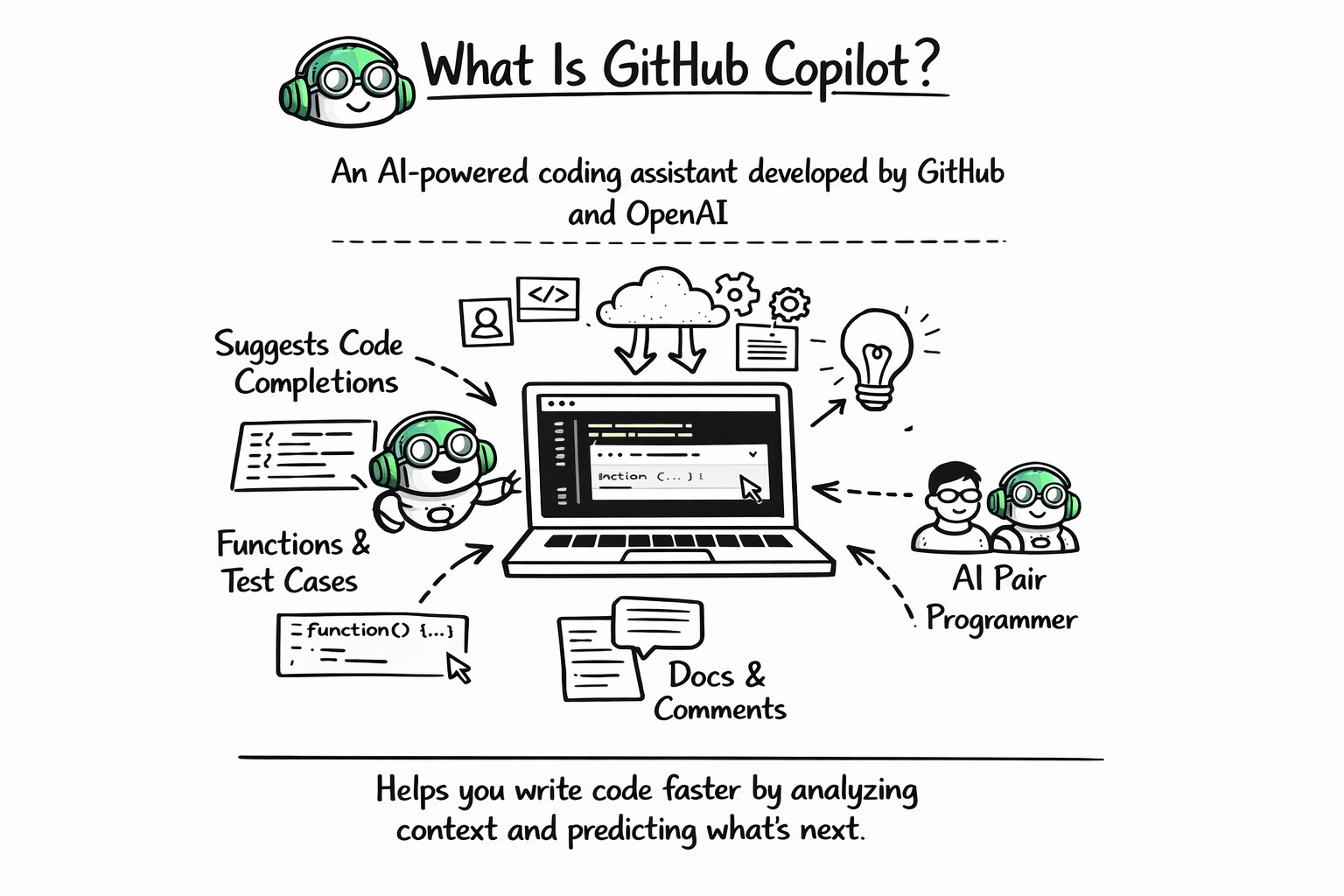
GitHub Copilot is an AI-powered coding assistant developed by GitHub in collaboration with OpenAI. It integrates directly into your IDE and suggests code completions, functions, test cases, documentation, and sometimes even entire files based on the context of your current project.
It acts like an AI pair programmer. But unlike a human partner, it processes vast amounts of code patterns in milliseconds and predicts what you’re likely trying to write.
Copilot does not “understand” code in the human sense. Instead, it predicts what code should come next based on patterns it learned during training.
That distinction is crucial when you’re trying to understand how GitHub Copilot works.
GitHub Copilot for Professionals
This intermediate-to-advanced course is designed for developers familiar with software development who want to integrate Copilot more deeply into their professional workflows. You’ll begin by exploring the Copilot ecosystem, configuring advanced IDE setups, and understanding the ethical use of AI. Next, you’ll explore prompt engineering techniques for prototyping, debugging, and generating clean, production-ready code. You’ll learn to use Copilot for code reviews, architectural refactoring, and security standards. The course also covers GitHub Copilot’s role in team collaboration: writing pull requests, automating CI/CD pipelines, and enhancing developer productivity through the Copilot. You’ll explore the future of autonomous AI agents, learn how to apply organization-wide usage policies, and foster a culture of responsible AI adoption. By the end of this course, you’ll be equipped to use Copilot as a powerful AI partner (not just a code generator) across all stages of software development.
The Core Technology Behind GitHub Copilot#
At its core, GitHub Copilot runs on large language models specifically trained on code. These models are similar in structure to natural language models but optimized for programming languages.
Under the hood, Copilot uses transformer-based neural networks. Transformers analyze sequences of tokens and predict what token should come next. In natural language, that might mean predicting the next word in a sentence. In programming, it means predicting the next token in your code.
Here’s a simplified comparison of natural language prediction versus code prediction:
Task Type | Example Input | Predicted Output |
Natural Language | “The capital of France is” | “Paris” |
Code Completion |
|
|
The mechanism is similar. The difference lies in the training data and token structure.
Instead of learning grammar rules like a human, the model learns statistical relationships between tokens across billions of lines of code.
Step 1: Training on Massive Code Datasets#
To understand how GitHub Copilot works, you need to start with training.
Large language models are trained on enormous datasets containing public code repositories, documentation, and open-source projects. During training, the model learns patterns such as:
How functions are structured
How classes are defined
How different libraries are typically used
Common naming conventions
Common bug patterns
The model does not memorize code in a simple copy-paste way. Instead, it builds probabilistic representations of patterns.
For example, if it sees thousands of implementations of sorting functions, it learns the structural characteristics of sorting logic. When you begin writing a new sorting function, it predicts the structure based on learned probability distributions.
Here’s a simplified representation of what the model learns:
Observed Pattern | Learned Behavior |
Frequent pairing of try and except | Predict error handling blocks |
Common use of useEffect with React state | Predict dependency arrays |
Standard API request structure | Predict headers and response parsing |
This training phase is computationally intensive and happens long before you ever install Copilot.
Step 2: Tokenization and Context Encoding#
When you type code in your editor, Copilot doesn’t see “code” the way you do. It sees tokens.
Tokens are small chunks of text that represent meaningful units in code. For example:
DefCalculate_sum():return
The model converts your entire visible file into a sequence of tokens.
Then it encodes these tokens into numerical vectors. This process allows the neural network to process patterns mathematically.
The more context you provide, the better the prediction. That means variable names, comments, previous functions, imports, and even file structure all influence Copilot’s suggestions.
If you write a descriptive comment like:
# Function to validate email using regex
Copilot now has stronger context than if you simply wrote:
def validate():
The comment becomes a predictive signal.
This is one of the most important practical insights into how GitHub Copilot works. It is highly context-sensitive.
Step 3: Context Window and Prediction#
Large language models operate within something called a context window.
The context window determines how much surrounding code the model can “see” at once. Copilot analyzes the current file and possibly the nearby context to generate suggestions.
Here’s how context influences prediction:
Context Present | Suggestion Quality |
Clear function name + comments | Highly relevant code |
Minimal variable names | Generic suggestion |
Full class structure | Complete method generation |
The model predicts the most statistically likely continuation of the token sequence.
It does not “reason” through your business logic the way you do. It predicts based on pattern similarity.
That’s why sometimes it generates perfectly aligned code, and other times it confidently produces something incorrect.
Step 4: Real-Time Inference#
When you pause typing, Copilot sends the tokenized context to a remote inference server.
The model processes that context and returns probable completions. These completions are ranked based on likelihood.
Inference must happen in milliseconds to feel seamless. That’s why Copilot relies on optimized AI infrastructure rather than running the model entirely on your local machine.
The real-time pipeline looks like this:
You type code.
Your IDE sends contextual tokens.
The model predicts likely continuations.
The best suggestion is returned.
You accept, modify, or reject it.
This loop repeats constantly as you code.
How Copilot Handles Different Programming Languages#
One fascinating aspect of how GitHub Copilot works is its multilingual flexibility.
Because the model was trained on diverse codebases, it understands patterns across many languages, including Python, JavaScript, TypeScript, Java, Go, and more.
However, performance varies depending on language popularity and training data density.
Language | Suggestion Quality (Typical) |
Python | Very strong |
JavaScript | Very strong |
TypeScript | Strong |
Java | Strong |
Niche languages | Moderate |
The model does not contain separate engines per language. Instead, it uses contextual cues to determine language patterns.
Does GitHub Copilot Understand Your Code?#
This is where misconceptions appear.
Copilot does not truly “understand” your project in a human sense. It recognizes statistical relationships.
If you define a function named process_payment, Copilot associates that name with patterns learned from similar functions across training data.
But it does not inherently know your business rules, database constraints, or company policies unless those are reflected in the immediate context.
You should think of Copilot as an advanced pattern predictor, not an autonomous software engineer.
How Copilot Learns From Feedback#
Copilot also improves through aggregate feedback.
When users accept or reject suggestions, anonymized signals can inform model improvements. Over time, this refines ranking systems and relevance.
However, Copilot does not directly “learn your personal codebase” in real time. It generates predictions based on the pre-trained model plus the current session’s context.
The Role of Prompt Engineering in Copilot#
You might not think of coding as prompting, but it absolutely is.
When you write descriptive comments, structured function signatures, and meaningful variable names, you are effectively prompting the model.
Here’s an example comparison:
Weak Prompt | Strong Prompt |
|
|
The second version yields far more accurate suggestions because it narrows the probability space.
Understanding how GitHub Copilot works gives you leverage. You can influence it.
Copilot’s Strengths#
Copilot shines in predictable coding patterns.
It performs exceptionally well in boilerplate code, repetitive tasks, test case generation, API integrations, and documentation scaffolding.
When the problem domain matches common patterns from open-source code, suggestions feel almost magical.
You will notice its power most when writing:
CRUD operations
Unit tests
Configuration files
Data parsing functions
Framework setup logic
The model excels where patterns are common and well-documented.
Copilot’s Limitations#
Despite its strengths, Copilot has real limitations.
It can hallucinate APIs that do not exist. It can generate outdated syntax. It may produce insecure code if the training patterns include insecure examples.
Because it predicts probability rather than correctness, you must always review suggestions.
Here’s a high-level comparison:
Strength | Limitation |
Fast boilerplate generation | May generate incorrect logic |
Speeds up repetitive work | Can hallucinate libraries |
Multi-language support | Limited deep architectural reasoning |
You remain responsible for validation, security, and correctness.
Security and Privacy Considerations#
You may wonder whether your code is being used for training.
GitHub states that Copilot processes context for inference but applies privacy safeguards depending on plan and configuration.
Organizations often configure Copilot to avoid exposing sensitive internal code to training pipelines.
When evaluating how GitHub Copilot works in enterprise settings, governance and compliance policies matter significantly.
Copilot vs Traditional Autocomplete#
It’s helpful to compare Copilot with traditional IDE autocomplete.
Feature | Traditional Autocomplete | GitHub Copilot |
Predicts single tokens | Yes | Yes |
Predicts entire functions | No | Yes |
Context-aware comments | No | Yes |
AI model-based | No | Yes |
Traditional autocomplete relies on static parsing and symbol tables. Copilot relies on AI-driven prediction.
That difference changes your workflow.
The Future of AI Pair Programming#
Understanding how GitHub Copilot works prepares you for what’s coming next.
AI-assisted development is evolving toward deeper integration with testing frameworks, architecture suggestions, refactoring intelligence, and even debugging explanations.
As models grow more capable, context windows expand, and fine-tuning improves, AI pair programming will become more integrated into daily development.
But one truth remains constant: AI augments developers. It does not replace engineering judgment.
How You Should Use GitHub Copilot Strategically#
Now that you understand how GitHub Copilot works, you can use it intentionally.
Write descriptive comments. Structure your code clearly. Treat it as a collaborative assistant. Review every suggestion critically.
When you shift from passive acceptance to strategic collaboration, Copilot becomes far more powerful.
It speeds up routine coding so you can focus on system design, architecture decisions, performance optimization, and problem-solving.
That is where human expertise remains irreplaceable.
Final Thoughts#
You started with a simple question: how does GitHub Copilot work?
Now you understand the full pipeline:
It trains on large code datasets.
It tokenizes and encodes context.
It predicts probable token sequences.
It returns ranked suggestions in milliseconds.
It improves through aggregate feedback.
Copilot is not magic. It is advanced probability modeling applied to programming languages.
When you understand the mechanics, you stop treating it like a black box and start using it as a precision tool.
And that shift changes everything about how you code with AI.
