How to get started with React for Web Development
New to React? This blog shows you how to get started with React for web development the right way, from mindset and setup to components and state, so you can build real UIs with confidence instead of confusion.
Starting with React can feel strangely intimidating.
You might already know HTML, CSS, and JavaScript. You might even have built a few small websites. Then you open a React tutorial, and suddenly everything looks different. HTML is mixed with JavaScript. Functions seem to control the UI. State changes cause re-renders you did not ask for.
At this point, most people ask the same question: How do I get started with React for web development without feeling lost?
This blog is written to answer that question honestly.
You will not be rushed into advanced patterns. You will not be buried under tools you do not yet need. Instead, you will be guided through how React thinks, how you should think while learning it, and how to move from zero to building real web interfaces with confidence.
If React has felt confusing so far, this blog is meant to slow things down just enough for it to finally make sense.
Learn React 19: The Complete Guide to Modern Web Apps
React remains one of the most widely used libraries for building modern web applications. This course focuses on modern React (React 18+ and emerging React 19 capabilities), covering improvements in rendering, concurrency, and application architecture that help developers build faster and more scalable user interfaces. This course takes you beyond the fundamentals and focuses on building production-ready React applications. You'll learn how to structure large React codebases using feature-based architecture, state ownership principles, context segmentation, reducer patterns, and headless or compound components. You'll also explore React’s rendering internals, including the Fiber architecture, render and commit phases, and modern concurrent rendering patterns using transitions and Suspense, along with performance optimization strategies such as memoization and component profiling. The course then moves into modern async UI patterns, teaching you how to build responsive interfaces using Suspense, server-side and streaming rendering concepts, lazy loading, and error boundaries, along with an introduction to React Server Components (RSC). You'll learn how to manage server data effectively using TanStack Query (formerly React Query), including caching, dependent queries, optimistic updates, and query invalidation. The course also introduces real-time-inspired and offline-first UI strategies, background synchronization, and performance techniques such as using Web Workers for off-main-thread computation. Beyond architecture and data management, you'll learn how to build complex forms, scalable workflows, and accessible user interfaces, along with practical testing strategies using React Testing Library. The course concludes with production-focused topics including accessibility architecture, internationalization (i18n), design systems, security considerations, and deployment practices. You'll be able to design, optimize, and deploy scalable React applications using modern architectural and performance patterns. Throughout the course, you'll apply what you learn through two hands-on projects: Task Manager Dashboard: Build a complete React dashboard that manages tasks, routing, state, and API interactions. Product Launch Readiness Board: Build a modern collaboration tool featuring optimistic updates, offline-capable editing, simulated real-time collaboration (UI-level), Suspense-based lazy loading, and a themeable, internationalized UI.
Why React feels different from traditional web development#
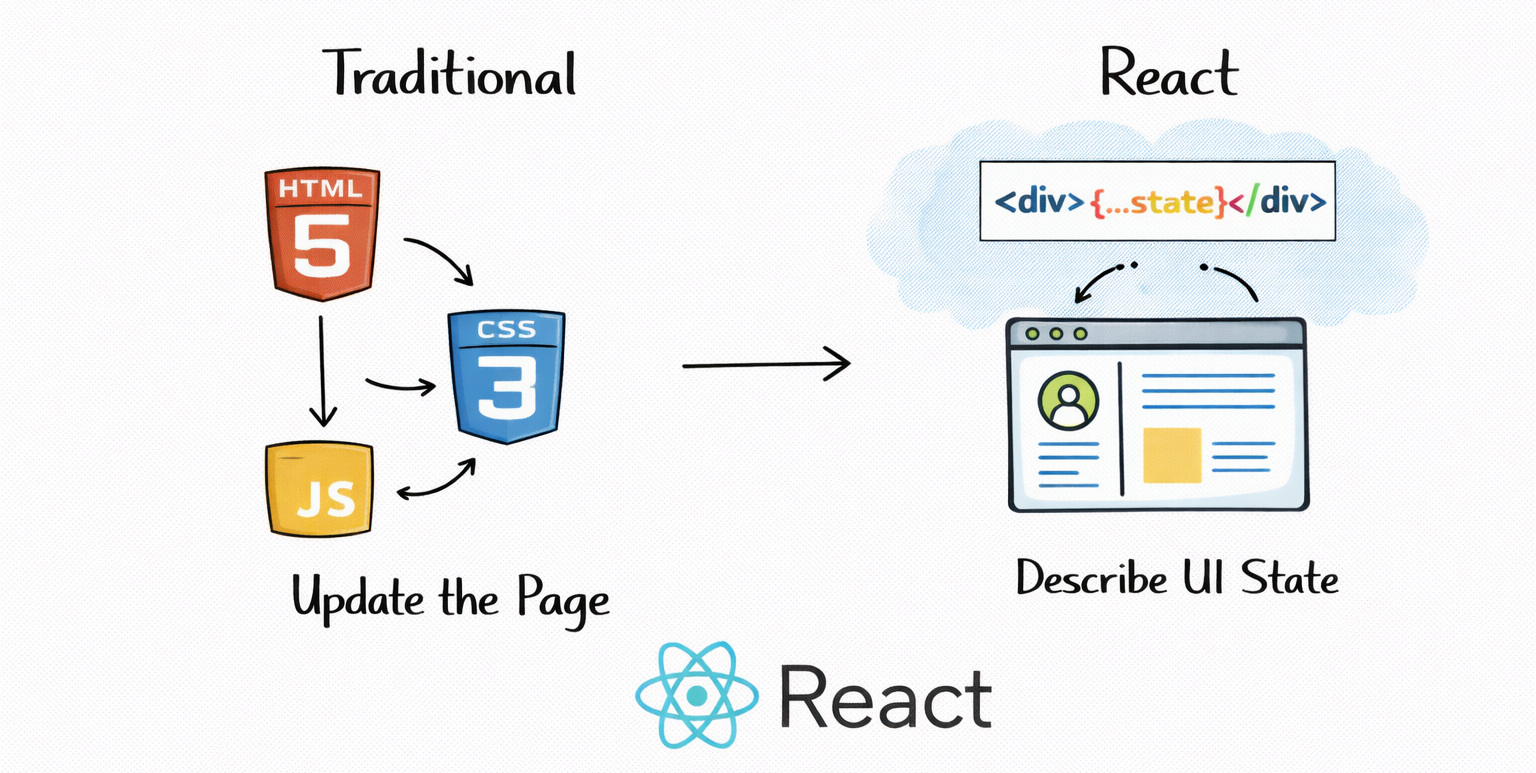
If you learned web development the traditional way, you likely followed a familiar pattern.
You wrote HTML to structure the page. You used CSS to style it. You added JavaScript to manipulate the DOM when something happened.
React flips this model on its head.
Instead of manually changing the DOM, you describe what the UI should look like for a given state. React takes responsibility for updating the DOM when that state changes. This shift is powerful, but it also requires a new mental model.
When beginners struggle with React, it is rarely because of syntax. It is because they are still thinking in terms of “how do I update the page?” instead of “what should the UI look like right now?”
Understanding this shift early makes everything else easier.
Zero to Hero in Front-end Development with React

Front-end development is a critical part of web applications. Many of the in-demand tech jobs today are for front-end developers. This Skill Path is designed for individuals who are interested in becoming front-end developers but don't have a background in programming. You’ll learn how to design and build efficient and scalable user interfaces using HTML, CSS, JavaScript, and the React framework. By the end of this Skill Path, you’ll have a strong understanding of front-end development concepts and the ability to build your own web applications.
What React actually is and what it is not#
Before you write any React code, it helps to be clear about what React does.
React is a JavaScript library for building user interfaces. It is not a full framework. It does not handle routing, data fetching, or styling by default. It focuses on rendering UI components efficiently based on state.
This narrow focus is intentional. It allows React to be flexible and composable, but it also means you will eventually rely on other tools around it.
As a beginner, you do not need to worry about the entire ecosystem. You need to understand components, state, props, and rendering. Everything else can wait.
Prerequisites you should have before learning React#
React builds on top of JavaScript, not instead of it.
You do not need to be a JavaScript expert, but you should be comfortable with a few core ideas. Functions, variables, arrays, objects, and basic ES6 syntax like arrow functions and destructuring will show up constantly in React code.
If JavaScript still feels unfamiliar, React will feel unnecessarily hard. In that case, spending a bit more time strengthening your JavaScript fundamentals will save you frustration later.
React is not a shortcut around JavaScript. It is a way to use JavaScript more effectively for UI development.
Setting up your first React environment#
Many beginners get stuck before they even write their first component. Building tools, package managers, and configuration files can feel overwhelming.
The key thing to remember is that you do not need to understand all of your tooling on day one. You only need a working environment that lets you focus on learning React itself.
Modern ways to start a React project#
Today, most React projects are created using modern build tools that handle configuration for you. These tools allow you to write modern JavaScript, use JSX, and see changes instantly in the browser.
At the beginning, your goal is not to master tooling. Your goal is to write components and see how React behaves.
Understanding JSX without overthinking it#
One of the first things that confuses new React developers is JSX.
JSX looks like HTML, but it is written in JavaScript. This can feel wrong at first if you were taught to separate structure and logic.
JSX is not HTML. It is a syntax extension that allows you to describe UI elements using JavaScript expressions. Under the hood, JSX gets transformed into function calls that React understands.
The important thing to internalize is this: JSX is just a way to describe what the UI should look like. It is not a template language. It is JavaScript.
Once you accept that idea, JSX becomes much less mysterious.
Components as the foundation of React development#
React applications are built out of components.
A component is simply a JavaScript function that returns UI. That UI is described using JSX. Components can be small, reusable, and composable.
Instead of thinking in terms of pages, React encourages you to think in terms of pieces. A button is a component. A navigation bar is a component. A form is a component.
Breaking your UI into components helps you reason about your application and reuse logic without duplication.
Props and how data flows in React#
Props are how components communicate with each other.
When a parent component renders a child component, it can pass data down through props. This creates a one-way data flow that makes applications easier to reason about.
Understanding this flow is critical. React is predictable because data moves in one direction. When beginners try to make data flow both ways, things become confusing quickly.
If you understand how props work, you understand how most React applications are structured.
State and why it drives everything in React#
State represents data that can change over time.
When state changes, React re-renders the component to reflect the new state. This automatic re-rendering is one of React’s core features.
The key idea is that you do not manually update the UI. You update the state, and React updates the UI for you.
This shift takes time to internalize, but once it clicks, React becomes much easier to reason about.
React hooks and the modern way of writing components#
Modern React development revolves around hooks.
Hooks allow you to add state and other React features to function components. The most common hooks you will encounter early are used for state management and handling side effects.
Hooks follow specific rules, and understanding those rules prevents subtle bugs. Good beginner tutorials explain not just how to use hooks, but why they exist and what problems they solve.
Learning hooks properly is one of the most important steps in getting started with React.
Learn React Hooks for Frontend Development

Web development has changed significantly in recent years. A web developer should not only know the basics of HTML, CSS, and JavaScript but also be proficient in frameworks such as Angular, React, and Vue. These frameworks make web development easier, enabling developers to focus on the application logic. This course is designed for newcomers to React and experienced React developers alike. You’ll start by learning the most fundamental concept in React—components. Specifically, you’ll learn about function components. You’ll then learn how to manage application state and side effects. You’ll then learn about the useMemo hook to boost an application’s performance. You’ll learn about the useContext hook which enables us to perform area updates in our application. Finally, you’ll learn how to create custom hooks in React. After completing this course, you can develop frontend applications with React. You’ll be able to develop complex web applications faster because React makes the process much easier.
Handling events and user interactions#
React handles events in a way that feels familiar if you know JavaScript.
You attach event handlers directly to elements using JSX. These handlers are just functions. When an event occurs, React calls your function.
The difference is that event handlers often update state instead of manipulating the DOM directly. This keeps your UI consistent and predictable.
Styling your first React components#
Styling in React is flexible, which can be both empowering and confusing.
You can use regular CSS, scoped styles, inline styles, or modern styling solutions. As a beginner, the simplest approach is often the best. Focus on understanding React first and refine your styling approach later.
React does not force a styling strategy, which allows you to adapt as your needs grow.
Building your first small React project#
Tutorials only take you so far.
At some point, you need to build something small on your own. A simple counter, a to-do list, or a form with validation can teach you more than hours of passive learning.
The goal of your first project is not perfection. It is exploration. You will make mistakes, and those mistakes will teach you how React behaves.
Common beginner mistakes when starting with React#
Most beginners try to learn too much at once. They jump into routing, state management libraries, and advanced patterns before understanding the basics.
Another common mistake is copying code without understanding it. This creates the illusion of progress without real comprehension.
The fastest way to improve is to slow down, experiment, and ask why things work the way they do.
How React fits into real web development#
React is not used in isolation.
Real web applications involve data fetching, routing, performance considerations, and deployment. As you grow more comfortable with React, you will naturally expand into these areas.
The important thing is not to rush. React itself has enough concepts to keep you busy early on.
A realistic progression for learning React#
Most successful React learners follow a similar path.
They start with components and JSX. They move to props and state. They learn hooks and events. They build small projects. Then they explore the ecosystem.
Tutorials and guides that respect this progression feel manageable. Those who skip steps feel overwhelmed.
How to know you are making real progress#
Progress in React is not measured by how many tutorials you finish.
It is measured by how comfortable you feel experimenting without instructions. When you can open a blank file and start building, you are on the right track.
Feeling confused occasionally is normal. Feeling stuck all the time is a sign that you need a better learning approach.
Final thoughts on getting started with React#
Getting started with React for web development does not require brilliance or memorization.
It requires patience, curiosity, and the willingness to think differently about UI.
React rewards developers who take the time to understand its mental model. Once that model clicks, everything else becomes easier.
You do not need to master React in a week. You need to build understanding step by step. If you do that, React becomes one of the most enjoyable tools in modern web development.
