How To Start Developing Mobile Apps Using Node.js
Want to build mobile apps with Node.js? This guide shows you how Node.js fits into mobile development, how to build backends for mobile apps, and how to go from beginner concepts to real, scalable mobile applications.
If you have been learning Node.js and recently found yourself wondering whether you can use it to build mobile apps, you are asking the right question at the right time.
Node.js is not a mobile framework in the traditional sense. You do not write Node.js code and magically get a mobile app interface on a phone screen. That misunderstanding is one of the biggest sources of confusion for beginners.
At the same time, Node.js plays a critical role in modern mobile app development, especially if you care about scalability, real-time features, and long-term maintainability.
Building Full-Stack Web Applications With Node.js and React
Node.js is a popular JavaScript runtime environment used to create server-side applications. It is an ideal tool for building robust, full-stack web applications with React. This course is an introduction to web development leveraging these two popular technologies. You’ll learn server-side applications with Node.js and learn to add database functionality with MongoDB fitting into the Express application framework. You’ll then build a user authorization system using the JSON Web Token (JWT). You’ll then focus on a client-side environment built with React. You’ll build a sample application to get familiar with the framework before styling the application and adding necessary user-interaction elements. You’ll wrap up by tying the frontend and backend together and deploying your web application with Heroku. By the end of this course, you’ll be prepared to build real-world websites using the most popular JavaScript tools.
This blog exists to bridge that gap.
You will learn how Node.js actually fits into mobile app development, what you should learn first, which tools matter, and how to move from writing backend code to shipping real mobile applications with confidence.
If you approach this the right way, Node.js becomes one of the most valuable skills you can bring into mobile development.
Understanding the role of Node.js in mobile app development#
Before you write a single line of code, it is important to understand what Node.js does and does not do in the mobile world.
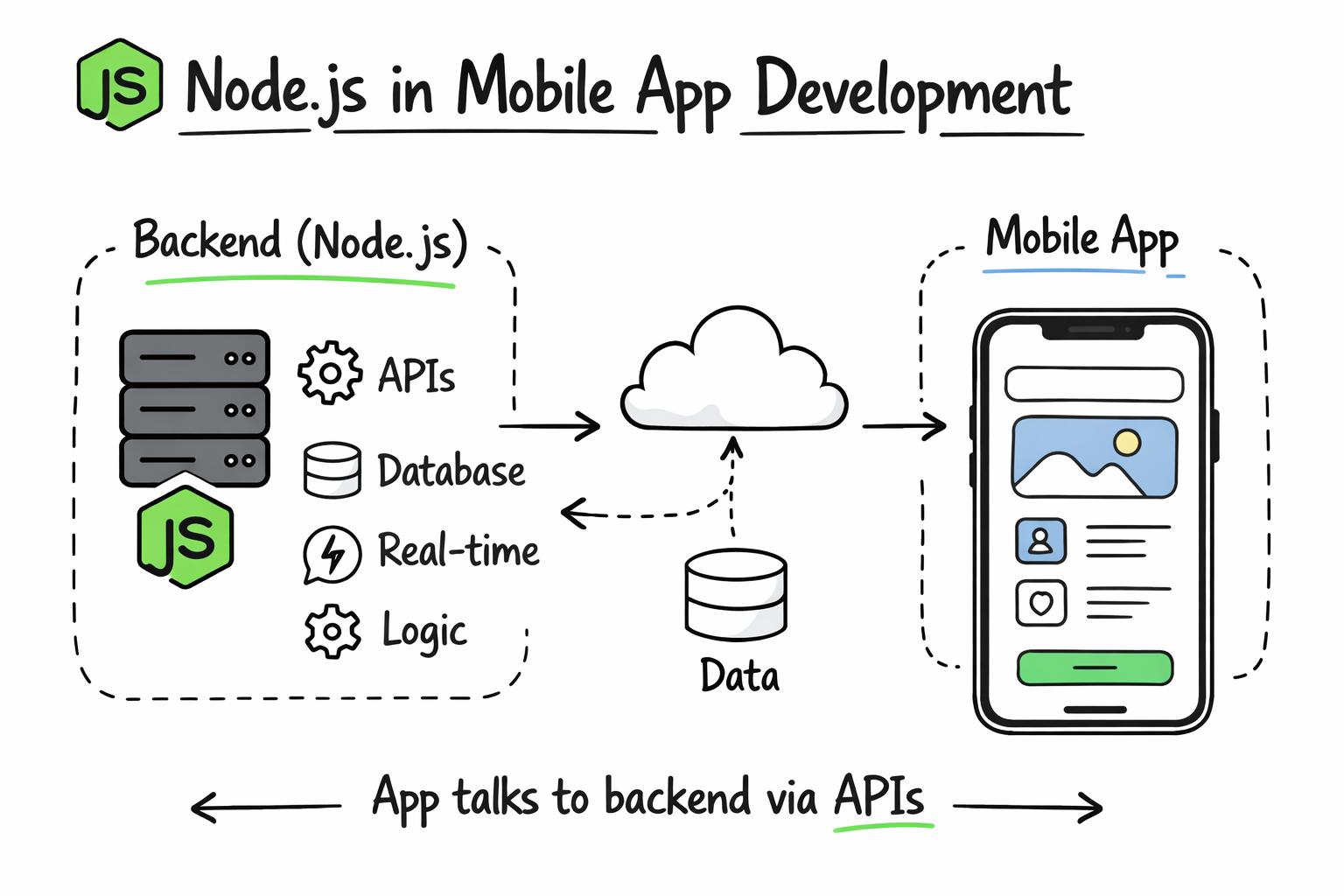
Node.js is a JavaScript runtime that runs on servers, not on mobile devices. It excels at handling requests, managing APIs, working with databases, and powering real-time features such as chat, notifications, and live updates.
Mobile apps, on the other hand, need a user interface that runs on iOS or Android. That interface is typically built using native technologies or cross-platform frameworks.
Node.js sits behind the scenes. It powers the backend that your mobile app talks to.
Once you understand this separation, the learning path becomes much clearer.
Learn Node.js
Modern applications rely on fast, scalable backend services, and Node.js has become one of the most widely used platforms for building them. From APIs and microservices to real-time applications, companies expect developers to understand asynchronous programming, networking, and production-ready server architecture. This course provides a structured path to developing the Node.js skills used in modern backend engineering. I built this course from my experience working on large-scale distributed systems for seven years at Microsoft, and later co-founding Educative. One challenge I consistently observed was that many developers could build simple Node.js applications but struggled to understand what happens behind the scenes. Rather than focusing only on frameworks, this course emphasizes the core runtime concepts that help you reason about performance, scalability, and maintainability. You'll begin by learning Node.js fundamentals, modules, and server-side JavaScript before diving into asynchronous programming with callbacks, Promises, async/await, and the event loop. From there, you'll explore event-driven programming, file systems, buffers, streams, HTTP servers, routing, REST APIs, PostgreSQL integration, JWT authentication, WebSockets, and automated testing with Jest. Throughout the course, interactive lessons and hands-on exercises reinforce each concept, culminating in a capstone project in which you'll build a production-style REST API capable of storing, filtering, and serving JSON data in multiple formats. Thousands of developers have used Educative's interactive learning platform to build practical software engineering skills and advance their careers. If you want to become a confident Node.js backend developer who understands not just how to write code but why it works, this course is the right place to start.
Why Node.js is a strong choice for mobile app backends#
Node.js is popular in mobile development for practical reasons, not hype.
It uses JavaScript, which means you can share language knowledge across frontend, backend, and tooling. Its non-blocking, event-driven architecture makes it well-suited for applications that handle many simultaneous users. The ecosystem is massive, with libraries for authentication, databases, file uploads, and real-time communication.
Most importantly, Node.js scales well from small projects to production systems.
If your goal is to build mobile apps that can grow beyond a demo, Node.js is a solid foundation.
Become a Node.js Developer
Node.js is a powerful JavaScript runtime built for creating fast, scalable applications. This Skill Path gives you a comprehensive foundation, starting with core Node.js concepts like HTTP, databases, JWT, and WebSockets. Then, you’ll dive into Express.js to build RESTful APIs, implement authentication, validation, real-time communication, and structured logging. Next, you’ll build full stack applications with the MERN stack (MongoDB, Express, React, Node). Finally, you’ll learn Node.js design patterns to architect robust, maintainable back-end systems with confidence.
What “developing mobile apps using Node.js” actually means#
When people say they are building mobile apps using Node.js, they usually mean one of three things.
They might be building a backend API with Node.js that serves a mobile app built with another technology. They might be using Node.js alongside a cross-platform framework that relies on JavaScript tooling. Or they might be creating a full-stack setup where Node.js handles business logic and data while a mobile framework handles UI.
Understanding which path you are on helps you avoid learning the wrong things too early.
Core prerequisites before combining Node.js and mobile development#
You do not need to be an expert in everything to get started, but a few fundamentals matter.
You should be comfortable with JavaScript basics such as functions, objects, promises, and async/await. You should understand what a server is and how HTTP requests work. You should also be familiar with basic Node.js concepts like modules and package management.
On the mobile side, you do not need deep platform knowledge immediately, but you should understand that mobile apps communicate with servers over APIs.
If these ideas feel fuzzy, spending time clarifying them will make everything else smoother.
Setting up a Node.js backend for mobile apps#
Most Node.js mobile backends start with a web server that exposes endpoints mobile apps can call. These endpoints handle tasks such as user authentication, data retrieval, and data updates.
You do not need a complex setup at the beginning. A simple server that can receive requests and send responses is enough to start learning.
Why REST APIs are still relevant#
REST APIs remain one of the most common ways mobile apps communicate with backends. They are simple, predictable, and well supported across platforms.
When you build a REST API with Node.js, your mobile app can request data using standard HTTP methods. This approach works well for most beginner and intermediate projects.
Choosing a Node.js framework for mobile backends#
Node.js itself is low-level. Frameworks make development faster and more structured.
Express is often the first framework developers encounter. It is lightweight, flexible, and widely used. For beginners, it provides a gentle learning curve while remaining powerful enough for production use.
More opinionated frameworks exist, but starting with a simple one helps you understand what is happening under the hood.
Managing data for mobile apps with Node.js#
Mobile apps rarely exist without data.
Your Node.js backend will typically connect to a database to store users, content, and application state. This database can be relational or non-relational depending on your needs.
The important thing early on is understanding how data flows from the mobile app to the server and back. Once you grasp that flow, switching databases or tools later becomes much easier.
Authentication and user management in mobile apps#
User authentication is a core feature of most mobile applications.
Node.js backends commonly handle login, registration, token generation, and session management. Mobile apps store authentication tokens and send them with requests to prove identity.
This separation keeps sensitive logic on the server and simplifies the mobile client.
Learning authentication early gives you insight into how real mobile apps are structured.
Real-time features and why Node.js shines here#
Many modern mobile apps rely on real-time updates.
Chat apps, notifications, live tracking, and collaborative features all require the server to push updates rather than waiting for requests.
Node.js is particularly strong in this area. Its event-driven model allows it to handle many open connections efficiently, making it a popular choice for real-time mobile applications.
Connecting Node.js with cross-platform mobile frameworks#
Cross-platform mobile frameworks allow you to build iOS and Android apps using a single codebase. These frameworks often use JavaScript or TypeScript, which aligns naturally with Node.js.
In this setup, your mobile app handles UI and user interaction, while Node.js handles data, logic, and integration with external services.
Common architectural flow#
Your mobile app sends requests to the Node.js backend. The backend processes the request, interacts with databases or third-party services, and sends a response. The mobile app updates the UI based on that response.
This separation of concerns keeps both sides manageable and scalable.
Comparing common mobile development approaches with Node.js#
Approach | Role of Node.js | When it works best |
Native mobile apps | Backend API | Performance-critical apps |
Cross-platform frameworks | Backend API | Faster development |
Hybrid architectures | Business logic | Shared JavaScript ecosystems |
This comparison matters because Node.js is flexible enough to support multiple mobile strategies.
Handling file uploads, images, and media#
Mobile apps often work with images, videos, and other media.
Node.js backends commonly handle file uploads, process images, and store files in cloud storage. The mobile app uploads files to the server, and the server manages storage and access.
Understanding this flow helps you build more realistic applications.
Error handling and stability in mobile backends#
Mobile apps operate in unpredictable environments.
Users may have poor connectivity, outdated devices, or unexpected interruptions. Your Node.js backend must handle errors gracefully and return meaningful responses.
Learning how to handle errors early improves both user experience and developer confidence.
Testing Node.js backends for mobile apps#
Testing is often skipped by beginners, but it becomes crucial as applications grow.
Testing your Node.js backend ensures that API changes do not break your mobile app unexpectedly. It also gives you confidence to refactor and improve code over time.
Even simple tests can dramatically improve reliability.
Deployment and hosting considerations#
A Node.js backend must be deployed somewhere accessible to mobile devices.
This involves hosting your server, configuring environment variables, and ensuring security. While this may feel intimidating at first, modern platforms simplify deployment significantly.
Understanding deployment completes the mental picture of how mobile apps operate in the real world.
Common misconceptions about Node.js and mobile apps#
One common misconception is that Node.js replaces mobile frameworks. It does not.
Another misconception is that learning Node.js alone is enough to build mobile apps. In reality, Node.js is one half of the system.
Recognizing these misconceptions early helps you focus on the right skills.
A realistic learning path for getting started#
Most developers succeed when they follow a gradual progression.
They start by learning Node.js fundamentals. Then they build a simple API. Then they connect that API to a basic mobile app. Over time, they add authentication, data persistence, and real-time features.
This progression avoids overwhelm and builds confidence steadily.
How to know you are making real progress#
Progress shows up when concepts connect.
You understand how a mobile app request reaches the server. You know where data is processed. You can debug issues without guessing. You feel comfortable adding features instead of fearing breakage.
That confidence is a sign that you are learning the right things in the right order.
Final thoughts on starting mobile app development with Node.js#
Node.js is not a shortcut to mobile development. It is a powerful backend tool that complements mobile frameworks beautifully.
If you approach it with the right expectations, Node.js becomes a long-term asset rather than a confusing detour.
Start small. Focus on fundamentals. Build real connections between your backend and mobile app. Over time, the pieces will fit together naturally.
When that happens, you will not just be building mobile apps. You will be building systems.
